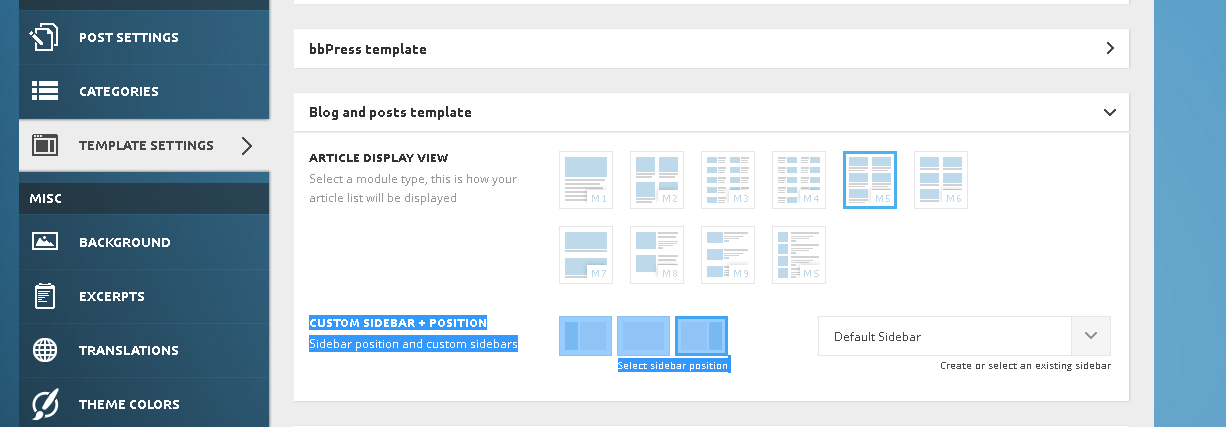
- NewspaperDesign your Post Pages using the Cloud Library Templates
- NewspaperDesign your post pages using the Default Templates
- NewsmagPage templates
- NewspaperPage templates
- NewspaperCreate a form contact page
- NewspaperCloud Library Templates
- NewspaperCloud Library – Category Templates
- NewsmagCategory templates
- NewsmagFooter templates
- NewsmagDefault post templates
- NewsmagPost templates
- NewsmagHomepage – How to build and set it
- NewspaperHomepage – How to build and set it
- NewspaperPost templates
- NewspaperDefault post templates
- NewspaperCategory templates
- NewspaperPost template ads
- Apitd_api_single_template::update_key
- Apitd_api_single_template::update
- Apitd_api_single_template::add
 Alin [tagDiv]
 Hi,
Block have only 3 type of pagination like you figured out: http://screencast.com/t/lyIpEjWE You can have that type of pagination for Latest Articles if you use a page template with Articles list: http://screencast.com/t/KOY52Dj0Bg
If you want a different sidebar for each post, please create a custom sidebar for each post: http://screencast.com/t/CnDv5QkrekvR and add widgets to it: http://screencast.com/t/pbmenKblQHp
Also if you want to have a sidebar for post from the same category you can create a custom sidebar to each category: http://screencast.com/t/lSvbINtSgj and add widgets. So post from that category will have the same sidebar.
Hope this helps!
Alin [tagDiv] Hi,
Yes you can add background only if you use a page template with background, but when you use also site background it will appear that issue on mobile(Big Slide images don’t resize) and Big Slide background will be catted: http://screencast.com/t/iGxwgJqNDdA – http://screencast.com/t/KxuL3Rv1a
Like I said above we know about this issue and it will be fixed in Newspaper 5 version. Till then please use only background for site or Homepage BG template. Sorry for inconvenience!
Thanks!
Alin [tagDiv] Hi,
Sorry for misunderstanding I thought that you want it for post template 8. So if the solution that you used in 1.5 version doesn’t work anymore, please try this for header style 8: http://screencast.com/t/QuIMq7s0
<?php if (is_front_page()){
                    putRevSlider("slider1");
                }           else{
                    locate_template('parts/header/ads.php', true);
                }?>
Result: – Homepage: http://screencast.com/t/1V9cYckqFf
– Post page : http://screencast.com/t/54R8kgijlv
Hope this helps!
-
This reply was modified 11 years by Alin [tagDiv].
 Yannis
 Actually, I had changed nothing in single_template_8.php.
All I had done was to create a header ad with the code <?php putRevSlider(“slider1″,”homepage”) ?>. That was done in the Theme Panel –> Ads. It was much easier than altering the single_template_8.php, but since this option does not work anymore, then I will have to modify the relevant php file.
 Lastminutegoals
Hello.
I would like to know if it’s possible to have a default pagination (not Ajax) type on custom pages that I make.
http://i.gyazo.com/8fc316e8b15a55363528044ce0a57eba.png
I tried with the backend editor, but the only options are “Load More” and “Next/Prev ajax”.
I have actually found a workaround for this, by chaging my front page from a custom page to my “Latest posts”. Those type of “default”-ish pages have the pagination I want. However, the problem is that in theme options, it won’t let me have sidebar for individual posts only, because in the theme Panel -> Template settings, both Blog & post settings fall in the same category.
http://i.gyazo.com/7af92f732b4f5cf1fc71636a7c15f706.png
I hope you can assist me with this. Thanks in advance
Alin [tagDiv] Hi,
Please change your page template, because if you use Homepage with background, Big Slider will be added automatically to your page. So if you don’t want to use Big Slider use a template without background: http://screencast.com/t/6FE4Ufy1BoyN
Thanks!
Alin [tagDiv] Hi,
Please use a page template without background for example: http://screencast.com/t/fXm58i1ry0 and(like I said above) add Big Slider manually to the page using Visual Composer: http://screencast.com/t/Phgvb2VL – http://screencast.com/t/uUa2mpAmLUm
Result: http://screencast.com/t/HsAn6hYGr
Thanks!
Alin [tagDiv] Hi,
Sorry for this, the screenshot from above I believed that is a page.
So if you need an add above comments on posts please add your code in Theme Panel > ADS > Custom AD 1: http://screencast.com/t/0F6qFnW9 and edit your post template file that you use and add this shortcode: http://screencast.com/t/fzthuQLKup
echo do_shortcode('[td_ad_box spot_id="custom_ad_1"]');
Result: http://screencast.com/t/jP9vbfkPWcor
Thanks!
 okti
oktiHi,
i have WordPress 4.1.1 with Newsmag template (www.edurozrywka.pl). I just recognised that when i enable myCRED plugin then Visual Composer is broken on some pages, when i try to edit them in backend. The same problem is with plugin User Pro.
Any idea why is that ? What can cause the conflict ?
 Marius
 Hi,
1. If you modify the image sizes you need to regenerate the thumbnails to see the changes then inspect the image to be sure there is the correct image size. At this moment your images are at 300x300px. About number of columns, there’s no settings in WooCommerce to do that and this can be changed via a hook(custom code).
2. This will be fixed in the next update, the bug is from the latest WooCommerce version. Untill that you can use this CSS to fix it
.wc-proceed-to-checkout {

    clear: both;

    text-align: right;

}

.woocommerce-cart .wc-proceed-to-checkout a.checkout-button {

    display: inline-block;

}
3. The issue is not the theme, some plugins need custom integration with each theme to work, like WooCommerce plugin to. You saw that on that plugin with real estate.
I don’t have the plugin to test it, sorry about that, if you want you ca try this from here: https://support.woothemes.com/hc/en-us/articles/203987053-Show-a-custom-template-for-the-vendor-shop-page-taxonomy-
Alin [tagDiv] Hi,
I’m not sure I understand, but if you want to not display featured image in post page and you want image to be set and display it on blocks, you can use post template 7: http://screencast.com/t/EmTlqMANj1X
Result post page: http://screencast.com/t/ML5ameyAk
Result page blocks: http://screencast.com/t/Q3nChbqa
Hope this helps!
 Lucian
 Hi,
Unfortunately you’d have to edit the 404.php template file and customize it. You can’t use the page builder to customize it but you could use the do_shortcode function to add blocks/widgets created using the VC page builder.
You can find more info abut how you can add content using the do_shortcode function here: https://forum.tagdiv.com/topic/a-few-questions/#post-29762
You can use the orderby parameter to set the sort order you want: http://codex.wordpress.org/Class_Reference/WP_Query#Order_.26_Orderby_Parameters ..here: http://screencast.com/t/d8W1lnm6gle
Thanks
 cyberlism7
 Hi Alin
I want the browser’s title on the homepage to be: (Website Name)| (Website description)
as shown in the General settings here: 
If I use visual composer’s homepage template, the homepage’s title will override the (Website name) on browser’s tab, as seen here: 

How can I fix this?
Thanks
Alin [tagDiv] Hi,
We know about this issue when is used page template Home BG with site background the images from Big Slide are not resized. I have checked your site and I see that you don’t use a background for Big Slider, so please change the page template to Homepage + Articles List and add Big Slider manually to the page using Visual Composer: http://screencast.com/t/Phgvb2VL – http://screencast.com/t/uUa2mpAmLUm
Result: http://screencast.com/t/HsAn6hYGr
If you still want to hide Big Slider on mobile screen(landscape) just increase the @media’s max-width to the landscape width of your iphone: http://stephen.io/mediaqueries/#iPhone
Hope this helps!
 simchris
 I used to use pagenavi, but on “most” things this site uses the same code, just built-in; so on things like a directory/archive, or bottom of a blog loop on home page, it works exactly the same way.
Presumably you could locate the pagehooks in all the templates, but no idea.
Sorry, not an answer just an opinion that I found I didn’t need to use pagenavi plugin anymore when I moved to this theme.
 princepetropia
 The thing is, I am having some trouble working with revslider, I created a new template, then created a new slider and added the template. I also selected “Posts” instead of gallery and checked the apt categories I want. Then after allt his, when I went to visual composer and added revslider ot my homepage, the homepage displays a warning that says: No slides were found, please create a slide tem,plate.
So far, I haven’t found a solution. If tagdiv support can help me out with that, maybe I can use revslider too.
 ErwinWinkelman
Hi,
I’m currently working on my new site http://www.street-photography.eu with the newsmag-template.
I’m working on the menu. I’ve got pages and categories in he menu. When I clik on a category, for example Agenda, it opens a new screen with the agenda items. So far so good.
It also opens a second menu wich I don’t want. How can I make this second menu disapear?
ErwinWinkelman Hi,
I’m currently working on my new site http://www.street-photography.eu with the newsmag-template.
I’m working on the menu. I’ve got pages and categories in he menu. When I clik on a category, for example Agenda, it opens a new screen with the agenda items. So far so good.
It also opens a second menu wich I don’t want. How can I make this second menu disapear?
 salocharly
Hi guys,
I got a mail from Google adsence optimization team asking me to implement this new type of mobile ad:
1) Mobile version – Implement an anchor ad: this is a new ad format that is working really well for mobile. It is a 320×50 ad units that remains fixed in the lower part of the screen, even when the user moves up and down in the page. I share with you the code. It will automatically only show for mobile users.
<script src=”//pagead2.googlesyndication.com/pagead/js/adsbygoogle.js”></script>
<ins class=”adsbygoogle”
style=”display:none;width:320px;height:50px”
data-ad-client=”pub-xxxxxxxxxx”
data-ad-channel=”xxxxxxxxxxx”></ins>
<script>
(adsbygoogle = window.adsbygoogle || []).push({
params: { google_reactive_ad_format: 1 }
});
</script>
How can i do this within the framework of the ad system in the template?
Thanks in advance!
S
simchrisJust for those who tend not to look at changelog, I’ve gone ahead and posted that here, for those who need it — since I was just looking at that myself.
ALSO: suggestion, use my “moving to newsmag” sticky as process for updating theme to minimize the change of “white screen of doom” or the server 500 issue (stupid Visual Composer!!!!) 😉
===================
[ Version 1.6 ]
– fix: when you have background color on site, the color disappear on post style 6
– fix: the two strings that where not translated properly
– fix: arrow list shortcode
– fix: issue with page template options on sites that did not use the english language
– fix: featured image placeholders now work as expected again
– fix: hide and show category label panel setting
– fix: search icon click on affix was going back to top
– fix: excerpt not working for trending now
– fix: excerpt missing for mega menu title
– fix: links that contained only #_and_something did not work
– fix: https issue on backend. TinyMCE font was loaded via HTTP
– fix: astpect ration for vimeo videos
– fix: missing translation
– improvement: better top bar settings
– improvement: social icons moved in their own panel in backend
– improvement: better footer panel with better text and better organization
– improvement: better woocommerce 2.3 compatibility
– improvement: faster category page, the system that pulls the subcategories uses two less queries
– improvement: removed width of the top bar for better spacing
– improvement: removed the texture from parallax templates (prevent flickering)
– new: footer template system
– new: category template system + category top post style template. Currently we do not deliver any new templates but this system paves the way for easy user customizations via plugins and it also allows us to add new styles.
– new: when subcategories don’t fit in the category page, the theme will make a drop down with the excess categories
– new: RGBA color picker in panel. You can now use colors with alpha blending (transparency) on all the elements of the theme that support colors
VISUAL COMPOSER
28.01.2015 – ver 4.4.2
– Extra CSS class can be used in grid elements now
– Single image styles fixed
– added action “vc_load_default_templates_action”
– vc_add_default_templates() fixed
– Added compatibility for older Layer slider
– Background disappearing in row on child element deleting fixed
– Message box backwards compatibility added
– Grid builder ajax stability improved
– Css tpl for Design options regenerated
– Custom query in Grid builder handles correctly ampersand and quote marks
– Compatibility with jwplayer improved
– Compatibility with ACF improved
===================================
Here is a list of all the changes between v 1.5 and v 1.6
===================================
Modified files – 83 files
•category.php
•footer.php
•functions.php
•header.php
•includes\js_files\td_main.js
•includes\less_files\category.less
•includes\less_files\footer.less
•includes\less_files\header.less
•includes\less_files\menu-header.less
•includes\less_files\page.less
•includes\less_files\pagebuilder\shortcodes\blocks.less
•includes\less_files\post-templates.less
•includes\less_files\pulldown-filter.less
•includes\less_files\type.less
•includes\less_files\woocommerce.less
•includes\modules\td_module_mx1.php
•includes\modules\td_module_single.php
•includes\modules\td_module_trending_now.php
•includes\plugins\td-social-counter.zip
•includes\plugins\td-speed-booster.zip
•includes\shortcodes\td_block_big_grid.php
•includes\shortcodes\td_block_mega_menu.php
•includes\shortcodes\td_block_trending_now.php
•includes\td_config.php
•includes\td_css_generator.php
•includes\wp_booster\td_autoload_classes.php
•includes\wp_booster\td_block.php
•includes\wp_booster\td_block_widget.php
•includes\wp_booster\td_css_buffer.php
•includes\wp_booster\td_global.php
•includes\wp_booster\td_global_blocks.php
•includes\wp_booster\td_module.php
•includes\wp_booster\td_page_generator.php
•includes\wp_booster\td_social_icons.php
•includes\wp_booster\td_util.php
•includes\wp_booster\td_wp_booster_functions.php
•includes\wp_booster\wp-admin\content-metaboxes\td_set_post_settings.php
•includes\wp_booster\wp-admin\content-metaboxes\td_set_reviews.php
•includes\wp_booster\wp-admin\content-metaboxes\td_set_smart_list.php
•includes\wp_booster\wp-admin\css\panel\controls.less
•includes\wp_booster\wp-admin\css\panel\navigation.less
•includes\wp_booster\wp-admin\css\wp-admin.css
•includes\wp_booster\wp-admin\css\wp-admin.less
•includes\wp_booster\wp-admin\images\panel\panel-icons\ico-ads.png
•includes\wp_booster\wp-admin\images\panel\panel-icons\ico-analytics.png
•includes\wp_booster\wp-admin\images\panel\panel-icons\ico-back.png
•includes\wp_booster\wp-admin\images\panel\panel-icons\ico-background.png
•includes\wp_booster\wp-admin\images\panel\panel-icons\ico-block.png
•includes\wp_booster\wp-admin\images\panel\panel-icons\ico-categories.png
•includes\wp_booster\wp-admin\images\panel\panel-icons\ico-color.png
•includes\wp_booster\wp-admin\images\panel\panel-icons\ico-css.png
•includes\wp_booster\wp-admin\images\panel\panel-icons\ico-excerpts.png
•includes\wp_booster\wp-admin\images\panel\panel-icons\ico-footer.png
•includes\wp_booster\wp-admin\images\panel\panel-icons\ico-header.png
•includes\wp_booster\wp-admin\images\panel\panel-icons\ico-post.png
•includes\wp_booster\wp-admin\images\panel\panel-icons\ico-responsive.png
•includes\wp_booster\wp-admin\images\panel\panel-icons\ico-template.png
•includes\wp_booster\wp-admin\images\panel\panel-icons\ico-translation.png
•includes\wp_booster\wp-admin\images\panel\panel-icons\ico-typography.png
•includes\wp_booster\wp-admin\images\panel\panel-icons\ico-welcome.png
•includes\wp_booster\wp-admin\js\td_wp_admin.js
•includes\wp_booster\wp-admin\panel\td_panel.php
•includes\wp_booster\wp-admin\panel\td_panel_generator.php
•includes\wp_booster\wp-admin\panel\views\ajax_boxes\td_panel_block_settings\td_thumbs_on_modules_and_blocks.php
•includes\wp_booster\wp-admin\panel\views\ajax_boxes\td_panel_categories\td_get_category_section_by_id.php
•includes\wp_booster\wp-admin\panel\views\ajax_boxes\td_panel_translations\td_translations.php
•includes\wp_booster\wp-admin\panel\views\td_panel_block_settings.php
•includes\wp_booster\wp-admin\panel\views\td_panel_categories.php
•includes\wp_booster\wp-admin\panel\views\td_panel_excerpts.php
•includes\wp_booster\wp-admin\panel\views\td_panel_footer.php
•includes\wp_booster\wp-admin\panel\views\td_panel_header.php
•includes\wp_booster\wp-admin\panel\views\td_panel_post_settings.php
•includes\wp_booster\wp-admin\panel\views\td_panel_template_settings.php
•includes\wp_booster\wp-admin\tinymce\tinymce.php
•loop.php
•parts\header\header-menu.php
•parts\header\top-menu.php
•parts\header\top-widget.php
•parts\page-category-big-grid.php
•parts\page-category-header.php
•single.php
•style.css
•td_less_editor-style.php
New files – 105 files
•images\panel\category_templates\icon-category-1.png
•images\panel\category_templates\icon-category-2.png
•images\panel\category_templates\icon-category-top-1.png
•images\panel\category_templates\icon-category-top-2.png
•images\panel\footer_templates\icon-footer-1.png
•images\panel\footer_templates\icon-footer-2.png
•images\panel\footer_templates\icon-footer-3.png
•images\panel\footer_templates\icon-footer-4.png
•images\panel\footer_templates\icon-footer-5.png
•images\panel\footer_templates\icon-footer-6.png
•images\panel\footer_templates\icon-footer-7.png
•images\panel\footer_templates\icon-footer-8.png
•images\panel\footer_templates\icon-footer-9.png
•images\panel\modules\td_module_1.png
•images\panel\modules\td_module_10.png
•images\panel\modules\td_module_11.png
•images\panel\modules\td_module_12.png
•images\panel\modules\td_module_13.png
•images\panel\modules\td_module_14.png
•images\panel\modules\td_module_15.png
•images\panel\modules\td_module_2.png
•images\panel\modules\td_module_3.png
•images\panel\modules\td_module_4.png
•images\panel\modules\td_module_5.png
•images\panel\modules\td_module_6.png
•images\panel\modules\td_module_7.png
•images\panel\modules\td_module_8.png
•images\panel\modules\td_module_9.png
•images\panel\single_templates\single_template_1.png
•images\panel\single_templates\single_template_2.png
•images\panel\single_templates\single_template_3.png
•images\panel\single_templates\single_template_4.png
•images\panel\single_templates\single_template_5.png
•images\panel\single_templates\single_template_6.png
•images\panel\single_templates\single_template_7.png
•images\panel\single_templates\single_template_8.png
•images\panel\single_templates\single_template_default.png
•images\panel\smart_lists\td_smart_list_1.png
•images\panel\smart_lists\td_smart_list_2.png
•images\panel\smart_lists\td_smart_list_3.png
•images\panel\smart_lists\td_smart_list_4.png
•images\panel\smart_lists\td_smart_list_default.png
•includes\block_templates\td_block_template_1.php
•includes\category_templates\td_category_template_1.php
•includes\category_templates\td_category_template_2.php
•includes\category_top_posts_styles\td_category_top_posts_style_1.php
•includes\category_top_posts_styles\td_category_top_posts_style_2.php
•includes\modules\td_module_mx5.php
•includes\modules\td_module_mx6.php
•includes\modules\td_module_mx_empty.php
•includes\wp_booster\external\kint\composer.json
•includes\wp_booster\external\kint\config.default.php
•includes\wp_booster\external\kint\decorators\concise.php
•includes\wp_booster\external\kint\decorators\plain.php
•includes\wp_booster\external\kint\decorators\rich.php
•includes\wp_booster\external\kint\Kint.class.php
•includes\wp_booster\external\kint\LICENCE
•includes\wp_booster\external\kint\parsers\custom\arrayobject.php
•includes\wp_booster\external\kint\parsers\custom\classmethods.php
•includes\wp_booster\external\kint\parsers\custom\classstatics.php
•includes\wp_booster\external\kint\parsers\custom\color.php
•includes\wp_booster\external\kint\parsers\custom\json.php
•includes\wp_booster\external\kint\parsers\custom\microtime.php
•includes\wp_booster\external\kint\parsers\custom\splfileinfo.php
•includes\wp_booster\external\kint\parsers\custom\splobjectstorage.php
•includes\wp_booster\external\kint\parsers\custom\timestamp.php
•includes\wp_booster\external\kint\parsers\custom\xml.php
•includes\wp_booster\external\kint\parsers\parser.class.php
•includes\wp_booster\external\kint\README.md
•includes\wp_booster\external\kint\scripts\source.reg
•includes\wp_booster\external\kint\scripts\source.vbs
•includes\wp_booster\external\kint\view\inc\kint.js
•includes\wp_booster\external\kint\view\inc\original.css
•includes\wp_booster\external\kint\view\inc\solarized-dark.css
•includes\wp_booster\external\kint\view\inc\solarized.css
•includes\wp_booster\external\kint\view\js\_kint.js
•includes\wp_booster\external\kint\view\less\original.less
•includes\wp_booster\external\kint\view\less\solarized-dark.less
•includes\wp_booster\external\kint\view\less\solarized.less
•includes\wp_booster\external\kint\view\less\_kint.less
•includes\wp_booster\external\kint\view\trace.phtml
•includes\wp_booster\external\kint\_main.php
•includes\wp_booster\td_block_template.php
•includes\wp_booster\td_category_template.php
•includes\wp_booster\td_category_top_posts_style.php
•includes\wp_booster\td_css_inline.php
•includes\wp_booster\td_module_single_base.php
•includes\wp_booster\wp-admin\css\panel\color_picker.less
•includes\wp_booster\wp-admin\images\panel\panel-icons\ico-social.png
•includes\wp_booster\wp-admin\js\td_edit_page.js
•includes\wp_booster\wp-admin\js\td_wp_admin_color_picker.js
•includes\wp_booster\wp-admin\panel\views\td_panel_social_networks.php
•js\site.min.js
•js\tagdiv_theme.js
•js\tagdiv_theme.min.js
•parts\footer\td_footer_extra.php
•parts\footer\td_footer_template_1.php
•parts\footer\td_footer_template_2.php
•parts\footer\td_footer_template_3.php
•parts\footer\td_footer_template_4.php
•parts\footer\td_footer_template_5.php
•parts\footer\td_footer_template_6.php
•parts\footer\td_footer_template_7.php
•parts\footer\td_footer_template_8.php
•parts\footer\td_footer_template_9.php
Deleted files – 50 files
•.idea\.name
•.idea\encodings.xml
•.idea\misc.xml
•.idea\modules.xml
•.idea\Newsmag.iml
•.idea\scopes\scope_settings.xml
•.idea\vcs.xml
•.idea\workspace.xml
•includes\modules\td_module_big_grid.php
•includes\wp_booster\td_api.php
•includes\wp_booster\wp-admin\images\panel\footer-1.png
•includes\wp_booster\wp-admin\images\panel\footer-2.png
•includes\wp_booster\wp-admin\images\panel\footer-3.png
•includes\wp_booster\wp-admin\images\panel\footer-4.png
•includes\wp_booster\wp-admin\images\panel\module-1.png
•includes\wp_booster\wp-admin\images\panel\module-10.png
•includes\wp_booster\wp-admin\images\panel\module-11.png
•includes\wp_booster\wp-admin\images\panel\module-12.png
•includes\wp_booster\wp-admin\images\panel\module-13.png
•includes\wp_booster\wp-admin\images\panel\module-14.png
•includes\wp_booster\wp-admin\images\panel\module-15.png
•includes\wp_booster\wp-admin\images\panel\module-2.png
•includes\wp_booster\wp-admin\images\panel\module-3.png
•includes\wp_booster\wp-admin\images\panel\module-4.png
•includes\wp_booster\wp-admin\images\panel\module-5.png
•includes\wp_booster\wp-admin\images\panel\module-6.png
•includes\wp_booster\wp-admin\images\panel\module-7.png
•includes\wp_booster\wp-admin\images\panel\module-8.png
•includes\wp_booster\wp-admin\images\panel\module-9.png
•includes\wp_booster\wp-admin\images\panel\module-mx1.png
•includes\wp_booster\wp-admin\images\panel\module-mx2.png
•includes\wp_booster\wp-admin\images\panel\module-mx3.png
•includes\wp_booster\wp-admin\images\panel\module-search.png
•includes\wp_booster\wp-admin\images\post-templates\post-templates-icons-0.png
•includes\wp_booster\wp-admin\images\post-templates\post-templates-icons-1.png
•includes\wp_booster\wp-admin\images\post-templates\post-templates-icons-2.png
•includes\wp_booster\wp-admin\images\post-templates\post-templates-icons-3.png
•includes\wp_booster\wp-admin\images\post-templates\post-templates-icons-4.png
•includes\wp_booster\wp-admin\images\post-templates\post-templates-icons-5.png
•includes\wp_booster\wp-admin\images\post-templates\post-templates-icons-6.png
•includes\wp_booster\wp-admin\images\post-templates\post-templates-icons-7.png
•includes\wp_booster\wp-admin\images\post-templates\post-templates-icons-8.png
•includes\wp_booster\wp-admin\images\post-templates\smart-list-0.png
•includes\wp_booster\wp-admin\images\post-templates\smart-list-1.png
•includes\wp_booster\wp-admin\images\post-templates\smart-list-2.png
•includes\wp_booster\wp-admin\images\post-templates\smart-list-3.png
•includes\wp_booster\wp-admin\images\post-templates\smart-list-4.png
•js\td_site.js
•js\td_site.min.js
•parts\footer\column-1.php
—————-
New files – 105 files
•images\panel\category_templates\icon-category-1.png
•images\panel\category_templates\icon-category-2.png
•images\panel\category_templates\icon-category-top-1.png
•images\panel\category_templates\icon-category-top-2.png
•images\panel\footer_templates\icon-footer-1.png
•images\panel\footer_templates\icon-footer-2.png
•images\panel\footer_templates\icon-footer-3.png
•images\panel\footer_templates\icon-footer-4.png
•images\panel\footer_templates\icon-footer-5.png
•images\panel\footer_templates\icon-footer-6.png
•images\panel\footer_templates\icon-footer-7.png
•images\panel\footer_templates\icon-footer-8.png
•images\panel\footer_templates\icon-footer-9.png
•images\panel\modules\td_module_1.png
•images\panel\modules\td_module_10.png
•images\panel\modules\td_module_11.png
•images\panel\modules\td_module_12.png
•images\panel\modules\td_module_13.png
•images\panel\modules\td_module_14.png
•images\panel\modules\td_module_15.png
•images\panel\modules\td_module_2.png
•images\panel\modules\td_module_3.png
•images\panel\modules\td_module_4.png
•images\panel\modules\td_module_5.png
•images\panel\modules\td_module_6.png
•images\panel\modules\td_module_7.png
•images\panel\modules\td_module_8.png
•images\panel\modules\td_module_9.png
•images\panel\single_templates\single_template_1.png
•images\panel\single_templates\single_template_2.png
•images\panel\single_templates\single_template_3.png
•images\panel\single_templates\single_template_4.png
•images\panel\single_templates\single_template_5.png
•images\panel\single_templates\single_template_6.png
•images\panel\single_templates\single_template_7.png
•images\panel\single_templates\single_template_8.png
•images\panel\single_templates\single_template_default.png
•images\panel\smart_lists\td_smart_list_1.png
•images\panel\smart_lists\td_smart_list_2.png
•images\panel\smart_lists\td_smart_list_3.png
•images\panel\smart_lists\td_smart_list_4.png
•images\panel\smart_lists\td_smart_list_default.png
•includes\block_templates\td_block_template_1.php
•includes\category_templates\td_category_template_1.php
•includes\category_templates\td_category_template_2.php
•includes\category_top_posts_styles\td_category_top_posts_style_1.php
•includes\category_top_posts_styles\td_category_top_posts_style_2.php
•includes\modules\td_module_mx5.php
•includes\modules\td_module_mx6.php
•includes\modules\td_module_mx_empty.php
•includes\wp_booster\external\kint\composer.json
•includes\wp_booster\external\kint\config.default.php
•includes\wp_booster\external\kint\decorators\concise.php
•includes\wp_booster\external\kint\decorators\plain.php
•includes\wp_booster\external\kint\decorators\rich.php
•includes\wp_booster\external\kint\Kint.class.php
•includes\wp_booster\external\kint\LICENCE
•includes\wp_booster\external\kint\parsers\custom\arrayobject.php
•includes\wp_booster\external\kint\parsers\custom\classmethods.php
•includes\wp_booster\external\kint\parsers\custom\classstatics.php
•includes\wp_booster\external\kint\parsers\custom\color.php
•includes\wp_booster\external\kint\parsers\custom\json.php
•includes\wp_booster\external\kint\parsers\custom\microtime.php
•includes\wp_booster\external\kint\parsers\custom\splfileinfo.php
•includes\wp_booster\external\kint\parsers\custom\splobjectstorage.php
•includes\wp_booster\external\kint\parsers\custom\timestamp.php
•includes\wp_booster\external\kint\parsers\custom\xml.php
•includes\wp_booster\external\kint\parsers\parser.class.php
•includes\wp_booster\external\kint\README.md
•includes\wp_booster\external\kint\scripts\source.reg
•includes\wp_booster\external\kint\scripts\source.vbs
•includes\wp_booster\external\kint\view\inc\kint.js
•includes\wp_booster\external\kint\view\inc\original.css
•includes\wp_booster\external\kint\view\inc\solarized-dark.css
•includes\wp_booster\external\kint\view\inc\solarized.css
•includes\wp_booster\external\kint\view\js\_kint.js
•includes\wp_booster\external\kint\view\less\original.less
•includes\wp_booster\external\kint\view\less\solarized-dark.less
•includes\wp_booster\external\kint\view\less\solarized.less
•includes\wp_booster\external\kint\view\less\_kint.less
•includes\wp_booster\external\kint\view\trace.phtml
•includes\wp_booster\external\kint\_main.php
•includes\wp_booster\td_block_template.php
•includes\wp_booster\td_category_template.php
•includes\wp_booster\td_category_top_posts_style.php
•includes\wp_booster\td_css_inline.php
•includes\wp_booster\td_module_single_base.php
•includes\wp_booster\wp-admin\css\panel\color_picker.less
•includes\wp_booster\wp-admin\images\panel\panel-icons\ico-social.png
•includes\wp_booster\wp-admin\js\td_edit_page.js
•includes\wp_booster\wp-admin\js\td_wp_admin_color_picker.js
•includes\wp_booster\wp-admin\panel\views\td_panel_social_networks.php
•js\site.min.js
•js\tagdiv_theme.js
•js\tagdiv_theme.min.js
•parts\footer\td_footer_extra.php
•parts\footer\td_footer_template_1.php
•parts\footer\td_footer_template_2.php
•parts\footer\td_footer_template_3.php
•parts\footer\td_footer_template_4.php
•parts\footer\td_footer_template_5.php
•parts\footer\td_footer_template_6.php
•parts\footer\td_footer_template_7.php
•parts\footer\td_footer_template_8.php
•parts\footer\td_footer_template_9.php
==============================
by tagDiv 2014 🙂 | http://tagdiv.com | Our portfolio
simchris I think you could probably copy the tag element from the post/single template to the page template? Not sure which “exact” files those are, but that would be the process.
Alin [tagDiv] Hi,
I have checked your site and found that you use a page template with big slide, that why you can’t disable it. Please use a template without Big Slider background – https://forum.tagdiv.com/page-templates/ and add Big Slider manually on pages where you need it: http://screencast.com/t/2zRf2U5s7Z
You have that issue with images because you use small featured image as WordPress cannot enlarge thumbnails, only make them smaller. You need to use a plugin like Thumbnail Upscale: https://wordpress.org/plugins/thumbnail-upscale/ to enlarge thumbnail. For upscale use a combination of plugins Thumbnail Upscale + Force Regenerate.
Thanks!
-
This reply was modified 11 years by Alin [tagDiv].
Alin [tagDiv] Hi,
You can try this css to color border(removing border may brake the grid), but it will change the color of border between sidebar and latest articles: http://screencast.com/t/7KRNXDbwCQPz – http://screencast.com/t/9XNOe4KpqZ
.td-pb-border-top{

border-color: white;

}

.td-pb-row [class*="td-pb-span"]{

border-color: white;

}
Also if you use page template with Latest Articles, maybe you want to color container border: http://screencast.com/t/DCquwnMP6
.td-container{

border-color: white;

}
Hope this helps!
 piunited
 I have changed the theme template from default to another setting and that has solved the issue. It has been like that overnight and the menu is still there.
If I try to change the menu and click save it doesn’t save. It will just sit there saying it is loading and nothing happens. this is when it removed the menu from the home page.
So at this stage I cannot edit the menu. if I do it will remove the menu
Alin [tagDiv] Hi,
Unfortunately there is no option to add php code with Visual Composer plugin, you could try to edit page template that you use and add php code directly there.
Thanks!