
- NewspaperDesign your Post Pages using the Cloud Library Templates
- NewspaperDesign your post pages using the Default Templates
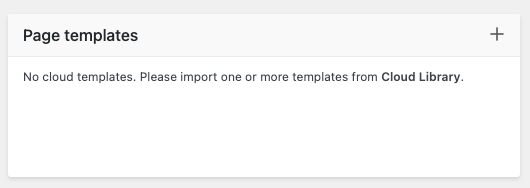
- NewsmagPage templates
- NewspaperPage templates
- NewspaperCreate a form contact page
- NewspaperCloud Library Templates
- NewspaperCloud Library – Category Templates
- NewsmagCategory templates
- NewsmagFooter templates
- NewsmagDefault post templates
- NewsmagPost templates
- NewsmagHomepage – How to build and set it
- NewspaperHomepage – How to build and set it
- NewspaperPost templates
- NewspaperDefault post templates
- NewspaperCategory templates
- NewspaperPost template ads
- Apitd_api_single_template::update_key
- Apitd_api_single_template::update
- Apitd_api_single_template::add
 Bettina
 Hello Khalid!
I can see they are working as they should. You can edit the pages with the TagDiv Composer and use a cloud template for your shop. You can edit the car page, add the Woo Cart element, and customize it as you want.
Thank you!
 Anamaria
 Hi,
Please tell me where it only appears on one page or the entire site. Did you add any code or elements from another plugin?
Please follow the steps from this topic https://forum.tagdiv.com/topic/error-at-zones-6models-1dom-the-model-does-not-match-the-content-currene/ if you have a child theme; please use the main theme.
You can try to revert an old revision on a page/template -> https://www.wpbeginner.com/beginners-guide/complete-guide-to-wordpress-post-revisions/
Thank you!
Anamaria Hello,
You can try to use this section https://cloud.tagdiv.com/#/single/page/Sections/2496 you can import it from cloud template where you can set your own content.
Thank you!
Anamaria Hi,
Please tell me where it only appears on one page or the entire site. Did you add any code or elements from another plugin?
Please follow the steps from this topic https://forum.tagdiv.com/topic/error-at-zones-6models-1dom-the-model-does-not-match-the-content-currene/ if you have a child theme; please use the main theme.
You can try to revert an old revision on a page/template -> https://www.wpbeginner.com/beginners-guide/complete-guide-to-wordpress-post-revisions/
Thank you!
Anamaria Hi,
Please tell me where it only appears on one page or the entire site. Did you add any code or elements from another plugin?
Please follow the steps from this topic https://forum.tagdiv.com/topic/error-at-zones-6models-1dom-the-model-does-not-match-the-content-currene/ if you have a child theme; please use the main theme.
You can try to revert an old revision on a page/template -> https://www.wpbeginner.com/beginners-guide/complete-guide-to-wordpress-post-revisions/
Thank you!
 Raj Kumari
 I want to remove these pages from the website so please guide me how to remove these pages:
https://www.iacquireexpert.com/tdc-review/
https://www.iacquireexpert.com/tdb_templates/footer-urban-observer/
https://www.iacquireexpert.com/tdb_templates/header-template-urban-observer/
https://www.iacquireexpert.com/tdb_templates/single-post-template-urban-observer/
https://www.iacquireexpert.com/tdb_templates/category-template-urban-observer/
https://www.iacquireexpert.com/tdb_templates/search-template-urban-observer/
https://www.iacquireexpert.com/tdb_templates/author-template-urban-observer/
https://www.iacquireexpert.com/tdb_templates/404-template-urban-observer/
https://www.iacquireexpert.com/tdb_templates/tag-template-urban-observer/
https://www.iacquireexpert.com/tdb_templates/date-template-urban-observer/
 candc
candcHello,
I am currently renewing a site created with the NewsPaper theme version 12.6.2, originally built using NewsPaper8 series. The original site was developed using WPBakery, but I am now transitioning to the tagDiv Composer for this renewal.
I am using the default template with a sidebar, but I want to create the homepage (front-page) without using a sidebar. This means that while the template for a standard page (page.php) includes a sidebar, I intend for the homepage not to have one. I have prepared the homepage using the tagDiv Composer. However, after setting this page as the homepage (front-page) and trying to edit it, the following error message appears in the tagDiv Composer editing screen, preventing further editing:
“Error at zones: 6(models) : 5(dom). The model does not match the content Current state has involved an issue.”
The homepage displays correctly without the sidebar, as desired. This error does not occur if the page is not set as the homepage, allowing for re-editing of the page.
This issue arises whether I use a template from the Cloud Library for the homepage or create it as a regular page using tagDiv Composer and then set it as the homepage. Other standard pages, aside from the homepage, are displayed as intended with sidebars.
I suspect the error may be due to the homepage using a different template than the standard page template. How can I resolve this issue? I am not using any original templates except for the header and footer. The homepage design is different from the pages created with WPBakery, so I do not believe this is an issue related to their compatibility.
Thank you for your assistance.
 vallartamirror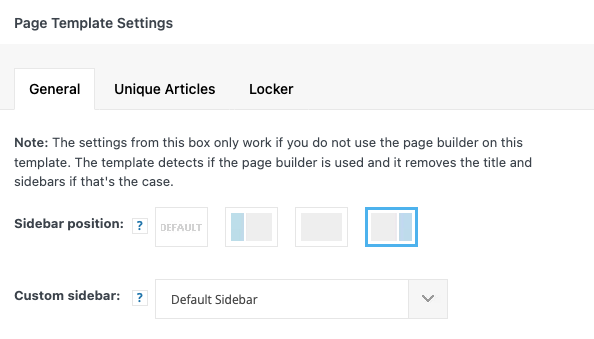
 forevermogulmag
 Also, how do I get this popup window https://prnt.sc/-ZkJ66T_7W-f. Is there a cloud template for this? I can’t seem to find one. If not, can you add this to my WordPress as a page also?
 mortgageman
Hi, (this is not the logo h1 issue) for some reason, any page I create includes the page title in my template (which I want), but then it also puts the page title in the content area (above the text). How can I remove this, it’s strange as it’s not on my older pages, but on any new page I create, this happens. (this doesn’t happen with posts)
 analia
  info@simonebarbone.net
 Yes I set a page, is bad? Should I only use it with categories?
I checked the settings in the links, they are already set correctly in header template.
Anamaria Hi,
Please tell me where it only appears on one page or the entire site. Did you add any code or elements from another plugin?
Please follow the steps from this topic https://forum.tagdiv.com/topic/error-at-zones-6models-1dom-the-model-does-not-match-the-content-currene/ if you have a child theme; please use the main theme.
You can try to revert an old revision on a page/template -> https://www.wpbeginner.com/beginners-guide/complete-guide-to-wordpress-post-revisions/
Thank you!
Anamaria Hi,
The Posts Loop automatically filters the posts depending on the cloud template you set (for example on the category page there will be posted posts from that category).
Thank you!
Anamaria Hi,
Please tell me where it only appears on one page or the entire site. Did you add any code or elements from another plugin?
Please follow the steps from this topic https://forum.tagdiv.com/topic/error-at-zones-6models-1dom-the-model-does-not-match-the-content-currene/ if you have a child theme; please use the main theme.
You can try to revert an old revision on a page/template -> https://www.wpbeginner.com/beginners-guide/complete-guide-to-wordpress-post-revisions/
Thank you!
 kaeferatwork
 Hi,
I am asking you about the warning message on the image (https://workdrive.zohoexternal.com/file/1hp0od6aec2faad4b4110bb174795963788a7).
this is showing on all pages not only the search template…
Anamaria Hello,
You can have different ads in each category if you use a different template for each category. If you want the same design, you can duplicate the templates.
Check this topic: https://forum.tagdiv.com/topic/different-logo-in-categorypage/; The same steps are to duplicate any template.
Thank you!
 Adi
Adi Hi,
I have one another site. (with one another licence key)
On PageSpeed Insights there is an error are showing in SEO section for Descriptive link text. check: https://prnt.sc/R99popOR1i21
Here is the blog post url.
Kindly provide the solution for this issue. this issue are only showing in the template.
 simchris
 I basically have 3 sizes for home page plus slider; and then use one of those in sidebar; and one in sidebar with no images. For posts we use inline image not featured image, so the image we upload *is* the image used in template. Heh, so maybe we have 5 modules. Better than 12 + the 3 from WP default!
Anamaria Hi,
Please tell me where it only appears on one page or the entire site. Did you add any code or elements from another plugin?
Please follow the steps from this topic https://forum.tagdiv.com/topic/error-at-zones-6models-1dom-the-model-does-not-match-the-content-currene/ if you have a child theme; please use the main theme.
You can try to revert an old revision on a page/template -> https://www.wpbeginner.com/beginners-guide/complete-guide-to-wordpress-post-revisions/
Thank you!
 AndreVC
Hi! I recently purchase this template and for the first couple of days it works very well.
However, for the last few days, I can’t save any changes that I made on the template, on my homepage, for example.
Sometimes a error message appears on top: “Erros at columns elements” and I lose the capacity of edit any block. In this cases, I’ve to recovery the last revision using Elementor.
This is the URL: https://exploraromundo.com/
kaeferatwork This is a dynamic page when creating a new blog it will reflect dynamically.
Page URL: https://placebrandobserver.com/blogs/
this is the page template setting screen.
https://workdrive.zohoexternal.com/file/e7wwwa008f2c5e31e4d0dae132803852f7e1c
in this page i need to display all the blog post..but no need of sidebar; can you help me?
Anamaria Hi,
Please disable the tagdiv mobile theme plugin.
Using our theme you can choose from 3 mobile versions
-> mobile responsive => https://www.screencast.com/t/oJ2ShOp47
-> mobile theme plugin => https://forum.tagdiv.com/the-mobile-theme/
-> mobile page => https://tagdiv.com/newspaper-10-3-7-update-brings-customizable-and-fast-mobile-pages/
If you created the mobile pages with tagDiv Composer, then when you install the Mobile Theme plugin, your pages will be overwritten by the plugin (the mobile theme comes with its templates for page, post, category, etc so your current templates from the desktop theme will get converted to the mobile theme layout, the page content is made without builders in mobile editor => https://www.screencast.com/t/xbgZG8kH also, the options that are provided to edit the mobile theme version are limited (this keeps the things simple)).
This is a video about Responsive Newspaper Theme, AMP & Mobile Theme, Mobile Pages & Templates -> https://www.youtube.com/watch?v=SpGkOnJeNZY
So, the mobile responsive is what you see when that you select the viewport on phone => https://www.screencast.com/t/matV17hH, so some settings may apply for each viewport(where is the border blue), and others are not(where the border is black).
The mobile page has the mobile templates from Cloud Library => https://www.screencast.com/t/YCcZ8rL8
The Mobile responsive version of the theme and the mobile page editor can be edit with tagDiv Composer, the mobile theme plugin cannot.
For example, you can have the mobile theme plugin activated and use the mobile page/mobile responsive version for the homepage/pages, but for the categories pages/404 page, you can’t use the mobile page/mobile responsive version if you have the mobile theme plugin activated.
So, if you want to design the pages with tagDiv Composer, you can use the mobile page or mobile responsive version.
Thank you!
Bettina Hello @vallartamirror !
Please make sure you set the cloud templates for every page by clicking on the cloud template you want from that list of templates. If you used default templates for your page, then you should choose the cloud template manually. It is not enough to set a cloud template globally.
Thank you!
Anamaria Hello,
Unfortunately, there is no option because the amp works with mobile theme and has a different structure.
Using our theme, you can choose from 3 mobile versions
-> mobile responsive => https://www.screencast.com/t/oJ2ShOp47
-> mobile theme plugin => https://forum.tagdiv.com/the-mobile-theme/
-> mobile page => https://tagdiv.com/newspaper-10-3-7-update-brings-customizable-and-fast-mobile-pages/
If you created the mobile pages with tagDiv Composer, then when you install the Mobile Theme plugin, your pages will be overwritten by the plugin (the mobile theme comes with its templates for page, post, category, etc so your current templates from the desktop theme will get converted to the mobile theme layout, the page content is made without builders in mobile editor => https://www.screencast.com/t/xbgZG8kH also, the options that are provided to edit the mobile theme version are limited (this keeps the things simple)).
This is a video about Responsive Newspaper Theme, AMP & Mobile Theme, Mobile Pages & Templates -> https://www.youtube.com/watch?v=SpGkOnJeNZY
So, the mobile responsive is what you see when that you select the viewport on phone => https://www.screencast.com/t/matV17hH, so some settings may apply for each viewport(where is the border blue), and others are not(where the border is black).
The mobile page has the mobile templates from Cloud Library => https://www.screencast.com/t/YCcZ8rL8
The Mobile responsive version of the theme and the mobile page editor can be edit with tagDiv Composer, the mobile theme plugin cannot.
For example, you can have the mobile theme plugin activated and use the mobile page/mobile responsive version for the homepage/pages, but for the categories pages/404 page, you can’t use the mobile page/mobile responsive version if you have the mobile theme plugin activated.
So, if you want to design the pages with tagDiv Composer, you can use the mobile page or mobile responsive version.
Thank you!
