
No search results were found in Documentation!
 neoekonomi
iam having pagespeed problems and not to load images at related contents after posts. There are so many css lazy load problem. Could you help me to fix them.
My site is ekonomistx dot com
Ty.
 Eric V
 Hello Mislek,
I see your mobile score on Google Pagespeed Insights is 60 when i test it.
How did you manage to do this? Mines is only 35.
Please advice.
Thanks!
 Calin
Calin Hi,
I make some speed tests on your website, here are the results:
-> https://www.screencast.com/t/oMUJBpkqbw5h
-> https://developers.google.com/speed/pagespeed/insights/?hl=ro&url=https%3A%2F%2Fatolyekariyer.com%2F&tab=desktop
-> https://www.screencast.com/t/pswCYieJC
-> https://gtmetrix.com/reports/atolyekariyer.com/Mgm1gA0a
Thank you.
 mislek
 Hello again,
I guess you didn’t read my message carefully?? As I’ve mentioned before I’m not using any plugin except the recommended ones. Here is my message again:
I’m using speedbooster plugin to eliminate render blocking. Google Pagespeed Insights was showing two things related to “Eliminate Render Blocking” which are: 1)td-plugin-multi-purpose and 2)google-fonts-style. Then I’ve followed your speedbooster guide to fix these 2 things and everything worked fine. In other words, there were no problem related to the “Eliminate Render Blocking” on Google PageSpeed Insights anymore.
Everything was fine until I activated tagDiv CloudLibrary. After activating tagDiv CloudLibrary, PageSpeed Insight has started to shown the 2 things that I’ve previously fixed (td-plugin-multi-purpose, google-fonts-style) and also started to shown a new thing: tdb_front_style (which is related to the tagDiv CloudLibrary) for “Eliminate Render Blocking”. And whatever I do, I can’t fix it. In other words, even though SpeedBooster plugin seems active in system status, it can’t do it’s job when I activated CloudLibrary. In order to make sure about this situation, I deactivated the tagDiv CloudLibrary and PageSpeed Insight immediately stopped giving any warnings related to “Eliminate Render Blocking”.
What I don’t understand is how can tagDiv SpeedBooster plugin could stop working while it is active ?
Can you please help me ?
Ps: There is no extra plugins in my website. Plugins that I use : tagDiv Cloud Library, tagDiv Composer, tagDiv Social Counter, tagDiv Speed Booster, WP Super Cache
 Catalin
 Hi,
Notice that the Speed Booster is an optional plugin and if you are using another untested plugin with the theme, this plugin will be automatically disabled. The speed booster is an optional plugin and it is tested only with these plugins – http://screencast.com/t/hcjLnOqh4i2 and if you use other plugins it will be automatically disabled. A lot of people install the plugin without knowing what it does and after that, they add many plugins and some of them are not written fine so the developer took this decision. If you want to always enable speed booster, delete this code from speed booster file: http://screencast.com/t/RZLIOPUNdqh
Please notice that the speed of your website depends on how well your site is optimized.
Notice that is not a simple task and if you do not have any experience in this regard you will do not bring good results for the theme. Also, notice that we have a speed optimization tutorial but this is addressed only to advanced users. So, if you follow the steps which are presented in this tutorial here -> https://forum.tagdiv.com/how-to-make-the-site-faster/ you can increase the page speed loading and if you are not aware of the steps in this regard, please consider hiring a freelancer/developer to help you because the speed optimization services are not covered by our support policy, as you can read here -> https://forum.tagdiv.com/support-policy-2/ Check our documentation here -> https://forum.tagdiv.com/requirements-for-newspaper/ regarding on dedicated server to fit our requirements.
Unfortunately, our theme does not have such an option to minify the style.css file and we cannot recommend any plugins with this functionality because is not tested with our theme. For minifying this file, we are using CloudFlare for our demo and works fine. If you want to read other views from our users, please check this topic -> https://forum.tagdiv.com/topic/tip-how-to-easily-minify-your-css-without-breaking-your-site/
Also, check all of your Ad Spots and if you have entered any suspicious code through them, remove all of them and check the results without them.
One of our top members here on the forum wrote his own optimization tutorial here:
https://forum.tagdiv.com/topic/tutorial-chriss-custom-optimizations-for-functions-php-etc/ and here -> https://www.infophilic.com/get-almost-100-pagespeed-newspaper-theme/
Basically, these are the theme requirements
– https://forum.tagdiv.com/requirements-for-newspaper/
Another useful guide for increasing the page speed can be found here -> https://kinsta.com/blog/google-pagespeed-insights/
Thanks for your understanding!
 vexx
vexx Disregard that, I had an extension of the mobile browser. It seems to work, but the PageSpeed still shows the page isn’t lazy loaded.
vexx Hey,
I don’t disagree it’s not loading properly for me, but if I do a Google Pagespeed test, besides having a very low grade, it shows that images aren’t deferred. I’m not sure why.
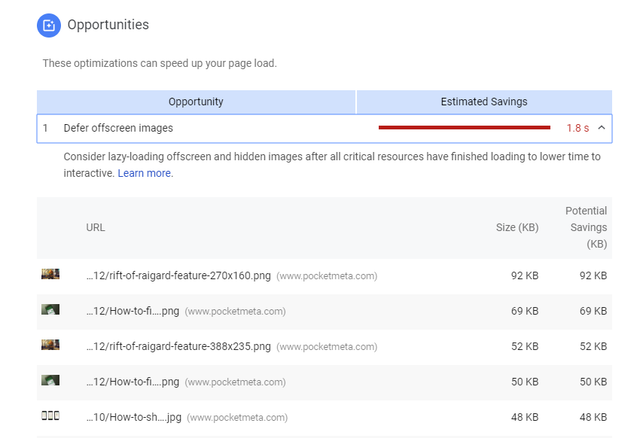
I’m not using the mobile plugin. Also, the mobile grade is slightly higher with lazy load turned off, I’ve did 5 runs to do an average, but since there are too many factors, I won’t blame LAzy for this. However, I don’t understand why it doesn’t show the images are deferred.
 mislek
Hello guys,
I’m using speedbooster plugin to eliminate render blocking. Google Pagespeed Insights was showing two things related to “Eliminate Render Blocking” which are: 1)td-plugin-multi-purpose and 2)google-fonts-style. Then I’ve followed your speedbooster guide to fix these 2 things and everything worked fine. In other words, there were no problem related to the “Eliminate Render Blocking” on Google PageSpeed Insights anymore.
Everything was fine until I activated tagDiv CloudLibrary. After activating tagDiv CloudLibrary, PageSpeed Insight has started to shown the 2 things that I’ve previously fixed (td-plugin-multi-purpose, google-fonts-style) and also started to shown a new thing: tdb_front_style (which is related to the tagDiv CloudLibrary) for “Eliminate Render Blocking”. And whatever I do, I can’t fix it. In other words, even though SpeedBooster plugin seems active in system status, it can’t do it’s job when I activated CloudLibrary. In order to make sure about this situation, I deactivated the tagDiv CloudLibrary and PageSpeed Insight immediately stopped giving any warnings related to “Eliminate Render Blocking”.
What I don’t understand is how can tagDiv SpeedBooster plugin could stop working while it is active ?
Can you please help me ?
Ps: There is no extra plugins in my website. Plugins that I use : tagDiv Cloud Library, tagDiv Composer, tagDiv Social Counter, tagDiv Speed Booster, WP Super Cache
Thanks in advance!!
 Jose
JoseHello,
I have been working for a long time on the optimization of my web pages, trying new things, looking at every corner, installing and uninstalling….
Finally, I got a good optimization, thanks to my work and the help of the tagDiv team (I made many queries here).
I have created a complete tutorial, explained step by step, so that all of you can optimize your web pages too (FREE TUTORIAL).
It’s written in Spanish, but if you’re interested, you can use the Chrome browser to read it in English. The Chrome browser automatically translates texts (right click – translate).
I’ve invested a lot of time in this. I hope you like it.
https://beseomyfriend.com/optimizar-newspaper-pagespeed/
Newspaper theme optimization helps to have a higher loading speed, mainly on mobile devices.
This is very good for improving the user experience and reducing the percentage of rebound. Speed is a key factor in SEO, because Google values it more and more.
Here I also leave an example of optimization, even using Adsense blocks:


Do you Want to see your current score? Use Google PageSpeed Insights (free)
https://developers.google.com/speed/pagespeed/insights/?hl=es
Calin Hi,
Unfortunately that depends on what plugins you are using, some plugins need to load in header others can be load in footer, unfortunately I can not say what JS to move in footer, but you can use some plugins for that.
For general theme requirements this would be the guide for a proper functionality
– https://forum.tagdiv.com/requirements-for-newspaper/
There are many optimization guides provided by our users here in the forum, some made by us, you could check some of them
– https://forum.tagdiv.com/cache-plugin-install-and-configure/
– https://forum.tagdiv.com/how-to-make-the-site-faster/
– https://www.infophilic.com/get-almost-100-pagespeed-newspaper-theme/
– https://forum.tagdiv.com/topic/score-100100-pagespeed-with-newspaper-wordpress-theme/
– https://forum.tagdiv.com/topic/newspaper-theme-speedify-your-website/
– https://forum.tagdiv.com/topic/tutorial-chriss-custom-optimizations-for-functions-php-etc/
– https://forum.tagdiv.com/cloudflare-cdn/
Thank you for your understanding.
vexxHey guys,
I was glad when I’ve seen the notes for the latest release with the new lazy load. However, I think I had higher expectations from this change, currently, my pages load way more faster without Lazy Load turned on. Also, Google PageSpeed gives me slightly higher grades without it (did several runs). Is it possible the script is the problem? Do any of you have similar results?
Catalin Hi,
Please notice that the speed of your website depends on how well your site is optimized.
Notice that is not a simple task and if you do not have any experience in this regard you will do not bring good results for the theme. Also, notice that we have a speed optimization tutorial but this is addressed only to advanced users. So, if you follow the steps which are presented in this tutorial here -> https://forum.tagdiv.com/how-to-make-the-site-faster/ you can increase the page speed loading and if you are not aware of the steps in this regard, please consider hiring a freelancer/developer to help you because the speed optimization services are not covered by our support policy, as you can read here -> https://forum.tagdiv.com/support-policy-2/ Check our documentation here -> https://forum.tagdiv.com/requirements-for-newspaper/ regarding on dedicated server to fit our requirements.
Unfortunately, our theme does not have such an option to minify the style.css file and we cannot recommend any plugins with this functionality because is not tested with our theme. For minifying this file, we are using CloudFlare for our demo and works fine. If you want to read other views from our users, please check this topic -> https://forum.tagdiv.com/topic/tip-how-to-easily-minify-your-css-without-breaking-your-site/
Also, check all of your Ad Spots and if you have entered any suspicious code through them, remove all of them and check the results without them.
One of our top members here on the forum wrote his own optimization tutorial here:
https://forum.tagdiv.com/topic/tutorial-chriss-custom-optimizations-for-functions-php-etc/ and here -> https://www.infophilic.com/get-almost-100-pagespeed-newspaper-theme/
Basically, these are the theme requirements
– https://forum.tagdiv.com/requirements-for-newspaper/
Another useful guide for increasing the page speed can be found here -> https://kinsta.com/blog/google-pagespeed-insights/
Thanks for your understanding!
Catalin Hello,
Please notice that the speed of your website depends on how well your site is optimized.
Notice that is not a simple task and if you do not have any experience in this regard you will do not bring good results for the theme. Also, notice that we have a speed optimization tutorial but this is addressed only to advanced users. So, if you follow the steps which are presented in this tutorial here -> https://forum.tagdiv.com/how-to-make-the-site-faster/ you can increase the page speed loading and if you are not aware of the steps in this regard, please consider hiring a freelancer/developer to help you because the speed optimization services are not covered by our support policy, as you can read here -> https://forum.tagdiv.com/support-policy-2/ Check our documentation here -> https://forum.tagdiv.com/requirements-for-newspaper/ regarding on dedicated server to fit our requirements.
Unfortunately, our theme does not have such an option to minify the style.css file and we cannot recommend any plugins with this functionality because is not tested with our theme. For minifying this file, we are using CloudFlare for our demo and works fine. If you want to read other views from our users, please check this topic -> https://forum.tagdiv.com/topic/tip-how-to-easily-minify-your-css-without-breaking-your-site/
Also, check all of your Ad Spots and if you have entered any suspicious code through them, remove all of them and check the results without them.
One of our top members here on the forum wrote his own optimization tutorial here:
https://forum.tagdiv.com/topic/tutorial-chriss-custom-optimizations-for-functions-php-etc/ and here -> https://www.infophilic.com/get-almost-100-pagespeed-newspaper-theme/
Basically, these are the theme requirements
– https://forum.tagdiv.com/requirements-for-newspaper/
Another useful guide for increasing the page speed can be found here -> https://kinsta.com/blog/google-pagespeed-insights/
Thanks for your understanding!
Calin Hi,
There are many optimization guides provided by our users here in the forum, some made by us, you could check some of them
– https://forum.tagdiv.com/cache-plugin-install-and-configure/
– https://forum.tagdiv.com/how-to-make-the-site-faster/
– https://www.infophilic.com/get-almost-100-pagespeed-newspaper-theme/
– https://forum.tagdiv.com/topic/score-100100-pagespeed-with-newspaper-wordpress-theme/
– https://forum.tagdiv.com/topic/newspaper-theme-speedify-your-website/
– https://forum.tagdiv.com/topic/tutorial-chriss-custom-optimizations-for-functions-php-etc/
– https://forum.tagdiv.com/cloudflare-cdn/
Hope this will help you.
Thank you for your understanding.
 Simion C.
 Hi,
There are a few speed optimization topics you can follow
– https://forum.tagdiv.com/cache-plugin-install-and-configure/
– https://forum.tagdiv.com/how-to-make-the-site-faster/
– https://www.infophilic.com/get-almost-100-pagespeed-newspaper-theme/
– https://forum.tagdiv.com/topic/score-100100-pagespeed-with-newspaper-wordpress-theme/
– https://forum.tagdiv.com/topic/newspaper-theme-speedify-your-website/
– https://forum.tagdiv.com/topic/tutorial-chriss-custom-optimizations-for-functions-php-etc/
– https://forum.tagdiv.com/cloudflare-cdn/
Note that there will also be overall improvements made by us in the theme, in coming updates. Be sure to check the theme requirements guide carefully as well
– https://forum.tagdiv.com/requirements-for-newspaper/
Thanks
Calin Hi,
We aware of this problem, and what I can say is that there will be overall performance improvements made in the theme in coming updates, to further optimize speed.
For general theme requirements this would be the guide for a proper functionality
– https://forum.tagdiv.com/requirements-for-newspaper/
There are many optimization guides provided by our users here in the forum, some made by us, you could check some of them
– https://forum.tagdiv.com/cache-plugin-install-and-configure/
– https://forum.tagdiv.com/how-to-make-the-site-faster/
– https://www.infophilic.com/get-almost-100-pagespeed-newspaper-theme/
– https://forum.tagdiv.com/topic/score-100100-pagespeed-with-newspaper-wordpress-theme/
– https://forum.tagdiv.com/topic/newspaper-theme-speedify-your-website/
– https://forum.tagdiv.com/topic/tutorial-chriss-custom-optimizations-for-functions-php-etc/
– https://forum.tagdiv.com/cloudflare-cdn/
Thank you for your understanding.
 lyricsabc
why my page loading speed is very slow after installing Newspaper theme ?
my website is lyricsabc.com please GOOGLE TESTER check and help me to fix this problem
 macksix
 It depends on if you mean your pagespeed score with Google or GTMetrix or if you mean perceivable pagespeed. Speedscore sites are unrealistic. If you don’t beleive me, check Amazon home page and it has a terrible pagespeed score, but it’s fast.
I can help you if you reply with URL so I can see it.
mislek Hi, it’s not shown in PageSpeed section. You gotta check Yslow section.
 Bogdan B.
 Hello,
Amp works fine on your site: https://ofwmoney.org/how-to/requirements-for-tin/amp/
If you want to improve your page loading speed, try these few guides
– https://forum.tagdiv.com/cache-plugin-install-and-configure/
– https://forum.tagdiv.com/how-to-make-the-site-faster/
– https://forum.tagdiv.com/topic/score-100100-pagespeed-with-newspaper-wordpress-theme/
– https://forum.tagdiv.com/topic/newspaper-theme-speedify-your-website/
– https://forum.tagdiv.com/topic/tutorial-chriss-custom-optimizations-for-functions-php-etc/
We also recommend this Cloudflare configuration
– https://forum.tagdiv.com/cloudflare-cdn/
For speedbooster you can disable the compatibility check like so:
https://forum.tagdiv.com/topic/tinymce-advanced-and-other-various-disabling-speed-boster/
Thank you!
Calin Hi,
In order to make your menu to work you’ll need to wait until the page is full load, after that your menu will appear.
Also you can try to optimized your website speed
There are many optimization guides provided by our users here in the forum, some made by us, you could check some of them
– https://forum.tagdiv.com/cache-plugin-install-and-configure/
– https://forum.tagdiv.com/how-to-make-the-site-faster/
– https://www.infophilic.com/get-almost-100-pagespeed-newspaper-theme/
– https://forum.tagdiv.com/topic/score-100100-pagespeed-with-newspaper-wordpress-theme/
– https://forum.tagdiv.com/topic/newspaper-theme-speedify-your-website/
– https://forum.tagdiv.com/topic/tutorial-chriss-custom-optimizations-for-functions-php-etc/
– https://forum.tagdiv.com/cloudflare-cdn/
And see if the problem is still there.
Thank you for your understanding.
-
This reply was modified 7 years by
 Calin.
 purlp
purlpHi guys I just what to ask a question.
https://ofwmoney.org/ have very poor rating in Gmatrix and PageSpeed Insights and also amp not working.
ofwmoney.org have cloud flare plus plan
https://purlp.com/ is same theme same hosting – but its has a good rating on gmatrix 60% up
1. What do I need to speed-up my blog?
2. My hosting is liquid-web, before I chat with their support they till its on the theme.
3. Can you till me what I should raise I when I chat with their support?
4. Do I need to cancel the cloud-flare plan?
5. In the amp why is it not working, I already install the plugin.
Calin Hi,
I think is referring to this file https://www.screencast.com/t/d0Q1GBnOr
You can try to optimize your website
There are many optimization guides provided by our users here in the forum, some made by us, you could check some of them
– https://forum.tagdiv.com/cache-plugin-install-and-configure/
– https://forum.tagdiv.com/how-to-make-the-site-faster/
– https://www.infophilic.com/get-almost-100-pagespeed-newspaper-theme/
– https://forum.tagdiv.com/topic/score-100100-pagespeed-with-newspaper-wordpress-theme/
– https://forum.tagdiv.com/topic/newspaper-theme-speedify-your-website/
– https://forum.tagdiv.com/topic/tutorial-chriss-custom-optimizations-for-functions-php-etc/
– https://forum.tagdiv.com/cloudflare-cdn/
And see if the problem is still there.
Thank you for your understanding.
JoseHello,
Google pagespeed always seems to me this error, I really don’t know what it refers to.
It’s a theme file, but I don’t know what it is, it’s called :
newspaper/images/icons/newspaper.woff8?
Here a photo:

More big: https://fotos.subefotos.com/58f7bb45728dd2e2ee6bc1998b69a776o.jpg
Google recommends me to use the tag <link rel=preload>, to give priority to the resources that are requested later when loading the page.
How can I do this? Where should I add that tag?
Thank you
Calin Hi,
Also you can use mobile theme -> https://forum.tagdiv.com/the-mobile-theme/
You can try to optimize your website
There are many optimization guides provided by our users here in the forum, some made by us, you could check some of them
– https://forum.tagdiv.com/cache-plugin-install-and-configure/
– https://forum.tagdiv.com/how-to-make-the-site-faster/
– https://www.infophilic.com/get-almost-100-pagespeed-newspaper-theme/
– https://forum.tagdiv.com/topic/score-100100-pagespeed-with-newspaper-wordpress-theme/
– https://forum.tagdiv.com/topic/newspaper-theme-speedify-your-website/
– https://forum.tagdiv.com/topic/tutorial-chriss-custom-optimizations-for-functions-php-etc/
– https://forum.tagdiv.com/cloudflare-cdn/
Thank you for your understanding.
