- NewspaperDesign your post pages using the Default Templates
- NewspaperPost template ads
- NewspaperWP Rocket and Newspaper Theme: Optimization Guide
- NewspaperHow to use the Flex Blocks cache option
- NewspaperFlex Block Settings Guide
- NewspaperThe Newspaper Mobile Theme: Introduction
- NewspaperDefault Category Settings
- NewspaperCloud Library – Category Templates
- NewspaperBig Grid Flex Settings
- NewspaperHeader Builder
- NewspaperMeta Info on Modules and Blocks
- NewspaperTheme modules and blocks
- NewspaperImport / Export Theme Settings
- TutorialsDefault Block Settings Guide
- NewsmagImport / Export theme settings
- TutorialsOffset Feature
- NewspaperUnique Articles
- TutorialsSystem status parameters guide
- NewsmagRequirements for Newsmag
- NewsmagBlock settings tutorial
 munnyndonuts
Hello! I’ve just installed the Echoverse demo without any of the sample content and I have a few questions about the customization options.
1. How can I remove or replace the little bee logo next to the site title? https://imgur.com/31ZoGUk
2. How do I control which posts go on the different content buckets? For instance, the Media Activity and Herbal Harvest sections: how do I customize it so that posts with specific tags or categories appear in specific ones? https://imgur.com/AX1NrTO
3. Finally, is there a way to edit the colors of each content bucket?
Thanks for your help!
 Bettina
 Hello!
1. Unfortunately, no. An inner row is a row within another row that has columns called inner columns because they are part of the inner row. You can add an inner row only into another row or column. They also have settings as any other shortcode/element from the tagdiv Composer. How to remove an inner row? The easiest solution is to click on the inner row word: https://app.screencast.com/PNI0Lolb0ZTm2 press Delete from your Keyboard, and click YES: https://app.screencast.com/sLv2xfmsO812v
You can set a row/inner row to be sticky or not from its settings: https://app.screencast.com/meYQjYKITuGuR .
You can reduce the inner columns of your inner row like this: https://app.screencast.com/bwmRwvQpsT2of
Please take a look here in this video for example where I build 6 columns: https://www.screencast.com/t/mZ2c5XamTFN2
2. Yes, with the help of the tagdiv Composer. Add a row and split it into 3 columns: https://prnt.sc/-y3xWBjrjmPD.
You can also specify the width of your columns, like 20%,60%,20%: https://prnt.sc/2zjfi6c2phgN
Drag and drop every element in each column. Example: https://prnt.sc/T2YSJ-cU73Eh
There are some settings to align it in the tagdiv Composer, click on the element: https://prnt.sc/lcYDthjDhhzv
3. No. These settings from point 2 are found only in the tagdiv Composer and you have to use a cloud single post template. The theme panel settings are proper for the default templates(those can not be edited with the tagdiv Composer).
Please check the differences between cloud vs default templates from our guides:
– https://forum.tagdiv.com/design-post-pages-using-cloud-library-templates/
– https://forum.tagdiv.com/design-post-pages-using-default-templates/
4. Already explained at point 3.
Thank you!
 Anamaria
 Hello,
You can remove the Single Post Author Box using Edit with tagDiv Composer on the Single Post Template and with a right-click you can delete => https://i.imgur.com/BnhhxVh.png , or selecting the element and with drag & drop place into the deleting red zone from the bottom right of the page => https://i.imgur.com/vkQVCjn.jpg
Thank you!
 stev1972
Using Free News Pro (https://demo.tagdiv.com/newspaper_free_news_pro/) Newspaper theme. In header there is a subscribe button. The code in header (see below) has created 800+ blog post URLs with tds-switching-plans-wizard appended to it!!!
Even when removing the subscribe button from the header and deactivating the tagDiv Opt-In Builder plugin the code causing the issue remains in the source code! I noticed that several tickets were registered in the past mentioning this problem but no solution was ever mentioned!
<div class="tds-button td-fix-index"><a

                href="tds-switching-plans-wizard/"

                 title="Subscribe"

                class="tds-button1 tdm-btn tdm-btn-sm tdi_22" ><span class="tdm-btn-text">Subscribe</span></div>
<div class="tds-button td-fix-index"><a
href="tds-switching-plans-wizard/"
title="Subscribe"
class="tds-button1 tdm-btn tdm-btn-sm tdi_33" ><span class="tdm-btn-text">Subscribe</span></div>
Please provide a fix ASAP or provide instructions how we can remove the code below from header.
This is affecting our SEO badly!
Thanks, Stefan
 nearview
 @anamaria,
Please see the site info below.
### wp-core ###
version: 6.7.2
site_language: en_US
user_language: en_US
timezone: America/New_York
permalink: /%postname%/
https_status: true
multisite: false
user_registration: 0
blog_public: 0
default_comment_status: open
environment_type: development
user_count: 15
dotorg_communication: true
### wp-paths-sizes ###
wordpress_path: /code
wordpress_size: 94.86 MB (99465258 bytes)
uploads_path: /code/wp-content/uploads
uploads_size: 0.00 B (0 bytes)
themes_path: /code/wp-content/themes
themes_size: 8.03 MB (8415114 bytes)
plugins_path: /code/wp-content/plugins
plugins_size: 28.00 B (28 bytes)
fonts_path: /code/wp-content/uploads/fonts
fonts_size: 2.28 MB (2386544 bytes)
database_size: 29.67 MB (31113216 bytes)
total_size: 134.83 MB (141380160 bytes)
### wp-active-theme ###
name: Newspaper Child theme (Newspaper-child)
version: 9.0c
author: tagDiv
author_website: http://themeforest.net/user/tagDiv/portfolio
parent_theme: Newspaper (Newspaper)
theme_features: core-block-patterns, post-formats, post-thumbnails, automatic-feed-links, html5, woocommerce, bbpress, align-wide, align-full, editor-font-sizes, widgets-block-editor, editor-style, menus, widgets
theme_path: /code/wp-content/themes/Newspaper-child
auto_update: Disabled
### wp-parent-theme ###
name: Newspaper (Newspaper)
version: 12.6.9
author: tagDiv
author_website: https://themeforest.net/user/tagDiv/portfolio
theme_path: /code/wp-content/themes/Newspaper
auto_update: Disabled
### wp-themes-inactive (1) ###
Twenty Twenty-Five: version: 1.1, author: the WordPress team, Auto-updates disabled
### wp-mu-plugins (1) ###
Pantheon MU Plugin Loader: version: 1.0, author: Pantheon Systems
### wp-plugins-active (41) ###
Advanced Custom Fields: version: 6.3.12, author: WP Engine, Auto-updates disabled
Autocomplete WooCommerce Orders: version: 3.4.0, author: QuadLayers, Auto-updates disabled
Bulk Move: version: 1.3.0, author: Sudar, Auto-updates disabled
Classic Editor: version: 1.6.7, author: WordPress Contributors, Auto-updates disabled
Classic Widgets: version: 0.3, author: WordPress Contributors, Auto-updates disabled
Code Snippets: version: 3.6.8, author: Code Snippets Pro, Auto-updates disabled
Convert Pro: version: 1.8.1, author: Brainstorm Force, Auto-updates disabled
Convert Pro – Addon: version: 1.5.14, author: Brainstorm Force, Auto-updates disabled
Disable Bloat for WordPress & WooCommerce: version: 3.5.0, author: Disable Bloat, Auto-updates disabled
Disable Comments: version: 2.4.7, author: WPDeveloper, Auto-updates disabled
Duplicate Page: version: 4.5.4, author: mndpsingh287, Auto-updates disabled
FluentSMTP: version: 2.2.90, author: FluentSMTP & WPManageNinja Team, Auto-updates disabled
Gravity Forms: version: 2.9.4, author: Gravity Forms, Auto-updates disabled
Gravity Forms ActiveCampaign Add-On: version: 2.1.0, author: Gravity Forms, Auto-updates disabled
Gravity Forms Advanced Post Creation Add-On: version: 1.5.0, author: Gravity Forms, Auto-updates disabled
Gravity Forms Authorize.Net Add-On: version: 2.11, author: Gravity Forms, Auto-updates disabled
Gravity Forms Google Analytics Add-On: version: 2.3.0, author: Gravity Forms, Auto-updates disabled
Gravity Forms reCAPTCHA Add-On: version: 1.6.0, author: Gravity Forms, Auto-updates disabled
GTM4WP – A Google Tag Manager (GTM) plugin for WordPress: version: 1.20.3, author: Thomas Geiger, Auto-updates disabled
Legendary Core for WordPress: version: 1.01.134, author: support@legendarydata.com, Auto-updates disabled
Legendary Data – Search Plugin: version: 1.00.022, author: Alvin Kreitman / Legendary Data, Auto-updates disabled
Molongui Authorship: version: 5.0.15, author: Molongui, Auto-updates disabled
Native PHP Sessions for WordPress: version: 1.4.3, author: Pantheon, Auto-updates disabled
Redirection: version: 5.5.2, author: John Godley, Auto-updates disabled
Simple User Avatar: version: 4.7, author: Matteo Manna, Auto-updates disabled
tagDiv Cloud Library: version: 3.8 | built on 10.02.2025 10:50, author: tagDiv, Auto-updates disabled
tagDiv Composer: version: 5.3 | built on 10.02.2025 10:50, author: tagDiv, Auto-updates disabled
Temporary Login Without Password: version: 1.9.0, author: StoreApps, Auto-updates disabled
The Events Calendar: version: 6.10.2, author: The Events Calendar, Auto-updates disabled
TotalPoll – Pro: version: 4.11.0, author: TotalSuite, Auto-updates disabled
User Role Editor: version: 4.64.4, author: Vladimir Garagulya, Auto-updates disabled
WooCommerce: version: 9.7.1, author: Automattic, Auto-updates disabled
WooCommerce.com Update Manager: version: 1.0.3, author: Automattic, Auto-updates disabled
WooCommerce Authorize.Net Gateway: version: 3.10.10, author: SkyVerge, Auto-updates disabled
WooCommerce Memberships: version: 1.26.11, author: SkyVerge, Auto-updates disabled
WooCommerce Subscriptions: version: 7.2.1, author: WooCommerce, Auto-updates disabled
WP-DraftsForFriends: version: 1.0.2, author: Lester ‘GaMerZ’ Chan, Auto-updates disabled
WP All Import – ACF Add-On: version: 3.3.9, author: Soflyy, Auto-updates disabled
WP All Import – User Import Add-On Pro: version: 1.1.8, author: Soflyy, Auto-updates disabled
WP All Import Pro: version: 4.10.1, author: Soflyy, Auto-updates disabled
WP Crontrol: version: 1.18.0, author: John Blackbourn, Auto-updates disabled
### wp-plugins-inactive (7) ###
EWWW Image Optimizer: version: 8.1.2, author: Exactly WWW, Auto-updates disabled
Featured Image Admin Thumb: version: 1.6, author: Sean Hayes, Auto-updates disabled
Pantheon Advanced Page Cache: version: 2.1.1, author: Pantheon, Auto-updates disabled
WP Fusion Lite: version: 3.44.8, author: Very Good Plugins, Auto-updates disabled
Yoast SEO: version: 24.7, author: Team Yoast, Auto-updates disabled
Yoast SEO: News: version: 13.3, author: Team Yoast, Auto-updates disabled
Yoast SEO Premium: version: 24.5, author: Team Yoast, Auto-updates disabled
### code-snippets (12) ###
snippet-5: name: Customize WP Login Screen, scope: global, modified: 2025-02-11 16:10:24
snippet-6: name: Issue Archive and Current Issue Shortcode, scope: global, modified: 2025-02-11 16:20:31, tags: [Shortcode]
snippet-7: name: Remove unnecessary fields from user edit screen, scope: global, modified: 2025-02-11 16:26:01
snippet-9: name: WordPress Admin Styles, scope: global, modified: 2025-02-04 16:55:35
snippet-12: name: Disable Yoast Redirects, scope: global, modified: 2025-02-21 18:52:27
snippet-13: name: Remove WooCommerce Payments Menu Item from Admin, scope: global, modified: 2025-02-05 18:01:46
snippet-14: name: WooMemberships Paywall Message, scope: global, modified: 2025-02-20 21:10:16
snippet-15: name: Disable Contributor upsell widget, scope: global, modified: 2025-03-11 14:14:04, tags: [Molongui Authorship]
snippet-16: name: IMPORT SCRIPT – For Guest Authors and Image Attachments, scope: global, modified: 2025-03-18 18:35:41, tags: [WP All Import]
snippet-17: name: Latest Poll Shortcode, scope: global, modified: 2025-03-11 14:14:52, tags: [TotalPoll Pro]
snippet-18: name: Rotate ConvertPro CTAs Shortcode, scope: global, modified: 2025-03-11 14:41:26, tags: [ConvertPro, Shortcode]
snippet-20: name: Add Hide Featured Image Checkbox and functionality., scope: global, modified: 2025-03-18 19:46:30
### wp-media ###
image_editor: WP_Image_Editor_Imagick
imagick_module_version: 1693
imagemagick_version: ImageMagick 6.9.13-17 Q16 x86_64 18482 https://legacy.imagemagick.org
imagick_version: 3.7.0
file_uploads: 1
post_max_size: 100M
upload_max_filesize: 100M
max_effective_size: 100 MB
max_file_uploads: 50
imagick_limits:
imagick::RESOURCETYPE_AREA: 251 GB
imagick::RESOURCETYPE_DISK: 9.2233720368548E+18
imagick::RESOURCETYPE_FILE: 24576
imagick::RESOURCETYPE_MAP: 126 GB
imagick::RESOURCETYPE_MEMORY: 63 GB
imagick::RESOURCETYPE_THREAD: 1
imagick::RESOURCETYPE_TIME: 0
imagemagick_file_formats: 3FR, 3G2, 3GP, AAI, AI, APNG, ART, ARW, AVI, AVS, BGR, BGRA, BGRO, BIE, BMP, BMP2, BMP3, BRF, CAL, CALS, CANVAS, CAPTION, CIN, CIP, CLIP, CMYK, CMYKA, CR2, CR3, CRW, CUR, CUT, DATA, DCM, DCR, DCX, DDS, DFONT, DNG, DOT, DPX, DXT1, DXT5, EPDF, EPI, EPS, EPS2, EPS3, EPSF, EPSI, EPT, EPT2, EPT3, ERF, EXR, FAX, FILE, FITS, FLV, FRACTAL, FTP, FTS, G3, G4, GIF, GIF87, GRADIENT, GRAY, GRAYA, GROUP4, GV, H, HALD, HDR, HISTOGRAM, HRZ, HTM, HTML, HTTP, HTTPS, ICB, ICO, ICON, IIQ, INFO, INLINE, IPL, ISOBRL, ISOBRL6, J2C, J2K, JBG, JBIG, JNG, JNX, JP2, JPC, JPE, JPEG, JPG, JPM, JPS, JPT, JSON, K25, KDC, LABEL, M2V, M4V, MAC, MAGICK, MAP, MASK, MAT, MATTE, MEF, MIFF, MKV, MNG, MONO, MOV, MP4, MPC, MPEG, MPG, MRW, MSL, MSVG, MTV, MVG, NEF, NRW, NULL, ORF, OTB, OTF, PAL, PALM, PAM, PANGO, PATTERN, PBM, PCD, PCDS, PCL, PCT, PCX, PDB, PDF, PDFA, PEF, PES, PFA, PFB, PFM, PGM, PGX, PICON, PICT, PIX, PJPEG, PLASMA, PNG, PNG00, PNG24, PNG32, PNG48, PNG64, PNG8, PNM, POCKETMOD, PPM, PREVIEW, PS, PS2, PS3, PSB, PSD, PTIF, PWP, RADIAL-GRADIENT, RAF, RAS, RAW, RGB, RGBA, RGBO, RGF, RLA, RLE, RMF, RW2, SCR, SCT, SFW, SGI, SHTML, SIX, SIXEL, SPARSE-COLOR, SR2, SRF, STEGANO, SUN, SVG, SVGZ, TEXT, TGA, THUMBNAIL, TIFF, TIFF64, TILE, TIM, TTC, TTF, TXT, UBRL, UBRL6, UIL, UYVY, VDA, VICAR, VID, VIDEO, VIFF, VIPS, VST, WBMP, WEBM, WEBP, WMF, WMV, WMZ, WPG, X, X3F, XBM, XC, XCF, XPM, XPS, XV, XWD, YCbCr, YCbCrA, YUV
gd_version: bundled (2.1.0 compatible)
gd_formats: GIF, JPEG, PNG, WebP, BMP, AVIF, XPM
ghostscript_version: 9.27
### the-events-calendar ###
### wp-server ###
server_architecture: Linux 6.1.112+ x86_64
httpd_software: nginx/1.27.1
php_version: 8.3.19 64bit
php_sapi: fpm-fcgi
max_input_variables: 10000
time_limit: 120
memory_limit: 1024M
max_input_time: 900
upload_max_filesize: 100M
php_post_max_size: 100M
curl_version: 7.61.1 OpenSSL/1.1.1k
suhosin: false
imagick_availability: true
pretty_permalinks: true
htaccess_extra_rules: true
current: 2025-03-20T14:32:51+00:00
utc-time: Thursday, 20-Mar-25 14:32:51 UTC
server-time: 2025-03-20T10:32:50-04:00
### wp-database ###
extension: mysqli
server_version: 10.4.25-MariaDB-log
client_version: mysqlnd 8.3.19
max_allowed_packet: 67108864
max_connections: 1024
### wp-constants ###
WP_HOME: https://dev-hartfordbusiness-com-wp.pantheonsite.io
WP_SITEURL: https://dev-hartfordbusiness-com-wp.pantheonsite.io
WP_CONTENT_DIR: /code/wp-content
WP_PLUGIN_DIR: /code/wp-content/plugins
WP_MEMORY_LIMIT: 512M
WP_MAX_MEMORY_LIMIT: 1G
WP_DEBUG: true
WP_DEBUG_DISPLAY: false
WP_DEBUG_LOG: true
SCRIPT_DEBUG: false
WP_CACHE: false
CONCATENATE_SCRIPTS: undefined
COMPRESS_SCRIPTS: undefined
COMPRESS_CSS: undefined
WP_ENVIRONMENT_TYPE: undefined
WP_DEVELOPMENT_MODE: undefined
DB_CHARSET: utf8mb4
DB_COLLATE: undefined
### wp-filesystem ###
wordpress: writable
wp-content: writable
uploads: writable
plugins: writable
themes: writable
fonts: writable
mu-plugins: writable
### acf ###
version: 6.3.12
plugin_type: Free
update_source: wordpress.org
ui_field_groups: 3
php_field_groups: 0
json_field_groups: 0
rest_field_groups: 0
post_types_enabled: true
ui_post_types: 27
json_post_types: 0
ui_taxonomies: 17
json_taxonomies: 0
rest_api_format: light
admin_ui_enabled: true
field_type-modal_enabled: true
field_settings_tabs_enabled: false
shortcode_enabled: false
registered_acf_forms: 0
json_save_paths: 1
json_load_paths: 1
-
This reply was modified 1 year by
nearview.
Anamaria Hi,
Usually, the ads in prebuilt websites are set in the element AD BOX, and you can remove it, edit with tagDiv Composer, select the viewport for phone and select the Ad box element and with right-click you can delete it => https://www.screencast.com/t/2GfCVx9BCAw7 or with drag & drop place it into the deleting red zone from the bottom right of the page
The ad box has 3 sections for ads: using theme panel ads -> https://i.imgur.com/KFa9ibl.png, using images/banners -> https://i.imgur.com/MfAPTaE.png and custom code -> https://i.imgur.com/2rh8SuD.png save it and will appear on the post (you can set a shortcode like a shortcode from adrotate plugin or other plugins).
Thank you!
 Børnenes Aarhus
Hi tagDiv Support Team,
I’m having an issue where the <h1> tag around the logo isn’t being removed, even after enabling “Disable H1 on logo” in both the frontend (tagDiv Composer) and backend (Theme Panel). I’m running Newspaper version 12, updated from version 8, and working in a test environment to redesign my site. My goal is to fix a “Multiple H1” issue flagged by Screaming Frog, where the logo has an empty <h1> alongside the page title’s <h1>.
Here’s what I’ve tried:
In tagDiv Composer (Frontend):
I imported a new header from Cloud Library.
Edited the “Header Logo” block, found “Disable H1 on logo” (a checkbox), checked it (enabled it), and saved the template.
Assigned the new header to the homepage in Theme Panel > Header > Main Menu.
In Theme Panel (Backend):
Went to Theme Panel > Header > Logo.
Found “Disable H1 on logo” (another checkbox), checked it (enabled it), and saved settings.
Cache Clearing:
Cleared W3 Total Cache (“Empty All Caches”).
Cleared Chrome browser cache and tested in incognito mode.
Despite these steps, the <h1> tag remains in the source code. Here’s an example of what I see when inspecting the page in Chrome:
html
<h1><span class=”tdb-logo-img-wrap”> </span></h1>
This empty <h1> causes a “Multiple H1” issue, as my page titles (e.g., from “Single Post Title”) also use <h1>.
What could be overriding the “Disable H1 on logo” setting? Is this a known issue after updating from version 8 to 12? Could old templates or settings from version 8 be interfering? Any help would be appreciated!
 Babawomba
 Hi Bettina,
You currently can reproduce the problem when opening these two different pages directly from the Google SERPs, at least I can with incognito mode:
– https://tinyurl.com/4u83xw2r
– https://tinyurl.com/mpmtevue
I have attached two new full page screenshots for you for these two pages:
https://1drv.ms/i/s!AlQHsqtJGzeatY9lkO8LPT26n-sodg?e=wLnhz8
https://1drv.ms/i/s!AlQHsqtJGzeatY9mSXcAdYX9FRN83A?e=zaUWMr
Here is the tagdiv composer view for our posts template:
https://1drv.ms/i/s!AlQHsqtJGzeatY9kLtq2PHDsn4wmrQ?e=KE6lXv
The issue seems to be somewhat related to how “Googlebot smartphone” renders the pages and then stored some data which is now being used when users click on the Google SERPs.
This means the issue appears only for some pages when users come from Google, as some cached version or parts of the code (that had been served on a previous crawl) is being applied
If the user then reloads the affected page the problem disappears. All visits/loads that are not coming from Google appear to render the pages correctly – including from Bing SERPs
My assumption as of now is that some dynamically served image (container/element) code to “Googlebot Smartphone” sometimes produces a flawed cache result – which then affects desktop users when they visit the site from Google SERPs.
In the meanwhile I did some tests with the previously reported page:
– Doing a minor change on the affected article
– Reducing the featured image dimensions and saving the page
– Re-indexing it again manually via Google Search Console.
This removed the problem. But this could be just a random success as in general not all pages are affected.
Further changes I have implemented in an effort to fix things:
I added this custom CSS code to my wordpress theme to force a limit for maximum image size rendering on mobile devices, to target Googlebot smartphone which seems to have some rendering issues with the code it gets:
@media (max-width: 767px) { .tdb_single_featured_image img { width: 100% !important; max-width: 696px !important; height: auto !important; } }
Anamaria Hi,
Usually, the ads in prebuilt websites are set in the element AD BOX, and you can remove it, edit with tagDiv Composer, select the viewport for phone and select the Ad box element and with right-click you can delete it => https://www.screencast.com/t/2GfCVx9BCAw7 or with drag & drop place it into the deleting red zone from the bottom right of the page
The ad box has 3 sections for ads: using theme panel ads -> https://i.imgur.com/KFa9ibl.png, using images/banners -> https://i.imgur.com/MfAPTaE.png and custom code -> https://i.imgur.com/2rh8SuD.png save it and will appear on the post (you can set a shortcode like a shortcode from adrotate plugin or other plugins).
Thank you!
Anamaria Hello,
Usually, the ads in prebuilt websites are set in the element AD BOX, and you can remove it, edit with tagDiv Composer, select the viewport for phone and select the Ad box element and with right-click you can delete it => https://www.screencast.com/t/2GfCVx9BCAw7 or with drag & drop place it into the deleting red zone from the bottom right of the page
The ad box has 3 sections for ads: using theme panel ads -> https://i.imgur.com/KFa9ibl.png, using images/banners -> https://i.imgur.com/MfAPTaE.png and custom code -> https://i.imgur.com/2rh8SuD.png save it and will appear on the post (you can set a shortcode like a shortcode from adrotate plugin or other plugins).
Thank you!
 Bakhti Roedarah
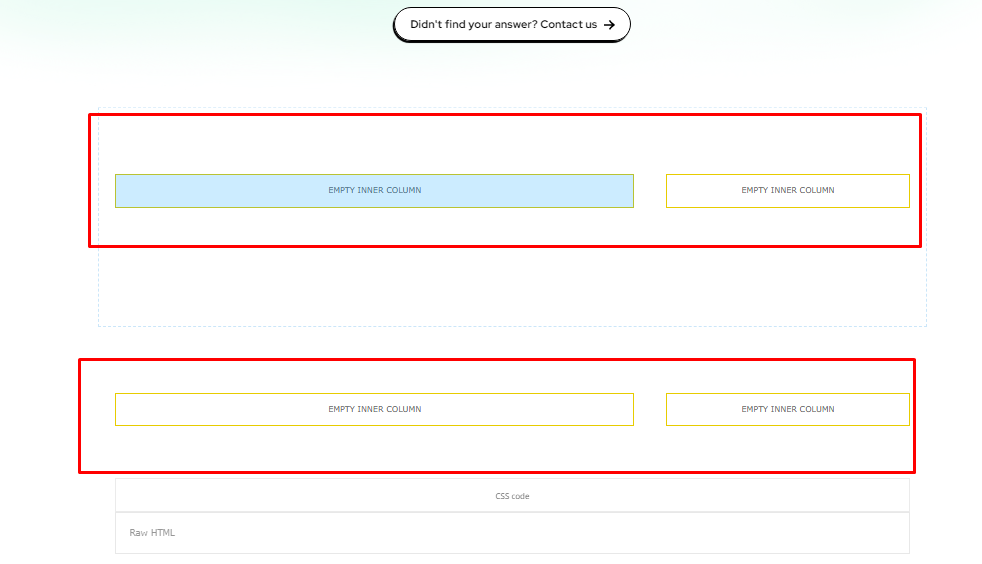
how can i remove these columns from the page in tag div builder
Anamaria Hello,
Do you want to remove it or only hide it for devices?
Usually, the ads in prebuilt websites are set in the element AD BOX, and you can remove it, edit with tagDiv Composer, select the viewport for phone and select the Ad box element and with right-click you can delete it => https://www.screencast.com/t/2GfCVx9BCAw7 or with drag & drop place it into the deleting red zone from the bottom right of the page
The ad box has 3 sections for ads: using theme panel ads -> https://i.imgur.com/KFa9ibl.png, using images/banners -> https://i.imgur.com/MfAPTaE.png and custom code -> https://i.imgur.com/2rh8SuD.png save it and will appear on the post (you can set a shortcode like a shortcode from adrotate plugin or other plugins).
Thank you!
Anamaria Hi,
A solution could be to use the unique article option, follow this guide: https://forum.tagdiv.com/unique-articles/
This option automatically removes duplicate posts from the page.
Thank you!
Anamaria Hello,
If you are referring to the posts, then you need to edit them in the Gutenberg editor -> https://forum.tagdiv.com/featured-image-or-video/
You can change the title of the blocks using tagdiv Composer -> https://i.imgur.com/JLTrDy8.png
Usually, the color and image are set on the row. Please edit with tagDiv Composer, select the row, go to the CSS tab, and there you can add or remove it https://i.imgur.com/svyHb9d.jpeg.
If this isn’t what you mean, please provide more details and screenshots.
A solution for sending a screenshot/video is this:
Download, capture, and send: https://www.techsmith.com/jing-tool.html
After making the screenshot, you will have a link; paste it here.
Thank you!
Anamaria Hi,
If you want to have a different sidebar for some posts, or remove it you simply duplicate the single post template or design and assign the sidebar. The same steps are for all templates -> https://forum.tagdiv.com/topic/how-to-add-different-sidebare-for-different-posts-with-the-same-category/
Thank you!
Anamaria ello,
If you want to exclude categories, add a ‘-’ symbol in front of each ID. If you want to display posts from a category and remove the posts included in one of its sub-categories, first add the parent category ID (ex. Fashion category – 341) and after it, place the sub-category ID (ex. Daily subcategory id: 342) with a ‘-’ symbol in front. If you decide to use the ‘multiple taxonomies filter,’ the standard Category Filter is ignored.-> https://forum.tagdiv.com/big-grid-flex-settings/
Thank you!
 nycinsider
 I don’t have that option in my settings:
General
Enable/disable saving history
Show hidden elements
Save settings
Those are my choices. I also can’t edit any of the templates anymore even if that option did exist b/c they all of a sudden don’t work with a plugin that has worked with your templates for 5+ years. Even on the homepage, where I completely removed that plugin and saved successfully 10x last week without error, today I opened the home page template and I’m getting an error. I know you’ll blame the plugin, but the error exists on templates where there is no plugin or conflicting anything – just tagdiv code. You sent me something called Custom Fields Support, but that doesn’t do what this plugin does. It’s basically like WP Patterns (reusable content), but you don’t have to open a post to edit them, they have their own listing in the dashboard menu.
I’ll probably have to move away from tagdiv/newspaper – it’s causing more errors/issues at this point than is worth troubleshooting. Faster to just move to a new theme and keep all the functionality built in to my sites. Giving up or changing functionality/plugins revenue is dependent on is way more challenging than installing a new theme. And since the paid support doesn’t help, just blames everything else about the site, it’s kind of a waste of time and money at this point – and the blame game just hinders revenue, so it’s a double loss.
-
This reply was modified 1 year by
nycinsider.
 cyberhrc
Hi
When i use AMP + Mobile theme i would like to remove author from homepage [ so i can only see thumbnail and post title ]
Also, is there some code where i could use TAG for grid instead of category? [ since we use TAG for our top news on homepage desktop ]
 lavozdelfestejo
 Hello,
Thank you very much for your detailed response and assistance.
I wanted to clarify that I’ve only used Elementor for photo galleries and to embed Instagram videos with HTML code in the past. Currently, I’m embedding Instagram videos directly using the Classic Editor, so I believe this transition won’t cause any issues related to Elementor.
Regarding the mobile menu, it wasn’t that I couldn’t set it up, but rather that I hadn’t done it yet. After reviewing the tutorial you shared, I now understand my mistake, so thank you for guiding me!
For now, I’ll continue uploading the old entries. Later, as mentioned in my other forum post, I plan to redesign the entire site from scratch. I believe this approach will provide me with more customization options than the “Magazine Pro” template I initially used.
I do have one question about the process: once I redesign the site using tagDiv Composer, would it be strictly necessary to remove Elementor Pro? I’m hesitant to do so unless it’s absolutely required, as I want to ensure no design or functionality issues arise.
Additionally, I’m wondering about the best approach to starting over. Should I create a completely new homepage and rebuild everything from scratch, or is it enough to simply create a new template and apply it? I want to ensure I’m taking the right steps.
Thank you again for your guidance and support!
Anamaria Hello,
@kpt
Please let me know where you are on a page/ category template.
You need to filter the block on the category you want to show it-> https://i.imgur.com/nlJvq8B.png -> https://forum.tagdiv.com/flex-block-settings-guide/ -> https://forum.tagdiv.com/what-is-ajax-preloading/ You need to edit the page with the tagdiv Composer and select the block to apply different filter and sort options.
For each category, on the flex block there is a special filter for the current category, which dynamically displays the posts from that category within each category -> https://forum.tagdiv.com/flex-block-settings-guide/
The Posts Loop automatically filters the posts depending on the cloud template you set (for example, on the category page, there will be posted posts from that category) https://forum.tagdiv.com/posts-loop/
@ali ghannouchi
We can help with this request, but you will need to contact us via email at contact@tagdiv.com, and you’ll need to provide the license key, then we’ll set the key in our system to be checked and if this no longer appears on that domain, then the mentioned domain will be removed.
Thank you!
lavozdelfestejoHello,
I created the structure of my site using TagDiv Composer, but when it comes to creating and editing posts, I couldn’t find the option to “Edit with TagDiv Composer”. Since I couldn’t edit posts with this editor, I installed Elementor Pro and disabled Gutenberg. However, now I would like to know if there is any way to use TagDiv Composer for editing posts or if I need to continue using another editor like Elementor Pro, as I prefer it over Gutenberg.
Additionally, I’m having some issues with image galleries. I’ve tried adding image galleries to posts, but I would like them to display as carousels or thumbnails, instead of showing all the images one after the other. I’ve managed this on the desktop version, but on mobile, the images are still shown one by one. Also, when I add a carousel in the header, I have to remove the featured image to prevent both from showing. Is it possible for the carousel to be the featured image?
Another issue I’m facing is with categories and how posts are displayed. I’m not sure how to properly organize everything so that categories look good and content is filtered appropriately on the main page and archive pages.
If there’s any way to use TagDiv Composer to edit posts or if I need to use another editor, I’d like to know how to proceed. I’d also appreciate assistance with the mentioned issues.
Thank you for your help.
Anamaria Hello,
If you want to exclude categories, add a ‘-’ symbol in front of each ID. If you want to display posts from a category and remove the posts included in one of its sub-categories, first add the parent category ID (ex. Fashion category – 341) and after it, place the sub-category ID (ex. Daily subcategory id: 342) with a ‘-’ symbol in front. If you decide to use the ‘multiple taxonomies filter,’ the standard Category Filter is ignored.-> https://forum.tagdiv.com/big-grid-flex-settings/
Thank you!
Anamaria Hi,
A solution could be to use the unique article option, follow this guide: https://forum.tagdiv.com/unique-articles/
This option automatically removes duplicate posts from the page.
Thank you!
 SinBin
Dear TagDiv Support Team,
I I am reaching out regarding my website, which uses the Newspaper theme. I am currently trying to disable all sidebars from my blog posts but have not been able to achieve this using the available theme settings or code customizations.
Specifically, I would like to:
Remove all sidebars from the blog posts globally (both dynamic and static sidebars).
Please let me know if you need additional details about my website configuration or access to assist with resolving this issue.
Looking forward to your assistance.
Anamaria Hello Claudiu,
1.3 The pro is added using this custom code CSS -> https://i.imgur.com/YBfqUU3.jpeg. You can delete the code CSS.
1.3.1 CSS is used for the logo, menu, and news ticker flex blocks -> https://i.imgur.com/shKyAKR.jpeg, so it is recommended that you check if this is no longer used before deleting it.
3. The theme colors are used for standard templates. For example, the colors for search, mobile menu, and back to top are still used. So, you can create your global colors in manage and use them on all templates.
4. The empty rows are not displayed in the front end; they are only displayed when you edit the page with tagdiv Composer. So, I don’t understand what you mean by ” How do I know the order and the number of columns and elements inside a row?” Can you please provide screenshots and more details?
7. The icons are added with HTML and CSS, so I recommend using that guide to add icons to the menu because they are easy to add.
/////////////////
1. Yes, the theme has the option for undo-redo, but it is disabled. Please open a page in tagDiv Composer, then click on Manager and then on settings -> https://i.imgur.com/KuvxEl6.png. Enable the option and should display the arrows for undo and redo ->
https://i.imgur.com/nxnyvw1.png Check this guide https://forum.tagdiv.com/tagdiv-composer-website-manager/
2. Yes, there is an option for hover color; please check the tab style https://i.imgur.com/sno3ST3.jpeg
3. These are not recommendations specific to any theme but rather general guidelines applicable to all websites, regardless of the theme used.
General Image Size Recommendations for Mobile:
For mobile display, image sizes are adjusted to ensure both performance and quality:
-
Featured Image: 600 x 400 pixels (or up to 720 x 480 pixels for high-resolution screens).
Thumbnail: 150 x 150 pixels (used for list or grid views).
Post Images: 600 – 800 pixels wide (suitable for both mobile and tablet displays).
General Image Size Recommendations for Desktop:
For desktop displays, larger image resolutions are typically used:
-
Featured Image: 1200 x 800 pixels.
Thumbnail: 300 x 300 pixels.
Post Images: 1200 – 1600 pixels wide (depending on the layout and design).
4. Please remove the align settings that you made and set this on the row https://i.imgur.com/mMokZ65.png
5. You can use the SCF plugin to create a custom field, and after, you can set the text and show it on the category template using the custom field element -> https://i.imgur.com/9bfKMKw.png -> https://i.imgur.com/1IoLb8T.png -> https://i.imgur.com/qE4g6oW.jpeg
For each category on the flex block, there is a special filter for the current category, which dynamically displays the posts from that category within each category -> https://forum.tagdiv.com/flex-block-settings-guide/
The Posts Loop automatically filters the posts depending on the cloud template you set (for example, on the category page, there will be posted posts from that category) https://forum.tagdiv.com/posts-loop/
5.1 Please check this topic https://forum.tagdiv.com/topic/how-to-add-different-sidebare-for-different-posts-with-the-same-category/
5.2 You can assign an individual header on the page like this: go to the manager and set the header template that you want -> https://i.imgur.com/whZRjpm.jpeg not global, then only this header will be on that page—the same steps for the footer.
Have a great weekend!