
- NewspaperDesign your post pages using the Default Templates
- NewspaperPost template ads
- NewspaperWP Rocket and Newspaper Theme: Optimization Guide
- NewspaperHow to use the Flex Blocks cache option
- NewspaperFlex Block Settings Guide
- NewspaperThe Newspaper Mobile Theme: Introduction
- NewspaperDefault Category Settings
- NewspaperCloud Library – Category Templates
- NewspaperBig Grid Flex Settings
- NewspaperHeader Builder
- NewspaperMeta Info on Modules and Blocks
- NewspaperTheme modules and blocks
- NewspaperImport / Export Theme Settings
- TutorialsDefault Block Settings Guide
- NewsmagImport / Export theme settings
- TutorialsOffset Feature
- NewspaperUnique Articles
- TutorialsSystem status parameters guide
- NewsmagRequirements for Newsmag
- NewsmagBlock settings tutorial
 Anamaria
 Hello Claudiu,
1. We introduced cloud templates because they help you create your desired design. In the cloud template library, you’ll find the 15 standard header templates and other templates -> https://cloud.tagdiv.com/#/load/Headers -> https://i.imgur.com/y1MSS8j.png. Regarding the logo, there are several options—you can set a text logo, an image logo, or an SVG logo. There are also options to hide the logo image or text logo, and you’ll find all options here -> https://i.imgur.com/gFRtk7c.png. Additionally, after setting the logo, you can adjust the sizes for each viewport, including tablet and phone -> https://i.imgur.com/ZJssWZl.png.
1.2 That option is displayed and works for the logo image in cloud templates; however, it’s not recommended. It was kept because you can also set the favicon here, and modifications would have been necessary to keep the favicon and remove the logo.
1.3 I think it’s not displaying because it’s not set to show the logo image -> https://i.imgur.com/xViW280.png.
1.4 Please provide more details about what you mean by a modal header.
2. The Elementor plugin works with standard templates, not cloud templates. It’s added there just like bbPress and other plugins.
2.1 I recommend creating your pages with tagDiv Composer. Here’s a tutorial on designing from scratch -> https://www.youtube.com/watch?v=SoGQ0d5kIBg
2.2 Yes, you can create cloud templates for posts, categories, and so on. You can create your own modules and use them in templates and pages -> https://forum.tagdiv.com/modules-builder-newspaper-theme/ -> https://forum.tagdiv.com/flex-block-builder-flex-loop-builder/ -> https://forum.tagdiv.com/how-use-tagdiv-cloud-library-templates/
3. First, create global colors in the manager https://forum.tagdiv.com/tagdiv-composer-website-manager/, and then select them according to where you want them applied https://i.imgur.com/x66vvKZ.png. If you want a different color instead of the one already selected, you only need to go to the manager to change it, and it will apply to all elements where it’s been used https://i.imgur.com/Mlg3Zac.png
4. You’ll find them in tagDiv Composer; here’s documentation on rows and their flexibility -> https://tagdiv.com/flexibility-rows-columns-newspaper-theme/
-> https://tagdiv.com/how-to-add-delete-and-duplicate-row-newspaper-theme/
-> https://tagdiv.com/right-click-menu-tagdiv-composer/
5. It depends—you may not need to create a footer from scratch; you can just import one and set your logo and menu depending on your needs https://forum.tagdiv.com/footer-templates/
6. You need to edit the single post template with tagDiv Composer. Select the title, and here you’ll have all the font, color, and other styling functionalities -> https://i.imgur.com/4KXVNqb.jpeg. -> https://forum.tagdiv.com/design-post-pages-using-cloud-library-templates/ -> https://forum.tagdiv.com/single-post-shortcodes/
7. You can add an icon element from font awesome plugin – https://forum.tagdiv.com/how-to-add-icons-in-menu/
Also, please check our documentation here: https://forum.tagdiv.com/category/newspaper-8-documentation/, and you can ask us anytime you have questions.
Thank you!
Anamaria Hello,
You have a single post template. For this, you can remove the author name section from the Template, edit with tagDiv Composer => https://www.screencast.com/t/4VoyAOlzgd6, select the element Single Post Comments, right-click, delete or select the element, and drag and drop it into the deleting red zone at the bottom right of the page.
The same steps for all elements.
Thank you!
Anamaria Hi,
A solution could be to use the unique article option, follow this guide: https://forum.tagdiv.com/unique-articles/
This option automatically removes duplicate posts from the page.
Thank you!
 jmbehr12-2
I am still fairly new to this theme and cannot figure out how to remove the up/down like/unlike buttons from my post pages. I cannot modify them in TagDiv composer like a normal element and I cannot find an option to remove them anywhere. Is there anyone who can advise? Thanks in advance this is super frustrating lol
Anamaria Hello,
The theme does not bring back anything if you make changes, only if you re-import the template.
Usually, the ads in prebuilt websites are set in the element AD BOX, and you can remove it, edit with tagDiv Composer, select the viewport for phone and select the Ad box element and with right-click you can delete it => https://www.screencast.com/t/2GfCVx9BCAw7 or with drag & drop place it into the deleting red zone from the bottom right of the page
The ad box has 3 sections for ads: using theme panel ads -> https://i.imgur.com/KFa9ibl.png, using images/banners -> https://i.imgur.com/MfAPTaE.png and custom code -> https://i.imgur.com/2rh8SuD.png save it and will appear on the post (you can set a shortcode like a shortcode from adrotate plugin or other plugins).
Thank you!
 Calin
Calin Hi danielm210, you are using a pro demo and this needs to be edited using the tagDiv Composer, not the theme panel, the theme panel settings are only fir the templates provided by the tagDiv Standard Pack plugin. So in your case you’ll need to edit the single post template using tagDiv Composer and add/remove the elements – https://i.imgur.com/rrP45hR.png – https://i.imgur.com/qGUSGwY.png
I hope this will help you!
Anamaria Hi,
A workaround for want you need is to use the Multiple terms filter and set the IDs of your categories -> https://forum.tagdiv.com/flex-block-settings-guide/ “– This option allows you to filter the posts by multiple categories. The procedure is similar to the one used on the Post ID filter. Add the category IDs separated by commas (ex: 13,23,18). If you want to exclude categories, add a ‘-’ symbol in front of each ID. If you want to display posts from a category and remove the posts included in one of its sub-categories, first add the parent category ID (ex. Fashion category – 341) and after it, place the sub-category ID (ex. Daily subcategory id: 342) with a ‘-’ symbol in front. If you decide to use the ‘multiple taxonomies filter,’ the standard Category Filter is ignored.”
Thank you!
Anamaria Hello,
I recommend using a single post template -> https://forum.tagdiv.com/design-post-pages-using-cloud-library-templates/ For example, add a flex block in a post template, go to the filter tab of the element’s settings, and from the dropdown category filter, you can choose between Single – More from author, Single – Related by category, Single – Related from tags. Those special filters will work as expected https://forum.tagdiv.com/flex-block-settings-guide/
For the moment, the only solution is to use a custom css to remove the section “More From Author”:
.td_block_related_posts .td-related-right{

display: none;

}
Set the code in Theme Panel – Custom code – custom CSS.
Thank you!
 Stuart R
 I appreciate your help. It’s only this update that is causing this, as I said at the top, this code has worked for years with no issues.
Here’s the backtrace:
Array
(
[0] => Array
(
[file] => C:\wamp64\www\sacc_stage\wp-content\plugins\td-composer\legacy\common\wp_booster\td_autoload_classes.php
[line] => 45
[function] => error
[class] => td_util
[type] => ::
[args] => Array
(
[0] => C:\wamp64\www\sacc_stage\wp-content\plugins\td-composer\legacy\common\wp_booster\td_autoload_classes.php
[1] => Missing parameter: ‘file’
)
)
[1] => Array
(
[file] => C:\wamp64\www\sacc_stage\wp-content\plugins\td-composer\legacy\common\wp_booster\td_js_generator.php
[line] => 243
[function] => loading_classes
[class] => td_autoload_classes
[object] => td_autoload_classes Object
(
)
[type] => ->
[args] => Array
(
[0] => td_res_context
)
)
[2] => Array
(
[file] => C:\wamp64\www\sacc_stage\wp-includes\class-wp-hook.php
[line] => 324
[function] => {closure}
[args] => Array
(
[0] =>
)
)
[3] => Array
(
[file] => C:\wamp64\www\sacc_stage\wp-includes\class-wp-hook.php
[line] => 348
[function] => apply_filters
[class] => WP_Hook
[object] => WP_Hook Object
(
[callbacks] => Array
(
[1] => Array
(
[wp_enqueue_global_styles] => Array
(
[function] => wp_enqueue_global_styles
[accepted_args] => 1
)
[wp_enqueue_stored_styles] => Array
(
[function] => wp_enqueue_stored_styles
[accepted_args] => 1
)
[wp_maybe_inline_styles] => Array
(
[function] => wp_maybe_inline_styles
[accepted_args] => 1
)
)
[9] => Array
(
[00000000000025050000000000000000load_modal_content] => Array
(
[function] => Array
(
[0] => um\frontend\Modal Object
(
)
[1] => load_modal_content
)
[accepted_args] => 1
)
)
[10] => Array
(
[the_block_template_skip_link] => Array
(
[function] => the_block_template_skip_link
[accepted_args] => 1
)
[WP_Duotone::output_footer_assets] => Array
(
[function] => Array
(
[0] => WP_Duotone
[1] => output_footer_assets
)
[accepted_args] => 1
)
[um_force_admin_bar] => Array
(
[function] => um_force_admin_bar
[accepted_args] => 1
)
[000000000000226c0000000000000000load_scripts] => Array
(
[function] => Array
(
[0] => MC4WP_Form_Asset_Manager Object
(
[load_scripts:MC4WP_Form_Asset_Manager:private] =>
)
[1] => load_scripts
)
[accepted_args] => 1
)
[00000000000021ad0000000000000000] => Array
(
[function] => Closure Object
(
)
[accepted_args] => 1
)
[td_more_article_box::on_wp_footer_render_box] => Array
(
[function] => Array
(
[0] => td_more_article_box
[1] => on_wp_footer_render_box
)
[accepted_args] => 1
)
[td_bottom_code] => Array
(
[function] => td_bottom_code
[accepted_args] => 1
)
[00000000000025d70000000000000000print_import_map] => Array
(
[function] => Array
(
[0] => WP_Script_Modules Object
(
[registered:WP_Script_Modules:private] => Array
(
)
[enqueued_before_registered:WP_Script_Modules:private] => Array
(
)
)
[1] => print_import_map
)
[accepted_args] => 1
)
[00000000000025d70000000000000000print_enqueued_script_modules] => Array
(
[function] => Array
(
[0] => WP_Script_Modules Object
(
[registered:WP_Script_Modules:private] => Array
(
)
[enqueued_before_registered:WP_Script_Modules:private] => Array
(
)
)
[1] => print_enqueued_script_modules
)
[accepted_args] => 1
)
[00000000000025d70000000000000000print_script_module_preloads] => Array
(
[function] => Array
(
[0] => WP_Script_Modules Object
(
[registered:WP_Script_Modules:private] => Array
(
)
[enqueued_before_registered:WP_Script_Modules:private] => Array
(
)
)
[1] => print_script_module_preloads
)
[accepted_args] => 1
)
[00000000000025d80000000000000000print_client_interactivity_data] => Array
(
[function] => Array
(
[0] => WP_Interactivity_API Object
(
[state_data:WP_Interactivity_API:private] => Array
(
)
[config_data:WP_Interactivity_API:private] => Array
(
)
[has_processed_router_region:WP_Interactivity_API:private] =>
[namespace_stack:WP_Interactivity_API:private] =>
[context_stack:WP_Interactivity_API:private] =>
)
[1] => print_client_interactivity_data
)
[accepted_args] => 1
)
[00000000000025b80000000000000000aiowps_footer_content] => Array
(
[function] => Array
(
[0] => AIO_WP_Security Object
(
[version] => 5.3.3
[db_version] => 2.0.10
[firewall_version] => 1.0.8
[plugin_url] => http://saccstage/wp-content/plugins/all-in-one-wp-security-and-firewall
[plugin_path] => C:\wamp64\www\sacc_stage\wp-content\plugins\all-in-one-wp-security-and-firewall
[configs] => AIOWPSecurity_Config Object
(
[configs] => Array
(
[aiowps_enable_debug] =>
[aiowps_remove_wp_generator_meta_info] =>
[aiowps_prevent_hotlinking] =>
[aiowps_enable_login_lockdown] => 1
[aiowps_allow_unlock_requests] =>
[aiowps_max_login_attempts] => 6
[aiowps_retry_time_period] => 30
[aiowps_lockout_time_length] => 600
[aiowps_set_generic_login_msg] =>
[aiowps_enable_email_notify] =>
[aiowps_email_address] => admin@email
[aiowps_enable_forced_logout] =>
[aiowps_logout_time_period] => 60
[aiowps_enable_invalid_username_lockdown] =>
[aiowps_instantly_lockout_specific_usernames] => Array
(
)
[aiowps_unlock_request_secret_key] => he44fklfiqc9bxqebnc1
[aiowps_enable_whitelisting] =>
[aiowps_allowed_ip_addresses] =>
[aiowps_enable_login_captcha] => 1
[aiowps_enable_custom_login_captcha] => 1
[aiowps_captcha_secret_key] => a5dhg18kkgcvpo9lgnws
[aiowps_enable_manual_registration_approval] =>
[aiowps_enable_registration_page_captcha] =>
[aiowps_enable_random_prefix] =>
[aiowps_enable_automated_backups] =>
[aiowps_db_backup_frequency] => 4
[aiowps_db_backup_interval] => 2
[aiowps_backup_files_stored] => 2
[aiowps_send_backup_email_address] =>
[aiowps_backup_email_address] => admin@email
[aiowps_disable_file_editing] =>
[aiowps_prevent_default_wp_file_access] =>
[aiowps_system_log_file] => error_log
[aiowps_enable_blacklisting] =>
[aiowps_banned_ip_addresses] => 77.72.82.146
[aiowps_enable_basic_firewall] => 1
[aiowps_disable_xmlrpc_pingback_methods] =>
[aiowps_block_debug_log_file_access] =>
[aiowps_disable_index_views] => 1
[aiowps_disable_trace_and_track] =>
[aiowps_enable_5g_firewall] =>
[aiowps_enable_6g_firewall] =>
[aiowps_enable_custom_rules] =>
[aiowps_custom_rules] =>
[aiowps_enable_404_logging] => 1
[aiowps_enable_404_IP_lockout] => 1
[aiowps_404_lockout_time_length] => 60
[aiowps_404_lock_redirect_url] => http://127.0.0.1
[aiowps_enable_rename_login_page] =>
[aiowps_enable_login_honeypot] => 1
[aiowps_enable_brute_force_attack_prevention] =>
[aiowps_brute_force_secret_word] => apricotsoup
[aiowps_cookie_brute_test] => aiowps_cookie_test_m6mpx7twx5
[aiowps_cookie_based_brute_force_redirect_url] => http://127.0.0.1
[aiowps_brute_force_attack_prevention_pw_protected_exception] =>
[aiowps_brute_force_attack_prevention_ajax_exception] => 1
[aiowps_site_lockout] =>
[aiowps_site_lockout_msg] => This site is currently undergoing maintenance. It will be back up and running in less than 30 mins.
Apologies for any inconvenience.
[aiowps_enable_spambot_blocking] => 1
[aiowps_enable_comment_captcha] => 1
[aiowps_enable_autoblock_spam_ip] => 1
[aiowps_spam_ip_min_comments_block] => 3
[aiowps_enable_automated_fcd_scan] => 1
[aiowps_fcd_scan_frequency] => 4
[aiowps_fcd_scan_interval] => 2
[aiowps_fcd_exclude_filetypes] =>
[aiowps_fcd_exclude_files] =>
[aiowps_send_fcd_scan_email] =>
[aiowps_fcd_scan_email_address] => admin@email
[aiowps_fcds_change_detected] => 1
[aiowps_copy_protection] =>
[aiowps_prevent_site_display_inside_frame] =>
[aiowps_prevent_users_enumeration] => 1
[aiowps_block_fake_googlebots] => 1
[aiowps_enable_lost_password_captcha] => 1
[aiowps_lockdown_enable_whitelisting] =>
[aiowps_lockdown_allowed_ip_addresses] =>
[aiowps_enable_registration_honeypot] =>
[aiowps_enable_woo_login_captcha] =>
[aiowps_enable_woo_register_captcha] =>
[aiowps_place_custom_rules_at_top] =>
[aiowps_enable_bp_register_captcha] =>
[aiowps_enable_bbp_new_topic_captcha] =>
[aiowps_ip_retrieve_method] => 0
[aiowps_disallow_unauthorized_rest_requests] =>
[aiowps_banned_user_agents] =>
[aiowps_login_page_slug] => apricot_soup
[aiowps_fcd_filename] => aiowps_fcd_data_wrfyn99cfp
[aiowps_last_fcd_scan_time] => 1727465861
[aiowps_enable_woo_lostpassword_captcha] =>
[aiowps_max_file_upload_size] => 10
[aiowps_recaptcha_site_key] => 6LcccWAUAAAAAHYXBQdxmOVd1TuRiSAmW_Pr0jrX
[aiowps_recaptcha_secret_key] => 6LcccWAUAAAAAH4WDiAedzGBe__JQVO9ogVeyFi9
[aiowps_default_recaptcha] =>
[aiowps_cookie_test_success] => 1
[installed-at] => 1650534420
[dismissdashnotice] => 1715511900
[aiowps_enable_php_backtrace_in_email] =>
[aiowps_max_lockout_time_length] => 60
[aiowps_disable_application_password] => 1
[aiowps_enable_trash_spam_comments] =>
[aiowps_trash_spam_comments_after_days] => 14
[aiowps_on_uninstall_delete_db_tables] => 1
[aiowps_on_uninstall_delete_configs] => 1
[aiowps_default_captcha] => google-recaptcha-v2
[aiowps_disable_rss_and_atom_feeds] =>
[aiowps_turnstile_site_key] =>
[aiowps_turnstile_secret_key] =>
[aiowps_enable_spambot_detecting] => 1
[aiowps_spam_comments_should] => 0
[aiowps_enable_contact_form_7_captcha] =>
[aiowps_auto_delete_default_wp_files] =>
)
)
[notices] =>
[admin_init] =>
[debug_logger] => AIOWPSecurity_Logger Object
(
[debug_enabled:AIOWPSecurity_Logger:private] =>
[debug_readable_level:AIOWPSecurity_Logger:private] => Array
(
[0] => SUCCESS
[1] => STATUS
[2] => NOTICE
[3] => WARNING
[4] => FAILURE
[5] => CRITICAL
)
)
[cron_handler] => AIOWPSecurity_Cronjob_Handler Object
(
)
[user_login_obj] => AIOWPSecurity_User_Login Object
(
[key_login_msg] => aiowps_login_msg_id
)
[user_registration_obj] => AIOWPSecurity_User_Registration Object
(
)
[scan_obj] => AIOWPSecurity_Scan Object
(
)
[captcha_obj] => AIOWPSecurity_Captcha Object
(
[cloudflare_verify_turnstile_url:AIOWPSecurity_Captcha:private] => https://challenges.cloudflare.com/turnstile/v0/siteverify
[google_verify_recaptcha_url:AIOWPSecurity_Captcha:private] => https://www.google.com/recaptcha/api/siteverify
)
[cleanup_obj] => AIOWPSecurity_Cleanup Object
(
)
[is_admin_dashboard_page] =>
[is_plugin_admin_page] =>
[is_aiowps_admin_page] =>
[is_aiowps_google_recaptcha_tab_page] =>
)
[1] => aiowps_footer_content
)
[accepted_args] => 1
)
)
[20] => Array
(
[wp_print_footer_scripts] => Array
(
[function] => wp_print_footer_scripts
[accepted_args] => 1
)
)
[40] => Array
(
[td_footer_script_code] => Array
(
[function] => td_footer_script_code
[accepted_args] => 1
)
)
[99] => Array
(
[000000000000234c0000000000000000run_replace] => Array
(
[function] => Array
(
[0] => Wplmi\Core\Frontend\PostView Object
(
)
[1] => run_replace
)
[accepted_args] => 1
)
)
[100] => Array
(
[td_add_js_typekit] => Array
(
[function] => td_add_js_typekit
[accepted_args] => 1
)
[td_js_buffer_footer_render] => Array
(
[function] => td_js_buffer_footer_render
[accepted_args] => 1
)
)
[1000] => Array
(
[wp_admin_bar_render] => Array
(
[function] => wp_admin_bar_render
[accepted_args] => 1
)
[00000000000025520000000000000000add_cookie_notice] => Array
(
[function] => Array
(
[0] => Cookie_Notice_Frontend Object
(
[compliance:Cookie_Notice_Frontend:private] =>
)
[1] => add_cookie_notice
)
[accepted_args] => 1
)
)
[100000] => Array
(
[tdc_on_live_css_inject_editor] => Array
(
[function] => tdc_on_live_css_inject_editor
[accepted_args] => 1
)
)
[99999999999999999] => Array
(
[um_add_form_honeypot_js] => Array
(
[function] => um_add_form_honeypot_js
[accepted_args] => 1
)
)
)
[priorities:protected] => Array
(
[0] => 1
[1] => 9
[2] => 10
[3] => 20
[4] => 40
[5] => 99
[6] => 100
[7] => 1000
[8] => 100000
[9] => 99999999999999999
)
[iterations:WP_Hook:private] => Array
(
[0] => Array
(
[0] => 1
[1] => 9
[2] => 10
[3] => 20
[4] => 40
[5] => 99
[6] => 100
[7] => 1000
[8] => 100000
[9] => 99999999999999999
)
)
[current_priority:WP_Hook:private] => Array
(
[0] => 10
)
[nesting_level:WP_Hook:private] => 1
[doing_action:WP_Hook:private] => 1
)
[type] => ->
[args] => Array
(
[0] =>
[1] => Array
(
[0] =>
)
)
)
[4] => Array
(
[file] => C:\wamp64\www\sacc_stage\wp-includes\plugin.php
[line] => 517
[function] => do_action
[class] => WP_Hook
[object] => WP_Hook Object
(
[callbacks] => Array
(
[1] => Array
(
[wp_enqueue_global_styles] => Array
(
[function] => wp_enqueue_global_styles
[accepted_args] => 1
)
[wp_enqueue_stored_styles] => Array
(
[function] => wp_enqueue_stored_styles
[accepted_args] => 1
)
[wp_maybe_inline_styles] => Array
(
[function] => wp_maybe_inline_styles
[accepted_args] => 1
)
)
[9] => Array
(
[00000000000025050000000000000000load_modal_content] => Array
(
[function] => Array
(
[0] => um\frontend\Modal Object
(
)
[1] => load_modal_content
)
[accepted_args] => 1
)
)
[10] => Array
(
[the_block_template_skip_link] => Array
(
[function] => the_block_template_skip_link
[accepted_args] => 1
)
[WP_Duotone::output_footer_assets] => Array
(
[function] => Array
(
[0] => WP_Duotone
[1] => output_footer_assets
)
[accepted_args] => 1
)
[um_force_admin_bar] => Array
(
[function] => um_force_admin_bar
[accepted_args] => 1
)
[000000000000226c0000000000000000load_scripts] => Array
(
[function] => Array
(
[0] => MC4WP_Form_Asset_Manager Object
(
[load_scripts:MC4WP_Form_Asset_Manager:private] =>
)
[1] => load_scripts
)
[accepted_args] => 1
)
[00000000000021ad0000000000000000] => Array
(
[function] => Closure Object
(
)
[accepted_args] => 1
)
[td_more_article_box::on_wp_footer_render_box] => Array
(
[function] => Array
(
[0] => td_more_article_box
[1] => on_wp_footer_render_box
)
[accepted_args] => 1
)
[td_bottom_code] => Array
(
[function] => td_bottom_code
[accepted_args] => 1
)
[00000000000025d70000000000000000print_import_map] => Array
(
[function] => Array
(
[0] => WP_Script_Modules Object
(
[registered:WP_Script_Modules:private] => Array
(
)
[enqueued_before_registered:WP_Script_Modules:private] => Array
(
)
)
[1] => print_import_map
)
[accepted_args] => 1
)
[00000000000025d70000000000000000print_enqueued_script_modules] => Array
(
[function] => Array
(
[0] => WP_Script_Modules Object
(
[registered:WP_Script_Modules:private] => Array
(
)
[enqueued_before_registered:WP_Script_Modules:private] => Array
(
)
)
[1] => print_enqueued_script_modules
)
[accepted_args] => 1
)
[00000000000025d70000000000000000print_script_module_preloads] => Array
(
[function] => Array
(
[0] => WP_Script_Modules Object
(
[registered:WP_Script_Modules:private] => Array
(
)
[enqueued_before_registered:WP_Script_Modules:private] => Array
(
)
)
[1] => print_script_module_preloads
)
[accepted_args] => 1
)
[00000000000025d80000000000000000print_client_interactivity_data] => Array
(
[function] => Array
(
[0] => WP_Interactivity_API Object
(
[state_data:WP_Interactivity_API:private] => Array
(
)
[config_data:WP_Interactivity_API:private] => Array
(
)
[has_processed_router_region:WP_Interactivity_API:private] =>
[namespace_stack:WP_Interactivity_API:private] =>
[context_stack:WP_Interactivity_API:private] =>
)
[1] => print_client_interactivity_data
)
[accepted_args] => 1
)
[00000000000025b80000000000000000aiowps_footer_content] => Array
(
[function] => Array
(
[0] => AIO_WP_Security Object
(
[version] => 5.3.3
[db_version] => 2.0.10
[firewall_version] => 1.0.8
[plugin_url] => http://saccstage/wp-content/plugins/all-in-one-wp-security-and-firewall
[plugin_path] => C:\wamp64\www\sacc_stage\wp-content\plugins\all-in-one-wp-security-and-firewall
[configs] => AIOWPSecurity_Config Object
(
[configs] => Array
(
[aiowps_enable_debug] =>
[aiowps_remove_wp_generator_meta_info] =>
[aiowps_prevent_hotlinking] =>
[aiowps_enable_login_lockdown] => 1
[aiowps_allow_unlock_requests] =>
[aiowps_max_login_attempts] => 6
[aiowps_retry_time_period] => 30
[aiowps_lockout_time_length] => 600
[aiowps_set_generic_login_msg] =>
[aiowps_enable_email_notify] =>
[aiowps_email_address] => admin@email
[aiowps_enable_forced_logout] =>
[aiowps_logout_time_period] => 60
[aiowps_enable_invalid_username_lockdown] =>
[aiowps_instantly_lockout_specific_usernames] => Array
(
)
[aiowps_unlock_request_secret_key] => he44fklfiqc9bxqebnc1
[aiowps_enable_whitelisting] =>
[aiowps_allowed_ip_addresses] =>
[aiowps_enable_login_captcha] => 1
[aiowps_enable_custom_login_captcha] => 1
[aiowps_captcha_secret_key] => a5dhg18kkgcvpo9lgnws
[aiowps_enable_manual_registration_approval] =>
[aiowps_enable_registration_page_captcha] =>
[aiowps_enable_random_prefix] =>
[aiowps_enable_automated_backups] =>
[aiowps_db_backup_frequency] => 4
[aiowps_db_backup_interval] => 2
[aiowps_backup_files_stored] => 2
[aiowps_send_backup_email_address] =>
[aiowps_backup_email_address] => admin@email
[aiowps_disable_file_editing] =>
[aiowps_prevent_default_wp_file_access] =>
[aiowps_system_log_file] => error_log
[aiowps_enable_blacklisting] =>
[aiowps_banned_ip_addresses] => 77.72.82.146
[aiowps_enable_basic_firewall] => 1
[aiowps_disable_xmlrpc_pingback_methods] =>
[aiowps_block_debug_log_file_access] =>
[aiowps_disable_index_views] => 1
[aiowps_disable_trace_and_track] =>
[aiowps_enable_5g_firewall] =>
[aiowps_enable_6g_firewall] =>
[aiowps_enable_custom_rules] =>
[aiowps_custom_rules] =>
[aiowps_enable_404_logging] => 1
[aiowps_enable_404_IP_lockout] => 1
[aiowps_404_lockout_time_length] => 60
[aiowps_404_lock_redirect_url] => http://127.0.0.1
[aiowps_enable_rename_login_page] =>
[aiowps_enable_login_honeypot] => 1
[aiowps_enable_brute_force_attack_prevention] =>
[aiowps_brute_force_secret_word] => apricotsoup
[aiowps_cookie_brute_test] => aiowps_cookie_test_m6mpx7twx5
[aiowps_cookie_based_brute_force_redirect_url] => http://127.0.0.1
[aiowps_brute_force_attack_prevention_pw_protected_exception] =>
[aiowps_brute_force_attack_prevention_ajax_exception] => 1
[aiowps_site_lockout] =>
[aiowps_site_lockout_msg] => This site is currently undergoing maintenance. It will be back up and running in less than 30 mins.
Apologies for any inconvenience.
[aiowps_enable_spambot_blocking] => 1
[aiowps_enable_comment_captcha] => 1
[aiowps_enable_autoblock_spam_ip] => 1
[aiowps_spam_ip_min_comments_block] => 3
[aiowps_enable_automated_fcd_scan] => 1
[aiowps_fcd_scan_frequency] => 4
[aiowps_fcd_scan_interval] => 2
[aiowps_fcd_exclude_filetypes] =>
[aiowps_fcd_exclude_files] =>
[aiowps_send_fcd_scan_email] =>
[aiowps_fcd_scan_email_address] => admin@email
[aiowps_fcds_change_detected] => 1
[aiowps_copy_protection] =>
[aiowps_prevent_site_display_inside_frame] =>
[aiowps_prevent_users_enumeration] => 1
[aiowps_block_fake_googlebots] => 1
[aiowps_enable_lost_password_captcha] => 1
[aiowps_lockdown_enable_whitelisting] =>
[aiowps_lockdown_allowed_ip_addresses] =>
[aiowps_enable_registration_honeypot] =>
[aiowps_enable_woo_login_captcha] =>
[aiowps_enable_woo_register_captcha] =>
[aiowps_place_custom_rules_at_top] =>
[aiowps_enable_bp_register_captcha] =>
[aiowps_enable_bbp_new_topic_captcha] =>
[aiowps_ip_retrieve_method] => 0
[aiowps_disallow_unauthorized_rest_requests] =>
[aiowps_banned_user_agents] =>
[aiowps_login_page_slug] => apricot_soup
[aiowps_fcd_filename] => aiowps_fcd_data_wrfyn99cfp
[aiowps_last_fcd_scan_time] => 1727465861
[aiowps_enable_woo_lostpassword_captcha] =>
[aiowps_max_file_upload_size] => 10
[aiowps_recaptcha_site_key] => 6LcccWAUAAAAAHYXBQdxmOVd1TuRiSAmW_Pr0jrX
[aiowps_recaptcha_secret_key] => 6LcccWAUAAAAAH4WDiAedzGBe__JQVO9ogVeyFi9
[aiowps_default_recaptcha] =>
[aiowps_cookie_test_success] => 1
[installed-at] => 1650534420
[dismissdashnotice] => 1715511900
[aiowps_enable_php_backtrace_in_email] =>
[aiowps_max_lockout_time_length] => 60
[aiowps_disable_application_password] => 1
[aiowps_enable_trash_spam_comments] =>
[aiowps_trash_spam_comments_after_days] => 14
[aiowps_on_uninstall_delete_db_tables] => 1
[aiowps_on_uninstall_delete_configs] => 1
[aiowps_default_captcha] => google-recaptcha-v2
[aiowps_disable_rss_and_atom_feeds] =>
[aiowps_turnstile_site_key] =>
[aiowps_turnstile_secret_key] =>
[aiowps_enable_spambot_detecting] => 1
[aiowps_spam_comments_should] => 0
[aiowps_enable_contact_form_7_captcha] =>
[aiowps_auto_delete_default_wp_files] =>
)
)
[notices] =>
[admin_init] =>
[debug_logger] => AIOWPSecurity_Logger Object
(
[debug_enabled:AIOWPSecurity_Logger:private] =>
[debug_readable_level:AIOWPSecurity_Logger:private] => Array
(
[0] => SUCCESS
[1] => STATUS
[2] => NOTICE
[3] => WARNING
[4] => FAILURE
[5] => CRITICAL
)
)
[cron_handler] => AIOWPSecurity_Cronjob_Handler Object
(
)
[user_login_obj] => AIOWPSecurity_User_Login Object
(
[key_login_msg] => aiowps_login_msg_id
)
[user_registration_obj] => AIOWPSecurity_User_Registration Object
(
)
[scan_obj] => AIOWPSecurity_Scan Object
(
)
[captcha_obj] => AIOWPSecurity_Captcha Object
(
[cloudflare_verify_turnstile_url:AIOWPSecurity_Captcha:private] => https://challenges.cloudflare.com/turnstile/v0/siteverify
[google_verify_recaptcha_url:AIOWPSecurity_Captcha:private] => https://www.google.com/recaptcha/api/siteverify
)
[cleanup_obj] => AIOWPSecurity_Cleanup Object
(
)
[is_admin_dashboard_page] =>
[is_plugin_admin_page] =>
[is_aiowps_admin_page] =>
[is_aiowps_google_recaptcha_tab_page] =>
)
[1] => aiowps_footer_content
)
[accepted_args] => 1
)
)
[20] => Array
(
[wp_print_footer_scripts] => Array
(
[function] => wp_print_footer_scripts
[accepted_args] => 1
)
)
[40] => Array
(
[td_footer_script_code] => Array
(
[function] => td_footer_script_code
[accepted_args] => 1
)
)
[99] => Array
(
[000000000000234c0000000000000000run_replace] => Array
(
[function] => Array
(
[0] => Wplmi\Core\Frontend\PostView Object
(
)
[1] => run_replace
)
[accepted_args] => 1
)
)
[100] => Array
(
[td_add_js_typekit] => Array
(
[function] => td_add_js_typekit
[accepted_args] => 1
)
[td_js_buffer_footer_render] => Array
(
[function] => td_js_buffer_footer_render
[accepted_args] => 1
)
)
[1000] => Array
(
[wp_admin_bar_render] => Array
(
[function] => wp_admin_bar_render
[accepted_args] => 1
)
[00000000000025520000000000000000add_cookie_notice] => Array
(
[function] => Array
(
[0] => Cookie_Notice_Frontend Object
(
[compliance:Cookie_Notice_Frontend:private] =>
)
[1] => add_cookie_notice
)
[accepted_args] => 1
)
)
[100000] => Array
(
[tdc_on_live_css_inject_editor] => Array
(
[function] => tdc_on_live_css_inject_editor
[accepted_args] => 1
)
)
[99999999999999999] => Array
(
[um_add_form_honeypot_js] => Array
(
[function] => um_add_form_honeypot_js
[accepted_args] => 1
)
)
)
[priorities:protected] => Array
(
[0] => 1
[1] => 9
[2] => 10
[3] => 20
[4] => 40
[5] => 99
[6] => 100
[7] => 1000
[8] => 100000
[9] => 99999999999999999
)
[iterations:WP_Hook:private] => Array
(
[0] => Array
(
[0] => 1
[1] => 9
[2] => 10
[3] => 20
[4] => 40
[5] => 99
[6] => 100
[7] => 1000
[8] => 100000
[9] => 99999999999999999
)
)
[current_priority:WP_Hook:private] => Array
(
[0] => 10
)
[nesting_level:WP_Hook:private] => 1
[doing_action:WP_Hook:private] => 1
)
[type] => ->
[args] => Array
(
[0] => Array
(
[0] =>
)
)
)
[5] => Array
(
[file] => C:\wamp64\www\sacc_stage\wp-includes\general-template.php
[line] => 3081
[function] => do_action
[args] => Array
(
[0] => wp_footer
)
)
[6] => Array
(
[file] => C:\wamp64\www\sacc_stage\wp-content\plugins\td-composer\legacy\Newsmag\footer.php
[line] => 66
[function] => wp_footer
[args] => Array
(
)
)
)
-
This reply was modified 1 year by
Stuart R.
Stuart R Thanks for your response. That does remove that error message, but I’m still getting wp_booster error:
Missing parameter: ‘file’
C:\wamp64\www\sacc_stage\wp-content\plugins\td-composer\legacy\common\wp_booster\td_autoload_classes.php
I can post the full backtrace if that will help?
 bananaj
 We need ability to to add to this setting on blocks images https://developer.mozilla.org/en-US/docs/Web/API/HTMLImageElement/fetchPriority
Currently our Featured Image on frontpage get loaded last and we get low LCP score.
On Posts it’s Ok because featured image is loaded with tag but block images are not.
Because images are loaded as css background-image: url(xxxx) and NOT as tags I can’t exclude them from lazyloading.
If the images where using tag we are add/remove lazyload and add fetchpriotity tag.
For great performance use Cloudflare and enable all their performance settings.
Anamaria Hello,
You can remove the block with the related posts section from Single Post Template, edit with tagDiv Composer the single post template => https://www.screencast.com/t/4VoyAOlzgd6, select the block and with right-click you can delete or selecting the element and with drag & drop place into the deleting red zone from the bottom right of the page.
The same steps for all elements.
You need to drag and drop the elements to move them where you want. Also, do you use a Single Post template or a standard template? Please provide a video.
You can find more details here:
-> https://forum.tagdiv.com/tagdiv-composer-tutorial/
-> https://forum.tagdiv.com/design-post-pages-using-cloud-library-templates/
Thank you!
 MzMaffei
we wish to have consistency in the way we edit anything on our multisite configuration.
I guess the best choice is to deactivate any other editor (I read the miixng use of dffrent editor could be a problem) and activate ONLY tagDic composer.
how do we achieve this configuration ?
I ahve been able to remove Elementor (deinstallint the Elementor plugin) and remove Gutemwber (thei a specific plugin) but still, when I open a post, the editor is the classic editor and NOT the tagDiv Composer.
Please have in mind that we are in a multisite configuration, where tagDic Composer (and any other plugin) is Netwoerk Activated ….
Thank you for helping
Anamaria Hello,
You have added in the post two Single Post Content elements, so the content is displayed twice, please remove one Single Post Content you can delete it with right-click.
Thank you!
Anamaria Hi,
You can remove the author name section from Single Post Template, edit with tagDiv Composer => https://www.screencast.com/t/4VoyAOlzgd6, select the element Single Post Comments and with right-click you can delete or selecting the element and with drag & drop place into the deleting red zone from the bottom right of the page.
The same steps for all elements.
You need to drag and drop the elements to move them where you want. Also, do you use a Single Post template or a standard template? Please provide a video.
You can find more details here:
-> https://forum.tagdiv.com/tagdiv-composer-tutorial/
-> https://forum.tagdiv.com/design-post-pages-using-cloud-library-templates/
Thank you!
 Aldis
AldisThe cooperation partner asks for the following article posted on the Tendences.lv blog to remove the “Rel=noopener” tag: https://tendences.lv/kas-ir-valsts-parads-un-ka-tas-ietekme-iedzivotajus/
What do I need to do to remove this tag?
It does not work through code edit and html edit of the article and also through database entries because this tag does not appear there, it appears only for the article version available on the Internet.
How can I do this please?
 Ebzion
 Hi,
By checking the “Hide image” checkbox it hides all images, need to remove only the fallback image or Placeholder image when no image is available.
If the image is present on a post it must show over the frontend.

 Bettina
 Hello!
Delete the menu from here: https://app.screencast.com/DGl1ECQrgeb2T
Edit the page: https://app.screencast.com/DmwHOMvdpriFr You can choose to use other header template from the Website Manager: https://forum.tagdiv.com/tagdiv-composer-website-manager/
You can choose the template you would like to use and add or remove elements from the tagdiv composer.
Try to delete the empty columns. You could try to delete it like this: select the row, press the button delete from your keyboard, then with your mouse select “YES”.
Also you have another option too, check this: https://www.screencast.com/t/pxuOzYIIpcG
More documentation about the cloud templates is here:
– https://forum.tagdiv.com/cloud-library-templates/
– https://forum.tagdiv.com/design-post-pages-using-cloud-library-templates/
– https://forum.tagdiv.com/cloud-library-category-templates/
Thank you!
 Theme
Theme Hi Bettina
No, I don’t use Mobile Theme plugin – should I? If so, what exact plug-in should I search for.
The only problem I have is the logo on post-view in mobile view. I recall seeing the tag: Discover the art of publishing’ somewhere – I simply cannot find it again so don’t know how to remove it.
I have installed really simple SSL
Is what you are saying that I need a plugin to show the logo correct+
thx
I will download
 darrenhive
 I’ve been through tht twice already and the prblem is still persisting. Here’s what theconsole log shows.
jquery.min.js?ver=3.7.1:2  jQuery.Deferred exception: Cannot read properties of undefined (reading 'models') TypeError: Cannot read properties of undefined (reading 'models')

    at Object.getFirstModelByZoneType (https://<removed>/wp-content/plugins/td-composer/assets/js/js_files_for_wrapper.min.js?ver=5b75a1149b707159a7e71fd3bf09ff7b:316:340)

    at Object.getShortcodeFromData (https://<removed>/wp-content/plugins/td-composer/assets/js/js_files_for_wrapper.min.js?ver=5b75a1149b707159a7e71fd3bf09ff7b:353:457)

    at Object.saveHeaderState (https://<removed>/wp-content/plugins/td-composer/assets/js/js_files_for_wrapper.min.js?ver=5b75a1149b707159a7e71fd3bf09ff7b:28:388)

    at Object.init (https://<removed>/wp-content/plugins/td-composer/assets/js/js_files_for_wrapper.min.js?ver=5b75a1149b707159a7e71fd3bf09ff7b:23:279)

    at https://<removed>/wp-admin/post.php?post_id=49498&td_action=tdc&tdbTemplateType=page&prev_url=%2F%2F<removed>%2F:1138:44

    at c (https://<removed>/wp-includes/js/jquery/jquery.min.js?ver=3.7.1:2:25304)

    at fireWith (https://<removed>/wp-includes/js/jquery/jquery.min.js?ver=3.7.1:2:26053)

    at e (https://<removed>/wp-includes/js/jquery/jquery.min.js?ver=3.7.1:2:27300)

    at https://<removed>/wp-includes/js/jquery/jquery.min.js?ver=3.7.1:2:27330 undefined

(anonymous) @ jquery.min.js?ver=3.7.1:2

(anonymous) @ jquery.min.js?ver=3.7.1:2

setTimeout

(anonymous) @ jquery.min.js?ver=3.7.1:2

c @ jquery.min.js?ver=3.7.1:2

fireWith @ jquery.min.js?ver=3.7.1:2

fire @ jquery.min.js?ver=3.7.1:2

c @ jquery.min.js?ver=3.7.1:2

fireWith @ jquery.min.js?ver=3.7.1:2

(anonymous) @ jquery.min.js?ver=3.7.1:2

c @ jquery.min.js?ver=3.7.1:2

fireWith @ jquery.min.js?ver=3.7.1:2

(anonymous) @ jquery.min.js?ver=3.7.1:2

(anonymous) @ js_files_for_wp_admin.min.js?ver=5b75a1149b707159a7e71fd3bf09ff7b:49

IndexedDB

get @ js_files_for_wp_admin.min.js?ver=5b75a1149b707159a7e71fd3bf09ff7b:49

(anonymous) @ post.php?post_id=49498&td_action=tdc&tdbTemplateType=page&prev_url=%2F%2F<removed>%2F:1108

load

(anonymous) @ post.php?post_id=49498&td_action=tdc&tdbTemplateType=page&prev_url=%2F%2F<removed>%2F:1107

(anonymous) @ post.php?post_id=49498&td_action=tdc&tdbTemplateType=page&prev_url=%2F%2F<removed>%2F:1142
That’s the warning, and here are the errors.
td_wp_admin.min.js?ver=12.6.7:1  Uncaught SyntaxError: Identifier '_extends' has already been declared (at td_wp_admin.min.js?ver=12.6.7:1:1)

    at td_wp_admin.min.js?ver=12.6.7:1:1

(anonymous) @ td_wp_admin.min.js?ver=12.6.7:1

js_files_for_wrapper.min.js?ver=5b75a1149b707159a7e71fd3bf09ff7b:400  Uncaught ReferenceError: tdDetect is not defined

    at HTMLIFrameElement.loadIframe (js_files_for_wrapper.min.js?ver=5b75a1149b707159a7e71fd3bf09ff7b:400:385)

    at HTMLIFrameElement.dispatch (jquery.min.js?ver=3.7.1:2:40035)

    at HTMLIFrameElement.<anonymous> (jquery.min.js?ver=3.7.1:2:38006)

loadIframe @ js_files_for_wrapper.min.js?ver=5b75a1149b707159a7e71fd3bf09ff7b:400

dispatch @ jquery.min.js?ver=3.7.1:2

(anonymous) @ jquery.min.js?ver=3.7.1:2

load

add @ jquery.min.js?ver=3.7.1:2

(anonymous) @ jquery-migrate.min.js?ver=3.4.1:2

(anonymous) @ jquery-migrate.min.js?ver=3.4.1:2

(anonymous) @ jquery.min.js?ver=3.7.1:2

each @ jquery.min.js?ver=3.7.1:2

each @ jquery.min.js?ver=3.7.1:2

Le @ jquery.min.js?ver=3.7.1:2

on @ jquery.min.js?ver=3.7.1:2

checkIframe @ js_files_for_wrapper.min.js?ver=5b75a1149b707159a7e71fd3bf09ff7b:406

init @ js_files_for_wrapper.min.js?ver=5b75a1149b707159a7e71fd3bf09ff7b:400

init @ js_files_for_wrapper.min.js?ver=5b75a1149b707159a7e71fd3bf09ff7b:410

(anonymous) @ js_files_for_wrapper.min.js?ver=5b75a1149b707159a7e71fd3bf09ff7b:411

(anonymous) @ js_files_for_wrapper.min.js?ver=5b75a1149b707159a7e71fd3bf09ff7b:411

post.php:1  Access to fetch at 'https://cloud.tagdiv.com/services-img/banner-composer.png' from origin 'https://<removed>' has been blocked by CORS policy: No 'Access-Control-Allow-Origin' header is present on the requested resource. If an opaque response serves your needs, set the request's mode to 'no-cors' to fetch the resource with CORS disabled.

domExtractorInjector.bundle.js:1
GET https://cloud.tagdiv.com/services-img/banner-composer.png net::ERR_FAILED 200 (OK)
C @ domExtractorInjector.bundle.js:1
(anonymous) @ domExtractorInjector.bundle.js:1
h @ domExtractorInjector.bundle.js:1
A @ domExtractorInjector.bundle.js:1
(anonymous) @ domExtractorInjector.bundle.js:1
load
(anonymous) @ domExtractorInjector.bundle.js:1
(anonymous) @ domExtractorInjector.bundle.js:1
(anonymous) @ domExtractorInjector.bundle.js:1
Show 8 more frames
Show less
This is running on a dev environment with no caching or optimization plugins
 hamzaaboufirass
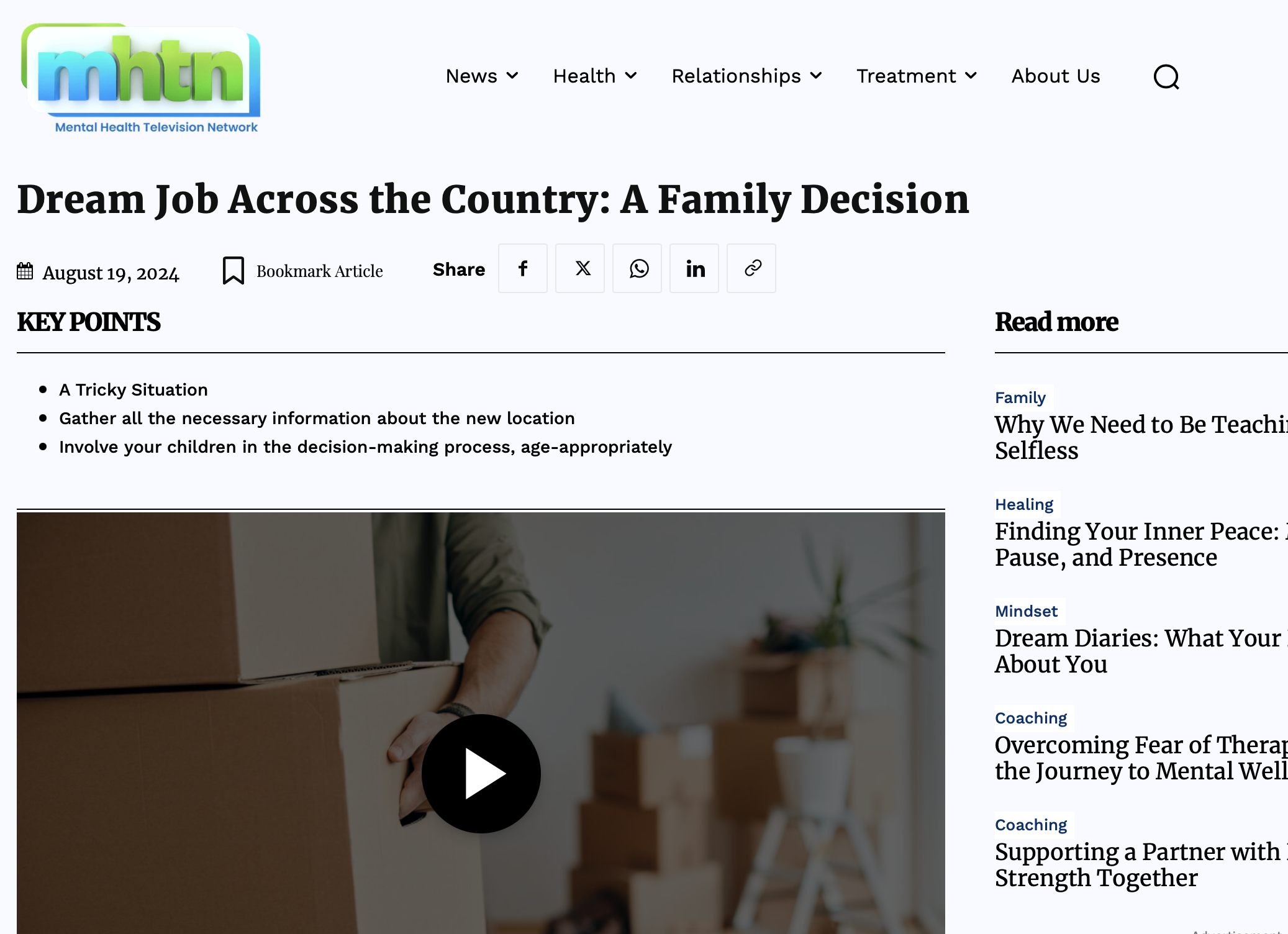
Issue with H3 tag, key points showing the whole text instead of just the h3 tag
Having issue with many posts, example:
https://mhtn.org/are-americans-losing-faith-in-college/
It should be like this:
https://mhtn.org/dream-job-across-the-country-a-family-decision/
When I remove the Gutenberg code and replace with standard html it works
 Emma Hin
Hello,
I’m using Momentum theme. I’m trying to add filters to my case studies.
I would like to setup the filters (which enable to filter by services/tags of case studies) above the case studies.
I managed to add the flex filters and set them up to drill down on the services taxonomy.
The problem is that when I filter, there is a page reload and the engine shows me a new page that looks like a search result page (it’s written archive). This is not the behavior I would expect. I would just need the page to remove case studies without leaving the page. Otherwise, I don’t want to make a “search” that leads me to a search result page after page reload. I would like to filter the cases studies without leaving the page, which should be the real effect of a filter and not a search.
Here are some screenshots :
https://imgur.com/YsgHGIL -> https://imgur.com/9nUB84V
Setup : https://imgur.com/VmZ4TET
Thank you for your help 🙂
Emma
Anamaria Hello,
As I said in the topic https://forum.tagdiv.com/topic/cant-find-any-option-to-change-the-taxonomy-name/, I recommend creating your own CPT and taxonomies.
Please check this guide https://www.scratchcode.io/how-to-change-custom-post-type-slug-in-wordpress/ -> https://codexcoach.com/how-to-remove-slug-from-custom-post-type-in-wordpress/
Please change the title length on the module -> https://i.imgur.com/7AUZdZi.jpeg
Thank you!
 mubassirhayat
Configuration
– WordPress
– Newspaper theme
– Doctors Pro Templates in use
The live search in the header is working fine but no results are shown on the search page. In the tag div editor I have removed Post Type from CPT search. I have also removed all the custom Taxonomies and Post types. Any help will be appreciated.
 Lamb
LambHi,
I want to partially lock content. I read already this page: https://forum.tagdiv.com/lockers/
And I found out that I don’t have the Gutenberg block in the posts edit.
I think I have the gutenberg blocks installed as I can find them in WP/Appearence/Widgets.
How to install Gutenberg blocks in the Posts? I remember I had them two years ago when I installed the theme.. but then one day it disapeared. I was thinking that in one of your theme updates you removed it.
So how to have it in the posts edit page pls?
Thank you.
Lamiaa



