
- TutorialsDefault Block Settings Guide
 Simion C.
 So if you change it back to no sidebar the issue will happen again? Quite unusual if that happens.
The super cache should be equal in performance with the total cache, or maybe behind by a small margin. Most reviews rate it as the second or third best caching plugin out there. But the result could be indeed different case to case. It looks like the total cache is performing good on the website, it’s quite fast.
 r00t
r00tHi. I launched a site today with advertising and it looked perfect to me, but it became quickly apparent that the real mobile view is quite different. It seems to be showing the featured images of posts. My post don’t have any featured images to speak of. I had all my content on the homepage. But everybody is seeing this other view. I can’t find any way to bring up this view and fix it in newspaper or WordPress. I even hired somebody from codementor.io and he also failed to find any field or setting related to this…
Does anybody have any idea why this might happen? It seems to be redirecting to a category or to just all the post I guess (the same thing in my case – I just use post as menu items containing essays).
 Calin
Calin Hi,
We recommend to make a backup ( making backup to your website will allow you to revert to the previews version that you have if there are some problem during the update ) to your website before make a theme update, also is indicate to try first on localhost the update or on website test.
There are no individual backup’s for sidebars, sorry!
Please check in appearance > widgets on inactive widgets -> https://www.screencast.com/t/gaoWdVD0 ( is possible that your widgets to be there ).
Also there are some major changes from Newspaper 8 to the last version of Newspaper theme ( v9.7); Updating the Core of the tagDiv Themes for Envato WordPress Requirements -> https://tagdiv.com/updating-the-core-of-tagdiv-themes/
How to Update the Newspaper Theme for WordPress -> https://tagdiv.com/update-newspaper-theme/
Thank you for your understanding!
 DavidServin
I have a theme background that stays fixed (You can see it through the semi-transparent Pages). It works fine when viewed from a computer, but it scrolls when viewed from a phone. It also stays properly fixed when looking at the phone preview on Dashboard > Appearance > Customize. I can’t figure out why it stays fixed when looking at the phone preview in Dashboard, but scrolls when actually observed on a phone. See http://www.C4DT.com
 joram-2
I created a custom header and everything works fine, accept for on mobile (portrait mode). For some reason all the content of a post/page snaps to the top under the header when on mobile (portrait mode). On the link below you can see what I mean.
https://vimeo.com/user33093694/review/334304796/5c2d5c9615
Changing the row’s margin doesn’t have any effect on the post’s content. It looks like the menu becomes an overlay header with the content of the page/post simply “snapping” to the top of the browser. Also when I make the header much larger as a test, the content stays in the same location (snapped to the top) and the bigger header simply hides more of the page/post. First I thought maybe it was because I hid the breadcrumbs of the post with custom css, but the problem persists and is exactly the same even when I remove that custom css.
It’s just my custom header with this problem, the header templates in the Theme Panel work fine.
Any ideas on how to solve this?
Thanks!
 alaid
alaid Hi
I have the same issue
Warning: getimagesize(https://soynuevaprensadigital.com/news1053fm/wp-content/uploads/sites/3/2019/04/news-logo-180×180-negativo.png): failed to open stream: HTTP request failed! HTTP/1.1 403 Forbidden in /home/soynueva/public_html/wp-content/plugins/td-cloud-library/shortcodes/header/tdb_header_logo.php on line 639
I tried and reviewed everything you mentioned and the issue continues, no matter which header template the issue continues to appear, it is only solved if I do not use a header template.
I need to solve this urgently
-
This reply was modified 7 years by
alaid.
 My Beautiful Europe
 Hi @calin , about point 2 on desktop everything works fine but on mobile it is not working at all. I have the white square and then the category disappear. This appears when I used a mobile not when i try the preview from the WordPress Theme.
If you could have a solution that would be great ! If you need any screenshot or access don’t hesitate to tell me
Calin Hi,
Please check this similar topic, and try the steps indicate there -> https://forum.tagdiv.com/topic/display-review-in-post-featured-image/
Thank you!
 Vlad S
 Hello !
In order to change the spacing between catergory title and content you can use this code:
.td-category-title-holder h1 {

 padding-bottom: 1px;

}
Here is a preview of the code in action: https://www.screencast.com/t/6yuToFQTgVY
Thank you !
 Modo
Modo https://modo.pk/blog/reviews/laptops/dell-xps-13-review-2019
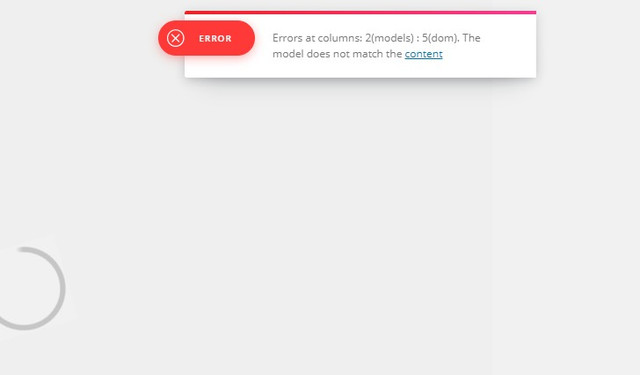
Something is wrong down here
When you edit the template it shows an error msg attached.
 nagol
nagol Hello, i writed it already. I need that in summary review form or subtitle form i can add a backspace with for example
<br>
or bold
<b>
At the end html in these form.
Simion C. Hi,
Sorry for the delay, there are many topics currently, and also taking into account the previous days off. We try to reply as soon as possible.
Regarding the issue, those links are not part of the theme by default. They must be entered somewhere in the theme panel, theme code if you made modifications to it, or a child theme maybe.
From what I can see adsagony could be an ad provider
– https://onlinepep.com/adsagony-review-legit-or-scam-payment-support-pros-cons-user-reviews/
– https://www.hindihelpsagar.com/2018/08/adsagony-ke-ads-blog-me-kaise-lagaye.html
Maybe you entered a code or script from them in the code somewhere in the theme. I can say for sure that the theme by default will not contain any ads such as this, or from ad providers.
Thanks
Calin Hi,
Please check our documentation for Reviews -> https://forum.tagdiv.com/reviews-2/
If is not what you mean, lease provide some more details about what you want to achieve!
Thank you!
Calin Hi,
How to get aggregated review stars schema in Google Search results? -> https://embedsocial.com/knowledge-base/google-aggregated-review-stars-schema/
If this is not working you can try this -> Rich snippets everywhere -> https://yoast.com/rich-snippets-everywhere/
Hope this will help you!
 Ranieri94
Hi Folks!
Yesterday I started using the “review” option in the editor and that’s super duper for me, but I have a question.
Is it possible to change the style of the overall score that appear on page (not in the article)?
I used “score points” but, for example, an 82 is shown as 4 stars.
I found this page: https://forum.tagdiv.com/reviews-2/ but it shows only stars in the end.
Thanks
Calin Hi,
If you want to add some code in More article box you need to set the code in td_more_article_box.php in Newspaper v9.7 this is in wp-content/plugins/td-composer/legacy/common/wp_booster/td_more_article_box.php in previews version was in wp-content/themes/Newspaper/wp_booster/td_more_article_box.php
Thank you!
Calin Hi,
Unfortunately, WooFunnels plugin has not been tested with our theme and therefore, we cannot say for sure if it will work or not as expected with the theme, sorry! Also, we cannot provide support for untested plugins.
This is our list with tested plugins with our theme -> https://www.screencast.com/t/cmPkh9jba4sZ
If you want the previews version you can get it from here -> https://forum.tagdiv.com/topic/important-new-update-newspaper-9-7/
Thank you for your understanding!
Vlad S Hello !
I have reviewed your website and indeed there is a problem with your newsletter. Please take a look at our documentation regarding the Newsletter plugin and make sure that all the steps are done correctly: https://tagdiv.com/tagdiv-newsletter-plugin/
Try to update the permalinks again (just save the settings) and see if the issue is still there. If this doesn’t work disable all plugins except for Visual Composer, update the permalinks and see if the issue is still there. https://www.screencast.com/t/LakkvN1Dh
Thank you!
 bobby20091gmail-com
 Hey
Thanks for your reply. Half way down the page it displays the first paragraph again.
Empire gaming hellhounds gaming set. Mouse, keyboard and mousemat. – Review Kit
Empire gaming hellhounds gaming set. Mouse, keyboard and mousemat. 1
A gaming set from a new sub brand hellhounds by Empire Gaming. Empire gaming is an up and coming brand in the UK with various other products available. We
And the main page photo. This only started happening after last update.
 josesdc
Hello, how can I show the Category grid with random post on category pages just like the home page? I see that home page every time that I refresh the page the category grid appears different post (random), but on internal pages (category pages) is not like this, cause appear always the same category grid but with a menu to show the post:
Latest
Featured posts
Most popular
7 days popular
By review score
Random
I need show the category grid on category pages on random automatically (just like the home page)
How can I setup the theme panel to do this or where in code appear this option to change it?
Thanks for your help
nagolHello, i need for review a sort of data sheet with for example name movie, release date and so on. I can insert it in description review form but description review is for plain text. Is there a way a can make not plain text? Or any tipp for this purpose? ( this is a tip for your next release too)
Thank you
 spu
spu Thanks Callin, we will look a the requirements and review them. We had seen and implemeted things via the document you have shared. But will recheck.
Also, our amp pages are not getting indexed and they have fallen out. Can you check. Thanks.
-
This reply was modified 7 years by
spu.
 dailywonder
 I give you admin access:
User: Massimo
pass: Steffa1988Steffa
You can access by modal login on top “Accesso”
If you try on any post, to show preview…he redirect to home page
 korgonthurus
 The problem with the background image is the same with the category.
As you said the cloud template doesn’t inherit any category settings, so category attributes like unique sidebar and unique background image won’t work.
The question is, are you planning to provide any kind of workaround for these issues, or should we find a workaround with the current posibilities? (I believe that being able to set a bg image per category is an important feature, loved by many of your customers, and missing out on it with the amazing cloud templates is a bad deal).
If you need a link example:
This article’s bg image is taken from its main category settings https://altarofgaming.com/black-desert-online-review/
However if I use a cloud template on this post, it will use the default site bg image which you can witness here https://altarofgaming.com/
josesdcHello, on my home page all the articles (bellow of header, with images) appears on random mode. How can I make the same with the category pages?, on internal catgories I only have the following options:
Latest
Featured posts
Most popular
7 days popular
By review score
Random
But I need that the articles of every internal category shows on random mode by default just like the home page.
Thnks for your help.

