
No search results were found in Documentation!
 slavamatador
Hello
https://recipes-for-you.com/
1. how to remove the display of the author and date on the post preview in need help with ?
2. increase the height of the selected blocks (make the block height 250 px) and make the distance between them 2 px
highlighted the blocks in red
 Koren17
 Hello,
I didn’t add any code I use the default template but I can’t remove the popup ads.
this is my website: https://openmindsblog.com/
if you can help me with one more thing it’s how I can change the links in the header for example I have now “Home”, “News”, “Reviews”, “Interviews” I want to change those categories to the categories that I have in my website.
 Anamaria
 Hello,
In the version 12 we have added this option; you can find more details here -> https://forum.tagdiv.com/user-reviews/
Thank you!
 justrealmoms
Hi, we saw that Newspaper’s “Review Post” is currently only edited by other Authors, not by the Readers. It would be interesting that readers could be able to vote the posts as well. An example is the ratings on Trip Advisor, done by Readers. We are currently using an external plug-in for this, allowing our readers to leave Star Ratings.
 nibbl
nibblGood afternoon
sorely missing in the thread where I write great reviews of automatic table of contents H2 H3, etc.
so that a person going to the article did not leaf through it, and could easily go to the desired part of the article from the table of contents.
I found a plugin that does this https://wordpress.org/plugins/table-of-contents-plus/
But I think that in your template probably already provided for this and I just do not see it?
if not, then please include my request in the next update!!!
I’d really like it to work like this – https://www.lifewire.com/fixes-for-broken-touch-screen-4149514
 Threewide
Hi on my site is the mega menu (the preview and link to category) gone. I don´t know when exactly but i can´t change it. Please help.
 Zelda
Zelda Hello @bettina !
Thanks for your reply. I’m agree with @rahulroushan We need a way to turn off globally this Reviews feature.
Thanks @anamaria for adding this to your request features.
 Bettina
 Hello Tobias!
1. You can change it from here: https://prnt.sc/mSlH6_MIqBHW Do not forget to delete the external image code.
2. Unfortunately, there is no option to achieve this with that functionality. If you need a different design for each profile, then you need to duplicate the template, make the changes, and assign the new template to the specific profile. See https://forum.tagdiv.com/topic/different-logo-in-categorypage/ for more information.Here I show you how to duplicate a template step by step.
3. Yes: https://forum.tagdiv.com/user-reviews/
4. Unfortunately, this has not been implemented yet.
Thank you for your feedback!
 euphorie-design
Hi there,
thanks for this great wordpress template.
I’ve installed the doctor’s demo theme and have some questions while customizing it.
1) Header picture @doctor profiles: https://demo.tagdiv.com/newspaper_doctors_pro/tdcpt_doctors/herman-rehema/
Where do I change/add the header (cover image) of each doctor profile?
2) Individual ‘Get in touch’: Is it possible to customize the contact form on each profile page? The e-mail should be sent to the e-mail-address of each doctor and not to a general address.
3) Reviews: Is it possible to unlock the review section for everyone without registration? So everybody can submit a review?
4) Search bar on front page (https://demo.tagdiv.com/newspaper_doctors_pro/): Is it possible that the search bar is searching for words in the ‘about’-section of the doctor profile pages, too? Now it only search for the name, location, speciality, but I want to extend this search function.
Thanks a lot in advance!
Tobias
 Jknize
please check error on screenshot 
 rahulroushan
 Why can’t you turn the Reviews feature into a plugin. Not every news or publishing website needs reviews. In fact very few need it.
Bettina Hello @ezioboy!
The single_template_7 that you are using is a default template and you can not edit it with the TagDiv Composer. If you’ll use a cloud template, then you can see the green button “Edit with the TagDiv Composer” when you access the article in your frontend.
The user reviews system is compatible only with cloud templates and not with the default ones.
We recommend to use cloud/PRO templates in order to have the possibility to edit them with the TagDiv Composer which contains a lot of functions and features, please check our tutorial here: https://forum.tagdiv.com/tagdiv-composer-tutorial/
More documentation about the cloud templates is here:
– https://forum.tagdiv.com/cloud-library-templates/
– https://forum.tagdiv.com/design-post-pages-using-cloud-library-templates/
– https://forum.tagdiv.com/cloud-library-category-templates/
Thank you!
 ezioboy
 hello anamaria
First of all thanks for the reply.
Does the single post template refer to the basic template provided by Real News? Does this mean that I have to drag the review through tagdiv Composer to work? Wouldn’t that be something that could work automatically? If not, will manual work still be necessary? Please solve the problem.
It seems inefficient to use the Real News basic template for general articles and select STYLE 7 for articles that require review and alternately write them.
Also, I have inquired before, but since the sidebar becomes empty when STYLE 7 is selected, it is difficult to fill in design elements within my capabilities.
Wouldn’t an update be needed to make it more convenient for general users to operate?
 Calin
Calin Hi,
Unfortunately, there are no settings for all the elements in part from a standard post template, therefore to resolve this problem, the simple and fast way will be to use a css. Please try this one:
.single p, .single .author-box-wrap, .single .td-review{

color: #eee;

}

.td-review .td-review-row-stars:hover {

    background-color: #aaa;

}
Please set the code in the theme panel > custom code> custom css.
I hope this will help you!
Let us know the results!
Anamaria Hi,
Usually, this happens when you set the page content in the header or footer sections.
-> https://i.imgur.com/381J9qm.jpg
-> https://i.imgur.com/wVGxYeg.jpg
-> https://i.imgur.com/0O3iGEg.jpg
So, please check if you have set the elements in the footer zone.
Also, I don’t know, but I think some of the problems you have are caused by a conflicting plugin.
2. In the Single Post Template, you need to add the elements from tagdiv Composer; you can find the shortcodes if you search after Single; those are for Single Post Template, -> https://forum.tagdiv.com/reviews-2/
Thank you!
ezioboyhello
When I add something through [tag div composer] in a specific page, is it automatically applied to all pages?
Can’t it be applied only to specific pages?
2.Review setup problem
https://ibb.co/wzLRkm7
https://ibb.co/BjsM65J
When you select Post Template STYLE 7 in Post Settings, reviews are written normally.
Conversely, reviews are not visible when selecting a review in the default post template of the Real News theme.
https://ibb.co/txX4TTr
https://ibb.co/rck84ZZ
Reviews do not apply.
 huma1985
 All my theme plugins are activated and updated.
please review website: http://www.learningall.com
thanks so much for help.
Bettina Hello @zelda!
We don’t have any settings to turn on/off. We have some shortcodes in the TagDiv Composer that can be removed, or you can manually remove the reviews from your posts.
Documentation here: https://forum.tagdiv.com/user-reviews/ -> https://forum.tagdiv.com/reviews-2/
Thank you!
Zelda Hello @Bettina!
There is no issue. And I think my question does not need screenshots or video.
I just want to know if there is a smart way, via theme panel or your theme API… to totally disable all review features (in back and front) : the tdc-review cpt, the tdc-review-criteria taxonomy, the tdc-review-email cpt.
Thanks.
Bettina Hello GentlemanJack!
1. Make sure you did not apply any margins or paddings to the elements in the CSS tab. They should be equal by default.
2. This is a setting in the flex blocks, Layout tab: https://prnt.sc/Yt6S3dxcOZ4H for a post with reviews: https://forum.tagdiv.com/reviews-2/ Unfortunately, you cannot place it after the title or in another position in that flex block.
Thank you!
 Ishu
IshuI run into problem,while creating a post.
The issue is that all of the text i wrote in my blog is underlined, where i checked in my elmentor’s text editor and there it is all fine, but when i hit the preview button all of my entire text shows underline.
Please help as soon as you can!
Thank you.
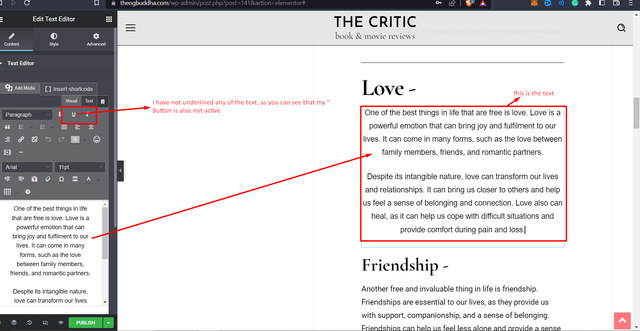
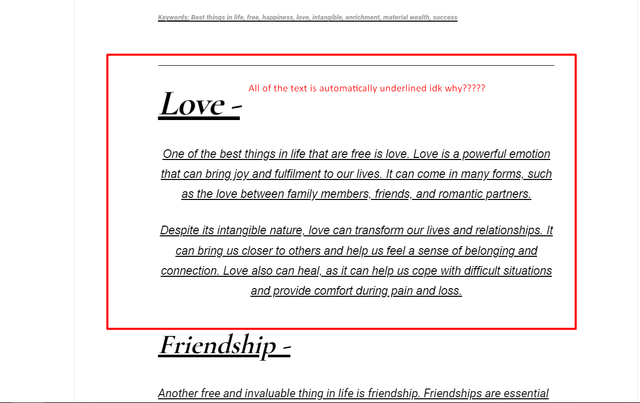
IshuI run into problem,while creating a post.
The issue is that all of the text i wrote in my blog is underlined, where i checked in my elmentor’s text editor and there it is all fine, but when i hit the preview button all of my entire text shows underline.
Please help as soon as you can!
Thank you.
ZeldaHi tagDiv,
Is there a way to disable all the reviews feature in admin ?
Thanks.
 giorgoskey
 I thought the preview image was generated automatically
Bettina Hello @giorgoskey!
Your video has no preview image. But you can set a featured image, and it will appear with the play button on the page.
Thank you!



