- NewspaperSocial Sharing
- NewspaperSharing
- NewspaperDesign your post pages using the Default Templates
- NewspaperFacebook Share
 eventindustrynews
Hi Guys
When selecting the networks we want our readers to be able to share to we only have FB and Twitter as options but I see in the documentation on this page there are multiple networks that should be available
 wizway
Hi,
I created a website on Your theme: korpovoice.pl.
After trying to paste the link on facebook wall – I see that the main picture of the article and describtion – doesn’t upload at all.
Bad describtion and no image loaded 🙁
Please help how to made it works.
 Simion C.
 Hi,
Looks alright now, checked in Chrome, Firefox, and Edge
– http://prntscr.com/melygq
– http://prntscr.com/melyo4
– https://www.screencast.com/t/jbL7WmEFmq
I don’t see any errors in the website at the moment – http://prntscr.com/mem0rk
Usually this kind of issue can be solved as mentioned in these topics
– https://forum.tagdiv.com/topic/strange-chinese-symbols-replaced-icons-and-arrows/
– https://forum.tagdiv.com/topic/font-blocked-from-loading-by-cross-origin-resource-sharing-policy-no-access-co/
Thanks
 najun
najun artimag
Hello,
I have a problem with the Felx Block 1.
If the titles of the individual articles are the same length, the article boxes have the same height (see picture 1). But if the titles have different lengths, the boxes are unevenly high and that does not look so pretty (see picture 2).
How do I make it, that all boxes always have the same height without having to limit the title length. Ideally, it should look like Picture 3.
Here is the link to the pictures
https://drive.google.com/drive/folders/1xDaJnt-WQthfyTSh5mjGMkX8CnaMyKP3?usp=sharing
thank you for your help!
Regards,
arti
 jalewa
Hello… when I share any article on Pinterest image is not appearing on pinterest share post.
Example go to this post (https://www.jalewa.com/bollywood-celebrity-houses-their-luxurious-home/) and click on Pinterest share button you will notice that image not appearing.
Kindly please help me solving this issue.
Simion C. Hi,
The socials you mention are available as a post sharing option, in the theme panel
– http://prntscr.com/md45ts
If you are referring to the social counter plugin, those socials are not available in it. Sorry for the inconvenience.
Thanks
 Calin
Calin Hi,
I inspected your site and I did not find the distribution buttons nowhere
-> https://www.screencast.com/t/vARm4eIK
-> https://www.screencast.com/t/sQtBnt9eQ6
Sharing documentation -> https://forum.tagdiv.com/sharing/
Thank you for your understanding.
 yakshicommunications
Dear Team,
From 6 months we are using newspaper Theme for our website, Pleased to inform you that we are really happy with the designs and responsiveness of website theme.
Unfortunately, from 2 months our sharing social network plugins are not working. Kindly help us fixing the Tagdiv Social sharing plugin so that we can share the content along with the images uploaded on website.
Awaiting for your reply.
Thanks
Sudheesh
sudheesh@kanlish.com
Simion C. Hi,
Unfortunately it will not work for pages, it is created to work only for posts. Page sharing options are not available in the theme, you could check some sharing plugins that have such a capability. Use a plugin together with the theme, or disable the theme sharing and use just the sharing plugin. Sorry for the inconvenience.
Thanks
jalewaHello… As for desktop social is working fine… But when user browse article from mobile and click on facebook social share it takes user to web browser for sharing. I want if facebook app is installed it should open facebook for sharing.
Please help me how we can do this.
And as for social sharing I want it should show mobile device bottom bar is it possible.
reply
 Berbi
BerbiHello,
The social sharing feature displays only on posts.
Is there a way to make it working also on pages, like adding a code somewhere ?
Thanks:).
Simion C. Hi,
You could use a plugin that has this capability, Instagram is not part of the theme sharing options for posts at the moment. You could try some free plugins, I found some examples here but there may be others that can do this
– https://kinsta.com/blog/wordpress-social-media-plugins/
Maybe in the future Instagram will be implemented in the theme sharing, sorry for the inconvenience.
Thanks
 fermin
Hello
I need to add the Instagram button in the news along with the like button, Facebook, Twitter and Whashap. But I do not get it in the list: Post settings, sharing.
I use the Newspaper version: 8.7.5
How can I do it?
Thank you
regards
Fermin
 Catalin
 Hi,
1)Please notice that our theme does not have any such an option that allows you to change the header.php from theme panel, sorry!
2)Sorry, the theme does not have any such an option. If the strange characters appear, you need to consult this topic from here ->
– https://forum.tagdiv.com/topic/strange-chinese-symbols-replaced-icons-and-arrows/
– https://forum.tagdiv.com/topic/font-blocked-from-loading-by-cross-origin-resource-sharing-policy-no-access-co/
Hope this helps!
Thanks.
 pixelhead
The sharing icons on my posts take a few min. to show up on the page. Is this an issue with the theme or maybe site cache?
Thanks
Chuck
Simion C. Hi,
No need for a fix, those socials are for mobile. They will appear only on mobile
– http://prntscr.com/maessg
When these sharing options are used they will open the mobile app on the phone and the post can be shared.
Thanks
 wilhard
Dear sirs, I setup whatsapp and viber share buttons in Post Settings/Sharing (have a look https://ibb.co/gP6R3TT). Why there is no whatsapp and viber sharing buttons on a blog posts (http://dev.wilhard.ru/bitcoin/kak-rabotaet-majning-bitkoinov/)? How do I fix it?
Thank you in advance.
 Stillwater
Any posts we are trying to share on facebook will be followed by the same text:
“Get the eBook that was read by more than 100 people”.
No matter if you share with through a share-plugin – or you share by copy/past the URL on Facebook status.
Regards
Jimmy
 Mark Gilbert
I want to get partial italics in post titles. I can achieve this in the post title itself using <i>…</i> or …. This shows up ok in the post title. However, it is not reflected when the title appears elsewhere. See this:
https://drive.google.com/file/d/1Dkwc6m9wV4ZwvRecR4hM0fM25SRuq-nb/view?usp=sharing
…where the post title is Flying Machines New Life but not in the Block 2 loop in the sidebar where there is no italic in this title.
Is this be possible now with CSS or in a future edition of Newspaper? I would love to have this option.
Thanks, MG
 Siebren10
Hello!
For any post on my website, when sharing it with a mobile device, only the title of the article is shared. As such, there is no link included in the message sent. How can this be solved?
URL of a random article: https://www.streamwijzer.nl/game-of-thrones-seizoen-8-wie-stierven-forthethrone/
Simion C. Hi,
Seems nothing was modified in that website regarding the sticky sidebar, as far as I can see.
If you zoom out a little in the browser it can be seen that the whole sidebar including the top ad are still sticky
– http://prntscr.com/m8w3qj
You could maybe design a cloud post template like this
– http://prntscr.com/m8w8cs
So basically there will be the ad next to the post title and sharing for example,not sticky. While the rest of the sidebar will be next to the post content, sticky. That may produce the result you want. This will require the cloud library plugin
– https://forum.tagdiv.com/tagdiv-cloud-library-plugin/
Thanks
 datt
datt Hi,
the filter works correctly..because I tryed to set up added this setting: (https://drive.google.com/open?id=1h4ZOkMNKY9apBGZjjUvhHMHhuvOHR9Yi) and finally it works…but Today I am in allert: becuase the posts that there are into “All” (in italian: Tutte) hasn’t all posts that there are in the other categories, like: cronaca, politica, economia… etc. Moreover the All’s loop posts is update to yesterday (https://drive.google.com/open?id=1h7qP0wfgxsA0w2Le95py9VX63zBCfiZb)! differently of loop’s posts for example of “politica” (https:https://drive.google.com/open?id=1OTPaHyD2y_Lj_f-t_4SvKdFhWbKBxi9x).. In fact This it has rightly the today’s articles; like the the other categories but this it’s not been for “All”!
Here site login credentials: https://drive.google.com/drive/folders/1FTd-9REcinTt5EApxYAz23rfDk2u0mpH?usp=sharing
Thank for support
Help me please
-
This reply was modified 7 years by
datt.
Mark GilbertHi – homepage looks great in Safari – http://jazzreview.co.uk – but in Firefox columns are going out of place and white space appearing. Is this because I’ve used inner rows? Please these shots of Firefox rendering and of my use of inner rows. Thanks.
https://drive.google.com/drive/folders/1yOQQ3OVowFDuQFhb8wK5H_IS4ik8QRKO?usp=sharing
 stowoo
Hello,
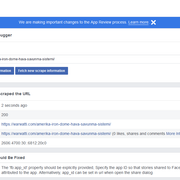
No pictures added to my facebook links. yesterday everything was normal but today not working facebook share botton. Error: fb:app_id
my page: https://warwatti.com
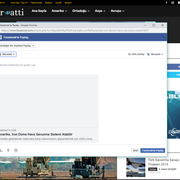
Facebook developer:
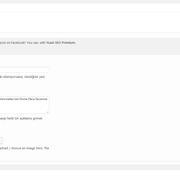
Yoast Setup:
Facebook Sharing Debugger: