
No search results were found in Documentation!
 Anamaria
 Hi,
Please make sure that you don’t have mixed content errors; you can check the console. You have to use an SSL plugin to fix it and then try to activate it again -> https://www.hostinger.com/tutorials/fix-mixed-content-wordpress/ -> https://wordpress.org/plugins/really-simple-ssl/
Also, if the theme can’t be activated, please check the console and see if there are message errors.
Also, make sure that all the settings are like in our requirements, please follow the guide carefully: https://forum.tagdiv.com/requirements-for-newspaper/
and please increase all requirements that are lower, and follow all steps.
Thank you!
Anamaria Hello,
Usually the “Invalid reply from server endpoint error” is caused by insufficient WP_Memory_limit, if you’ll set it to 256M, and is still not working, please double it and check the rest of the settings from our guide -> https://forum.tagdiv.com/requirements-for-newspaper/ also make sure that you are using SSL and you have a good bandwidth, the one from our server is 1GB/s and the one that I use at home is 500MB/s, if you have low bandwidth, then you can access parts of the cloud, this can be done from the frontend, for example, if you are on a post -> https://i.imgur.com/4G74M7F.jpg or from tagDiv Composer -> https://i.imgur.com/2F6MhfI.png or from backend -> https://www.screencast.com/t/wekHmc7kJ8J
Thank you!
 Bettina
 Hello Dimitri!
I will add your query on our improvement list!
If you can’t find an element after you have hidden it on every viewport, check this thread for the solution: https://forum.tagdiv.com/topic/cssdisplay-show-or-hidden/
Also, we’ve added a feature that shows you the hidden elements on the page: https://app.screencast.com/sQBS2ivsSLxry
Thank you!
 tagDiv_wordpress
 sorry, now fixed. problem my website ssl
 Calin
Calin Hello,
1. You have now the amp plugin but also the mobile theme plugin, but I understand that you want to use the responsive version, therefore non of those plugins are not required (you can disable the tagDiv mobile theme and amp plugin).
2. This is usually related to a cache or optimizing plugin that is interfering with the js from the theme. Is this situation always, for example when you are logged in (and the cache is not apply)? If yes, then please check the browser console to see if there are any errors.
Indeed, I checked the website pagination is working now (because you disable the mentioned options from LiteSpeed cache plugin).
For css I think that you can use some options but not all of theme and for js please try to exclude those:
/jquery-?[0-9.](.*)(.min|.slim|.slim.min)?.js

/jquery-migrate(.min)?.js

tagdiv_theme.min.js

tdBlocksArray
If this is not work please try this:

/jquery-?[0-9.](.*)(.min|.slim|.slim.min)?.js

/jquery-migrate(.min)?.js

tagdiv_theme.min.js

tdBlocksArray

tdb_globals

td_youtube_list_ids

iosSlider

/td-cloud-library/assets/js/js_files_for_front.min.js
Also, the amp is deprecated – https://i.imgur.com/gipeN7q.png
Thank you!
Anamaria Hi,
Please make sure that you don’t have mixed content errors; you can check the console. You have to use an SSL plugin to fix it and then try to activate it again -> https://www.hostinger.com/tutorials/fix-mixed-content-wordpress/ -> https://wordpress.org/plugins/really-simple-ssl/
Also, if the theme can’t be activated, please check the console and see if there are message errors.
Also, make sure that all the settings are like in our requirements, please follow the guide carefully: https://forum.tagdiv.com/requirements-for-newspaper/
and please increase all requirements that are lower, and follow all steps.
Thank you!
 rahuldas
I am encountering an issue where the animation sometimes continues indefinitely without loading any content; it just keeps loading endlessly.
 Allen Clein
So, my theme is updated to the latest version and it persists the problem. The login popup and login page not working. Even with correct credentials it just endlessly loads. How to fix it?
Screenshots: https://prnt.sc/g17xB5Y0_PdU
Allen CleinSo, my theme is updated to the latest version and it persists the problem. The login popup and login page not working. Even with correct credentials it just endlessly loads. How to fix it?
Screenshots: https://prnt.sc/g17xB5Y0_PdU
 dailynewsng
Hello,
I have gotten issue with adding up my ads codes on the theme. It is not saving, only rolling endlessly without reflecting save or any positive response.
I do not know how to get over that.
Regards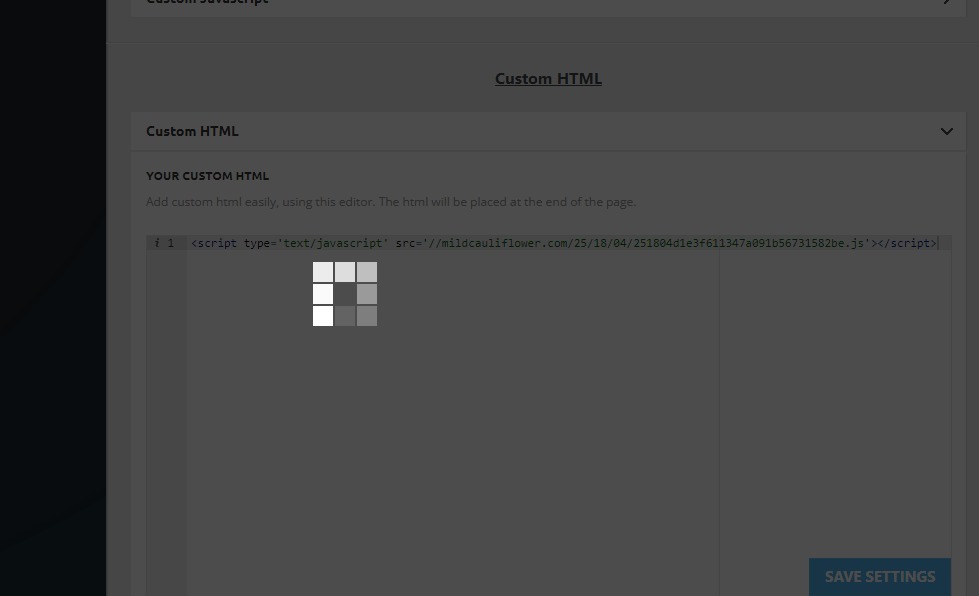
Anamaria Hi,
Please make sure that you don’t have mixed content errors; you can check the console. You have to use an SSL plugin to fix it and then try to activate it again -> https://www.hostinger.com/tutorials/fix-mixed-content-wordpress/ -> https://wordpress.org/plugins/really-simple-ssl/
Also, if the theme can’t be activated, please check the console and see if there are message errors.
Also, make sure that all the settings are like in our requirements, please follow the guide carefully: https://forum.tagdiv.com/requirements-for-newspaper/
and please increase all requirements that are lower, and follow all steps.
Thank you!
Anamaria Hi,
Please make sure that you don’t have mixed content errors; you can check the console. You have to use an SSL plugin to fix it and then try to activate it again -> https://www.hostinger.com/tutorials/fix-mixed-content-wordpress/ -> https://wordpress.org/plugins/really-simple-ssl/
Also, if the theme can’t be activated, please check the console and see if there are message errors.
Also, make sure that all the settings are like in our requirements, please follow the guide carefully: https://forum.tagdiv.com/requirements-for-newspaper/
and please increase all requirements that are lower, and follow all steps.
Thank you!
 gcamara
Hi
I have a tested clean site to test things, so I installed pulse pro and check its header and how its menu is working flawlessly in mobile and desktop being sticky. I am trying to find replicate this in a production site, but there is no evidence (no row, no inner, no element, no theme panel) where sticky is checked for default template of pulse pro demo site.
So my question is, where is this sticky checked option?
Best regards
 jubau
jubau thank you i was able to fix the search but,
i really need help to find solution for 7 days and 24/48 jours posts sorting
– DNS is correct as per your request.
– SSL is FULL
– my security firewall is Low
– not using the pro plan
– Add the configuration rules
-clean all cache
but i can have 7 days and 24/48 jours posts sorting display.
really need your help for this
thank you
 jose405
myfeelingsarevalid.com
1. SSL is not working on mobile devices. Site shows secure on desktop, but shows as not secure in all mobile devices.
2. When I make a change on the website, that change does not apply on mobile. Why not?
Please help
 jonle944
 The issue was actually from my side, there was an issue regarding http and https redirect. It was caused by a misconfiguration setup between the server SSL Certificate and Cloudflare encryption “Flexible” mode.
I fixed it now after I removed the old SSL certificate and used Cloudflare’s Origin Certificate instead and switch Cloudflare’s SSL/TLS encryption mode to Full
Anamaria Hello,
Usually the “Invalid reply from server endpoint error” is caused by insufficient WP_Memory_limit, if you’ll set it to 256M, and is still not working, please double it and check the rest of the settings from our guide -> https://forum.tagdiv.com/requirements-for-newspaper/ also make sure that you are using SSL and you have a good bandwidth, the one from our server is 1GB/s and the one that I use at home is 500MB/s, if you have low bandwidth, then you can access parts of the cloud, this can be done from the frontend, for example, if you are on a post -> https://i.imgur.com/4G74M7F.jpg or from tagDiv Composer -> https://i.imgur.com/2F6MhfI.png or from backend -> https://www.screencast.com/t/wekHmc7kJ8J
Thank you!
 webmaze
Dear TagDiv Support Team,
I represent Webmaze – Web Design Studio and I am a user of your Newspaper Theme for my website. I have been thoroughly enjoying the features and design that your theme offers.
I am currently looking for a way to display Facebook likes of my post when i share it to Facebook on my website, specifically within the Newspaper theme. After exploring various options, I am wondering if there is a recommended plugin or method that you suggest for incorporating Facebook likes into the theme.
I have researched some plugins, but I value your expertise and guidance in choosing a solution that seamlessly integrates with the Newspaper. If there is a particular plugin or method that you believe works well with your theme or if there are any built-in features that I may have overlooked, I would greatly appreciate your insights.
Additionally, if there are any updates or developments related to displaying social media metrics within the Newspaper Theme, I would love to hear about them.
Thank you for your time and assistance. I appreciate the support your team provides, and I look forward to your guidance on this matter.
 Sophia_FACES
Please note that my website https://facesoman.com/ is not opening. It says ERR_SSL_UNRECOGNIZED_NAME_ALERT
My SSL certificate is in place and active, therefore I contacted HostGator support person for this issue and this was his answer:
‘I was able to check that there are certain plugins on your WordPress website that are in conflict with your other plugins and themes. On this matter, you may need to coordinate with a website developer to check it further with you and also to fix the issue with the plugins’.
A request to look into the same asap.
Regards,
Sophia
Anamaria Hi,
Please make sure that you don’t have mixed content errors; you can check the console. You have to use an SSL plugin to fix it and then try to activate it again -> https://www.hostinger.com/tutorials/fix-mixed-content-wordpress/ -> https://wordpress.org/plugins/really-simple-ssl/
Also, if the theme can’t be activated, please check the console and see if there are message errors.
Also, make sure that all the settings are like in our requirements, please follow the guide carefully: https://forum.tagdiv.com/requirements-for-newspaper/
and please increase all requirements that are lower, and follow all steps.
Thank you!
Anamaria Hello,
Usually the “Invalid reply from server endpoint error” is caused by insufficient WP_Memory_limit, in config is WP_MEMORY_LIMIT not PHP Memory Limit (there is a typo, sorry) if you’ll set it to 256M, and is still not working, please check the rest of the settings from our guide -> https://forum.tagdiv.com/requirements-for-newspaper/ and please increase all requirements that are lower, and follow all steps. Also please make sure that you use an SSL to have https.
Also if the theme is not activated you’ll get the same message, make sure that you have the theme activate as in our guide from here -> https://tagdiv.com/how-to-activate-the-newspaper-theme/
Let us know about your results!
Thank you!
Anamaria Hi,
Please make sure that you don’t have mixed content errors; you can check the console. You have to use an SSL plugin to fix it and then try to activate it again -> https://www.hostinger.com/tutorials/fix-mixed-content-wordpress/ -> https://wordpress.org/plugins/really-simple-ssl/
Also, if the theme can’t be activated, please check the console and see if there are message errors.
Also, make sure that all the settings are like in our requirements, please follow the guide carefully: https://forum.tagdiv.com/requirements-for-newspaper/
and please increase all requirements that are lower, and follow all steps.
Thank you!
Anamaria Hi,
Please make sure that you don’t have mixed content errors; you can check the console. You have to use an SSL plugin to fix it and then try to activate it again -> https://www.hostinger.com/tutorials/fix-mixed-content-wordpress/ -> https://wordpress.org/plugins/really-simple-ssl/
Also, if the theme can’t be activated, please check the console and see if there are message errors.
Also, make sure that all the settings are like in our requirements, please follow the guide carefully: https://forum.tagdiv.com/requirements-for-newspaper/
and please increase all requirements that are lower, and follow all steps.
Thank you!
Anamaria Hi,
Please make sure that you don’t have mixed content errors; you can check the console. You have to use an SSL plugin to fix it and then try to activate it again -> https://www.hostinger.com/tutorials/fix-mixed-content-wordpress/ -> https://wordpress.org/plugins/really-simple-ssl/
Also, if the theme can’t be activated, please check the console and see if there are message errors.
Also, make sure that all the settings are like in our requirements, please follow the guide carefully: https://forum.tagdiv.com/requirements-for-newspaper/
and please increase all requirements that are lower, and follow all steps.
Thank you!
 maronici
Hi.
We utilize the TagDiv Newspaper theme, However, we are encountering an issue where the ‘save settings’ process is endlessly loading. I have thoroughly reviewed all the information available on your support forum, but the problem persists (maybe a 403 problem in the ajax….who knows?). Could you please provide assistance in resolving this?



