No search results were found in Documentation!
 pepix90
good evening, I have a problem with the colors of the site. a problem a bit ‘strange. I try to explain myself. I changed the background color of the top menu and the main menu. everything works, but when I update the page or change page for a few seconds the old color (black) comes back and then the color chosen by me reappears. why this problem in the page refresh? thank you
 lafber
Hello support,
My install and customizing of the Newspaper theme went well and the site is now live. But I have a strange behaviour.
The page load indicator keeps running (the one in place of the favicon in firefox) for about 15 seconds.
Looking in Firefox in the Performances I see many calls to setInterval from tagdiv_theme.min.js line 311.

I would like to get rid of this bug and can’t found what’s going wrong here. Could you help please?
 tszabolcs
Hey,
When I install the Cloud Library plugin, Jetpack starts behaving strange. When I try to open its stats page it gets into an infinite loop of opening ever smaller inner windows (makes a mess on the screen), its settings page becomes unreachable, etc. When I switch off the plugin, everything is OK again.
Cheers,
Sz.
 webpunks
Hi there,
we are using Newspaper + the mobile theme. Funny thing: since the update from 8.7.4 to 8.7.5 (currently running on 8.8.) the tagDiv Mobile Theme Plugin (version 1.1) is deactivating itself randomly. We do not get any warnings or similar within wordpress, it just deactivates itself and we have to switch it on again. This could then work for minutes or hours until it deactivates itself again.
Our site has around 300k visitors a month – so we should normally see a pattern or a trigger that’s responsible for this behavior, but till now we haven’t found out.
We checked the database logs and the server logs – nothing. We also activated debugging – also nothing related to this strange behavior (just a warning we already fixed).
Any ideas what could go wrong? Did you introduce any changes to the mobile theme related to the last updates of the theme?
Server Setup: nginx, easy engine, fastcgi-cache – worked like a charm till the update from 8.7.4 to 8.7.5
Thanks
 nouveau
 okay, now for some strange reason it has changed to this:
Warning: array_merge(): Argument #1 is not an array in /homepages/7/d680526825/htdocs/clickandbuilds/nouveautycoon/wp-content/plugins/td-grids-red-pack/td-grids-red-pack.php on line 582
Warning: Cannot modify header information – headers already sent by (output started at /homepages/7/d680526825/htdocs/clickandbuilds/nouveautycoon/wp-content/plugins/td-grids-red-pack/td-grids-red-pack.php:582) in /homepages/7/d680526825/htdocs/clickandbuilds/nouveautycoon/wp-includes/pluggable.php on line 1216
-
This reply was modified 8 years by
nouveau.
 m2sahin
I enabled the theme’s AMP feature for both text and pages. I did not know what AMP was when I enabled it. When I searched the site on Google, the homepage opened very strangely. The home page was very simple. Most of the content and most of the features did not show. I learned that this is because the AMP is active for the pages. I disabled the theme’s AMP feature for pages but it still opens as an amp page when I search my site on Google. My site is multilingual. I am using the Polylang plugin. When I searched the site using browsers with different languages, the main page was opened as AMP page in other languages I used. I’ve removed the AMP feature for pages, but I do not know how to remove them from Google searches. Please help
I know I should not write this topic here but there is nobody else I can ask. maybe you have an idea.
thanks
 Daltai
 Hi Simion,
Ok thats really strange! It appears to be working correctly now! But I honestly tried this already and it had my mind completely stressed.
I will remove some of the unnecessary CSS now and see if it works the way I want it to.
I think there is a conflict depending where you save your CSS in the theme.
Live CSS vs Theme Custom CSS modudle. I found that can change things especially with the use of “!important” in a piece of CSS code
Thanks!
Shane
-
This reply was modified 8 years by
Daltai.
 Simion C.
 Making all these modifications is not necessary unless you want to modify a thumbnail size. Block 5 looks like this
– https://demo.tagdiv.com/newspaper/block-5/
I see from your screenshot that the thumbnails are not of the same size despite the block using a single module and thumbnail size.
Please read carefully the regeneration guide, if you tried to regenerate and no success
– https://forum.tagdiv.com/thumbnails-fix-strange-looking-images-on-blocks/
The regeneration process requires the installation of GD library for php on the server for image processing
Check the theme system status panel – https://www.screencast.com/t/TsqRJrJGU
If needed ask your hosting provider to enable the required extension for PHP. If there is still a problem please provide a link to your website so we can take a look.
 Veronika
 Hi Simon,
yes, I am using “Page Builder” by Site Origins, but its still strange because I am using this builder on other websites too and there I can see the bullet lists without any issues :/
Can you please check now? I added the text as a bullet list, specifically the one under the header “ČOMU SA VENUJEME”
http://lepsiezakony.sk/o-nas/
thank you!
-
This reply was modified 8 years by
Veronika.
 Catalin
 Hello goldfish45,
It seems to be a problem with your caches. Try to clear all of them, purge CDN files if you are using a CDN system, clear all server and browser caches and check the results. If the problem still persists, please try reading the following topic from here -> https://forum.tagdiv.com/topic/strange-symbol/ and try to fix it.
Thanks.
 Vundy
VundyI have a strange issue… On the very bottom of my website I see this: “Powered by Live Score & Live Score App” with link which is not put there from me. And I don’t know how to remove it. Please anyone help me!
You can see at http://www.1x2help.com at the bottom of any page.
 mariyan
Hi,
I encountered a strange problem.
All plugins and wordpress are up to date but the site breaks on homepage or cannot load images on single posts. Even no admin bar is showing with the tagDiv Social Counter 4.1 activated on a Newspaper 7.7 version.
I haven’t upgraded to 8 yet, until I am sure nothing breaks with it. But will do it soon I know it’s for the better.
Thanks,
Mariyan
 pmallarp
 Thank you for your answer – I will do that next time. I was not aware, that it could give that strange result – You learn all the time ;0)
Best Regards Poul Mikael Allarp.
 Bogdan B.
 Hello,
Please check these forum topics:
– https://forum.tagdiv.com/topic/strange-chinese-symbols-replaced-icons-and-arrows/
– https://forum.tagdiv.com/topic/font-blocked-from-loading-by-cross-origin-resource-sharing-policy-no-access-co/
Thanks.
pmallarp Update: This is a very strange weekend. Now everythin is up and running as it should, an also normal user, who are not logged in kan see the site. I do hope it will stay like this. Best Regards Poul Mikael Allarp.
pmallarp Update: Strange, now the two browsers, where I’m logged in – Firefox and Chrome seems too work quite normal no problems there, but the in other browsers Microsoft Edge, Cyperfox, Vivaldi, Opera there are now no theme at all. Never seen anything like that. Now I tried to log into the site in Cyperfox browser an everything is normal – Does this mean that it is not at theme problem, but the problem is somewhere else? Best Regards Poul Mikael Allarp
pmallarp It has been kind of strange, I deactivated a couple of plugins, Autooptimize for one, and suddenly I could see colours. Then I found out, that it was only the browsers I am logget into the webside, I can see the colours. I reconstructed some widges that were missing. Somme hours later I saw that the other browsers were starting to show text- and background-colours – but not on the frontpage, only the categorypages and posts. I will waite to see if things will be ok. At the former updat of Newspaper some small things were changet at the site, for instance the search button in the menu, had mowed one line down and to the left – after a week or two the problems suddenly went away. But I have newer seen anything like that, at there could be a problem othe places than the Theme. I will follow up on this, and hopefully I need no help. Best Regards Poul Mikael Allarp
 arvidbux
Hi there,
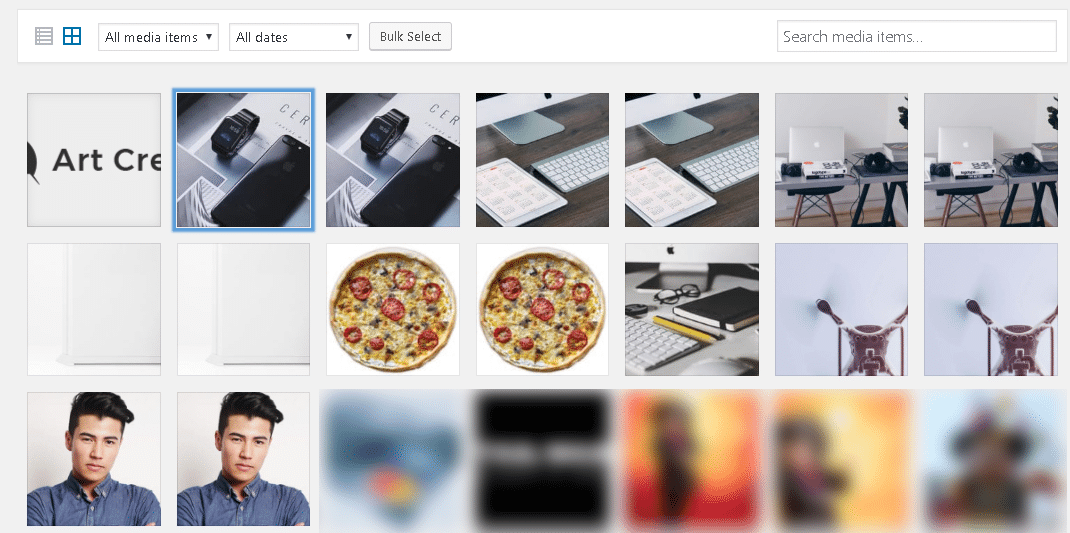
for some strange reason since the most recent update, Art Creek Demo image files keep on showing up in the gallery. I deleted them from within WordPress and using FTP, but each time they return.
You can see the images here: https://www.traveltothemagic.net/wp-content/uploads/2018/05/2018-05-26_8-59-25.png
I was able to relate it back to the Newspaper Theme and Demo.
Why are these files being (re)loaded? Not using the demo.
Thanks,
Arvid
Simion C. Hi,
So the problem was with thumbnails not displaying properly on Safari. The thumbnails created by the theme are of specific fixed sizes for each module
– https://forum.tagdiv.com/theme-thumbs/
It would be somewhat impossible that the images would display in different sizes across browsers. Unless maybe you use a CDN for the images, plugins for image optimization or plugins that could affect images, optimization coding etc. If the thumbnails would have a problem it would be displayed on all browsers.
Most thumbnail issues (like not being of the same size) are fixed by regenerating them
– https://forum.tagdiv.com/thumbnails-fix-strange-looking-images-on-blocks/
Let us know if there still is a problem, provide a link to it and we will take a look.
Thanks
Bogdan B. That is a strange issue indeed.
Please contact us on our email address at contact@tagdiv.com and provide a link to your site and wp-admin (login information and admin rights) so we can login and investigate. Please also include a link to this conversation so we can identify you.
Thank you!
 ChrisB
Is there a way I can prevent this from running via a child theme? I don’t want the editor-style.css file to load.
add_action( 'after_setup_theme', 'my_theme_add_editor_styles' );

function my_theme_add_editor_styles() {

	if (TD_DEPLOY_MODE == 'dev') {

		// we need the full url here due to a WP strange s*it with ?queries

		add_editor_style(get_stylesheet_directory_uri() . '/td_less_style.css.php?part=editor-style');

	} else {

		add_editor_style(); // add the default style

	}

}
 thejournier
I’m having the same problem as found on here: link
There’s a link to https://192.168.0.120/wp_011_gadgets/wp-content/uploads/2017/03/52.jpg on my site that is causing the site to continue loading on and on. The site loads but the loading icon spins for a couple minutes on the browser. The URL I posted above indicated it has something to do with the theme and I can fix it through the theme panel somewhere. How do I fix this?
I know this is written in a confusing way but I’m confused as to what is causing this. 🙂
 Erfekto
 Hello,
I have been investigating and it seems that my problem is not so strange. Please, any solution?
Tomorrow my support ends and I would like to leave it solved.
Thanks
Simion C. Hi,
The mega-menu module uses this thumbnail size
– https://www.screencast.com/t/oJhbWsT4d
You can try to regenerate the thumbnails, this is a guide
– https://forum.tagdiv.com/thumbnails-fix-strange-looking-images-on-blocks/
This process will recreate the thumbnails necessary for the modules.
Thanks
 ruslangr
Hello! PLS take a look on this strange post formatting while inserting photo in the article. What is that might be?? How to fix it? Thanks!