No search results were found in Documentation!
 dylanswims
Hi,
I’m encountering the same problems that a lot of other people seem to be having. When I go to use TD composer and use the page elements “icons” the icons don’t load or the “column text” element the wp text editor doesn’t load. I was having a look at the system requirements and think this could be because the max_execution_time requirement. On the system status it says it recommends over 60 if using the demos. I am not using a demo, but wondering if this is still the issue.
I have my hosting through hostgator and the max_execution_time is fixed at 30. Is it really the case that in order to run this theme I would have to upgrade my entire hosting package?
 Simion C.
 Hi,
Make sure the theme system status is configured properly
– https://forum.tagdiv.com/system-status-parameters-guide/
Ask your hosting to increase the parameters mentioned in then guide if necessary. Test without having other plugins except theme plugins active.
As instructed above, if there is still an issue please send us an email at the address mentioned above and provide the admin login information. We will take a look. Also include a link to this topic in the email.
Thank you!
 orrorea33giri
 Hi
I followed the instructions but I still have the same issue.
I tried to set up teh parameters both in the .hthaccess and php.ini files but it makes no difference.
I noticed that the system status the php.ini configuration didn’t chnage although I did changed the php.ini file
Thanks
Simion C. Hi,
Do not hesitate to let us know if you are experiencing issues. The composer should work at any moment. Usually that issue is caused by insufficient resources, please check the theme system status
– https://forum.tagdiv.com/system-status-parameters-guide/
Ask your hosting provider to increase the allocated resources if needed. Then check if the issue is solved. Let us know.
Thanks
 onkarkore1
Hello Team,
I have checked newspaper activation status and it is showing error message as theme is not activated.
When I am clicking on the activate now button it is asking to enter evanto purchase code.
After entering valid purchase code when I click on the “Yes Activate” Button its not generating any output.
Indeed theme remains in yet to activate mode. When I cross verify activation status under newspaper system status it is throwing the same error code “Your Theme is Not Registered”
Could you please suggest on the same.
Thanks,
Simion C. Hi,
@jacobevansj Check the theme system status, maybe insufficient resources are causing the issue
– https://forum.tagdiv.com/system-status-parameters-guide/
Ask your hosting provider to increase the parameters mentioned in the guide if necessary. Let us know if there is still a problem.
 Catalin
 Hello orrorea33giri,
Make sure that your system status parameters are correctly increased according to our documentation from here -> https://forum.tagdiv.com/system-status-parameters-guide/
Thanks for your understanding!
 arrezzo
 Ok – the system status is actually showing my changes. Let me try the site now.
arrezzo I still haven’t gotten it to work. I tried to change my .ini and wp-config parameters but according to system status in the theme, my changes haven’t been applied. I am on Go Daddy servers.
Can this be a PHP issue?
 bojancoach
Hi,
I have the issue with Newspaper theme at godaddy hosting. For some reason after Newspaper Theme activation, WP-Admin area wont load. It actually breaks (looks like php die) at some point at “admin_head” hook (I created child theme to intercept the hooks, and all the hooks before “admin_head” have me some output).
The system is set as described at https://forum.tagdiv.com/system-status-parameters-guide/ and still nothing. I tried to change php version. Actually I tested it with php 5.4, 5.6, 7.0, 7.1 and still the same issue every time.
It all work just fine on my local WAMP server, but on godaddy hosting, it simple doesn’t work.
If it is any help, the output that I get have 83 lines, and the last lines are these:
<script type=’text/javascript’ src=’http://www.eurocommits.com/wp-admin/js/color-picker.min.js?ver=4.9.4′></script>
<script type=’text/javascript’ src=’http://www.eurocommits.com/wp-content/themes/Newspaper/js/td_wp_admin.min.js?ver=8.7.1′></script>
<script>
After that script opening tag, nothing…
Please help, or recommend a hosting where it works. Thank you!
Simion C. Hi,
That could mean there is a problem with a plugin. Deactivate the plugins as you did again, by renaming the plugins folder. That will deactivate all plugins. Then enable theme plugins only, check if there is any issue. Enable plugins one at a time to see which one causes the issue.
Also check if there are sufficient resources allocated by the hosting provider
– https://forum.tagdiv.com/system-status-parameters-guide/
Ask them to increase the parameters if necessary. Let us know the results.
Thank you!
Simion C. Hi,
Those warnings seem to point to a WordPress file from what I can see. Try switching to a default WordPress theme and see if they are still present.
Make sure you install the theme properly, installing by FTP is most recommended
– https://forum.tagdiv.com/install-via-ftp/
Check the theme system status and see if all the parameters are set according to the guide
– https://forum.tagdiv.com/system-status-parameters-guide/
Deactivate all other plugins except the theme included plugins, to eliminate a plugin conflict. Let us know the results.
Thanks
Catalin Hello tanteidee,
Check the system status parameters to be increased according to our documentation from here -> https://forum.tagdiv.com/system-status-parameters-guide/ Most likely, the PHP memory has exhausted and that’s why you edit anything.
Thanks for the message!
Simion C. Hi,
We try our best to reply to all topics in the allocated support hours. We answer from oldest to newest, if you reply in your own topic the response will be delayed. So an answer would have been provided already.
Regarding the issue, first please check the theme system requirements and status panel
– https://forum.tagdiv.com/requirements-for-newspaper/
– https://forum.tagdiv.com/system-status-parameters-guide/
Next while the theme is active, deactivate all other plugins as a quick test. Check if this has any effect.
If there is still a problem, send us an email at contact@tagdiv.com and provide admin login details and FTP access. We will take a look. Also include a link to this topic in the email.
Thank you!
 Bogdan B.
 Hello,
Here are the recommended values to be used with our theme in any given scenario: https://forum.tagdiv.com/system-status-parameters-guide/
As for wp fastest cache, the plugin is not tested. I cannot say for sure if it performs better or worse than wp super cache. The fact that the plugin is not tested does not mean it will not work. It simply means we cannot guarantee it’s proper functionality.
Thank you!
Simion C. Check if there are sufficient resources, in the theme system status
– https://forum.tagdiv.com/system-status-parameters-guide/
Ask your hosting provider to increase the parameters mentioned in the guide, if necessary.
Bogdan B. Hello,
Please use this guide to increase your memory allocation: https://forum.tagdiv.com/system-status-parameters-guide/
If the problem is still there after you made the proper implementation, please contact us on our email address at contact@tagdiv.com and provide a link to your site and wp-admin (login information and admin rights) so we can login and investigate. Please also include a link to this conversation.
Thank you!
Simion C. Hi,
Please check the theme system status, check if there are sufficient resources
– https://forum.tagdiv.com/system-status-parameters-guide/
That issue could be caused by insufficient memory, ask your hosting provider to increase the parameters if necessary. Then check if the issue is solved.
Thanks
Catalin Hello MamasLT,
Ensure that you have correctly update your theme via FTP way and also, make sure that you are using the latest version of the plugins which come bundled with the theme packet. I suggest you disable the old plugins and reinstall it again from the Theme plugins section from here -> https://www.screencast.com/t/VUmagG7eZ0Ru Check the system status parameters to be correctly increased according to our documentation from here -> https://forum.tagdiv.com/system-status-parameters-guide/
Thanks for the message!
Bogdan B. Hello,
font awesome might be among the compatibility list but chances are you have a plugin that is not there. Speedbooster deactivates itself once a plugin that is not on the list is detected. Here is an example on my end with and without speedbooster:
with speedbooster active: https://www.screencast.com/t/8RfwP7l5Rxo
without sppedbooster active: https://www.screencast.com/t/9QFD4wYDkl
Please check under the system status to see if speedbooster is indeed active or has been disabled: https://www.screencast.com/t/ySg8bZRScS or https://www.screencast.com/t/fiRubZMjOx
Thank you!
 rafael-l
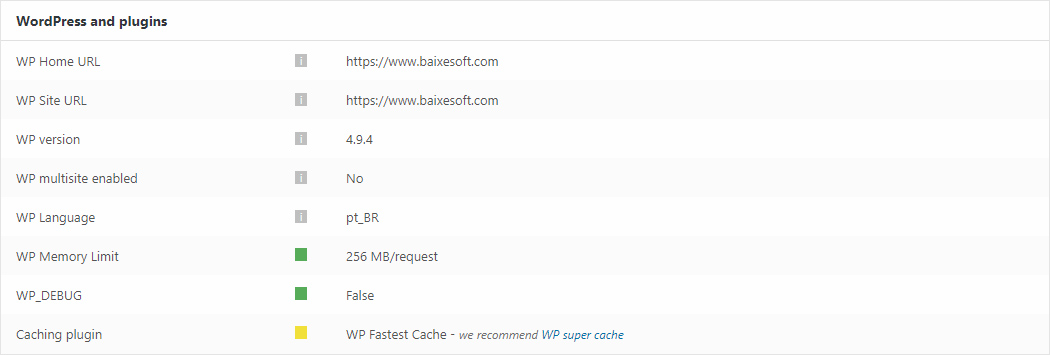
Hi there! Just two quick things about this screenshot form the system status:
https://www.baixesoft.com/wp-content/uploads/2018/02/Sem-Título-1.jpg
1) How much memory in wp memory limit will you recommend for a dedicaded server with a considerable number of access and with 4GB DDR3 RAM Memory at disposal only for this website?
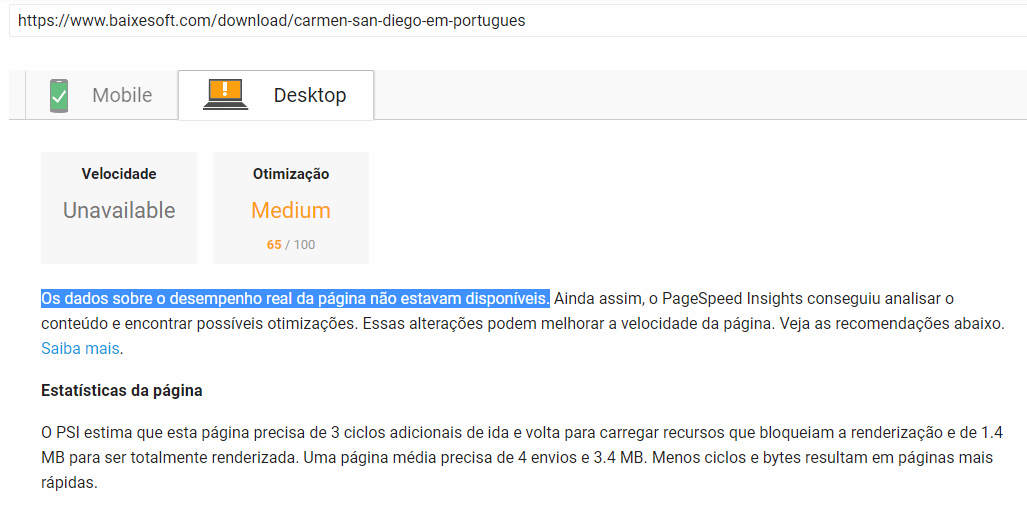
2) I have the premium version of WP Fastest Cache, cause it did way more effect than WP super cache in the previous theme, so there is any problem to use the fastest cache in newspapper? Cause i experienced this in PageSpeed Insights: “Data on actual page performance is not available” like the screenshot above (in portuguese language).
https://www.baixesoft.com/wp-content/uploads/2018/02/Page-speed.jpg
Thank’s for the support!
Simion C. The theme requirements are mentioned here, please check if everything is set accordingly
– https://forum.tagdiv.com/requirements-for-newspaper/
– https://forum.tagdiv.com/system-status-parameters-guide/
Please try to download the theme package again and reinstall the theme. We are currently investigating some issues with the theme. If there is still a problem, please send us an email at contact@tagdiv.com and provide admin access, we will take a look. Also include a link to this topic in the email.
Thank you!
Catalin Hello,
The header menu colors can be changed from Theme panel. Try it again when you ensure that your system status parameters are correctly increased according to our documentation from here -> https://forum.tagdiv.com/system-status-parameters-guide/, clear all the caches, purge all CDN files and see the results.
Thanks for the message!
Simion C. The website is not loading at all – https://www.screencast.com/t/B9A5retNiRj9
Please reinstall the theme properly – https://forum.tagdiv.com/how-to-update-the-theme-2/
Reinstall the version you were using or download the latest theme version. If you install the latest theme version update the theme plugins as well.
Check the theme requirements and system status recommended values
– https://forum.tagdiv.com/requirements-for-newspaper/
– https://forum.tagdiv.com/system-status-parameters-guide/
Ask your hosting provider to increase the allocated resources if needed. Let us know if there still is a problem.
 Rashburn
Thank You for a quick reply from https://forum.tagdiv.com/topic/tagdiv-stopped-loading/#post-218172.
I installed the multi-purpose plugin as well as uninstalled the 2.0 TDC and reinstalled it with no change. I am very disappointed in this as I can not update my main home page. TDC is working on other pages that were built with it.
I see that this issue is quite common, I am hoping that I do not have to re-create my entire site to move forward.
I looked that the system status with this result: https://randyashburn.com/wp-content/uploads/Screen-Shot-2018-02-18-at-5.35.32-PM.png
I have made the requested adjustments in the php.ini file: https://randyashburn.com/wp-content/uploads/Screen-Shot-2018-02-18-at-5.37.03-PM.png
I am doubtful that this is why our TDC’s have stopped loading, although it is worth the time to investigate.
This has been an issue for almost 60 days now. Please let me know how you feel this can be truly resolved…
I have not been able to save a lot of changes in Newspaper as well. There have been random things over the last months that I did not think to document. Even this morning I am trying to create a new blog and I used a previous draft that even though I am saving the new changes, it is not consistently saving them on the site.
I am hoping not to get a generic answer here and if there is anything I can do to answer any questions please do not hesitate to ask. I realize that you are just now hearing of my issues, although NEWSPAPER has been great until a a couple of updates ago and now I am unfortunately losing market share and momentum.
Thank You Again,
Randy
randyashburn.com