- TutorialsSystem status parameters guide
 Calin
Calin Hi,
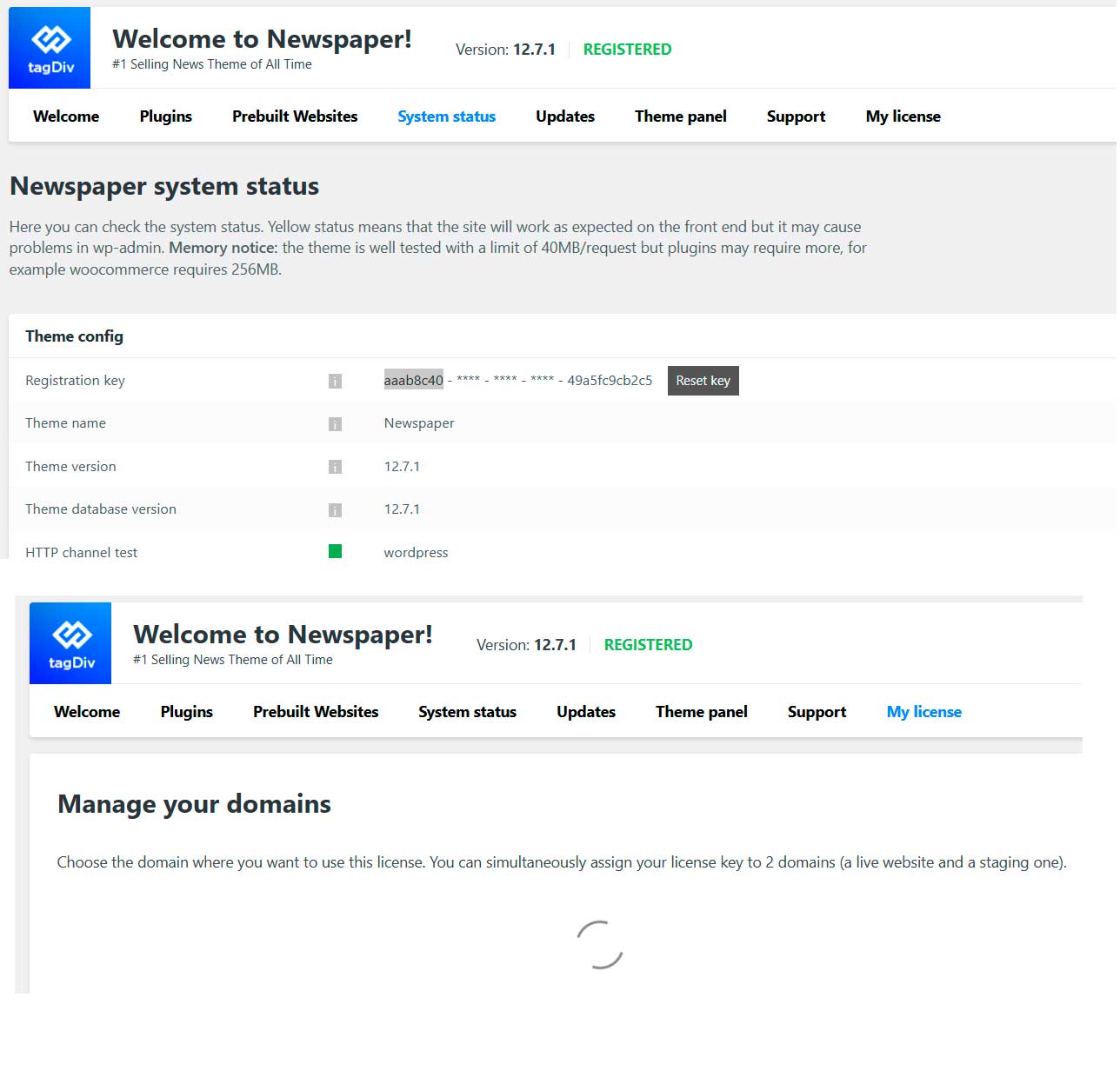
Please check Newspaper > System Status and confirm that a license key is displayed. It should show the full key, not just ***-***-***-***. If only the beginning and end of the key are visible, please go to Newspaper > My License and verify that the license key is assigned to the correct (current) domain.
 caasindia
 Thank you for your response.
I can confirm that the theme is properly registered and the license key is correctly assigned to the live domain. The license status shows ACTIVE in Newspaper → My License (screenshot attached).
Despite this, the fatal error continues to occur intermittently in tdc_check_domain.php when the system attempts to validate the domain.
This suggests that the license validation request occasionally returns a WP_Error, which is not being handled safely under PHP 8.2, resulting in a fatal crash.

Please let me know if this is a known issue or if additional diagnostics are required from my side.
 Angela
Hi I have installed Newsmag on a multisite setup.
The main site is here: https://wordpress-1531109-5903242.cloudwaysapps.com/
And the subsite is here: https://wordpress-1531109-5903242.cloudwaysapps.com/marketing-world/
The theme and required plugins are activated for both but TagDiv Composer only seems to be working on the main site and not the latter. The system status is good and the license is good but i don’t have the option to ‘Edit with TagDiv Composer’ on …/marketing-world/ ?
Any guidance/assistance greatly appreciated.
 Simion C.
 Hi,
So when you access the pages panel in wordpress there is a critical error. What if you deactivate more plugins? Leave just theme plugins active and check again. Maybe it’s a problem that happens due to insufficient wp memory, and by deactivating plugins there is more free memory. If you check in the theme system status panel is the wp memory set to at least 256M? -> https://prnt.sc/2Bo3sC0eIzdk Actually even if it is, I suggest setting it to 512M, it can be done in the wp-config file -> https://prnt.sc/bNokB9oAbAVW
If that doesn’t work, we could take a look as well, maybe we can figure out the cause. In this case you can send us an email at contact@tagdiv.com and provide a link to the website, admin login (user and pass) and also access to cPanel or FTP.
Thanks.
Calin Hi,
If you have a new license key to replace the old one, you need to go to Newspaper > System status and click on the “Reset key” button. After that, use the new license key to activate the theme – https://forum.tagdiv.com/newspaper-6-how-to-activate-the-theme/
Thank you!
 attp
attp Same here, I have ads but only on movile device, some weird tagdiv advertisements.. I dont have any advertisement switch in the settings “system status”
 monkycars
 Hello,
I purchased my license today.
When accessing the “My License” section within the Newspaper menu, I see “Manage your domains” and text that says “Choose the domain where you want to use this license. You can simultaneously assign your license key to 2 domains (a live website and a staging one).” and immediately below it, an infinite loading animation. Therefore, I haven’t been able to configure my domain…
Additionally, when I go to “Prebuilt Websites,” I find a red box with the following text: “An issue has been encountered while trying to validate your license key.” But on the other hand, if I go to “System status,” I find that all the boxes are green, and next to the version number, it says I am “REGISTERED.
What should I do?
-
This reply was modified 8 months by
monkycars. Reason: Added more information
 Iqtidar
 For now,
I have reverted to WordPress 6.8.3.
The Theme Panel, where it shows System Status, did have issues with 6.9. It wasn’t loading or showing any information.
6.9 is also not compatible with Cloudflare plugin. Also as soon as I started a new post or began editing, the CPU and RAM usage reached its max and website went down. Creating/editing a post became a headache.
You also need to increase your WP Memory Limit and Max Vars for WordPress 6.9 to function properly, especially on the backend/admin.
Hope this helps someone.
Iqtidar The ‘System Status’ page is also not opening in WordPress 6.9.
It’s only showing a blank page with a couple of links. Not loading information.
 epublishers
Bought new license activated in themes panel still showing not active
https://bionieuws.eddy.one/wp-admin/admin.php?page=td_system_status
Calin Hi,
If you get a message like this“Sorry, you are not allowed to access this page.” ,then you can solve this problem in this way:
go in Newspaper> System status and replace the url from: -> https://i.imgur.com/WlRnszw.png
admin.php?page=td_system_status
in
admin.php?page=td_system_status&reset_registration=1
And try after that to activate the theme.
If there is still a problem, you can send us an email at contact@tagdiv.com and provide wp-admin login (to can login in WordPress admin zone) and the license. We will take a look at the problem and we’ll fix it. Include a link to this topic in the email.
Let me know the results!
Thank you!
Calin Hi,
Please go to Newspaper > System status and see if you have the theme displaying the key. If you do, then go to the My License tab and see if it is activated for the local/test domain.
 Bikul
Bikul Hi Carlin,
I clicked on the Text”WP_DEBUG” and zhis appears, but there is no “Clear buttons”.
Calin Hi Bernd,
The last thing you can try is to go to Newspaper > System Status, scroll down to WP_DEBUG, and click on the text several times until a new section appears below. From the hidden menu, click the Clear buttons to remove the old data.
Thank you!
Calin Hi,
What you need to do is to connect on the domain you want to change the license, go to Newspaper > System status and click on the reset key button, after that use the license key you want to have on that domain to activate the theme.
Thank you!
Thank you!
 enveribq
 Hi I did try your solution, it still doesn’t work and yes my theme requirements on Newspaper system status are all green. here are screenshots https://prnt.sc/dJMZKDU8kkWG
https://prnt.sc/UKEKCAn47ytR
 FrankMoriano
Whenever I try to edit any pages with the TagDiv Composer I get a “Ooops… Error 404 – Sorry, but the page you are looking for doesn’t exist.” I have tried this will all the pages on my site. I confirmed all the plugins are installed and the sever settings are correct.
System Status
PHP Version: 8.3.25
WP Memory Limit: 256 MB
PHP Execution Time: 600
PHP Max Input Vars: 3000
 gqjesus
Is there something that can be done about this?
The filesystem “/” mounted at “/” reached “critical” status because you currently use 92.58% of its available blocks.
Notification Type: critical ⛔
Server: xxx.com
Primary IP Address: 1.0.0.1.x
Filesystem: /
Mount Point: /
Percent Used: 92.58%
Disk Block Usage: Used: 275.08 GB
Available: 23.32 GB
Total: 314.39 GB
ChkServd Version: 17.0
Here is what I’ve done so far
The wp_actionscheduler_logs table continues to grow rapidly. For now, I’ve manually removed the old log entries from this table to free up disk space.
To automate the cleanup process, I added the necessary code inside your WordPress theme’s functions.php file, but it doesn’t seem to be working as expected.
Why does the wp_actionscheduler_logs table grow so large and so quickly?
If they suggestion or specific fix or configuration that can be applied? As if I dont’ manually clean this up every 2 weeks the website goes down.
Calin Hi,
Please do not share the license key via the forum, only in private via email. I edited the key from the topic.
If you get a message like this“Sorry, you are not allowed to access this page.” ,then you can solve this problem in this way:
go in Newspaper> System status and replace the url from: -> https://i.imgur.com/WlRnszw.png
admin.php?page=td_system_status
in
admin.php?page=td_system_status&reset_registration=1
And try after that to activate the theme.
If there is still a problem, you can send us an email at contact@tagdiv.com and provide wp-admin login (to can login in WordPress admin zone) and the license. We will take a look at the problem and we’ll fix it. Include a link to this topic in the email.
Let me know the results!
Thank you!
Calin Hi,
What you need to do is to use the new key you get from your Themeforest to activate the theme. For this, you need to go to Newspaper > System status, and if there is a key, press the reset key button. After that, use the new license key to activate the theme on that domain.
Thank you!
 sergiob64
Hola, ayer dejó de funcionar el alta de entradas en mi wordpress con el tema newspaper y activado con su licencia correspondiente. Cuando le doy a publicar me sale: Ha fallado la publicación. Las respuesta no es una respuesta JSON válida.
Todos los plugins que están activados están actualizados con las últimas versiones. Por curiosidad me he iddo a ver el estado del tema y cuando accedo me sale este mensaje:
An issue has been encountered while trying to validate your license key
Please reset the key from the System status tab and try to activate it again, or contact our customer support team at contact@tagdiv.com.
If you don’t have a valid license key, you can get one now and continue to enjoy the full benefits of this great product.
Y en la opción de mi licencia no me aparece el dominio asignado y si un círculo girando.
Os dejo este enlace donde hay una captura de lo que explico: https://www.cuadernosmanchegos.com/error.jpg
Un saludo, espero qwue me puedan ayudar.
 xorgelorenzo
My .user.ini is en root of public.html and is in 1024M, but when I go to TagDic System Status shows 40M
The other options are ok in the user.ini
#; START :: Ferozo PHP User Configuration
max_execution_time = 60
max_input_time = 120
max_input_vars = 3000
memory_limit = 1024M
post_max_size = 256M
upload_max_filesize = 256M
display_errors = 0
log_errors = 1
error_reporting = 32759
date.timezone = America/Argentina/Buenos_Aires
error_log = /home/poladmn/public_html/error-php.log
#; END :: Ferozo PHP User Configuration
I aldo have many issues when I try to edit Home page, and Gateway recurrente errors.
If I put in wp-config.php is the same, but I have an error in in error log php
Calin Hi,
If you have a new license key, you can reset the existing one by going to Newspaper > System Status, then use the new key to activate the theme.
Typically, a license key is valid for one website. You can review the full ThemeForest license terms here:
– https://themeforest.net/licenses/standard
– https://themeforest.net/licenses/terms/regular
– https://prnt.sc/X0AldIM7e7ni
However, we allow each license key to be used on two websites simultaneously, as we understand that most users need both a live and a testing/staging environment.
If the key has been used on more than two domains, additional licenses will be required. Please note that we cannot interfere with domains that are already using the activated theme under your license.
Thank you for your understanding!
Calin Hi,
To replace the key, go to Newspaper > System status, and click on the reset key button. After that, use the new key to activate the theme.
Thank you!
Calin Hi,
You can check and if you are using Apache/Linux/ .. servers by checking in Newspaper system status – https://i.imgur.com/w5oXNoV.png
Also, you have more results with .htaccess file because you have search in after allfiles on your host. It should be edited only the one were the WordPress install for your website is set. Please ask your host to help you set the code in the htaccess file.