
No search results were found in Documentation!
 reivaj255
 nothing happens, I tried everything mentioned, I deactivated all the plugins, I installed td composer but I still get the critical error when activating the same td composer plugin, once removed the web works again.
image error – https://ibb.co/SnFF2cR
install – https://ibb.co/1bCkw97
system status – https://ibb.co/x2bGmz4
Please I need help inmediately.
 Vlad S
 Hello!
Please send us a screenshot of your System Status Tab and make sure that all the requirements are met as you can see here: https://forum.tagdiv.com/requirements-for-newspaper/ ; You will have to first start looking for a plugin conflict. please deactivate ALL plugins except tagDiv ones, also if you are using child theme or cache plugin, deactivate them, clear all cache and try again.
Also you can try and remove and re-install the tagDiv Composer plugin and please send us a link to your website in order to take a look.
Let us know the results.
Thank you !
Vlad S Hello!
Please send us a screenshot of your System Status Tab and make sure that all the requirements are met as you can see here: https://forum.tagdiv.com/requirements-for-newspaper/ ; You will have to first start looking for a plugin conflict. please deactivate ALL plugins except tagDiv ones, also if you are using child theme or cache plugin, deactivate them, clear all cache and try again.
Also you can try and remove and re-install the tagDiv Composer plugin and please send us a link to your website in order to take a look.
Let us know the results.
Thank you !
Vlad S Hello!
Please send us a screenshot of your System Status Tab and make sure that all the requirements are met as you can see here: https://forum.tagdiv.com/requirements-for-newspaper/ ; You will have to first start looking for a plugin conflict. please deactivate ALL plugins except tagDiv ones, also if you are using child theme or cache plugin, deactivate them, clear all cache and try again.
Also you can try and remove and re-install the tagDiv Composer plugin and please send us a link to your website in order to take a look.
Let us know the results.
Thank you !
Vlad S Hello!
Please send us a screenshot of your System Status Tab and make sure that all the requirements are met as you can see here: https://forum.tagdiv.com/requirements-for-newspaper/ ; You will have to first start looking for a plugin conflict. please deactivate ALL plugins except tagDiv ones, also if you are using child theme or cache plugin, deactivate them, clear all cache and try again.
Let us know the results.
Thank you !
 Anamaria
 Hello,
Please try to activate the theme manually => https://www.screencast.com/t/GDo5doWPUM1M,
also, if you get a message like this“Sorry, you are not allowed to access this page.” , then you can solve this problem in this way:
go in Newspaper> System status and replace the url from: -> https://i.imgur.com/WlRnszw.png
admin.php?page=td_system_status
in
admin.php?page=td_system_status&reset_registration=1
And try after that to activate the theme.
A guide for the theme activation is here: https://tagdiv.com/how-to-activate-the-newspaper-theme/ -> https://www.screencast.com/t/EL4k48Lq
If there is still a problem, you can send us an email at contact@tagdiv.com and provide wp-admin login (to can login in WordPress admin zone), license certificate and purchase code, open the text file and look for the Item Purchase Code. – http://forum.tagdiv.com/how-to-find-your-envato-purchase-code/. We will take a look at the problem and we’ll fix it. Include a link to this topic in the email.
Let me know the results!
Thank you!
 sameehsn
Hello,
I have tried everything and setup memory to 256 MB. Checked with my hosting as well but still the system status in theme shows its 40MB.
Please help.
Anamaria Hello,
Please try to activate the theme manually => https://www.screencast.com/t/GDo5doWPUM1M,
also, if you get a message like this“Sorry, you are not allowed to access this page.”, then you can solve this problem in this way:
go in Newspaper> System status and replace the url from: -> https://i.imgur.com/WlRnszw.png
admin.php?page=td_system_status
in
admin.php?page=td_system_status&reset_registration=1
And try after that to activate the theme.
A guide for the theme activation is here: https://tagdiv.com/how-to-activate-the-newspaper-theme/ -> https://www.screencast.com/t/EL4k48Lq
If there is still a problem, you can send us an email at contact@tagdiv.com and provide wp-admin login (to can login in WordPress admin zone), license certificate and purchase code, open the text file and look for the Item Purchase Code. – http://forum.tagdiv.com/how-to-find-your-envato-purchase-code/. We will take a look at the problem and we’ll fix it. Include a link to this topic in the email.
Let me know the results!
Thank you!
Anamaria Hello,
Please try to activate the theme manually => https://www.screencast.com/t/GDo5doWPUM1M,
also, if you get a message like this“Sorry, you are not allowed to access this page.” , then you can solve this problem in this way:
go in Newspaper> System status and replace the url from: -> https://i.imgur.com/WlRnszw.png
admin.php?page=td_system_status
in
admin.php?page=td_system_status&reset_registration=1
And try after that to activate the theme.
A guide for the theme activation is here: https://tagdiv.com/how-to-activate-the-newspaper-theme/ -> https://www.screencast.com/t/EL4k48Lq
If there is still a problem, you can send us an email at contact@tagdiv.com and provide wp-admin login (to can login in WordPress admin zone) and the license. We will take a look at the problem and we’ll fix it. Include a link to this topic in the email.
Let me know the results!
Thank you!
Vlad S Hello!
That can be done on Theme panel – system status and you can reset the key from there: https://www.screencast.com/t/Qfpziczeph
Thank you!
Vlad S Hello!
Please send us a link to your website and also a screenshot of your system status from theme panel so we can take a look.
Thank you!
 lyon
lyonHello, We are using Newspaper Theme version 10.4 on our multisite network, with WordPress 5.7.2. Ever since updating to 10.4, we’ve had an issue that affects just two of our sites on the network, one of which is the main site. All the other sites have no issue.
What happens is when we build a page with a sidebar in TD Composer, and leave the page template set to default, we are seeing a strange overlapping sidebar:
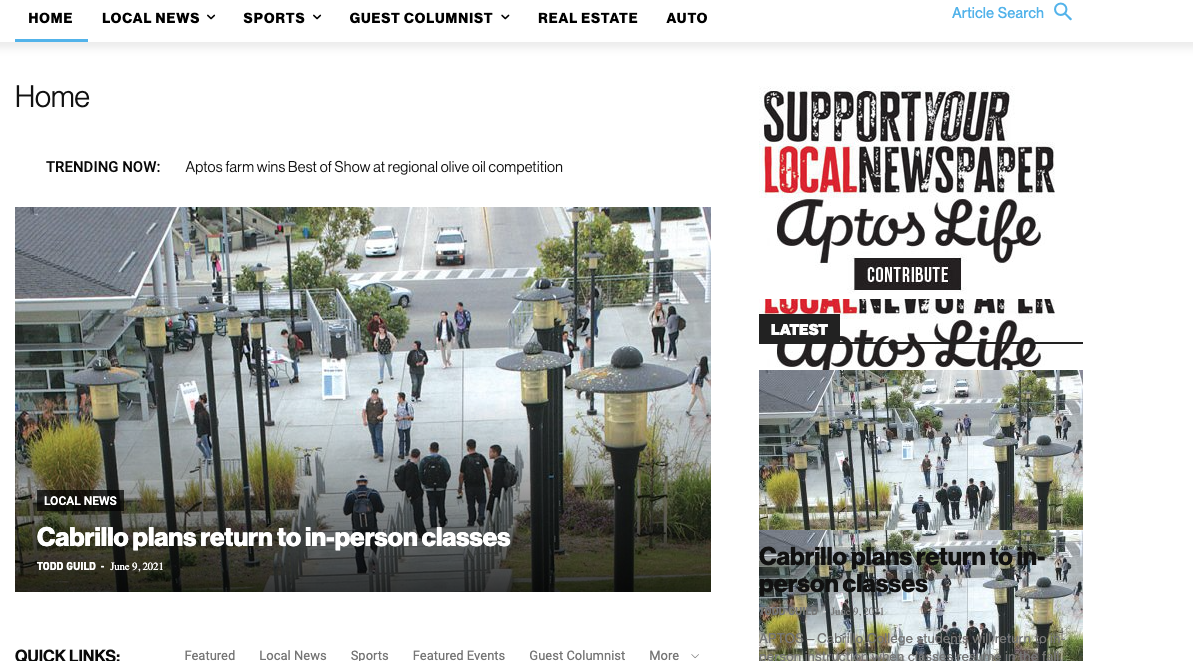
This is how we have the sidebar set in TD Composer:
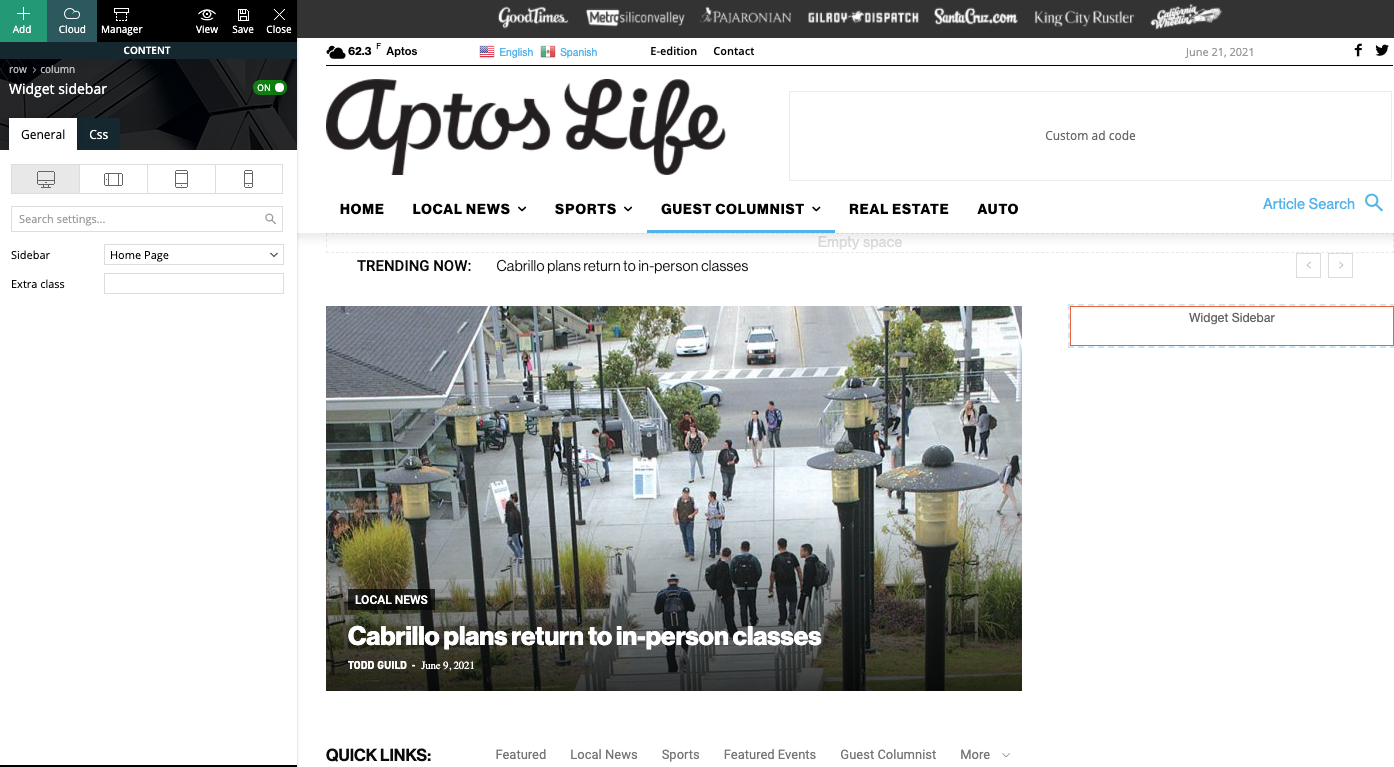
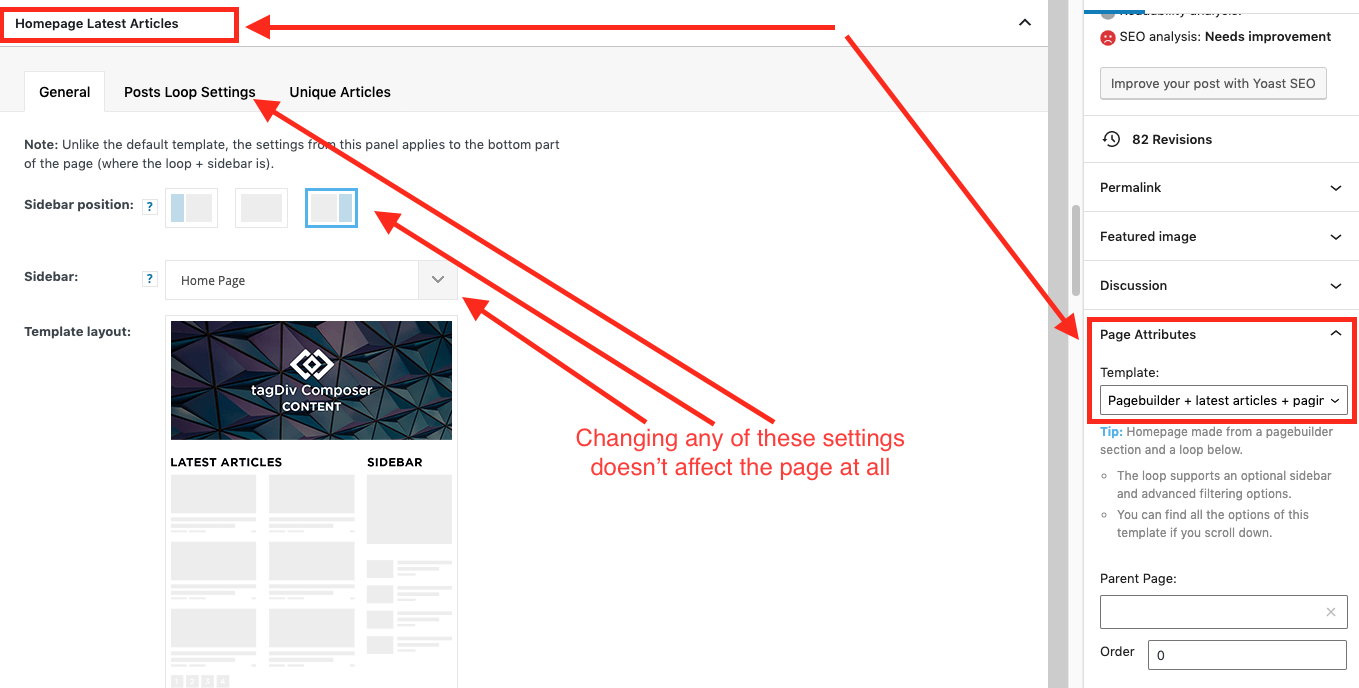
As a temporary workaround we can set the page template to Pagebuilder + latest articles + pagination, but this opens up a whole new set of problems. For example, if we try to change or hide the sidebar in the “Homepage latest articles” settings, no changes occur. Even something such as changing the title on the post loop won’t take affect.
As a result, instead of two overlapping sidebars, we now have two duplicate sidebars stacked on top of each other:
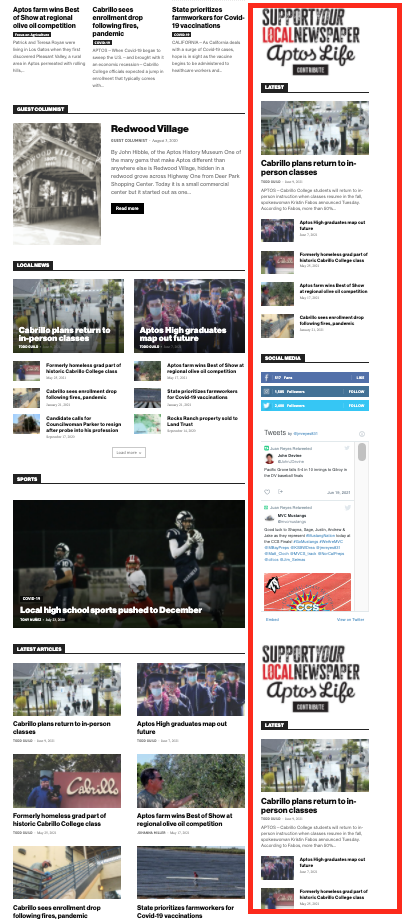
Is there any way to fix these issues? Ideally we would like to leave the page template set to default, with the overlapping sidebars eliminated.
We’ve already tried disabling all our plugins to check for conflicts. Here is some more info from the System Status panel:
Theme name Newspaper
Theme version 10.4
Theme database version 10.4
HTTP channel test wordpress
Installed demo Default – demo ID: default | install type: full
Theme Mobile Newspaper mobile version
php.ini configuration
Server software Apache/2.4.38 (Debian)
PHP Version 7.3.19-1~deb10u1
post_max_size 32M – You cannot upload images, themes and plugins that have a size bigger than this value. To see how you can change this please check our guide here.
max_execution_time 120
max_input_vars 3000
SUHOSIN installed false
PHP extensions
mbstring available
GD library available
WordPress and plugins
WP Home URL https://aptoslife.com
WP Site URL https://aptoslife.com
WP version 5.7.2
WP multisite enabled Yes
WP Language en_US
WP Memory Limit 1 GB/request
WP_DEBUG False
Caching plugin No caching plugin detected – for best performance we recommend using WP Super Cache
 Calin
Calin This error happens due to a lot of possible reasons. Check the useful guide from here -> https://www.hostinger.com/tutorials/fix-sorry-you-are-not-allowed-to-access-this-page-wordpress#gref
Theme activation -> https://tagdiv.com/how-to-activate-the-newspaper-theme/
You can manually activate the Newspaper theme from here: https://www.screencast.com/t/EL4k48Lq
If this is still not working go in Newspaper> System status and replace the url from: -> https://i.imgur.com/WlRnszw.png
admin.php?page=td_system_status
in
admin.php?page=td_system_status&reset_registration=1
And try after that to activate the theme.
Let me know the results!
Vlad S Hello!
Please send us a screenshot of your System Status Tab and make sure that all the requirements are met as you can see here: https://forum.tagdiv.com/requirements-for-newspaper/ ; You will have to first start looking for a plugin conflict. please deactivate ALL plugins except tagDiv ones, also if you are using child theme or cache plugin, deactivate them, clear all cache and try again.
Thank you !
 Christopher
 I have everything that’s needed in system status, it’s all green. I deactivated WP-Super Cache and all other plugins except tagdiv plugins, because you said so. Here’s the screenshot you asked for.

Site still says the same thing.
I don’t know what else to do?
-
This reply was modified 5 years by
Christopher.
Vlad S Hello!
Please send us a screenshot of your System Status Tab and make sure that all the requirements are met as you can see here: https://forum.tagdiv.com/requirements-for-newspaper/ ; You will have to first start looking for a plugin conflict. please deactivate ALL plugins except tagDiv ones, also if you are using child theme or cache plugin, deactivate them, clear all cache and try again.
That option is possible when using Cloud Library post templates: https://www.youtube.com/watch?v=I1R3j1QYod0 And you can activate or deactivate the infintie scroll from here: https://tagdiv.com/infinite-loading-for-single-posts/
TagDiv Composer cannot be used on mobile theme.
Thank you !
Vlad S Hello!
Please send us a screenshot of your System Status Tab and make sure that all the requirements are met as you can see here: https://forum.tagdiv.com/requirements-for-newspaper/ ; You will have to first start looking for a plugin conflict. please deactivate ALL plugins except tagDiv ones, also if you are using child theme or cache plugin, deactivate them, clear all cache and try again.
Also you can try and remove and re-install the tagDiv Composer plugin and please send us a link to your website in order to take a look.
Let us know the results.
Thank you !
 ralvira
Hi! I’ve added the PHP.ini file with the parameters mentioned in the documentation and I’m still having issues with the page.
Vlad S Hello!
Please make sure to activate all the required plugins. When a plugin is disabled that shortcode will appear on your website. Please send us a screenshot of your System Status Tab and make sure that all the requirements are met as you can see here: https://forum.tagdiv.com/requirements-for-newspaper/ ; You will have to first start looking for a plugin conflict. please deactivate ALL plugins except tagDiv ones, also if you are using child theme or cache plugin, deactivate them, clear all cache and try again.
Also you can try and remove and re-install the tagDiv Composer plugin and please send us a link to your website in order to take a look.
Let us know the results.
Thank you !
 fquiquet
 System status screenshot
https://postimg.cc/30jqJsFd
https://postimg.cc/rDwHMY0w
All requirements are met
Next step : I will try to deactivate some plugin
Vlad S Hello !
Please send us a screenshot of your System Status Tab and make sure that all the requirements are met as you can see here: https://forum.tagdiv.com/requirements-for-newspaper/ ; You will have to first start looking for a plugin conflict. please deactivate ALL plugins except tagDiv ones, also if you are using child theme or cache plugin, deactivate them, clear all cache and try again.
Also you can try and remove and re-install the tagDiv Composer plugin and please send us a link to your website in order to take a look.
Let us know the results.
Thank you !
Vlad S Hello !
Please send us a screenshot of your System Status Tab and make sure that all the requirements are met as you can see here: https://forum.tagdiv.com/requirements-for-newspaper/ ; You will have to first start looking for a plugin conflict. please deactivate ALL plugins except tagDiv ones, also if you are using child theme or cache plugin, deactivate them, clear all cache and try again.
Also you can try and remove and re-install the tagDiv Composer plugin and please send us a link to your website in order to take a look.
Let us know the results.
Thank you !
 Sportconity
 Hello Vlad,
We desactivated all other plugins than the TagDiv ones, even TagDiv Social Counter, along with clearing our caches but sadly without any luck. TagDiv Composer doesn’t load when we press the button “Edit with TagDiv Composer”.
Here are pictures of the system status:
https://www.dropbox.com/s/v88l9krwd2hh1a9/Newspaper%20Status.png?dl=0
https://www.dropbox.com/s/i0ap90q00xfvacm/Newspaper%20Status2.png?dl=0
as for the link to the website : http://footamateurtv.com/
Thanks for your help because indeed because of this we can’t finalize the website and launch it.
Have a good day
Vlad S Hello !
Please send us a screenshot of your System Status Tab and make sure that all the requirements are met as you can see here: https://forum.tagdiv.com/requirements-for-newspaper/ ; You will have to first start looking for a plugin conflict. please deactivate ALL plugins except tagDiv ones, also if you are using child theme or cache plugin, deactivate them, clear all cache and try again.
Also you can try and remove and re-install the tagDiv Composer plugin and please send us a link to your website in order to take a look.
Let us know the results.
Thank you !
Vlad S Hello !
Please send us a screenshot of your System Status Tab and make sure that all the requirements are met as you can see here: https://forum.tagdiv.com/requirements-for-newspaper/ ; You will have to first start looking for a plugin conflict. please deactivate ALL plugins except tagDiv ones, also if you are using child theme or cache plugin, deactivate them, clear all cache and try again.
Also you can try and remove and re-install the tagDiv Composer plugin and please send us a link to your website in order to take a look.
Let us know the results.
Thank you !



