
- TutorialsSystem status parameters guide
- NewspaperUser review system
- NewspaperHow to use the Flex Blocks cache option
- NewsmagRequirements for Newsmag
- NewspaperRequirements for Newspaper
 Vlad S
 Hello !
Usually this is a system status issue. Make sure that everything is green in there !
Please make sure that all the system requirements are accomplished as you can see it here:https://forum.tagdiv.com/requirements-for-newspaper/
Thank you !
Vlad S Hello !
As long as you refresh your key before removing the account everything should be good to go. In order to reset the key you will have to go into Theme Panel – System Status: https://www.screencast.com/t/GpYCnp8kvyqq
Thank you !
 vv2005
 There shouldn’t be any problem since your going to use it on the same domain name. If you plan to use it on different domain name, then you need to first deactivate the key on your website by going to ->Theme panel->System status->Registration key->Reset key
 johnkruse
 From Newspaper System Status
Theme version and theme database version is 9.8
WP version is 5.3.2
Caching plugin- “No caching plugin detected”
How do I update Newspaper and WordPress
Thank you
Vlad S Hello !
The easiest way would be to install the Newspaper Theme on the new domain and re-activate it. You will have to reset the key first. The key can be re-freshed by going into Theme Panel – System Status: https://www.screencast.com/t/GpYCnp8kvyqq
I hope this was helpful !
Thank you !
 criticanacional
 Just reset key in “System Status” – “Theme config”
“Registration key” and bingo!
Solved
 Roy9696
Composer doesn’t show up on the menu. How do I use it?
Plugin is installed and activated. Site refreshed several times.
All System Status check boxes are green.
 amiloaded
 I’ve already met all the requirments and confirmed from the System Status
 Calin
Calin Hi,
Please make sure that you have the latest version of Newspaper them v10.2 and WordPress 5.3
Please make sure that the theme system status is configured as mentioned in the requirements guide. Please follow the guide carefully
– https://tagdiv.com/newspaper-theme-requirements/
and please increase all requirements that are lower, and follow all steps;
If you are using the preview draft, please deactivate the schema articles from here: https://www.screencast.com/t/0E3IucACC You will have to check that in order to deactivate the schema, this issue will be fixed in the next update.
Thank you!
Calin Hi,
Please make sure that you do not have any plugin conflicts, please deactivate all non theme plugins, clear all cache and try again.
Please make sure that the theme system status is configured as mentioned in the requirements guide. Please follow the guide carefully
– https://tagdiv.com/newspaper-theme-requirements/
and please increase all requirements that are lower, and follow all steps;
Also please check our documentation for When tagDiv Composer is not working -> https://forum.tagdiv.com/tagdiv-composer-not-working/
If there is still a problem, you can send us an email at contact@tagdiv.com and provide admin login, as well as cPanel or FTP if possible. We will take a look. Include a link to this topic in the email.
Thank you!
 gurenet
I have imported the demo “romania news”, the website is very slow, the changes in the template are not executed, in the tagdiv composer plugin, the save icon rotates and never just saved. I have looked at the system status and everything is correct.
 asadcj
 Here I attached my system status. Not solved yet.
Vlad S Hello !
It will matter but there will not be any issues if you reset the key after using it on domain A. You can reset the key by going into Theme Panel – System Status.
I hope this was helpful !
Thank you !
 imkimc
Hello,
When we preview a draft document the see the following problems:
– missing the side bar widgets
(the space for the sidebar is there but the side bar does not show up, nor is the sidebar <div> present in the HTML code when inspected).
– images do not show (but their code is present in the HTML)
– shortcodes fail to process/render
– Browser window sizes below 750px all images are center justified regardless of settings
-
All of the theme requirements are met per system status panel in theme settings.
All plugins deactivated except TagDiv plugins and problems still persists.
We do not use the flex blocks, so that work around will not work for us.
Suggestions?
 Izaura
Hello there,
I ‘ve installed the theme- Newspaper version 10.2, and I am having some issues with theme panel. I am unable to make any changes or save settings. The Square spinning in a loop infinite and won’t updates the settings configuration. I’ve checked the systems status and php.ini configuration seems ok, also I disable all plugins and active one by one, however the issue persists.
Any help I would be appreciated.
Thanks,
Calin Hi,
Please make sure that you do not have a plugin conflict, please deactivate ALL plugins except tagDiv Composer, also if you are using child theme or cache plugin, deactivate them, clear all cache and try again.
Please make sure that you you re-save the permalinks -> http://prntscr.com/p8n6ep also make sure that the system status is set as in our guide from here ->https://forum.tagdiv.com/requirements-for-newspaper/
Let me know the results!
Thank you!
 nobledru
 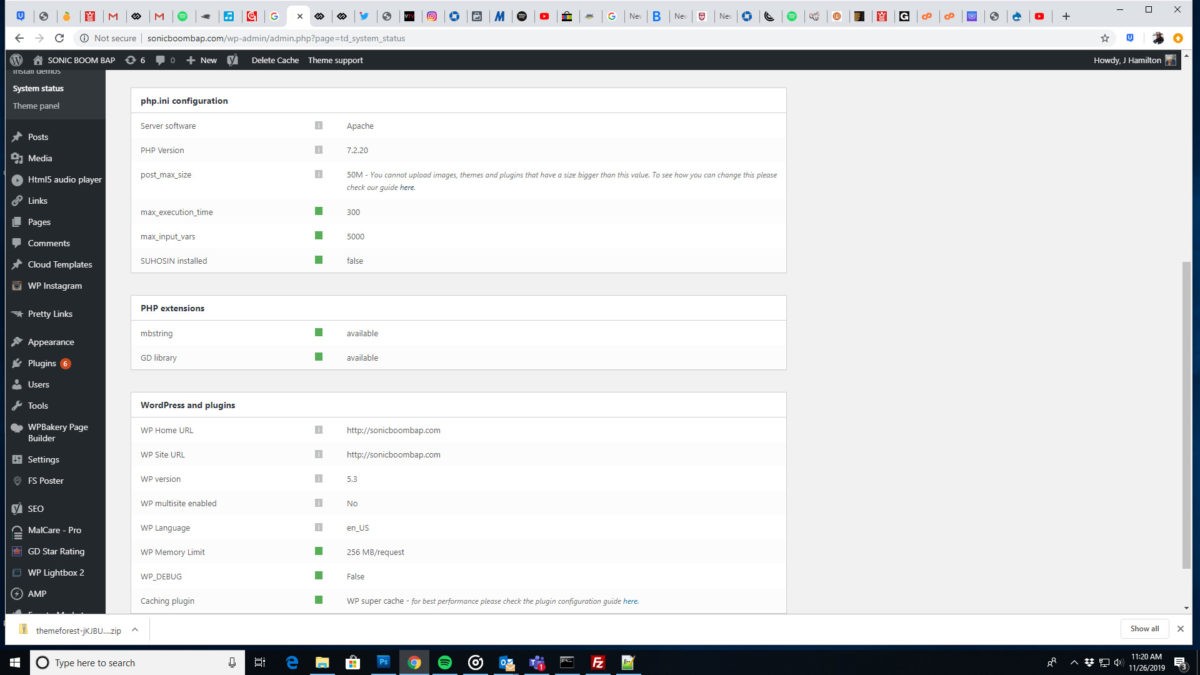 I installed everything properly. I did all that was required but I still can’t save changes in Theme Panel. Can you guys take a look?
-
This reply was modified 6 years by
nobledru.
 tip4pc
Recently I Installed tagDiv Mobile Theme and make some custom font size on this version. But i’m tested and found that some post not display correctly in mobile version, instead it look like responsive from desktop site. Demo below when access from smartphone
In mobile version: https://www.techsignin.com/tintuc/oppo-a9-2020-trang-ngoc-thach/
Responsive from desktop site: https://www.techsignin.com/tintuc/robot-phuc-vu-mi-lg-cloi-chefbot/
Here is some status from my system:
Theme config
Registration key i e029451f – **** – **** – **** – 028d2b2fc560
Theme name i Newsmag
Theme version i 4.9.1
Theme database version i 4.9.1
HTTP channel test wordpress
Theme Mobile Newsmag mobile version
Thank you for your support
Calin Hello !
Usually this issue is related to a firewall or security module which blocks admin-ajax.php request. Please verify the console for error while saving the settings on the Theme Panel, usually it displays a 403 or 404 error.
I suggest to check your System Status and increase all the php.ini directives at least to the recommended values – https://forum.tagdiv.com/system-status-parameters-guide/
If you don’t use a security plugin, please ask your host about this, maybe you have a security module which blocks this.
If you use a plugin like Wordfence please set it in learning mode.
Let us know and if the issue persist please contact us via email at contact@tagdiv.com and provide wp-admin access so we can take a closer look. Also paste a link to this topic so we can identify you.
Thank you !
 gstraton
 The issue is similar to the ones experienced by other users:
https://forum.tagdiv.com/topic/remove-tag-title-and-breadcrumbs-from-tag-page/
https://forum.tagdiv.com/topic/i-can-not-save-the-settings-in-the-theme-panel/
With the screen turning black. I already checked tagDiv’s system requirement settings and I set them. All system status is GREEN.
Vlad S Hello !
Please note that if you’re using a PRO layout that is fully editable using the tagDiv Composer. Also you can disable standard pack if you use PRO layout.
Make sure that your system status is up to date according to our documentation here: https://forum.tagdiv.com/requirements-for-newspaper/
And also please make sure you are clearing your cache after doing some modifications.
Thank you !
 izyanatirah
Hi ,I need some help as Im new to this WordPress. right now I cant publish any post the error message said that “the response is not a valid JSON response”. In the system status also the mbstring was not available (PHP extension). Hope to get some explanation and solution. Thank you.
 exclusivebangla
Hi,
My website address is https://exclusivebangla.com/
It is showed on System Status Page: Speed booster v4.9.3 – Disabled – incompatible plugin detected: font-awesome/font-awesome.php
Would you please give a solution.
Thanks
Best Regards
Rabiul
Administrator
Exclusive Bangla
Vlad S Hello !
According to Envato license terms a theme can be used for a single end product (website)
– https://themeforest.net/licenses/standard
– https://themeforest.net/licenses/terms/regular
You can reset the key from one domain and use it on the other one by going into Theme Panel – System Status and you can reset it from there.
Thank you !
 LisaCJ
 Thanks Calin on all of that.
Re 1)
I’ve looked at the system requirements, and gone to my hosting provider. I’m running PHP 7.2 and I have 128M WP Memory – although I am still getting this message in the system status saying I only have 40M – why could that be? And is this perhaps the issue. They’ve doubled checked and I do have the 128M limit.
See this link: https://drive.google.com/open?id=1smDqu1d8aa2ZGhdiVAHAiJ9WOV_PKd0n
Thanks
