
- NewsmagtagDiv Composer Tutorial
- NewsmagHow to use the Visual Composer plugin
- NewsmagHow to update a plugin
- NewsmagRequirements for Newsmag
- NewsmagInstall via WordPress
- NewsmagInstall via FTP
- NewsmagBlock settings tutorial
- NewsmagPage Menu
- NewsmagCustom ad spots
- NewsmagSmart sidebar
- NewsmagVideo playlist
- NewsmagPage templates
 thcp2020
Hi there,
I want to change the colour scheme of my website but have found that using the Newpaper theme panel and TD composer on each page that I dont know how to change the colour of each page.
Is there a way of changing the colour of every page without changing the colour on each element using the Style tab?
All the best
Thcp2020
 mbos01
Hi,
Could anyone please tell me how I can use the single post source shortcode? I can add the element with TD composer but how do I add this as content to my posts?
Thanks!
 AEGISAlliance
Hello. On my website TheAEGISAlliance.com I have a few custom post types. I have code in functions.php that allows the custom post types to display in the category and tag pages.
I have some post blocks on the desktop version of the front page on my website created with the TD Composer that users are able to click on a category and view recent posts under those categories. But, on the front page, posts in custom post types aren’t displaying in these categories on the front page.
Is there some code I can add to functions.php to make them display? Or are there settings I don’t know about? I’m using the Newspaper child theme.
Please help. Thank you.
 Vlad S
 Hello !
We replied here: https://forum.tagdiv.com/topic/get-current-year-for-footer-using-td-composer/
Thank you !
 Calin
Calin Hi,
To display the amp views you need to comment a line of code wp-content/plugins/td-composer/mobile/single.php -> https://i.imgur.com/BB9YSdk.png -> https://i.imgur.com/5UW52Js.png this will display the count but it will not work as on desktop because the normal JavaScript is not allow.
For author image you need to add this custom code line https://i.imgur.com/TObfuCc.png on this path wp-content/plugins/td-composer/mobile/single.php the code can be get from here , also you’ll need some custom css https://i.imgur.com/dNQaFvC.png
Hope this will work.
Thank you!
 WalnutHillDesign
I’m using menu with td composer page content for the main navigation menu submenus to create a sort of mega menu. This works nicely on desktop, but it does not display on mobile, which is understandable. How can I show a simple submenu list of links on mobile instead of the set page content?
If I add submenu items to the wp menu it almost works, but it outputs 1 item on the desktop version along with the embedded page and messes that mega menu up.
I see we can select a different menu in the header composer for the Mobile view.
What’s the best way to handle this? Create & manage 2 versions of the menu, or is there a way handle this with one menu?
 Anamaria
 Hello,
Please try this code, for all removed all the space on the rows => https://i.imgur.com/MfSE7kg.png
.tdc-row{
padding-left: 0;
padding-right: 0;
}
.tdc-row .wpb_row{
margin-left: 0!important;
margin-right: 0!important;
}
If you want only a few rows, you can remove with tagDiv Composer => https://www.screencast.com/t/5cFOBYLBE
Thank you!
 palsys
I’m having a sudden issue with TD Composer in that it will no longer save – just an infinite swirling circle. There were no site changes made prior to this issue beginning, and I’m at a loss as to how to fix it. I’ve increased memory allocation, disabled plugins to test for conflicts, upgraded TD Composer, all to no avail.
Anyone have any ideas?
 haqemcom
Hey tagdiv, can help how to get current year using PHP/JavScript for footer if I using TD Composer? write Java in inline text
Thank you
 MikeKhero
Hello Community:
I Request help with this issue: I can´t edit any page with the TD Composer; when I try to edit, the TD Composer keep Spinning and it not work; I tried Already to create a new page section, and the TD composer keep spinning.
I Tried to Desactivate every plugin and the issue persist; Also, I tried to delete cache, and the issue keeps persist.
Can anybody help me?.
Thanks for your support.

 bogmart
Hi,
I hope you can help me.
I am using different elements that on desktop look good as it should be (stretch row) and on mobile i have some space left and right.
How can i make the element to be full width on mobile?
See printscreen here – https://prnt.sc/wkdeb7
Thank you,
 billyapps
Hello,
I tried to update my theme to the latest version but when installing plugins TD composer install failed. I tried to do that manually i get this message while uploading .zip file: “The link you followed has expired.”
In checking system status, i found that some PHP values need to be increased. My host support team did that but i still get a ‘PHP Memory Limit need to be increased to 128 mb) even if it is already done.
I’ve deactivated plugins excepts tagdiv plugins, deleted the cache using a cache plugin but nothing has changing.
Your help will be appreciated
Regards
haqemcomHey, how to get the current year using JavaScript/PHP for the footer if using TD Composer?
Thanks in Advance.
 steve@tvstrategies.com
 Hi – Thanks for your suggestions. I still need help with your first one. The second one is resolved. The third one is resolved, but not in the way that you suggested.
1) You suggested to change the images to 300×250 (from 300×300) -> https://i.imgur.com/PaHY1Y2.png
See my screen shot: https://ibb.co/6nJQ4pq
As you suggested, I changed the image on the right to be 300 x 250 (the other two, i did not change). This did not help. Also, there is no control for the padding or borders around the individual images in the image block, using tagDiv Composer. Unless I did not understand what you suggested!
2) For the sidebar image alignment, you mentioned the different width and margins that were set on the element https://i.imgur.com/rG2xch9.png I removed them as you suggested, and it’s great – thanks
3) For my Text Alignment problem, I pasted your custom CSS into the Theme Panel > Custom Code > Custom CSS. It did not work. But, when I pasted it into Live CSS, it worked perfectly.
.td_block_image_box.td-image-box-style-2 .entry-title a {
padding: 0px;
}
Thanks for the great technical support!
 rajkumartrivedi
Getting the following error and this is the primary reason which the home page is loading very slowly.
[08-Jan-2021 17:36:52 UTC] PHP Fatal error: Cannot redeclare tdc_on_remove_core_updates() (previously declared in /srv/htdocs/wp-content/plugins/td-composer/includes/tdc_main.php:353) in /srv/htdocs/wp-content/plugins/td-composer/includes/tdc_main.php on line 352
Website URL: https://blog.toothache.care/
What should be done?
I have updated the plugins and it is still the same issue
 mi0o
mi0oHello,
after update theme I got this error:
PHP Fatal error: Uncaught Error: Class ‘td_global’ not found in C:\inetpub\wwwroot\intranet\wp-content\themes\Newspaper\vc_templates\vc_row.php:3
Stack trace:
#0 C:\inetpub\wwwroot\intranet\wp-content\plugins\js_composer\include\classes\shortcodes\core\class-wpbakeryshortcode.php(271): require()
#1 C:\inetpub\wwwroot\intranet\wp-content\plugins\js_composer\include\classes\shortcodes\vc-row.php(40): WPBakeryShortCode->loadTemplate(Array, ‘[vc_column][td_…’)
#2 C:\inetpub\wwwroot\intranet\wp-content\plugins\js_composer\include\classes\shortcodes\core\class-wpbakeryshortcode.php(366): WPBakeryShortCode_Vc_Row->content(Array, ‘[vc_column][td_…’)
#3 C:\inetpub\wwwroot\intranet\wp-content\plugins\js_composer\include\helpers\helpers.php(1317): WPBakeryShortCode->output(”, ‘[vc_column][td_…’)
#4 C:\inetpub\wwwroot\intranet\wp-includes\shortcodes.php(343): vc_do_shortcode(”, ‘[vc_column][td_…’, ‘vc_row’)
#5 [internal function]: do_shortcode_tag(Array)
#6 C:\inetpub\wwwroot\intranet\wp-includes\shortcodes.php(218): preg_repla in C:\inetpub\wwwroot\intranet\wp-content\themes\Newspaper\vc_templates\vc_row.php on line 3
but when I check location : Newspaper\includes\wp-booster\ there is tag-div_global.php not tg_global.php
Any ideas?
Thanks
 Seeyja
 Example errors:
Notice: Undefined index: tdb_templates in /kew-v2/wp-content/plugins/td-composer/legacy/common/wp_booster/td_api.php on line 1179
Notice: Undefined index: tdb_templates in /kew-v2/wp-content/plugins/td-composer/legacy/common/wp_booster/td_api.php on line 923
Anamaria Hello,
tagDiv Composer is a page and cloud builder, it can be used only for pages and cloud templates, therefore you can use it on a single post template from tagDiv cloud library to adjust the layout, but not to write the post content, for this, you need to use the WordPress editor.
You can edit the page with TD Composer in WordPress->Pages => https://www.screencast.com/t/AMOjYCA7Q7p, or in front side.
Thank you!
 JMolina
When I create a post I don’t have an option to build it with TD Composer.
Is there an option to create posts with TD Composer?
Anamaria Hello,
tagDiv Composer is a page and cloud builder, it can be used only for pages and cloud templates, therefore you can use it on a single post template from tagDiv cloud library to adjust the layout, but not to write the post content, for this, you need to use the WordPress editor.
You can edit the page with TD Composer in WordPress->Pages => https://www.screencast.com/t/AMOjYCA7Q7p, or in front side.
You can set a different single post template for each post if you want. Please check this guide for single post template: https://forum.tagdiv.com/design-post-pages-using-cloud-library-templates/
Thank you!
 codexxx
 Hey Vlad,
Yeah, I understand but some say that there is a workaround by adding the custom fonts in the \wp-content\themes\Newspaper\style.css, and I’ve tried that but it seems it does not working probably because I am using tagdiv composer that it is not pointed to the right path of css file. I am not sure if I can add the custom fonts on the path below, tell me if that is feasible.
\wp-content\plugins\td-composer\assets\fonts
Thanks
-
This reply was modified 5 years by
codexxx.
 STARSonTV
 Hi there,
i also have a problem with td composer because i can’t save or delete anything there. I’m trying to edit templates, but it doesn’t work. I assume that this has been the case since the last theme update. There are no conflicts with plugins. I’ve also uninstalled and reinstalled. It did not work. I also deleted the browser cache. That didn’t work either. I’ve sent you an email with all the information you need to help me. Thanks a lot for this.
Many Greetings,
Sebastian
Anamaria Hello,
If you are referring to this line, it can be add on the standard header only with custom css => https://i.imgur.com/QxpOnXd.png, you need to add the custom code in Theme Panel -> Custom Code -> Advanced CSS -> Phones => https://www.screencast.com/t/1Wcj3wHXyR,
.td-header-style-10{

border-bottom: 2px solid red;

}
Also, it can be achieved, using a cloud header from tagDiv Cloud library, you can edit it with tagDiv Composer and add that line.
Hope this helps you!
Thank you!
Anamaria Hello,
tagDiv Composer is a page and cloud builder, it can be used only for pages and cloud templates, therefore you can use it on a single post template from tagDiv cloud library to adjust the layout, but not to write the post content, for this you need to use the WordPress editor.
You can edit the page with TD Composer in WordPress->Pages => https://www.screencast.com/t/AMOjYCA7Q7p, or in front side.
Thank you!
 aaronqur
A few days ago my site changed for the worse, only showing empty columns when I go to edit in the TDComposer. Here’s what I see when I edit any page:
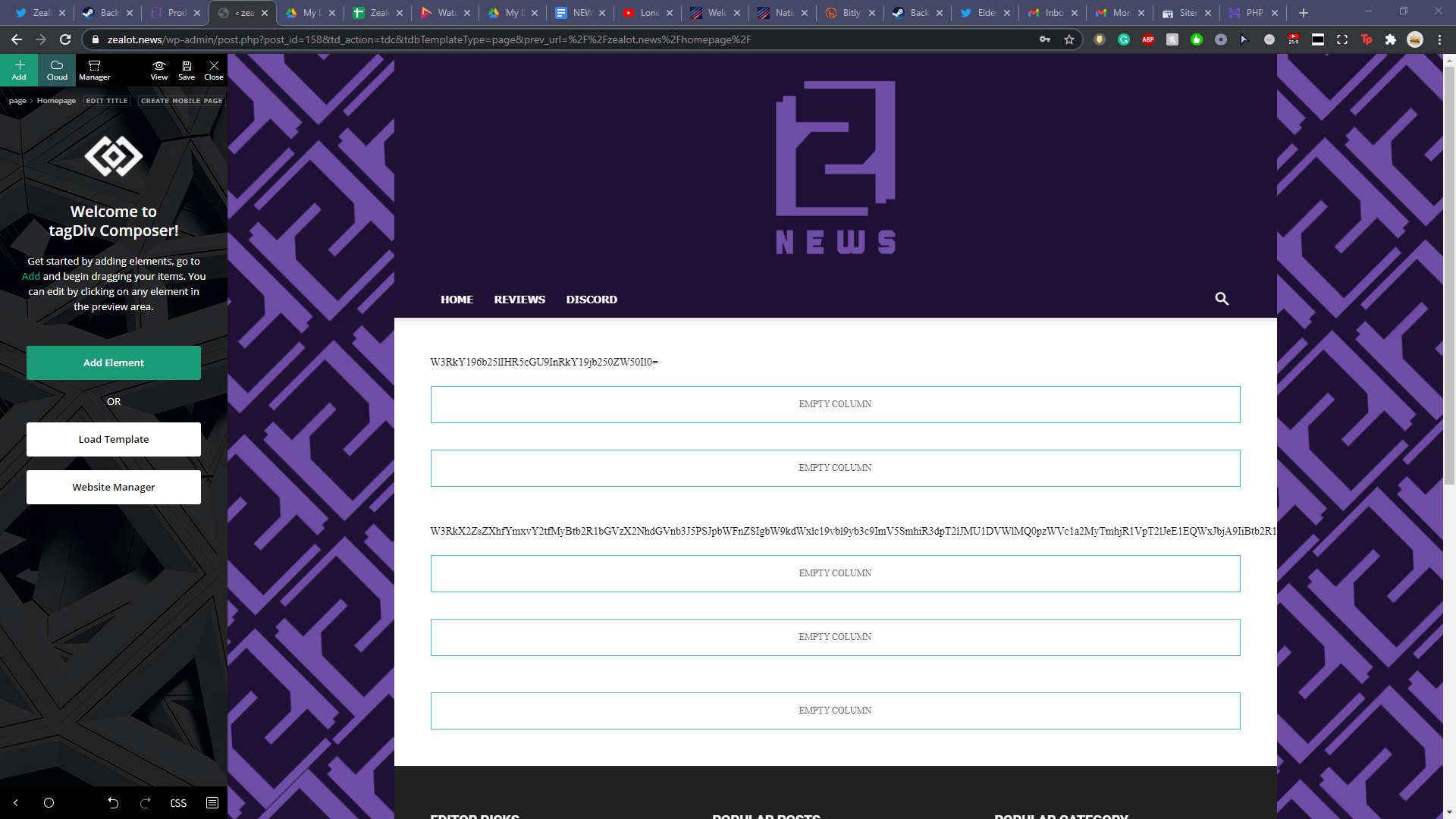
I already ran through all my plugins, deactivating them one at a time hoping for a fix. Sadly that didn’t work. I also updated my PHP to 7.4. I reverted back to 7.2 when I noticed the issue but that didn’t fix it either. Any help would be much appreciated, I’m trying to avoid restoring a backup so I don’t lose an immense amount of work over the past few days.



