
- NewsmagHow to update a plugin
- NewsmagHow to update the theme
- NewsmagHow to update the WPBakery plugin
- NewsmagCategory templates
- NewsmagWhat’s included in Newsmag theme package
- NewsmagAjax view count
- NewsmagSmart Lists
- NewsmagFeatured images
- NewsmagFeatured image or video
- NewsmagModal window
- NewsmagtagDiv slider gallery
- NewsmagVideo playlist
 Simion C.
 Hi,
This will be available in the coming update. We are also working on theme compatibility with PHP 7.2 among other new features. As soon as all the tasks are completed the update will be release. it shouldn’t be long now. Please have a little more patience.
Thanks
 zzboba
Hello,
I’ve checked the update log, there are listed various new (and promising) shortcodes… like “hero shortcode”, “client shortcode” etc — but I can’t find any documentation how to implement them (what is the exact shortcode lingo?), and they don’t appear in the Shortcodes or Formats Dropdown in the editor.
Anyone knows? Thanks!
Jan
Simion C. Hi,
Indeed that would summarize it. Certain row layouts and elements will break when both page builders are active at the same time.
A thing to note would be that the tagDiv composer will receive many more options over future theme updates. These will not be available in Visual composer.
Thanks
 curve
curve Thanks @simion. Please could this capability be added to a future update for the theme.
Simion C. Hi,
Demos may contain multi-purpose elements, these can only be edited or placed with the tagDiv composer. The dental demo is built with such elements, it cannot be edited with Visual composer, the shortcodes will not be interpreted by it.
The tagDiv composer is the main page builder in the theme. All the demos are built with it. The new multi-purpose plugin and elements can only be used with it. Coming updates will provide many more options and features specially for the tagDiv composer. That should be taken into consideration
– https://forum.tagdiv.com/tagdiv-composer-tutorial/
– https://www.youtube.com/watch?v=C0ARTSimnUY&index=4&t=43s&list=PL6CsDkMaejhr2ExZCO73U11SSVKB9r_NE
Thanks
 Catalin
 Hello liberoarbitrio,
Most likely, you should update the theme via FTP way because this is the surest method in this case, according to our documentation from here -> https://forum.tagdiv.com/install-via-ftp/ After theme update, check the theme requirements from here ->https://forum.tagdiv.com/requirements-for-newspaper/ Also, check the system status parameters to be increased according to our documentation from here -> https://forum.tagdiv.com/system-status-parameters-guide/
Hope this helps!
Thanks for the message!
Catalin Hello bz,
Notice that Mega Menus should work as expected with the latest version of it. Make sure that your theme update has been made correctly via FTP way, remove all of the untested plugins, clear all the caches and check the results.
Thanks for your understanding!
 beycank
Hi everyone
Yesterday I update my theme via Plugin. Now my site design is broken. (beycank.com) I found that, tagdiv composer is deleted. So I tried to install again but I got this problem:
Installing Plugin: tagDiv Composer
The plugin does not have a valid definition section.
Installation package downloaded, download location: http://beycank.com/wp-content/themes/Newspaper/includes/plugins/td-composer.zip…
Opening package …
Installing plugin …
The destination folder already exists. /var/www/vhosts/beycank.com/httpdocs/wp-content/plugins/td-composer/
Attachment setup failed.
So, What should I do now? where can I found this folder. Should I delete it and try again to install it? Thank you so much. Please help me 🙂
 mhshoon
Hi tagDiv,
Thank you for the wonderful theme. I have used the theme to publish articles on finance.
I would like to be able to display a “Last Updated” for each of my posts/articles.
Meaning, assuming I wrote a post on 1 Feb 2018, and I made some changes to it via the wordpress platform today, I would like it to display “Last Updated 6 Feb 2018”.
How can this be done?
Thank you.
 MrKeerthan
 robsabo10
I don’t know where this issue popped up from, but I noticed it yesterday. We’ve added some code by way of speeding up the site while deleting many plugins. Already troubleshooted by disabling every plugin on the site and removing any code that was added.
On every TAG page, our images display the WORDPRESS CAPTION CODE for some strange reason. Never has this happened over two years prior to yesterday.
example of tag: elitesportsny.com/tag/greg-bird

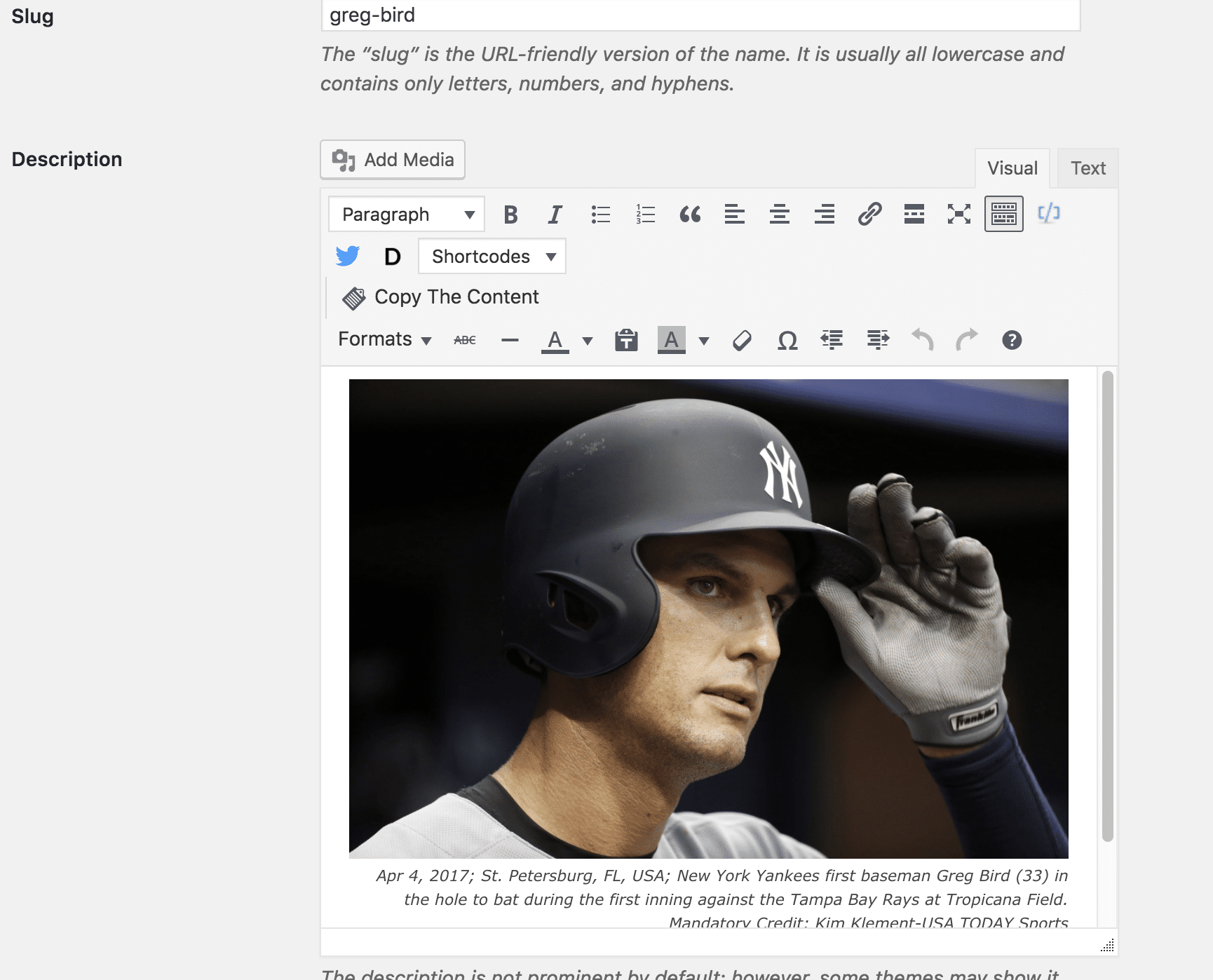
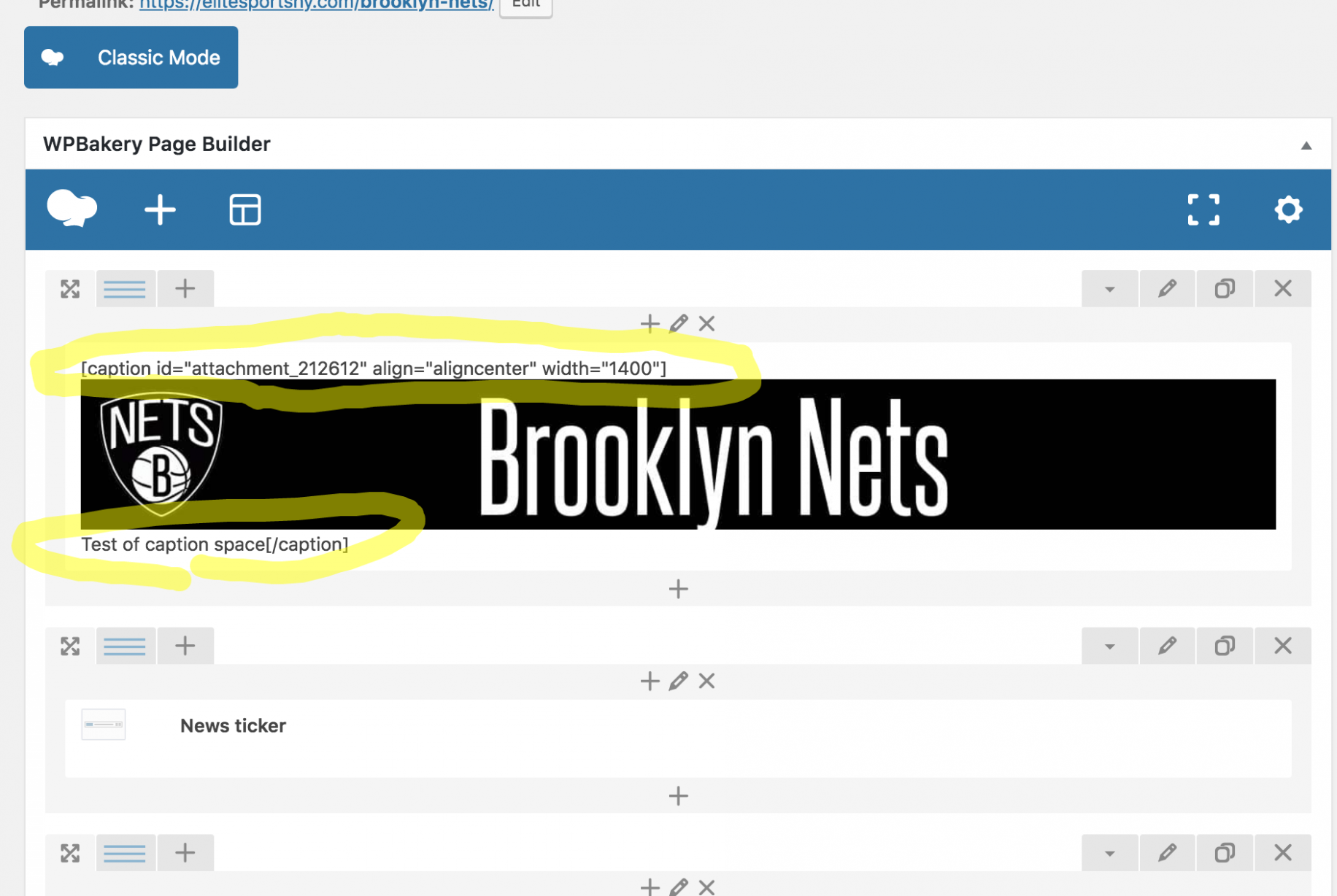
So the backend of the tag and post shows fine, yet the Tag shows up completely screwed up. The backend of the Page is messed up, yet shows up on the front end as perfectly fine. It feels like a Visual Composer issue, but I’ve always used the regular version coming with the theme. (Just updated it tonight out of desperation in looking to fix the issue.)
Definitely need help here. Thanks.
 simchris
 Also note the WP update today (Feb 6) fixes some issues with Customizer.
 jigstuff
 Hi Simion C,
Thank you for the reply. my website is http://www.thewinin.com/
Yes you are right mobile page displays it as simple post content text. my developer said API is integrate properly and problem is not there.
Please if you or tagdiv developer can help me and tell me what is the issue than i will ask me developer to look into that.
Btw any update on this news https://tagdiv.com/amp-newspaper-theme/
love to get amp support and would defnately pay extra to get it.
Anyways thanks once again
simchris PHP 5.6 still works perfectly for WordPress.
PHP 7.1x got huge number of updates this week, so that can also be used.
simchris WordPress 4.9.3 update today fixes a number of WP-specific bugs with PHP 7.2, so good to try using that to see if it fixes some of the problems.
https://wordpress.org/news/2018/02/wordpress-4-9-3-maintenance-release/
 notageek4u
Hi gang! Me again.
I’ve been editing a page with the composer and making it look all nice, and all that jazz; however, whenever I go back into my recently updated & saved page to add another element into it…the code is all gone, and I have go to my WP revisions to copy and paste the code all over again…
Is this normal to keep happening?
It saves it, but when I go back into tagdiv to edit it, all the code is gone.
Help please?
 Jerrad
I am trying to use a plugin called Easy Table of Contents. Easy Table of Contents uses v.4.0.0 of Waypoints jquery. Currently the Visual Composer supplied with Newspaper uses Waypoints v.2.0.2 which was released on Feb 3, 2013. Is it possible to get this updated in a future release of Newspaper?
Thanks,
Jerrad
 baraderoteinforma
Hi,
I’m having problems with your theme. I’ve been using it for more than one year in my site without any issues, but with the last update the site start to overload my server sometimes when I’m trying to edit or create a post (every 3 times of 5 more or less).
I thought that maybe was one of the plugins that I’ve using in the editor, like TinyMCE Advanced, but even deactivating all plugins, sometimes the editor still overload my server. I’ve also disable the minify on Cloudflare and W3 Total Cache, thinking that maybe there was a script failing, and it’s get a little bit better, but still overloading sometimes)
It is very annoying by the way. Can you help me to fix it? If you’ve already identified it and it’s going to be fixed on the next update, please tell me when do you expect to have it ready.
Thanks,
Regards.
 bz
bzHello,
On Saturday I applied the latest update to version 8.6. and suddenly all of the mega menus were replaced by regular plain dropdowns.


Would you have any idea what could be causing this behaviour?
Thank you!
 Monokromdesign
Hi
I would like to position the caption inside the featured image in the post (not below as it is now). I followed the instructions in another post (https://forum.tagdiv.com/topic/featured-image-caption-post-style-4) and updated single_template_6 in order to have the caption. Worked, but it places it below the image, not in it.
Hope you can help 🙂
Site is: wefrb.easysite.dk
See this screenshot: https://www.dropbox.com/s/a9cr4f3x47uwcsg/Sk%C3%A6rmbillede-2018-02-05-kl.-14.17.33.png?dl=0
Catalin Hello,
Thanks for this but at the moment there’s no another way of this. We will consider this regard and if our developer will found another workaround we will implement it in future updates.
Thanks for the message!
 Sportguide
 The problem that obviously exist is the conflict between your theme and tagdiv composer and visual composer. Each time I install and activate tagdiv composer the pages that are created with visual composer are damaged. Or I update visual composer the pages are damaged as well and the links of these pages are gone. The problem does not appear with the new Elementor page builder. Do you have any idea of the problems and is there any reasonable solution? If not it remains just to give up on visual composer or on your theme.
Simion C. Hi,
@jOOc Usually hosting providers offer the possibility to change the PHP version of the server. You could ask them to lower the version and use the theme.
We are currently working to provide 7.2 support, the theme will receive an update as soon as the tasks are completed. I could not give you an exact date for this, however it should not be long now.
Thank you!
 jlcougy
After multiple attempts*, I can’t solve the problem of the search icon position, always on a second line.
So I go back to version 8.2
Is there a real solution?
Thanks
JL Cougy (jl.cougy@gmail.com)
* 8.6 Update via FTP – Save in the theme panel to regenerate the CSS cache of the theme – Clear Cache
Site : https://www.enrevenantdelexpo.com/
Header Style 3
Custom CSS :
.td-header-header {
background-image: url(“https://www.enrevenantdelexpo.com/wp-content/uploads/2018/01/En-revenant-de-lexpo_Blog-2018.jpg”
);
background-repeat: no-repeat;
}
.td-header-menu-wrap-full{
height:30px!important;
}
#td-header-menu{
min-height: 30px!important;
}
.sf-menu > li > a{
line-height: 30px!important;
}
.td-main-menu-logo{
height:30px!important;
}
.home .td-main-page-wrap{
padding-top:0!important
}
.td-header-gradient:before{
display:none!important
}
Catalin Hello Stinus V,
Yes, after each update, all of your additional customizations will be lost if you will never make a full backup to your database. Notice that when the theme is updated, all the actual code of the theme will be overwritten by the new update. In this case, if you want that your additional customization to be there after theme update, you should use the child theme and add there all of these changes.
Thanks for your understanding!


