- NewsmagHow to update a plugin
- NewsmagHow to update the theme
- NewsmagHow to update the WPBakery plugin
- NewsmagCategory templates
- NewsmagWhat’s included in Newsmag theme package
- NewsmagAjax view count
- NewsmagSmart Lists
- NewsmagFeatured images
- NewsmagFeatured image or video
- NewsmagModal window
- NewsmagtagDiv slider gallery
- NewsmagVideo playlist
 thuriumar
 Thank you for reply! I will wait for update.
 Flyer87
  ryderspyder
 Thanks Simion for your reply. So I’m trying to edit and delete rows to see if that solves the problem, but it won’t even allow me to delete rows now. It says my WPBakery Visual Composer needs updated, but it wants to charge me for that. Do you think that is the problem?
 eklisiarh
Hi, I am using HTML widgets for PHP and this worked as a charm so far but since the last Newsletter Update it shows me errors in my code and it doesn’t let me save the widget.
Is there a way to disable this in Newspaper Theme pls? I know my code is ok!
 pistachoverde
 hi!
it´s an error with the revslider and the new update 8.2 (over wp 4.9) if you “unplug” the revslider the “tagdiv composer” it will works fine again.
with wp 4.8.3, latest version of RSlider (5.4.6.3.1) and 8.1.2 TG NP version works fine.
please fix it!
😉
-
This reply was modified 8 years by
pistachoverde.
-
This reply was modified 8 years by
-
This reply was modified 8 years by
 Bogdan B.
 If you have been the victim of an attack, update your theme immediately to the latest version and use one of these guides:
http://securepress.org/tutorial-how-to-remove-malware.php
https://wordpress.org/support/topic/malware-removal
https://www.wordfence.com/docs/how-to-clean-a-hacked-wordpress-site-using-wordfence/
Here is a link for best WordPress security practices:
https://forum.tagdiv.com/topic/tutorial-good-basic-security-practices/
Thank you!
Bogdan B. Please update your theme to the latest version as the fixes for the latest version are already implemented: https://forum.tagdiv.com/how-to-update-the-theme-2/
Thank you!
Bogdan B. Yes we confirm that you have to update the theme to make the weather widget work again.
The site changed their code. We had to change our code accordingly.
Thank you!
Bogdan B. Hello,
In order to make a theme update hassle free, you should first know what the new update brings most important. If you update to newspaper 8, please note there is a new page builder that will activate automatically and it will create layout issues together with visual composer. You have been usign VC up to this point so now you have a choice.
1. Either continue using VC
2. switch to the new page builder and re-create your pages with it from scratch as it is a must
visual composer will still receive updates but we will not be adding any new elements to it from now on. We will develop our theme based on the tagdiv composer.
Only use 1 page builder though and disable the other no matter the choice made.
Once this is out of the way, you can simply use these guides:
https://forum.tagdiv.com/how-to-update-the-theme-2/
https://forum.tagdiv.com/how-to-update-visual-composer-plugin/
Thank you!
Bogdan B. Hello,
Automatic updates are a bad idea. You should never allow automatic updates for anything. Not wordpress, not plugins and not themes. You should have the chance to create a back-up before any update. The speedbooster plugin has nothing to do with the wp automatic updates however. It is complicated to install as it’s meant for advanced users. Try to make other implementation first before you get to the speedbooster plugin: https://forum.tagdiv.com/how-to-make-the-site-faster/
Thank you!
Bogdan B. Hello,
Unfortunately a child theme is not update proof. A child theme is available in the main theme package. You have to download the full theme package from envato, not just the theme zip file. Please read this guide in order to implement a child theme if you want to make code customization to the theme: https://forum.tagdiv.com/the-child-theme-support-tutorial/
Thank you!
 trebol30
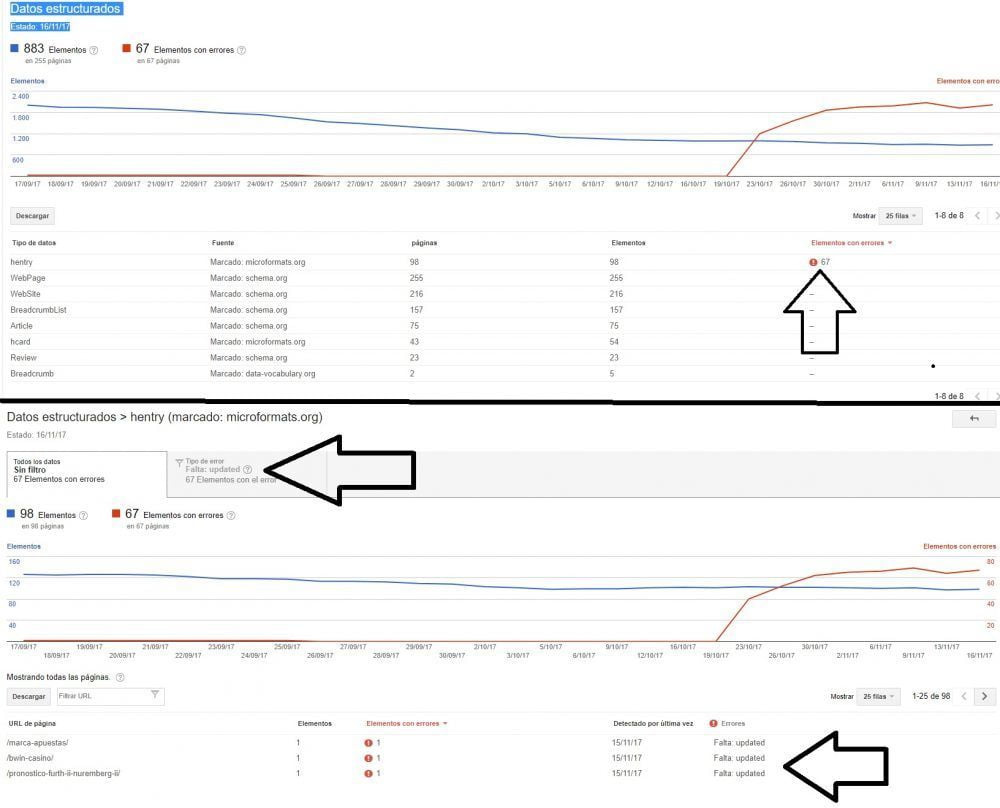
Hello, since the day 19/11/2017 (a month ago now) the errors in the structured data began to increase.
More or less since I did the last update of the topic to 8.1.
In the 67 errors the failure is in hentry »absence updated.
Can you help me solve this problem with code?
SEE » http://www.trebol-apuestas.com/wp-content/uploads/2017/11/errores.jpg
 haqemcom
Why my blog date not update ? my blog always show 17, november 2017? and instagram not update!!
if i login the date is show a currently date and same with footer insta! what problem ? not login blog show 17,november check https://haqem.my
Bogdan B. Hello,
There seems to be an array that is not defined in the code
https://www.screencast.com/t/ts1jNEt0msK
$td_tgm_theme_plugin[‘source’] is not defined
I have added this to our bug list for future updates and will pass this information on to the development team.
Sorry for the inconvenience.
 RuthEBurke
 Hi Simon
Thanks for your reply. I have followed your instructions, got a token, entered it and have the Envato Market plugin. This shows that an update is available for Newspaper – has the orange bar above the theme name with the update icon to click…but when I click it absolutely nothing happens. Zip. Not sure what to do next. Where on earth do I go from there if it doesn’t update when I click the Udate Available link?
Ruth
Bogdan B. Hello,
Please check the fonts section. Did you change anything? Did you make any updates before the issue happened? what has changed between the time it was working fine and now?
Thanks.
 lisek
lisek Not really. I think it could be implemented as default as next update 🙂 Ithelps people to read pages when they are offline (very usefull). Of course – I can install third party plugin but better is to have as little as possible, right? 🙂 That why I’m asking.
 Catalin
 Hello Stinus V,
Please do not mislead the people with this wrong information. You have to update the theme with the latest version of it which is Newspaper 8.2 because in that update version this bug has been fixed. Update it via FTP way. After this updating, if the problem is still there, please send us an email at contact@tagdiv.com with your log-in information (wp-admin) so we can further inspect it closer your setup page.
Thanks for the message!
Catalin Hello tbrmedia,
You have to update the theme with the latest version of it which is Newspaper 8.2 because in that update version this bug has been fixed. Update it via FTP way.
Thanks for the message!
 tbrmedia
Hi,
My team is also experiencing the problem.
I tried the below recommended edit to the style sheet and it did not fix the issue. Do you have any other suggestions while we wait for the theme update?
Thanks so much! -Rob
>>>>>>>>>>>>>>>>>>>>>>>
Simion C. #202086
Nov 17, 2017 at 1:52 pm
Hi,
We are aware of the issue with the image captions, after the WordPress update. We will release a theme update that will fix the issue as soon as possible. Sorry for any inconvenience caused.
If you would like to try and resolve the issue, try editing the theme stylesheet here
– https://www.screencast.com/t/l1hDDIy7
Remove the !important tag from the code
– https://www.screencast.com/t/7LTyVdUR
Or wait for the theme update.
Thanks
 zirzy
zirzyHi,
When is the latest Revolution Slider version (5.4.6.3.1) included in Newspaper update package? Or do i have to purchase it separately?
 wojo
wojoHello, since the last update I can, if I go on the start page on edit go nothing more.
eg: I would like to insert block 7 or a picture gallery does not work. you can not save it and the site will not keep it.
What can I do?
 celhil
 I have tried to regenerate the thumbnails. But it didn’t work for me too.
Its strange: I updated to WordPress 4.9 (with Newsmag 4.1) and the images will be displayed in full size. After downgrading back to WordPress 4.8.2 the images are also displayed in full size. But after change the theme to classic and then back to Newsmag the images are okay.
Now, my problem is the same as before: I cannot update to WordPress 4.9. Newsmag 4.1 and 4.2 didn’t work for me.
Any help is welcome.
Catalin Hello Pradeep Augustine,
Please keep in mind that we do not have any bad reports in this case and notice that all of the bugs fixes are solved in new theme update which is Newspaper 8.2. YOur problems seem to be only from your end because we have not seen anything like this before, sorry!
Check your plugins list and if you are using some untested plugins, try to disable all of them and check the results again.
Thanks for your understanding!
 adarsh
Hello, this is Adarsh.
Will you please resolve the issue, which I was facing.
the website tsrtconlinebus.com is redirecting to another website.
I updated the theme to the latest version of the activation code. But no use, if I disable the theme. than it working fine.