
- NewsmagHow to update a plugin
- NewspaperHow to update a plugin
- NewsmagHow to update the theme
- NewsmagHow to update the WPBakery plugin
- NewspaperHow to update the WPBakery Page Builder plugin
- NewspaperHow to Update the Newspaper Theme
- Apitd_api_top_bar_template::update_key
- Apitd_api_top_bar_template::update
- Apitd_api_single_template::update_key
- Apitd_api_single_template::update
- Apitd_api_footer_template::update_key
- Apitd_api_footer_template::update
- Apitd_api_smart_list::update_key
- Apitd_api_smart_list::update
- Apitd_api_thumb::update_key
- Apitd_api_thumb::update
- Apitd_api_category_top_posts_style::update_key
- Apitd_api_category_top_posts_style::update
- Apitd_api_category_template::update_key
- Apitd_api_category_template::update
 peppecastelli
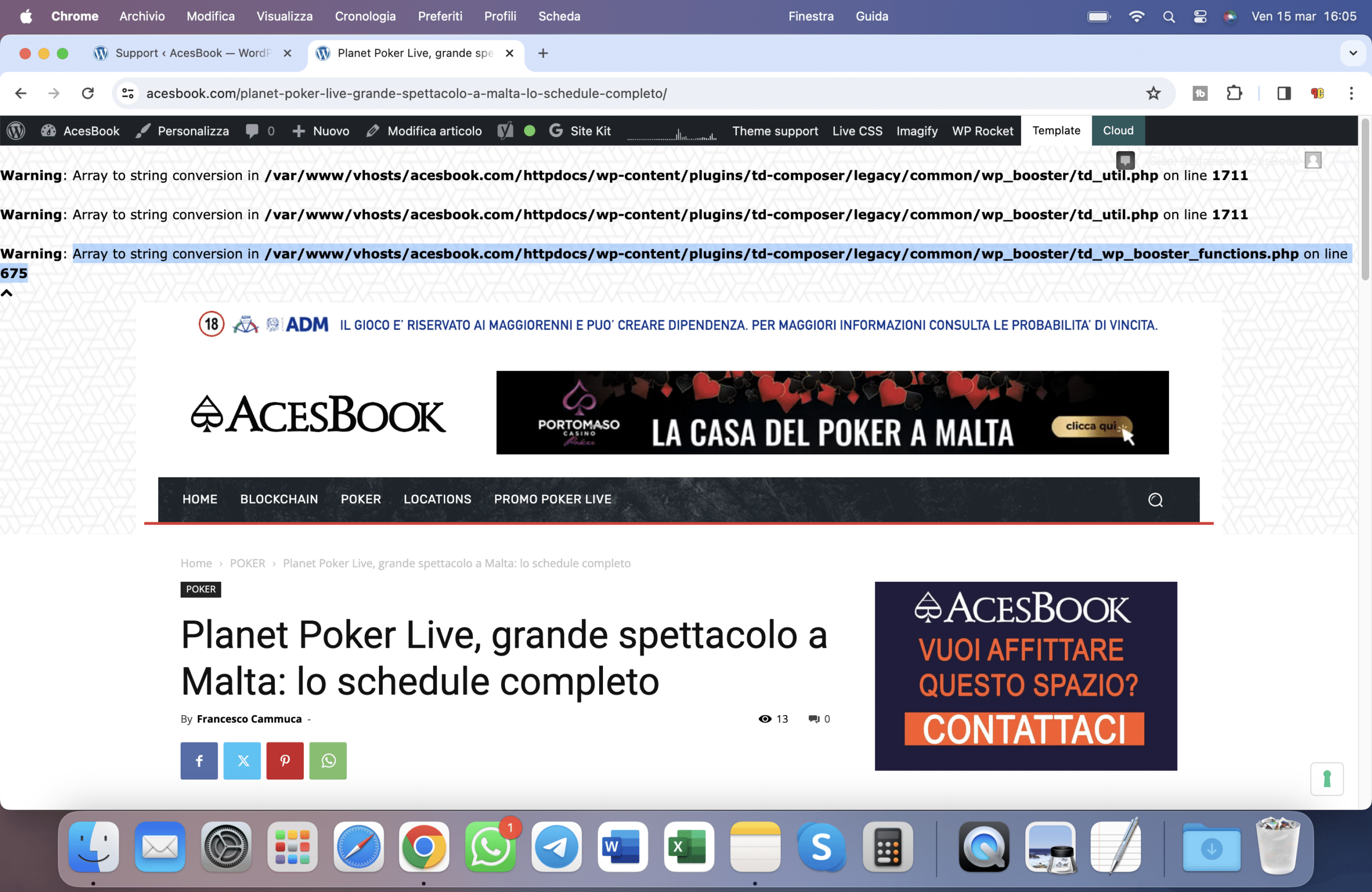
Good morning, after updating to version 12.6.5 I get this error.
The site is http://www.acesbook.com on any post there is this error.
 Anamaria
 Hi,
If you want, you can contact our custom work team here, and they can help you update the theme safely and clear the files: https://tagdiv.com/premium-customization-services/
Thank you!
 Stefan
Images not showing when sharing articles to Facebook after latest update. Only a white square with the picture name. Have tried Newspapers own share function + other share plugins. Same problem.
Screenshot
https://ibb.co/3p1mWfQ
 dra_proba
I just did the update. After the update, an arrow appeared in the upper left corner (up arrow, no link, on a white background). What happened? https://im.ge/i/Screenshot-1S.Rjy3v1
 vanessazlobich
 Ok, I managed to update theme and reinstall plugins, but website design got wrecked… And now mainpage is ruined, is there a way to fix it?
Anamaria Hi,
You should download the latest version of it from Theme Forest account and download it.
Please check this guide to update the theme manually https://forum.tagdiv.com/how-to-update-the-theme-2/
Thank you!
vanessazlobich Is there a tutorial on how to update my theme? I couldn’t find for some reason…
Also, I just discovered that if I comment this code in plugin td-composer:
echo ' <style id="tdw-css-placeholder">' . $css_buffer . '</style>';
this file located here /td-composer/css-live/css-live.php
Virus stops opening popups.
-
This reply was modified 2 years by
vanessazlobich.
Anamaria Hi,
So, in order to no longer have malware, you need to update the theme. From what I see, you have 9.8, which is a very old version and is likely vulnerable to new technologies, which is why I suggested updating the theme and following all the steps above. If you’re not sure how to do it, our custom work team can help you with both theme updates and malware file cleanup https://tagdiv.com/submit-a-request/
Thank you!
Anamaria Hi,
Please update the theme to the latest version 12.6.5.
This malware infects not only theme files but also WordPress files or other plugin files. This malware was not detected only in our theme but also in many other themes and plugins https://www.bleepingcomputer.com/news/security/massive-balada-injector-campaign-attacking-wordpress-sites-since-2017 / -> https://cybernews.com/security/wordpress-malware-epidemic-balada-injector/ -> https://www.geoedge.com/balda-injectors-2-0-evading-detection-gaining-persistence /
You could consider reinstalling the WordPress version, reinstalling the theme, and checking for this plugin wp-zexit.php. It might be wise to inspect via FTP if it doesn’t appear in the WordPress -> Plugins. Additionally, using Wordfence to scan the website and remove unknown users would be prudent.
Thank you!
 freddyvill
 i have the 12.6.5
In the previous version the problem started with this continuous update
 muhammadumair
Dear Support Team,
I hope this message finds you well. We are currently encountering two critical issues with our website: https://www.techrepublish.com/ that are significantly impacting user experience: the category section posts are not displaying, and the mobile performance is unacceptably slow.
Category Section Posts Not Showing:

Users are unable to view posts within specific categories on our website. Despite efforts to troubleshoot on our end, including database query optimization and CMS updates, the issue persists. We suspect there may be a theme-related component causing this problem and would appreciate your expertise in resolving it promptly.
Mobile Performance Issue:

Our website’s performance on mobile devices has been notably sluggish, leading to increased bounce rates and decreased user engagement. This slowdown is detrimental to our site’s effectiveness and user satisfaction. We request your assistance in identifying and addressing any theme-related factors contributing to this performance degradation.
Given the critical nature of these issues, we urgently seek your support and expertise in resolving them. Any guidance, updates, or solutions you can provide would be immensely valuable in restoring the functionality and performance of our website.
If additional information or access to our website backend is required for troubleshooting purposes, please do not hesitate to reach out. Our team is fully committed to collaborating with you to achieve a swift and effective resolution.
Thank you for your prompt attention to these matters. We eagerly await your assistance and appreciate your dedication to ensuring the optimal functioning of our website.
Sincerely,
[Umair]
[umairahmadtechnew@gmail.com]
Anamaria Hi,
The updates of the theme our lifetime. Who said the update is not for a lifetime? Only support expires. If you are referring to this https://i.imgur.com/8SIwypM.png, then this is not required.
Thank you!
 ZonaNorteDiario
 Yeap it fixed it. Please be more carefull before launching the updates, even been something easy to fix, the update shouldn’t have broke anything.
 norbiQue
Hi,
You send an email with a promotion for a template at $39
In addition, the description says “Free lifetime updates”.
then why do I get a message when I order that I have to pay extra for an upgrade for another 6 months?
thank you
norbert a.
 Amazos
How do I get news and updates from other websites to automatically post on my news blog?
 ztatic
Hello,
After last update off theme I can see this error on site
Warning: Array to string conversion in /home/casopismi/public_html/wp-content/plugins/td-composer/legacy/common/wp_booster/td_util.php on line 1711
I have update all , deactivate and activate plugins but same thing.
Regards
 Bettina
 Hello!
Please update the theme and plugins to the latest version.
For every update, we always recommend the following:
-> First of all, please make sure you have a backup.
-> Please deactivate all the non-tested plugins with our theme before updating.
-> Update WordPress, PHP, the theme, and plugins to the latest version: https://forum.tagdiv.com/how-to-update-the-theme-2/.
-> Check all these requirements for the theme: https://forum.tagdiv.com/requirements-for-newspaper/
Thank you!
Anamaria Hi,
If you want to update the theme, you should download the latest version of it from Theme Forest account and download it.
I recommend that you update the theme manually https://forum.tagdiv.com/how-to-update-the-theme-2/ via FTP/cPanel/File Manager, also if possible disable extra plugins during the theme update to avoid any problems that may arise and make sure that you have activated the tagDiv Standard pack plugin to keep the website’s look. You can try to update the theme on a staging website.
After you update the theme, you need to update the theme plugins too.
In the worst cases, the settings in the theme panel may be lost (there have been isolated cases), in these cases, after the theme plugins that were previously used are activated, you will have to use a backup for the theme panel -> https://forum.tagdiv.com/import-export-theme-settings/
If you want, you can contact our custom work team here, and they can help you update the theme safely: https://tagdiv.com/premium-customization-services/
Thank you!
Anamaria Hello,
You have the mobile theme plugin activated; please disable it.
Using our theme, you can choose from 3 mobile versions
-> mobile responsive => https://www.screencast.com/t/oJ2ShOp47
-> mobile theme plugin => https://forum.tagdiv.com/the-mobile-theme/
-> mobile page => https://tagdiv.com/newspaper-10-3-7-update-brings-customizable-and-fast-mobile-pages/ The option that you need to use.
Suppose you created the mobile pages with tagDiv Composer. In that case, when you install the Mobile Theme plugin, your pages will be overwritten by the plugin (the mobile theme comes with its templates for page, post, category, etc, so your current templates from the desktop theme will get converted to the mobile theme layout, the page content is made without builders in mobile editor => https://www.screencast.com/t/xbgZG8kH also, the options that are provided to edit the mobile theme version are limited (this keeps the things simple)).
This is a video about Responsive Newspaper Theme, AMP & Mobile Theme, Mobile Pages & Templates -> https://www.youtube.com/watch?v=SpGkOnJeNZY.
So, the mobile responsive is what you see when that you select the viewport on phone => https://www.screencast.com/t/matV17hH, so some settings may apply for each viewport(where is the border blue), and others are not(where the border is black).
The mobile page has the mobile templates from Cloud Library => https://www.screencast.com/t/YCcZ8rL8
The Mobile responsive version of the theme and the mobile page editor can be edit with tagDiv Composer, the mobile theme plugin cannot.
For example, you can have the mobile theme plugin activated and use the mobile page/mobile responsive version for the homepage/pages, but for the categories pages/404 page, you can’t use the mobile page/mobile responsive version if you have the mobile theme plugin activated.
So, if you want to design the pages with tagDiv Composer, you can use the mobile page or mobile responsive version.
Also, please check this topic https://forum.tagdiv.com/topic/amp-pages-not-working-well-with-this-theme/
Thank you!
 ML
MLHello,
I noticed on all my NewsPaper Themed websites (7 websites with different structures), that since Google update on their Core Web Vitals Assessment, the status on Mobile is Failed because of Interaction to Next Paint (INP). On Desktop it’s fined.
I’m using WP Rocket to make sure everything is optimized but it looks like it’s not enough to fix the issue.
I’m sure your team is looking into that, and maybe you have an estimated time of update to fix this ?
Please don’t answer anything like “have a look at those links to optimize speed”, nor write me “speed is not part of our assistance”.
Thanks
ZonaNorteDiario Yeah, it fixed after doing that, but it shouldnt be happening, the update should work properly.
 gocciolo
 How to update my theme whitout changing anything on my website?
When tried to update it I lost anything. Can I simply change some files and update with the new one? My website is actually offline for a TagDiv malware problem.
 mnasir129
 hi Anamaria,
Thanks for your response. It was indeed a coincidence. My hosting provider changed my .htaccess file for some reason and it has been reverted back. And it happened exactly at the same time when I updated the theme.
 benefieldcs
I used to have multiple post template options when creating a post. However, after updating the theme to 12.6.5, most of these options are now missing. Is there any way to get them back?
 ozanguner
 Thank you for the update.
A problem has occurred. After the update was completed, the system became faster. However, an icon appeared in the top left corner. Afterwards, I was unable to see the pictures on the administrator page on the dashboard side.
Interestingly, while I can see the images in the tagdiv editor, when I save and want to see them, the images do not appear. But an ordinary participant can access all the images.
I removed the icon with a script. I will send you the screenshots.. I hope we can find a solution..
The script I wrote is like this.
body div .td-icon-menu-up{
display:none;
I am sending you two screenshots. Unfortunately, I cannot see the images in the dashboard area after the update. But they are visible in the TAGDIV COMPOSER area.

