- NewsmagHow to update a plugin
- NewspaperHow to update a plugin
- NewsmagHow to update the theme
- NewsmagHow to update the WPBakery plugin
- NewspaperHow to update the WPBakery Page Builder plugin
- NewspaperHow to Update the Newspaper Theme
- Apitd_api_top_bar_template::update_key
- Apitd_api_top_bar_template::update
- Apitd_api_single_template::update_key
- Apitd_api_single_template::update
- Apitd_api_footer_template::update_key
- Apitd_api_footer_template::update
- Apitd_api_smart_list::update_key
- Apitd_api_smart_list::update
- Apitd_api_thumb::update_key
- Apitd_api_thumb::update
- Apitd_api_category_top_posts_style::update_key
- Apitd_api_category_top_posts_style::update
- Apitd_api_category_template::update_key
- Apitd_api_category_template::update
 Simion C.
 Hi,
Maybe your install got infected somehow. You could try a theme reinstall by FTP
– https://forum.tagdiv.com/install-via-ftp/
And activate only the plugins that are provided with the theme. Then scan with the tool again and see if it still detects malware.
This is an extensive security tutorial that may be useful as well
– https://forum.tagdiv.com/topic/tutorial-good-basic-security-practices/
However you should consider updating the theme and plugins to the latest version, if possible
– https://forum.tagdiv.com/how-to-update-the-theme-2/
Thanks
 smhinspire
After updating to Newsmag 4 the menus on mobil devices (phones and tablets) do not show correctly.
Opening the website shows blank page above the fold, further down the complete list of the menu items then only further down shows the website content.
What might be the problem here?
please check: https://pinkycloud.com
Please advice.
Thank you
 nitrofox
Version 8.1, Update today.
Today I put the mobile theme in my site, but the menus and search do not work, clicking Add a # in address.
I created unique menus just for the mobile tab menus in wordpress and not put links, just added the categories menu ( https://upimagens.com/di/I6KT/mobile_menu.jpg ).
 steve83
Apologies for starting a new thread on this. I’m not getting anywhere with my previous thread and need to summarise everything in hope of a solution.
5 days ago I upgraded Newspaper theme to 8.1. All my pages were created with visual composer.
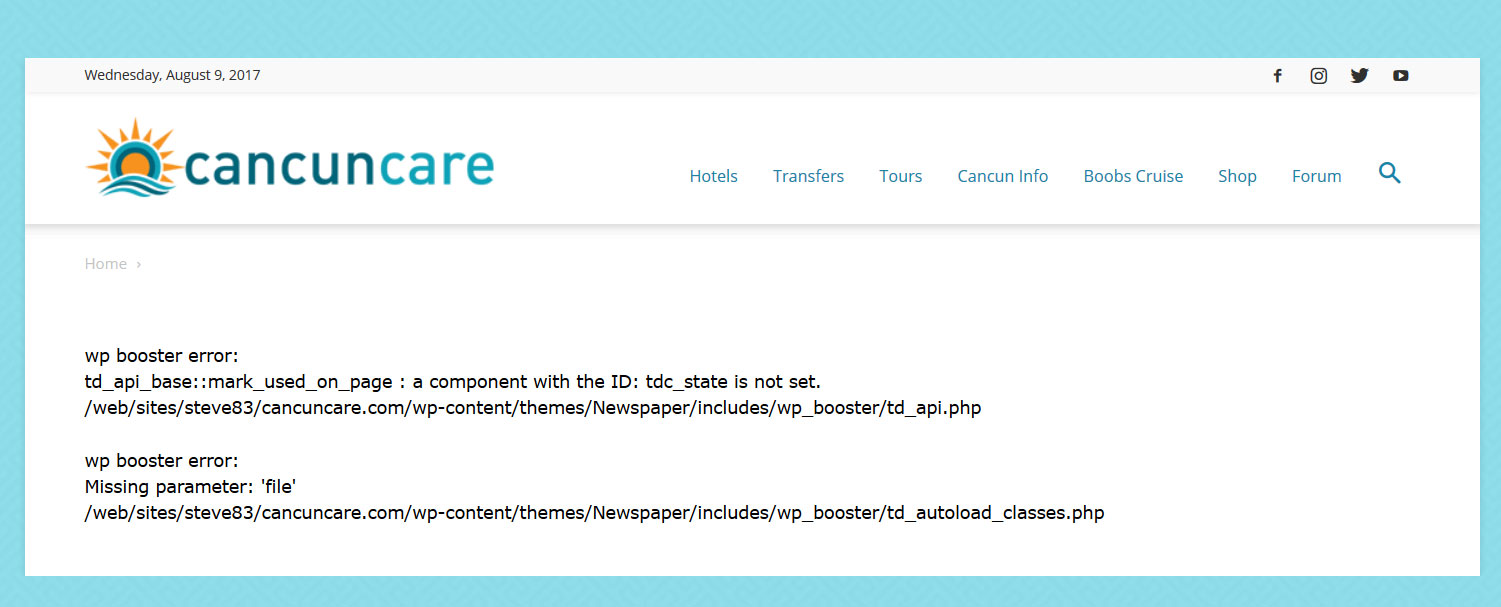
With tagdiv composer deactivated and visual composer activated my pages give the following error.
wp booster error:
td_api_base::mark_used_on_page : a component with the ID: tdc_state is not set.
/web/sites/steve83/cancuncare.com/wp-content/themes/Newspaper/includes/wp_booster/td_api.php

wp booster error:
Missing parameter: 'file'
/web/sites/steve83/cancuncare.com/wp-content/themes/Newspaper/includes/wp_booster/td_autoload_classes.php
(screenshot http://www.cancuncare.com/screenshot/homepage-with-vc.jpg)
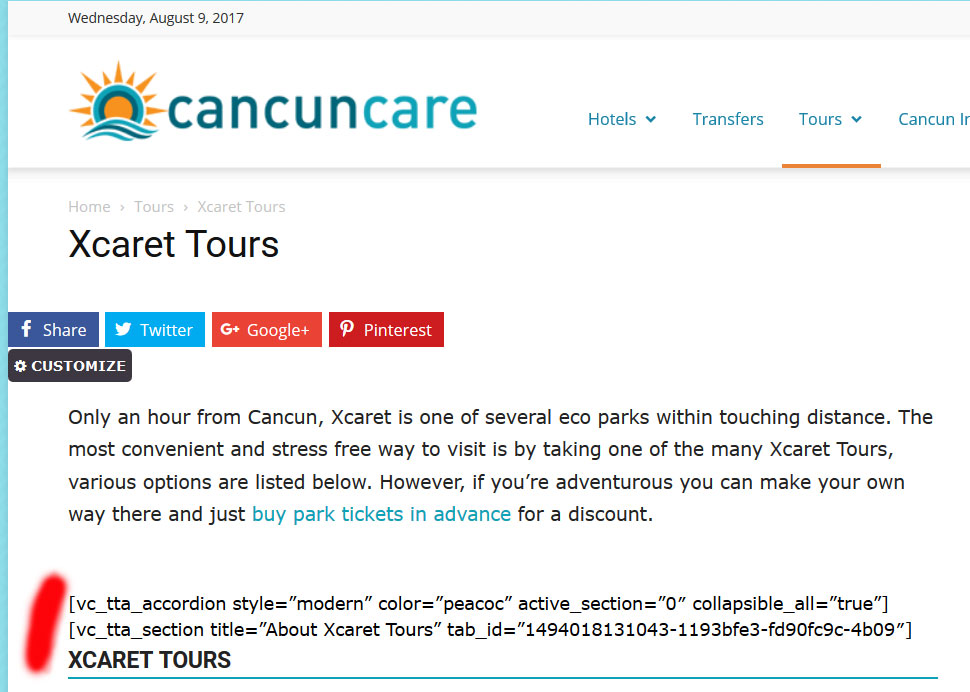
With tagdiv composer activated and visual composer deactivated many elements do not show at all, instead displaying the visual composer code.
(screenshot http://www.cancuncare.com/screenshot/page-with-tc.jpg)
The only way I have found to get the pages to show somewhat correctly is to install and activate both tagdiv composer and visual composer, which when I do so results in some page elements rendering incorrectly (images showing at an incorrect size and sidebars appearing below content). Re-making these pages from scratch results in the exact same problems. I understand having both tagdiv and visual composer enabled is not good. But disabling tagdiv results in the wp-booster error, and disabling visual composer results in elements not displaying.
I have been going round in circles for the last 5 days and am no further on than when I started. I really need a proper solution to this, the latest Newspaper update (8.1) broke my site and I need to get it fixed.
I am happy to provide wordpress login and ftp details if you could advise me on a secure way to do this.
steve83 All was working fine before the latest update. It was the update that broke things.
As mentioned, following the update the pages showed a wp booster error and did not render at all. Activating tagdiv composer allowed the page to show but the strange rendering of pages explained above occurred. At no time were any pages created with tagdiv composer, it was only installed for the first time with the latest update.
I then reinstalled Visual composer via ftp, deactivated tagdiv composer and the pages rendered again but still had the weird display errors. I then removed tagdiv composer and wp supercache. I reinstalled the whole theme via ftp (minus tagdiv composer) but the problem continues.
I guess the only way to fix these issues are to build all affected pages from scratch, at least 20 pages around 20 hrs of work I didn’t anticipate 🙁
-
This reply was modified 9 years by
steve83.
 simchris
 For those who got lost from above:
a) how to scan your site with free Securi site scan — may not catch everything, but good place to start:
https://sitecheck.sucuri.net/
b) WordPress offical docs (codex)
— on “security hardening WordPress”
https://codex.wordpress.org/Hardening_WordPress
–> includes suggestions for changes to .htaccess
–> stop php execution in uploads folder
–> disable XMLRPC
–> edits to wp-config.php
: secure the file
: disable core file editing from WP panel
c) Official WordPress security updates log
https://wordpress.org/news/category/security/
d) WPscan WordPress vulnerability log
https://wpvulndb.com/
e} Security Plugins
While there are many to choose from, an essential one we use here:
* Limit Login Attempts
https://wordpress.org/plugins/wp-limit-login-attempts/
You should be checking these — hacker sure are !!
 generalsynod
Hello
On my staging site I updated Newspaper to 8.1 I have noticed an issue with the visibility of the search bar.
On production, you click the search icon, the search box appears, you type, and then hit search to go to the result page.
On the staging site, you click on the search icon, the search box appears. As you attempt to type in your search term the box slips down and dissapears.
Caches are cleared.
Production 8.0: http://www.anglicanjournal.com
Staging 8.1: http://www.staging3.anglicanjournal.com/
Thanks, Brian
 najarfermin
 Nop, it wasn’t that. It was really some update. I checked the final html source code and it was not generated completely.
Anyways, I found a backup copy, I reverted the online site and the problem was fixed. Next time I will made the update on a local site to test it before doing it online.
 infinitybgn
 Hi Catalin
we have updated the theme but were having some issues.
There were some conflicts between using our child theme for the old version with the new parent theme
We have the parent theme active now and have pasted the css into Appearance > Customise > Custom CSS. This has resolved all of our issues.
Thank you for your support and we will come back here if we need further assistance.
ps the script traffictrade.life was getting injected into our header ad and directing users to malicious sites. Hopefully the new theme prevents this
 Catalin
 Hi,
Please note that the theme has to be updated along with WordPress and plugins. Old versions can have security breaches and these can be exploited by different tools.
Please make sure you update your theme, plugins, and WordPress and do not stick to old versions.
If you have been the victim of an attack, update your theme immediately to the latest version and use one of these guides:
http://securepress.org/tutorial-how-to-remove-malware.php
https://wordpress.org/support/topic/malware-removal
https://www.wordfence.com/docs/how-to-clean-a-hacked-wordpress-site-using-wordfence/
Here is a link for best WordPress security practices created by Chris S:
https://forum.tagdiv.com/topic/tutorial-good-basic-security-practices/
Thank you!
Catalin Hello akashdeep305,
Please note that the theme has to be updated along with WordPress and plugins. Old versions can have security breaches and these can be exploited by different tools.
The old version from prior to April 2016 had a security issue which was patched in 6.7.2. Similarly, WordPress prior to 4.7 is insecure.
Please make sure you update your theme, plugins, and WordPress and do not stick to old versions.
If you have been the victim of an attack, update your theme immediately to the latest version and use one of these guides:
http://securepress.org/tutorial-how-to-remove-malware.php
https://wordpress.org/support/topic/malware-removal
https://www.wordfence.com/docs/how-to-clean-a-hacked-wordpress-site-using-wordfence/
Here is a link for best WordPress security practices created by Chris S:
https://forum.tagdiv.com/topic/tutorial-good-basic-security-practices/
Thank you!
Catalin Hello danielalonso,
Please note that the theme has to be updated along with WordPress and plugins. Old versions can have security breaches and these can be exploited by different tools.
The old version from prior to April 2016 had a security issue which was patched in 6.7.2. Similarly, WordPress prior to 4.7 is insecure.
Please make sure you update your theme, plugins, and WordPress and do not stick to old versions.
If you have been the victim of an attack, update your theme immediately to the latest version and use one of these guides:
http://securepress.org/tutorial-how-to-remove-malware.php
https://wordpress.org/support/topic/malware-removal
https://www.wordfence.com/docs/how-to-clean-a-hacked-wordpress-site-using-wordfence/
Here is a link for best WordPress security practices created by Chris S:
https://forum.tagdiv.com/topic/tutorial-good-basic-security-practices/
Thank you!
 redshoepaul
Hey everyone, just after installing the theme, no images have been showing up other than the advertisement header. Updated to the newest version and it’s still not working. The theme worked flawlessly on my test server.. Examples below:
https://postimg.org/image/87v2dg46j/
https://postimg.org/image/4qt0ah54b/
https://postimg.org/image/400a4p2qz/
Is this in result to some poor CSS error by default? After trying to upload featured images myself, those still don’t show up either. Could this be a server side issue?
Thanks!
Simion C. Hi,
This is an unusual issue, I have not seen it before. Please update the theme by FTP
– https://forum.tagdiv.com/install-via-ftp/
Then deactivate all other plugins excpet theme plugins and clear any caching installed. If you use a child theme, switch to the main theme. Then check if the problem is still occurring. Please let us know the results.
Thanks
 Bryan Buckles
 Hey Simion,
Thanks for the info!
I clicked the links but it seems there is a new interface than the theme panel that I am used to seeing. I noticed there is a new update to Newspaper. I have read some comments that suggest that there may be some issues with the update as some have stated that after the update of 8 their website had “major problems”. Is that the case? Do I need this update to make the changes that I need on this site? I currently have version 7.4
 Camy
CamyHi – I FTP the ‘Newspaper’ folder up onto the server and it over writes the files etc. as anticipated – hovever the site & admin then goes to a white page… restoring the backup restores the site. Is 4.2 to the latest version too big a jump?
infinitybgnHi
Recently we have been infected by traffic.life getting into our header ad on 2.3.6 so have updated to 4.0
However we are having some complications, nothing major but just a few styling issues.
Firstly the login / signup link in header top: When logged in, the menu is constantly open and clicking doesnt close it.
Also the images for our news articles are not showing. They’re in media library but not showing on posts, they are there I know it because right click > view image shows the picture, its just not being displayed.
The site can be found at http://178.62.81.15, can anyone advise how we go about this? We had everything set up in child theme but I override parent theme with new version and its almost there just a few problems.
Many thanks in advance
Simion C. Hi,
The tagDiv composer does not have tab elements at the moment, only Visual composer has these. This might change in future theme updates, but I could not say for sure when it will happen. The suggestion is already on our list.
Thanks
Simion C. Hi,
Please provide a link to your website so we can inspect it. There were no changes in the latest update made to how the menus are designed and displayed.
It could be a plugin that is causing the problem. Try deactivating all your plugins as a test, and clear all caching. Then check if this has any effect.
Thanks
 viglioh
Yesterday I used the “Text with title”, uploading a trasparent image and changing the background color of the text with title with red. Today (I updated to 8.1), this doesn’t work and shows only the background color. Is like he is covering the image. How can i solve?

Simion C. Hi,
The recommended way of updating or installing Word press themes is by FTP. Please see this guide for more information about this, and also other steps to ensure a smooth update process
– https://forum.tagdiv.com/how-to-update-the-theme-2/
Auto update is also available through the Envato plugin, as mentioned in the guide.
Consider making backups, in case something goes wrong you can simply revert to a previous working website. Hopefully that will not be the case.
Any modifications made to the theme files directly will be lost, but nothing else will be affected (theme panel settings, custom code, posts, pages etc).
Plugins included with the theme can simply be deactivated and removed and then install the new ones from the theme package.
Other plugins that are working with the current version of the theme, may or may not work anymore after an update of the theme or of the plugin. That is the case with all themes and plugins.
If you want to make the switch to the tagDiv composer you will have to recreate the pages with the new editor
– https://forum.tagdiv.com/tagdiv-composer-tutorial/
– https://forum.tagdiv.com/visual-composer-tagdiv-composer-transition/
Some elements that were specific to Visual composer are not available in tagDiv composer. More options and features will be added to this front-end page editor exclusively, in future updates however.
Thanks
Catalin Hello jornalcidade,
Sorry for this but please notice that our theme does not have any such an easy option to achieve this, sorry! All the additional customizations which you want to do and if you want to keep them for the next theme updates should have to be done in the child theme. Try to make this after you read the following documentation here -> https://forum.tagdiv.com/newsmag-child-theme-support/
If you are not aware of the steps which are needed to take in this regard, please consider hiring a freelancer/developer to help you because we cannot provide custom services at the moment, sorry!
Thanks for your understanding!
 bokitchan
Dear
I think i need your help:
1)when i ‘Edit with TD Composer,show Erro

2)The Mobile Theme,I done like this:
https://forum.tagdiv.com/the-mobile-theme/
but,Don’t show the menu,
setp

erro:

thx.
 pavel@earnware.com
 I also uploaded the newest tagdiv composer, and deleted it 3 times to update it – Nothing works!
pavel@earnware.comSo first I updated to 8.0 – re-created all the pages in the new tagdiv composer, from scratch. Now after the update today to 8.1 this happened: 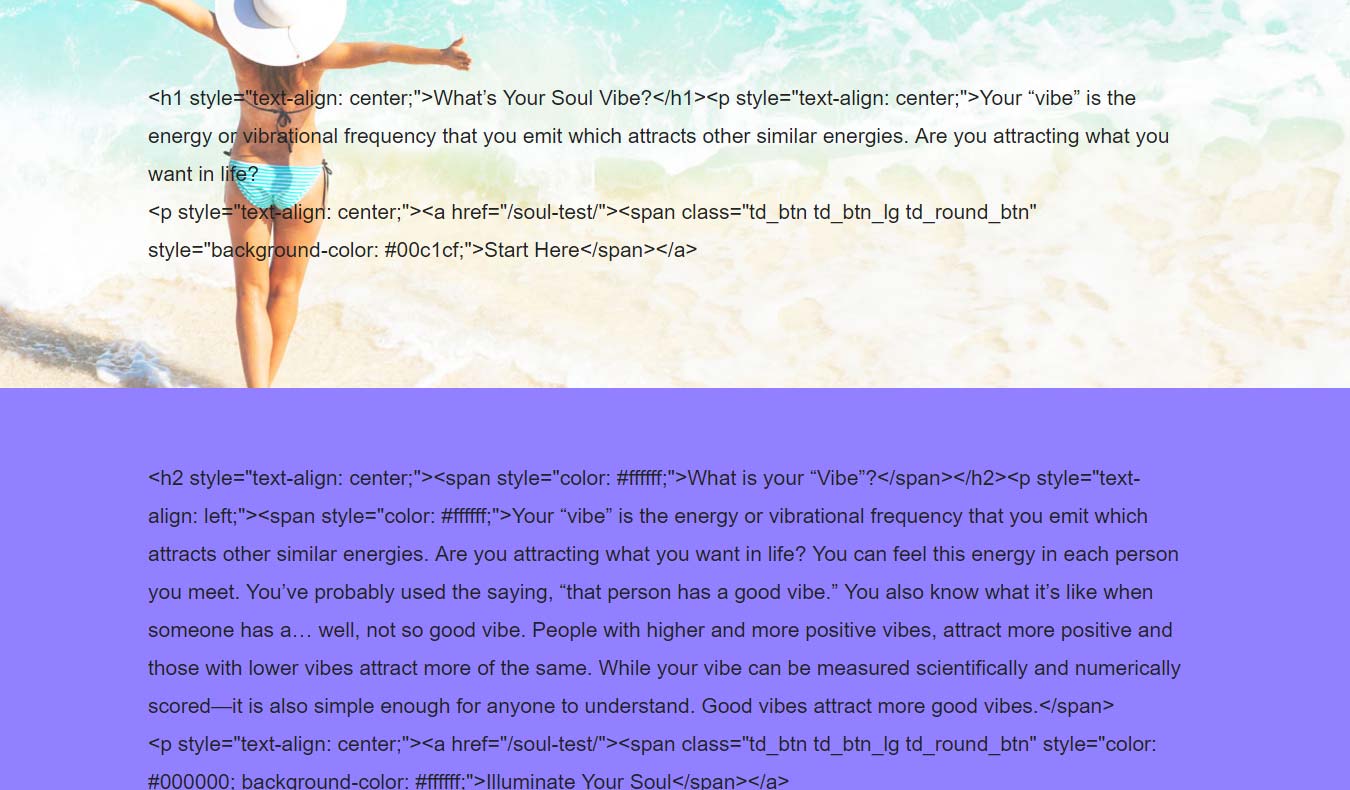 – on many pages getting this thing.
I save the page, close it – and when I come back to it and save it again, it just shows this. Please help..