
- NewsmagHow to update a plugin
- NewsmagHow to update the theme
- NewsmagHow to update the WPBakery plugin
- NewsmagCategory templates
- NewsmagWhat’s included in Newsmag theme package
- NewsmagAjax view count
- NewsmagSmart Lists
- NewsmagFeatured images
- NewsmagFeatured image or video
- NewsmagModal window
- NewsmagtagDiv slider gallery
- NewsmagVideo playlist
 monoazulweb
 Yes, I can use conventional tables. But it would not be simple since I need to update 300 tables weekly, so I use an add-on to VC, which is not compatible with TDC.
 hvtimes
Error when trying to share via Facebook. Everything shares fine except the featured image, so there is no image included in the share. This only became an issue lately. Maybe after your last update?
ERRORS from the facebook debugger that I am getting include:
1. URL requested a HTTP redirect, but it could not be followed.
2. The ‘og:url’ property should be explicitly provided, even if a value can be inferred from other tags.
3. The ‘fb:app_id’ property should be explicitly provided, Specify the app ID so that stories shared to Facebook will be properly attributed to the app. Alternatively, app_id can be set in url when open the share dialog.
4. The parser’s result for this metadata did not match the input metadata. Likely, this was caused by the data being ordered in an unexpected way, multiple values being given for a property only expecting a single value, or property values for a given property being mismatched. Here are the input properties that were not seen in the parsed result: ‘DC.date.issued’
 MikeMcElwee
Hi
I’m busy trying to change all my pages to the Tag Div Composer. However when I try to create a 2/3 + 1/3 column setup I get stacked columns instead
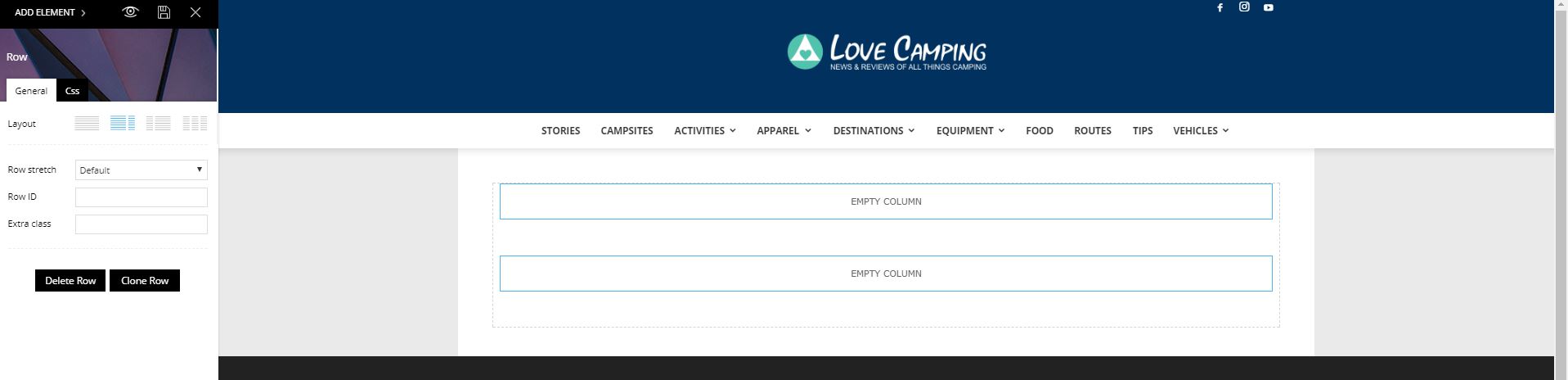
Please advise how to fix this. Obviously I want to update the site use you latest system but being able to create a sidebar is pretty fundamental.
 Edward
 Update the theme via FTP: https://forum.tagdiv.com/how-to-update-the-theme-2/
 sweetylee
Please help, I can not update to the latest version. I have already tried through wordpress
 bformhals
 SO, it definitely is not reading the input variables correctly. I adjusted other items that display in the System Status area and they updated and showed correctly. That vaiable never changes no matter what it is changed to.
Also in System Status it says it has deactivated the TAG DIV Booster, it never deactivates. It says it has a confict with the WP Orion Worker Plugin (Unfortunate)
bformhals  Bogdan B.
 Hello,
Yes, you are correct. You will still have access to unlimited updates for life.
Thanks.
 Simion C.
 Hi,
There is only one inline article ad available in the theme panel, at the moment. This may change in a future update. You could try using an ad inserting plugin that has the option to insert ads in desired places.
That would be easier, since implementing another inline in theme by code modification would not be an easy task.
Thanks
Simion C. Hi,
That is happening becasue the Visual composer plugin has been updates to version 5.2. Updates for this plugin are provided in the theme package, after they have been properly tested. This will ensure a full compatibility between the theme and this plugin.
It is strongly not recommended to update Visual composer directly from the author (option available when you have a purchased version)
– https://forum.tagdiv.com/how-to-update-visual-composer-plugin/
What you can try is to deactivate and delete the current version you are using, and install the one from the theme package.
Thanks
 Mpasho Support
 Please Note i was not performing a theme update, this was a general failure in production, My sent went down and when i logged into the theme panel is when i realized the the theme had reset its configuration settings.
Simion C. Hi,
The Big grids do not have the ajax filter option. Only blocks have that feature. The grids have other differences from blocks as well.
It would not be easy to implement the filter for the grids, and would require code modifications in the theme files (if even possible). You can only use the available filtering options, in the filter section of the grid slide.
Maybe this will change in future updates, and this will be available as an option.
Rows can only be split in a maximum of three columns, with the tagDiv composer. So you could only have three individual sliders on a row.
Thanks
Simion C. Hi,
The author name can be removed from the post page, in the theme panel
– https://www.screencast.com/t/N9q9lYLuM
The comment count can be disabled in the same post settings
– https://www.screencast.com/t/to3uWvBg
Each header style has a recommended logo size
– https://forum.tagdiv.com/logo-favicon/
Header styles 9, 10 and 11 do not have a limit for the header logo size. In these header style you can use any size you want
– https://forum.tagdiv.com/header-styles/
The images and logo displayed should be the same for both versions of the theme. I believe nothing has changed in the theme updates to affect the image quality. Try testing with all plugins disabled on both installs, and upload the same photo. Then check for differences.
Also remove any modifications done through the theme files if there are any (like image filters)
Thanks
 sortofrobot
As I understand, after paying for a licence (59$), I won’t have access to this support forum, but I will be able to download new updates (Newspaper 9, 10… etc) that fix security issues, as long this theme is sold.
Is this correct?
monoazulweb But I have already updated to version 8.
 Eeroshi
Hello guys,
I recently updated my WordPress Theme Newspaper 7 to Newspaper 8, but I really don’t like this new update. For me, Visual Composer is way better than TagDiv Composer, as there are a lot more things we can do and it’s easier to use.
So, is there a way I can get back to Newspaper 7 ?
Thanks,
 semedia
 Hi!
I just bought the theme and just love it 😀
As a lot of people, I’m interested to have the possibility to have a full width version (for posts, pages, and all website)…
I read that now it’s not possible but do you have the intention to create this feature in a next update and if yes, maybe a date?
Thank you in advance for your answer 🙂
Bogdan B. Hello,
Sorry but I cannot say for sure. The theme will ask for an activation if you update to version 8 but that is because we changed the activation system.
The widgets and layout should not be lost when updating. Please use this guide to properly update your theme: https://forum.tagdiv.com/how-to-update-the-theme-2/
Thanks.
Simion C. Hi,
Up to version 7.1 including. Newer PHP versions have not been tested. PHP support may change in future updates.
We have not had any other reports regarding the Big grids specifically. I will pass this informational along to the developer team. If there is anything wrong, it will be rectified as soon as possible.
Thanks
Simion C. Hi,
At the moment there is mo option to add more shortcodes in tagDiv composer. Please note that more options and elements will be added to the tagDiv composer in future updates.
I could not say if something like this will be available in the next update, but it is a possibility in later updates.
Thanks
 Catalin
 Hello Pierresrl,
Sorry for this misunderstanding but please notice that in the Post Type field you should add the post, page or event and not Video as you have entered, sorry! Please check the following screen here -> https://www.screencast.com/t/7IivEyoXA2 We will update this section with this note.
Also, for Featured sorting, notice that you should have some posts which are in the Featured category. Otherwise, you will bring no results.
Thanks for your understanding!
Simion C. Hi,
If you updated the theme, please go to the plugins section and deactivate the tagDiv composer. This is activated by default when the theme is updated to the latest version, or installed for the first time
– https://forum.tagdiv.com/tagdiv-composer-tutorial/
Everything should display like before the update, after that. Having both editors active could lead to some Visual composer elements or settings not functioning properly. Editing Visual composer pages with the tagDiv composer is not recommended as well.
It is always best to make full backups before updating themes, as mentioned here
– https://forum.tagdiv.com/how-to-update-the-theme-2/
This is useful in case something goes wrong.
Thanks
 technoxyz
 also post on homepage or categories sorted by last updated
Simion C. Hi,
It should not be complicated. If the theme version displayed is still the old one, then you did not update the theme fully or properly. The simplest way of updating or installing the theme is by FTP
– https://forum.tagdiv.com/install-via-ftp/
You can also do it with WordPress
– https://forum.tagdiv.com/install-via-wordpress/
You could consider making a backup before if needed, just to be safe.
More information about the theme update process here
– https://forum.tagdiv.com/how-to-update-the-theme-2/
Thanks
Catalin Hello najarfermin,
Please notice that your posts are not showing at full mode because you have a background image setup to your website and the theme will automatically come to boxed mode. If you will remove the background image, the posts will be displayed in normal mode. This is not a problem caused by your update, sorry! Clear all the caches and check the results.
Thanks for the message!
