
- Apitd_api_top_bar_template::update_key
- Apitd_api_top_bar_template::update
- Apitd_api_single_template::update_key
- Apitd_api_single_template::update
- Apitd_api_footer_template::update_key
- Apitd_api_footer_template::update
- Apitd_api_smart_list::update_key
- Apitd_api_smart_list::update
- Apitd_api_thumb::update_key
- Apitd_api_thumb::update
- Apitd_api_category_top_posts_style::update_key
- Apitd_api_category_top_posts_style::update
- Apitd_api_category_template::update_key
- Apitd_api_category_template::update
- Apitd_api_module::update_key
- Apitd_api_module::update
- Apitd_api_block::update_key
- Apitd_api_block::update
- Apitd_api_header_style::update_key
- Apitd_api_header_style::update
 Andrei L.
 Hi
I am not sure what you mean so please provide more specific details about this issue.
Regarding your question about a new option in block’s filter this involve custom work and unfortunately we cannot offer it as we work hard on the development, updates, fixes and support. If you want that my advice is to look for a freelancer from sites like: http://studio.envato.com/ to do it for you.
Thanks!
 Bogdan B.
 Hello,
I understand what you mean now, but the theme does not support it at the moment. Maybe in a future update we will be able to implement such an option. You can use a plugin for that if you want. Something like: https://wordpress.org/plugins/youtube-embed-plus/ but we did not test any YouTube plugins and cannot make a recommendation on which one works best with our theme. Try out a few of them and see how they work.
I hope this helps.
Thank you for your message.
Andrei L. Hi
@Jill try to clear the cache, browser cache also, deactivate all plugins except Visual Composer and test again. If the problem persist try update the theme again and make sure you follow our update guide: https://forum.tagdiv.com/how-to-update-theme/
@jerome try the above suggestion and if the problem persist please provide a link so I can inspect it.
Let me know how it goes!
Thanks!
Bogdan B. Hello manoj.yadav,
Unfortunately, removing the padding on every element in the theme is a tedious job. The theme was built this way in a grid style and the margins and padding changes for different screen sizes.
Doing this task involves a lot of custom work which unfortunately (at the moment) we cannot provide as we work hard on development, updates, fixes and support.
You can hire a developer for this custom job if you wish from sites like http://studio.envato.com/.
Thank you.
 sylcharlestone
 Hi Andrei,
I’ll try all this and will keep you updated.
Thanks much.
John
Bogdan B. Hi,
The updates are provided by us via the theme package, we try to deliver the latest versions with each update. The plugins are located in the ../Newspaper-tf/plugins folder – http://screencast.com/t/2Ri75hQV
In the case of Revolution Slider you have to
1. export your current sliders before you update
2. delete the current plugin and install the latest version
3. import the sliders saved on step one
For more details please check their official documentation – http://www.themepunch.com/faq/update-plugin-packaged-theme/
Revolution Slider and Visual Composer come with bulk license, this means that the plugins can only be distributed with the theme and only we can provide updates for them. You cannot update them directly from their developer.
Thank you!
Bogdan B. Your suggestion was added on our list and we hope in a future update we will be able to implement a switch for the filter box in our theme panel.
Thank you
 MLHS
MLHS I’ve done this and there’s a lot to consider. It’s a bit finicky to get it working 100%, but once you do, I found that the speed is actually better, and not worse. That would have a positive ranking impact.
As far as ranking goes, there needs to be consideration that the http and https are considered two separate domains and, even when you 301 redirect them, you’re losing some link juice off of them. A 301 redirect URL/link maintains about 90% of it’s value, so you’re actually hurting the site from an SEO standpoint.
We organized all of the backlinks to the site and prioritized them from most important to least important. Then we contacted each and every webmaster and asked them to update the links from http to https to minimize the loss.
I don’t expect that https has a huge ranking benefit, and if you don’t fix your backlinks, it’s a negative with regards to SEO. If there’s a tie breaker for two results, the winner goes to the site with https—that’s how we see it.
TL;DL – you’ll get a speed boost (if done correctly), update your backlinks to point to the https version of the site, and the ranking impact is slight and will probably only be in the 1-3% area, in my experience.
 Lucian
 Hi Jeni,
You need to add a redirect for those case when the theme folder: blog/wp-content/themes/Newsmag/ is accessed directly and redirect it to the homepage. Try a redirect plugin for that like: https://wordpress.org/plugins/seo-redirection/ or similar.
You don’t need to repurchase the theme, it’s just an update so log into your themeforest account then go the downloads section, you find the latest theme version there, download it and update it using the update guide.
Let us know how it goes!
Thanks
 Emil G
 Hi,
The theme doesn’t have an option to set a different page for mobiles, sorry. We plan to improve the mobile theme in a future update but for now i cannot say when this will be implemented. Until then you could try one of the solutions presented here – http://screencast.com/t/yQZEYNsJd6L – http://stackoverflow.com/questions/16165211/how-to-set-a-different-static-homepage-for-mobile-version-wordpress
Thank you!
 meathead
Since a recent Newsmag update the Speed Booster in Newsmag system status seems to conflict with all other plugins.
I thought it was just one, but every time I remove a plugin the next one is named as the problem.
It says this in the Newsmag system status:-
Speed Booster – v4.1 – Disabled – incompatible plugin detected: ewww-image-optimizer/ewww-image-optimizer.php
But if I disable ewww-image-optimizer the next plugin is named.
Anyway – even if it solved the issue, I need my plugins!
Any ideas how to fix this?
meathead It seemed to be a conflict with WooCommerce Add-On Pro and/or WP All Import Proand – once these were updated the problem went away.
Thanks for looking into it.
 g10ktk
Hi there,
Why I can’t update Revolution Slider to version 5 from 4.6.93? Also, I can’t see any preloaded examples in the current plugin? RevSlider team suggested to talk to Theme team. Please suggest.
Can you send me some zip file of examples, if any?
Please respond asap.
Thanks.
Bogdan B. Not all the files and folders. The child theme requires just a few of them: read our documentation for more info: https://forum.tagdiv.com/the-child-theme-support-tutorial/.
If you are also talking about an update, then yes if it’s a major update and the theme will be rebuild, then yes, all the files will be rewritten. (It happened in the current version. Version 6 is a totally different theme than Version 4)
Thank you
Andrei L. Hi
Thanks for reporting this, I have added this on our issue tracker and we will try to fix it in the next theme’s updates!
Thanks!
Bogdan B. Hello kushpvo,
The theme already has 2 menus for the header section: top-menu and main menu. You cannot add a third one from the panel. You could do that with custom modifications, but unfortunately time does not allow us to provide that as we work hard on the development, updates, fixes and support. You can always look for a freelancer from sites like: http://studio.envato.com/
Thank you.
Bogdan B. Hello adriatikxhelo8,
You can test a category page you create from the view button: http://screencast.com/t/0Eto8Fsrsn
Normally it should show up. Make sure you save your settings when editing: http://screencast.com/t/CcHOW7vUjZ
If you do not click update/save settings, all your changes will be gone.
FOr further customisation of your category page check this section of our theme panel: https://forum.tagdiv.com/how-category-settings-work/
I hope this helps. If you still have this problem, provide more details so we can closely inspect it.
Thank you.
Andrei L. Hi
To hide the ads from multiple post you need to add is_single(ID) for each post like here:
if (is_single(134) || is_single(135) || is_single(136))
You need to modify every file corresponding with the post template used, for example for post template 4 the file that needs to be modified it’s loop-single-4.php
When you update the theme the old file are overwritten by the new theme’s files, except the one from child theme, so if you want to keep your changes a solution would be to move the modified file in child theme: https://forum.tagdiv.com/child-theme-support/
Thanks!
-
This reply was modified 11 years by Andrei L..
 Grumme
Hi.
How do i do so the <h2> text not is under the ad?
I want it to start under the picture instead – It used to work, until i updated the theme.
I have uploaded a picture of the problem on my website: 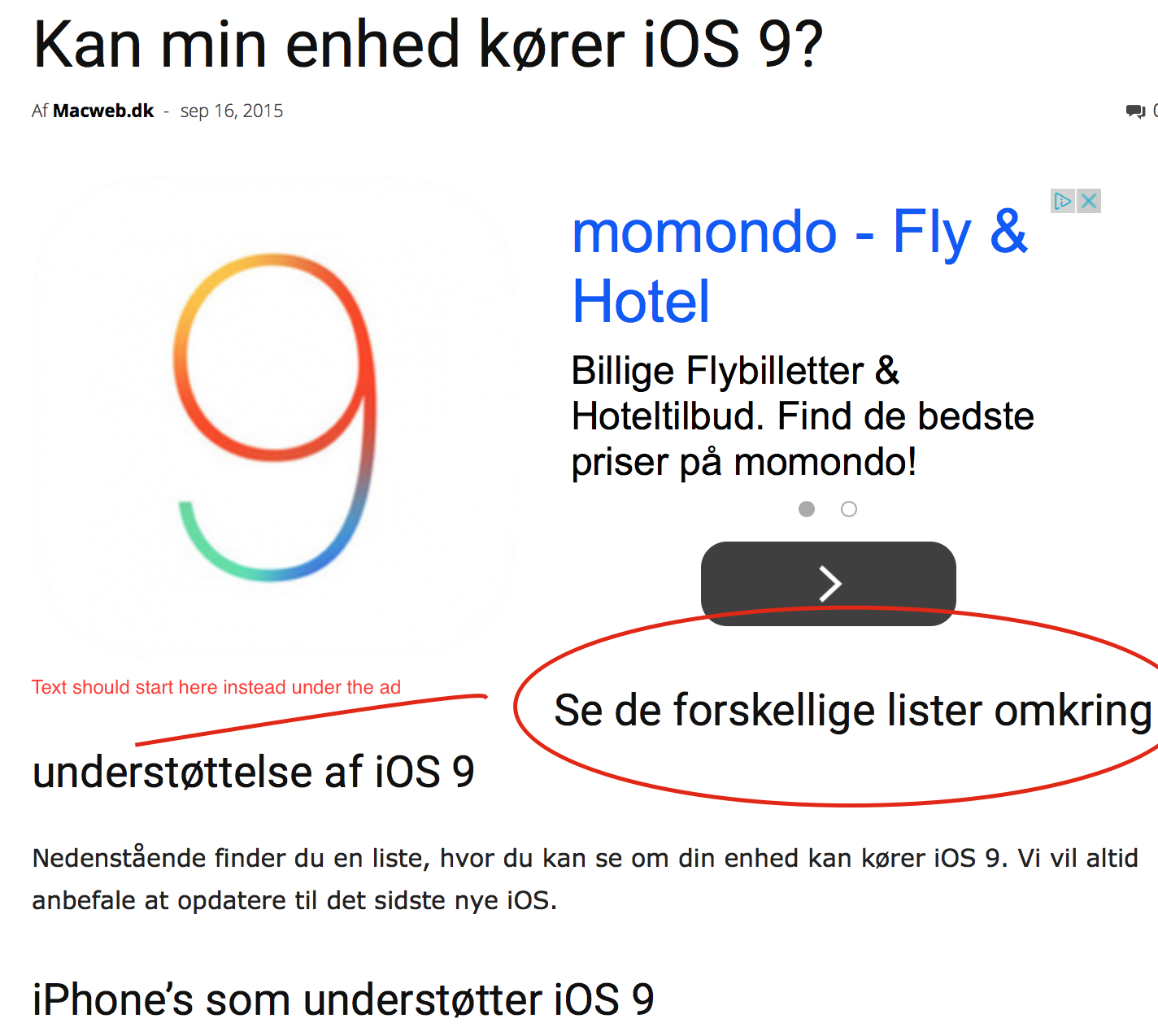
Link to the site on the picture http://macweb.dk/kan-min-enhed-koerer-ios-9/ (But it’s a general problem with all my topics)
 Jeni
Jeni Hi Lucian
Thank you for getting back to me. The first section has a link to a previous thread that in turn links to some additional code that needs to be entered into the template. I’m sorry, but I’m not clear on where exactly I need to find the code to replace. I have look around a bit and I’m really not sure where it is or where it should be.
In regards to you second paragraph about updating, do I need to purchase the program again? I don’t see any option to update.
Also more errors are showing up in Webmaster tools now sighting duplicate content.
Some very simplified directions would be very helpful. thank you.
Regards,
Jeni
Bogdan B. Thank you for your suggestions, they were added to our list of updates and we hope in a future version we can provide them. The developers will have the final decision though.
Thank you for your message.
Lucian Hi mboydnv,
I believe you refer to the pull-down filter which appears on category pages: http://screencast.com/t/kOU8DtDNdGa That can be removed by commenting this line in the category template file you’re using: http://screencast.com/t/GMn2QAHfK – http://screencast.com/t/FStrQuO9N1
We also have this on our request list so we’ll consider adding an option for this in future updates.
Hope this helps! Let me know if this is not what you’ve meant!
Thanks for the message!
 travisnw
 Another update: This problem is not occurring if I create a new post and add text blocks. It seems to be the Instagram code messing with it. I tried posting it in as raw Javascript and the same problem happened. Anyone else had this problem with Instagram and VC?
travisnw Update: More specifically:
I’ve created a template in VC that includes raw HTML blocks. I’m pasting in ebmbed code from Instagram. It seems to work fine until I hit “save draft.” At that point it stops showing everything I’ve done in VC. It still shows up in Classic Mode. Could it be that the Instagram HTML is somehow messing with VC?
sylcharlestone Oh yes, (to follow up with my message a few minutes before) I forgot, also, with the modifications I’m making, will there be any problem when there’s a new update of the newspaper theme? i’m afraid to lose the modifications I’m making now. Thanks.
