
 Bettina
 Hello!
Here is the guide: https://tagdiv.com/newspaper-10-3-7-update-brings-customizable-and-fast-mobile-pages
Thank you!
Bettina Hello!
Yes, this kind of pagination is not available for the Flex Block 1 element.
This feature should work well: https://prnt.sc/gjfNEMD7RE7I (Check if you do not use some extra plugins that may interfere there.)
The Posts Loop element doesn’t have a tab with all the filter options, like flex block elements.
The Posts Loop is automatically filtering the posts depending on the cloud template you set (for example, on the category page, there will be posts from that category).
1. This will require custom work, which is not covered by the support team.
For customization and other services, you can contact our custom work team here: https://tagdiv.com/premium-customization-services/.
2. Something should interfere there. I’ve tested this feature on the latest update of the theme and plugins, and it is working well.
3. The blocks are different and work differently. We cannot change the way blocks work, but we could add a new block with new features.
Thank you so much for your understanding!
Bettina Hello @mintchocolat !
I’ve tested it on the last update of the theme, and it works perfectly.
This option https://prnt.sc/BE_DBzcdVUQ4 will hide the modified date if this date is older than one week.
Thank you!
Bettina Hello @aadipalash!
Check which footer is assigned for your mobile version: https://prnt.sc/kZ4DldPHTMWc
Please note that you will assign a footer for your mobile version; it will change in the desktop version as well (same footer). If you need a different footer, then you should build a mobile page: https://tagdiv.com/newspaper-10-3-7-update-brings-customizable-and-fast-mobile-pages
You can set a sticky footer that will appear every time you scroll down the page: https://prnt.sc/dj75Bw74Mvqb (Click on the footer’s row.)
Make the same changes in the mobile viewport as well.
Thank you!
Bettina Hello!
The mobile theme and AMP layout is similar. Uninstall the AMP plugin and set only mobile theme in the theme panel settings.
I recommend you use these 2 mobile versions:
1. Responsive version: A responsive version of your website looks similar to the desktop version. TagDiv Composer is used to edit the page.Click on the mobile viewport: https://www.screencast.com/t/XDQJedlggSB. There, you can see your mobile version and edit or adjust the elements to look better.
2. Mobile pages: https://tagdiv.com/newspaper-10-3-7-update-brings-customizable-and-fast-mobile-pages
If you need to use the mobile version 1 or 2, then you need to uninstall the Mobile Theme plugin and AMP.
Thank you!
 lopabella
First of all, I am using Child theme of Newspaper.
I want to know the proper method to update newspaper theme when i have other plugins.
More specifically, what are the step i should take before updating the theme so that my site design don’t get crashed.
 chriswp
Hi there,
When updating posts I get an error message:
Update failed. Could not update the entry in the database.
My hosting company says the following:
It’s the theme causing a PHP Fatal Error:
PHP Fatal error: Uncaught Error: Class “td_global” not found in /www/hidden_773/public/wp-content/themes/Newspaper-child/page-pagebuilder-latest.php:6
Stack trace:
#0 /www/hidden/public/wp-includes/template-loader.php(106): include()
#1 /www/hidden/public/wp-blog-header.php(19): require_once(‘/www/hidden…’)
#2 /www/hidden/public/index.php(17): require(‘/www/hidden…’)
#3 {main}
thrown in /www/hidden_773/public/wp-content/themes/Newspaper-child/page-pagebuilder-latest.php on line 6″ while reading upstream, client: 217.60.022.167, server: hidden[.]dk, request: “GET / HTTP/2.0”, upstream: “fastcgi://unix:/var/run/php8.0-fpm-hidden.sock:”, host: “hidden[.]dk:14451”, referrer: “https[:]//hidden[.]dk/”
Replaced my website with hidden in the above.
Do you know what this is about?
 TheStormer
Hai,
The product detail page should have a different coloured background. As far as I know, only the class „td-ss-main-content“ in der single-product.phps would have to be renamed / redefined. Interestingly, all(!) changes I make to template file woocommerce/single-product.php have no effect at all. Even if I delete the whole <div> container ;=)
Am I making a thought error? The class td-ss-main-content and thus the <div> container is already displayed in the frontend, so it must be the template. Nowhere else outside of the Newspaper Theme have I found the class. Nothing seems to be stored in the database either. Caching has of course been deleted ?
Where is my error or is there another possibility to set an individual page background per page, for example for category.php, page.php or single.php? There is no access to the single-product.php via the Cloud templates. Also not via the Theme panel
At the moment, Newspaper version 12.1.1 is still in use. The update is scheduled for the next few days.
I know the disadvantages of changing something directly in the template and not using a child theme ;=)
Thx for supporting me!
Best Rgds
TheStormer
 zhangleji
 Never mind problem solved. Luckily I made a backup before update so I restore the files and updated the theme again. Problem solved. It did say some TagDiv plugins not updated and asked me to manually update them.
 cyberhrc
Hi
I’ve just updated on latest version and there is a BIG difference in page look from Edge / Safari / Chrome / Opera
I’ve worked whole day on edge and now I went to try and see how it looks like on other browsers and I was puzzled about the difference [ since they are all chromium afaik? ]
I’ve activated https://demo.tagdiv.com/newspaper_downtown_pro/ theme and changed categories for my needs
Please open http://www.sisak.info in different browsers or check here https://imgur.com/a/NSKOcn2
Any ideas what is happening that render is so different ?
Also, my global header got top bar and it just appears for a sec and than disappears ..
zhanglejiHi, I just updated the theme to the latest version but my website has some issues. It seems the issue is the menu login. URL: https://weliveinus.com
Thank you!
 Tech Lifestyle
 No, we don’t have double elements in TagDIV composer. For the first time I notice this bug yesterday. Before was clean.
– We Deactivate, then activate third party plugins
– Update Theme to 12.5.1
– Update WP
– Update THP plugins
Result: duplicated content is still on page in bottom, after page content and before footer.
On all single page situation is same
To be precisely, all within element “Single Post Content” is duplicated
 loslunes
Hello, I have just noticed that last firefox for android version makes my site lost the fonts (for example bolds are not shown). Look at attached images, first one is from mobile firefox not workings as it should. Second one is from chrome where is working fine. Right now it seems its working fine in firefox for pc. It´s something strange that starts to happen today after I have updated firefox in my mobile (maybe its a problem related with my phone..).
Do you know something about this issue? Nothing strange is configured in this firefox for android with font options and it works fine until today.
Bettina Hello!
We have 3 options for mobile versions that you can use:
1. Responsive version: A responsive version of your website looks similar to the desktop version. TagDiv Composer is used to edit the page.Click on the mobile viewport: https://www.screencast.com/t/XDQJedlggSB. There, you can see your mobile version and edit or adjust the elements to look better.
2. Mobile pages: https://tagdiv.com/newspaper-10-3-7-update-brings-customizable-and-fast-mobile-pages
3. Mobile theme plugin: The Mobile Theme is a performance-optimized theme included in the main Newspaper theme that only loads on mobile devices. It comes with its own templates and designs for pages, posts, categories, etc., so your current templates from the desktop theme will get converted to the mobile theme layout. Please see https://forum.tagdiv.com/the-mobile-theme/ and https://forum.tagdiv.com/mobile-theme-introduction/ for more information.
A full explanation is here: https://www.youtube.com/watch?v=SpGkOnJeNZY
If you need to use the mobile version 1 or 2, then you need to uninstall the Mobile Theme plugin and AMP.
Unfortunately, AMP is not working with the cloud templates because the AMP’s layout is not fully customized.
The AMP version works best with default templates and not cloud templates. That’s why we integrated it with the Mobile theme plugin.
The feedback from our clients about AMP was negative and it is not used anymore, that’s why we didn’t add more customization options.
Thank you so much for understanding!
Bettina Hello!
Unfortunately, this is not implemented in our theme yet.
In order to do this, you should modify the code in the theme. After every update, you need to save the code somewhere and add it again.
Try to delete these lines: https://prnt.sc/aH_7MVLeIrGw ; tdb_single_user_reviews_form.php file, \wp-content\plugins\td-cloud-library\shortcodes\single path.
Thank you!
Bettina Hello @nuggsog !
Your website can’t be reached. You should customize the homepage with the TagDiv Composer.
More documentation about the cloud templates is here:
– https://forum.tagdiv.com/cloud-library-templates/
– https://forum.tagdiv.com/design-post-pages-using-cloud-library-templates/
– https://forum.tagdiv.com/cloud-library-category-templates/
We have 3 options for mobile versions that you can use:
1. Responsive version: A responsive version of your website looks similar to the desktop version. TagDiv Composer is used to edit the page.Click on the mobile viewport: https://www.screencast.com/t/XDQJedlggSB. There, you can see your mobile version and edit or adjust the elements to look better.
2. Mobile pages: https://tagdiv.com/newspaper-10-3-7-update-brings-customizable-and-fast-mobile-pages
3. Mobile theme plugin: The Mobile Theme is a performance-optimized theme included in the main Newspaper theme that only loads on mobile devices. It comes with its own templates and designs for pages, posts, categories, etc., so your current templates from the desktop theme will get converted to the mobile theme layout. Please see https://forum.tagdiv.com/the-mobile-theme/ and https://forum.tagdiv.com/mobile-theme-introduction/ for more information.
A full explanation is here: https://www.youtube.com/watch?v=SpGkOnJeNZY
If you need to use the mobile version 1 or 2, then you need to uninstall the Mobile Theme plugin and AMP.
Thank you!
Bettina Hello Megan!
Yes, you should add the element that takes the description automatically. For example, the author box element: https://prnt.sc/PqK4BUS20oEG
In the next update, you will see the new logo for Twitter.
Thank you!
Bettina Hello @alkars !
Please make sure you use the latest update of the theme and plugins.
Make a test and deactivate ALL plugins except tagDiv ones, also if you are using a cache plugin, deactivate it, clear all cache and try again.
If the problem is still there, then contact us via email at contact@tagdiv.com and provide the following:
– admin url and credentials
– the license certificate and purchase code
– a link to this topic in order to identify you
Thank you!
Bettina Hello @cmnews23 !
We exclusively sell the Newspaper theme on the Envato ThemeForest Market – https://themeforest.net/item/newspaper/5489609. When you buy a Newspaper theme license from ThemeForest, Envato issues you a unique item’s purchase key that unlocks the most important features of the Newspaper theme, allowing you to access the future updates on the theme and enter the support center. Without it, your theme is locked with no theme updates, support, and you have no access to some of the most powerful features. Please find more information on how to find your Purchase Key from here – https://help.market.envato.com/hc/en-us/articles/202822600-Where-Is-My-Purchase-Code-. I hope you find the information a useful one.
But, we need to set the license manually.
Contact us via email at contact@tagdiv.com and provide the following:
– admin url and credentials
– the license certificate and purchase code
– a link to this topic in order to identify you
Thank you!
 nolandolce
 So if I add content in the description as you’ve shown, it publishes that content on the author bio page. I’m asking if there is a way to update only the meta description, without adding words to the page? Also, sorry for asking on this chain, but our twitter logo is still the old one, even though the theme is up to date. Any ideas? Thanks!
 Jim790@gmail.com
Hi,
A plugin called FS Poster recently stopped working as an error would be returned that “Your plugin is disabled due to using the license on the second address”. After much troubleshooting with their support, they have suggested this:
“On your site, the site_url() function sometimes just returns a ‘/’ instead of the site’s domain.
Meanwhile, the request to the site contains these parameters. {“td_theme_name”:”Newspaper”,”v”:”12.5.1″,”action”:”td_ajax_update_views”,”td_post_ids”:”[13705]”}
Maybe this Newspaper theme is doing something that the domain just comes as a slash. Please clarify this with that theme author.”
Do you guys have any thoughts on this on how to fix it?
Jim Piwowarczyk
 ponhonhoi
what code can i add the function to disable the cloud model menu making it visible only to users with admin profile
Bettina Hello Gus!
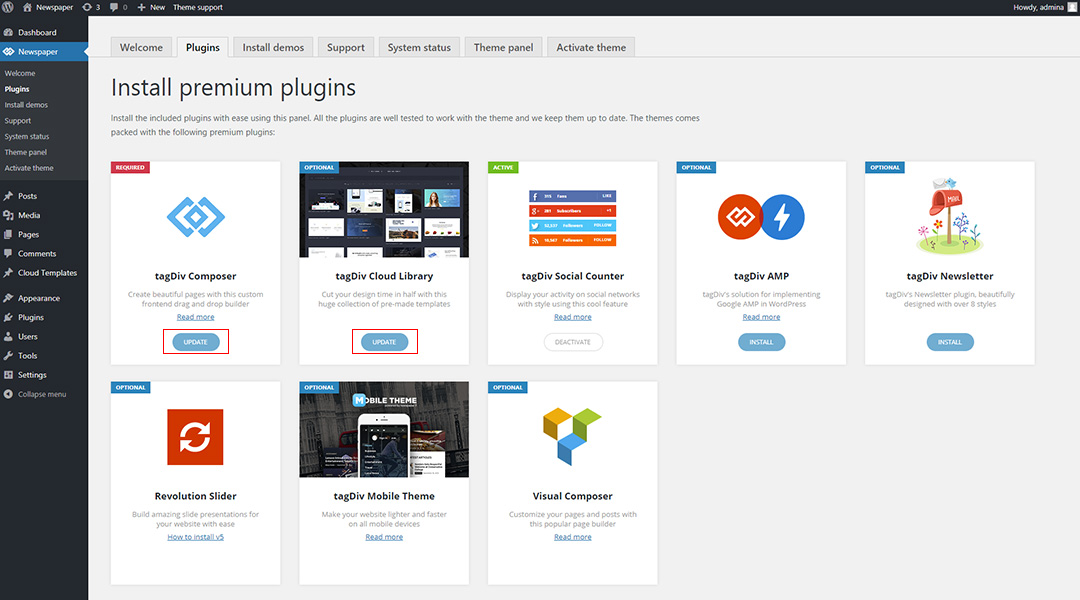
Please update the theme from Newspaper -> Updates: https://forum.tagdiv.com/how-to-update-the-theme-2/
Make sure your plugins are up to date too.
Thank you!
Bettina Hello @dlicoppe !
Unfortunately, I’m not sure if this will be added in the next update or not. Also, I don’t have any ETA yet.
As a workaround, maybe you can find a plugin that can be used with our theme.
In the theme, the standard WordPress login is used.
Thank you!
 viclee888
I have enabled the Line social share button but it never shows up. Other ones such as facebook linked in all show up correctly but Line never shows. How do I fix this?
Update: somehow .td-social-line is set to display:none. After I added a custom class
.td-social-line {display: inline-block !important;}
it now displays. Why is it set to display:none? It was not set in styles.css or in customizer.
