
- NewsmagHow to update a plugin
- NewspaperHow to update a plugin
- NewsmagHow to update the theme
- NewsmagHow to update the WPBakery plugin
- NewspaperHow to update the WPBakery Page Builder plugin
- NewspaperHow to Update the Newspaper Theme
- Apitd_api_top_bar_template::update_key
- Apitd_api_top_bar_template::update
- Apitd_api_single_template::update_key
- Apitd_api_single_template::update
- Apitd_api_footer_template::update_key
- Apitd_api_footer_template::update
- Apitd_api_smart_list::update_key
- Apitd_api_smart_list::update
- Apitd_api_thumb::update_key
- Apitd_api_thumb::update
- Apitd_api_category_top_posts_style::update_key
- Apitd_api_category_top_posts_style::update
- Apitd_api_category_template::update_key
- Apitd_api_category_template::update
 PostmasterPU
 Hi,
Maybe it would be better to discuss with wordfence team to remove the alert from the daily database updates of their tool if plugin version 3.9.2 is already fixed?
Or maybe tagdiv could release an update with 3.9.3?
Changing manually the version is not a real/fair solution (my humble opinion).
Thank you,
 RENATO
 hello, @Calin So about the previous issues, I can’t get shortcodes to work at all, because in TagDiv Composer! It doesn’t show up on the page, it only appears in posts. I spoke with the owner of the search plugin, and he said he tried to contact you guys from the theme to get support for his plugin and didn’t get a response. The guy from the search theme said this about your theme, https://imgur.com/a/HcEGq1O
I had to create a search field, I couldn’t add it to the header, but I managed to add it to the home page. I’m having some problems.
The block images, I can’t reduce the image size no matter what I do, I have to set up CSS for all of them, it’s a lot of work, and when I delete some tdi_ element it changes the number and messes everything up. Well, tdi_98, I can’t get the image to be 90px by 90px. I used this CSS when it was tdi_97 and it was working perfectly. Then I had to delete some elements, it changed to tdi_98 and it stopped working. I adapted everything correctly, only the images aren’t staying 90px by 90px, they’re huge. Look there, the CSS is correct. https://ibb.co/TMNTDZvB desktop mode only, because for mobile I had created a separate page. https://glostv.com/tv-ufg
Could you provide CSS to fix the large image issue? To make it 90px by 90px.
About this related thing, https://ibb.co/qLBYQZPX, I can’t set it to a primary category, like there’s this option, https://ibb.co/1GJkWGGs, to make it primary up there, https://ibb.co/VpJb4rCj. Is this possible via CSS?
About this, is there also a way to hide the title without needing CSS?
Is there somewhere in the theme that disables the date that keeps showing up?
Google searches, https://ibb.co/hFZNCXJf I already deleted everything in WordPress, did everything, hid it in WordPress, https://ibb.co/wFRmCNrh
Is there any way to make the site faster with this theme? You guys in the theme recommended Super Cache, which is horrible depending on the configuration, it modifies the CSS and everything. I measured my site on https://pagespeed.web.dev/ and it’s terrible, seems like the theme is too heavy. Is there a way to improve this? Because when I update something it takes too long to update the page; I’m not logged in.
Lastly, how do you translate https://ibb.co/LXG4WdqF I tried to find it and couldn’t. If you can help me with these problems.
Ask the theme owner to add in the next update the ability to reduce the image size of the tdi_ modules so we don’t need to keep using CSS code. Ask them to add shortcode support in TagDiv Composer! on pages, because it only appears in posts.
 Natdanai Kon
 Hi,
I clicked on the green “Check for updates” button, but nothing happened.
Could you please advise what I should do next?
Thank you.
 Nachrichtenexpress
Does anybody have issues with updating to Newsmag 5.4.3.4?
Tried a few times it keeps freezing.
 FBM
FBMHi,
since the 12.7.2 Version tag div composer is showing the following error:
In the composer: “Errors at columns: 1(models) : 0(dom). The model does not match the content Current state has involved an issue. You could try an UNDO operation (CTRL+Z / CTRL+SHIFT+Z)”
In devtools:
ace.js?ver=7cd248d7c…5207c3f8b916c3f00:1 dropping module because define wasn’t a string.
t @ ace.js?ver=7cd248d7c…5207c3f8b916c3f00:1
Did something change in the loading order of scripts with the update? It only occurs when updating the theme to the version 12.7.2 and 12.7.3.
Thanks for assistance!
 Calin
Calin Yes, the version of you plugin is safe.
The Wordfence free version receives updates to the plugin software itself, but security updates for firewall rules and malware signatures are delayed by 30 days compared to the Premium version. https://wordpress.org/plugins/wordfence/ – https://i.imgur.com/V5Pqwry.png
Calin Hi,
Normally, updates are displayed when you click the “Check for Update” button under Newspaper > Updates – https://i.imgur.com/2xjEg7v.png
If you download the latest package from ThemeForest and upload it manually, your theme should then show the latest version.
If you’d like us to take a closer look, please create a full backup of your website and contact us via email at contact@tagdiv.com, providing WP-Admin access so we can investigate the issue.
Thank you!
Calin Hi,
Please click on the green button for “check for updates” and the new version will be displayed https://forum.tagdiv.com/how-to-update-the-theme-2/
Thank you!
Natdanai Kon 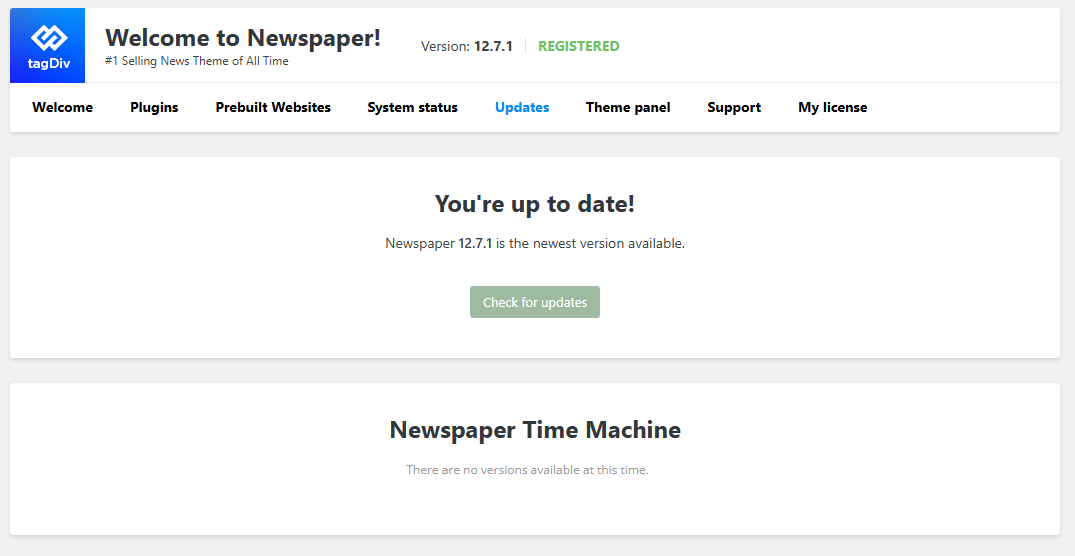
When will the 12.7.3 update be released?
Calin Hi,
If this situation were after the theme update, then make sure that the theme plugins that you had before the theme update are also now installed, like tagDiv Composer, tagDiv Cloud Library, and tagDiv Standard Pack.
Thank you!
 lastwordonsports
Hi,
I updated to the latest theme (I’ve been using Newspaper for 5 years) on extratimetalk.com, but once I did, the header/menu disappeared. When I go to the menu spot in Theme Panel, it looks right. When I go to WP>Appearance>Menus, it looks right also. But the menu and logo are gone from the header despite both being correct in Theme Panel and Appearance/Menus.
Any ideas?
 dragold
Hello,
Today, Wordfence issued a critical security alert for the tagDiv Cloud Library plugin. I’m trying to update the theme, but it won’t let me and says it’s already up to date. Can you tell me when you plan to fix this vulnerability?
I’ve included a link to the Wordfence website with the alert and explanation of the issue.
 yassinee
 We’ve already updated to version 3.9.2, which should include the security fix.
However, some security scan tools are still reporting the same vulnerability — possibly because their databases haven’t been updated yet.
Could you please provide a solution or official confirmation to help us clear this false warning?
If there are any additional steps or patches required beyond version 3.9.2, please let us know.
Calin Hi,
Please make a full backup and update the theme to 12.7.3 and make sure that all current theme plugins are installed and updated.
This should resolve the problem.
Calin Hi,
When the theme cannot be updated normally, there are some extra plugins or code interfering (especially object cache), in this situation, the best option is to update the theme and plugins manually – https://forum.tagdiv.com/how-to-update-the-theme-2/ – https://i.imgur.com/NGsPWBy.png
Thank you!
Calin Hi,
Please make sure that the theme is updated to the last version, Newspaper v12.7.3, and the problem will be resolved.
Before updating the theme, make sure you have a full backup. Also, after updating the theme, make sure that all theme plugins you are using now are installed and updated.
https://forum.tagdiv.com/how-to-update-the-theme-2/
 Simion C.
 The new update should be detected if you press the check for updates button in the theme updates panel. Then the new version can be installed. Or, the theme can be updated manually, like any other wordpress theme. It only takes a few minutes to update the theme using any method.
If anyone has issues updating the theme, please send us an email at contact@tagdiv.com and provide admin login for the website so we can check as well.
@JayWay Sorry to hear that. The update was meant to fix the vulnerability and improve security, not to cause users to request a refund. Please send us an email and let us know what the problems are exactly. Also please provide access to the website so we can investigate. We will gladly take a look. Once the issues are cleared up, we hope that since you like the theme you can continue using it for your website.
Thank you!
 JayWay
 Just checked again : seems not to be completely updated still on my site, trying manual update……My thinking : I just bought this plugin from Envato short time ago and it’s problems out of the box ….. I like the theme, really, not the problems……
 donnell352
I’m trying to activate the theme on a new site and it isn’t working. After I enter the purchase code and email, I click ‘Activate’ and nothing happens. I’ve tried this from multiple browsers and the same thing happens on all. Could someone please help with this?
Also, I’m not seeing the “Edit with TagDiv Composer” button on any of my pages. Is this because the theme isn’t activated? Is that a new update or something?
Any help would be greatly appreciated. Thanks.
 simchris
 Themeforest sent out a notice this morning that update is available to download.
Best way to update, is decompress files on local drive; then login via FTP to site, remove old theme, upload new version; remove old plugin for td-composer; upload new version.
Log into panel, activate composer plugin. Check menus and footer.
Always make backup of site prior to update!
 Daily Nintendo
 @jayway, mine finally was able to update by going to the theme itself and click on update there. After check for updates it appeared just now. Hopefully for you too.
 mikeshecky
 I had almost the identical issues with you the other day as well.
It as suggested I fresh install them (and plugins) via ftp. That solved most of my problems. I also couldn’t update theme normal way.
Daily Nintendo Is it a gradual release? The theme shows I am up-to-date and no updates are visible. This while the composer is still on the vulnerable version.
-
This reply was modified 11 months by
Daily Nintendo.
Simion C. Hi,
We released a theme update today. Please update the theme to the latest version. The composer plugin contains the fix for that vulnerability and it’s version was updated to 5.4.2.
Thank you!
Simion C. The update has been released. Please update the theme to the latest version. The update contains the fix for the respective vulnerability and the composer version has been updated to 5.4.2.
Thank you!



