- NewsmagHow to update a plugin
- NewsmagHow to update the theme
- NewsmagHow to update the WPBakery plugin
- NewsmagCategory templates
- NewsmagWhat’s included in Newsmag theme package
- NewsmagAjax view count
- NewsmagSmart Lists
- NewsmagFeatured images
- NewsmagFeatured image or video
- NewsmagModal window
- NewsmagtagDiv slider gallery
- NewsmagVideo playlist
 pistacio
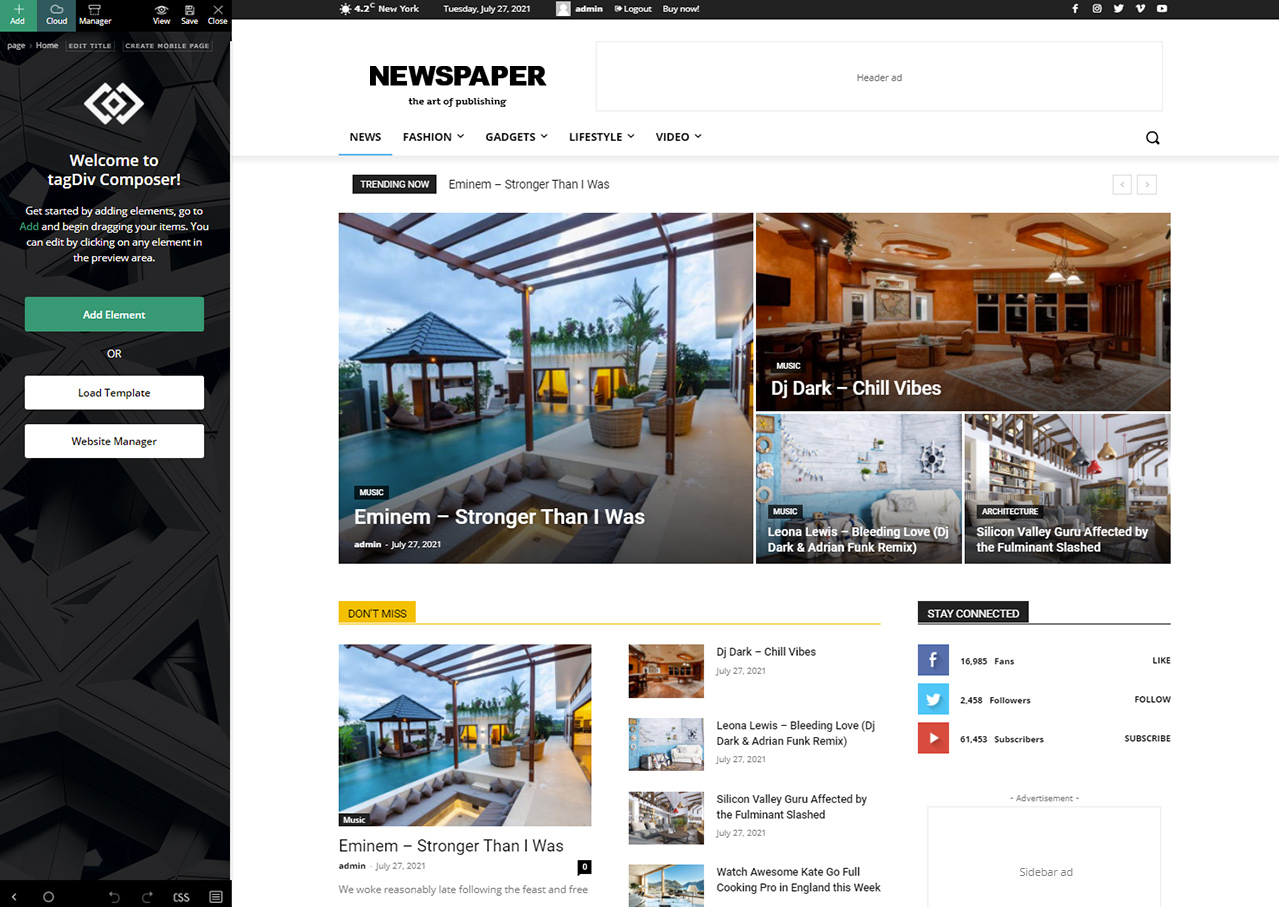
 I’m really sorry to bother you but my TagDiv Composer looks like this one:
https://forum.tagdiv.com/wp-content/uploads/2017/05/Newspaper-tagDiv-Composer.jpg
and I can’t find the buttons you pointed to anywhere.
Do I have to update the Composer to the newest version?
 Bettina
 Hello!
Edit the category page with TagDiv Composer. Click on the mobile viewport: https://www.screencast.com/t/XDQJedlggSB; there you can see your mobile version and edit or adjust the elements to look better.
If you want to use mobile pages: https://tagdiv.com/newspaper-10-3-7-update-brings-customizable-and-fast-mobile-pages/, then please assign a mobile page to your category template.
If the problem is still there, then please uninstall the cache plugin you use and try again in an incognito file.
Thank you!
 Beaker
My site is here:
I just started developing the site. I installed the child theme included in the download and it seems to be working properly, but when I make changes to the child theme CSS they won’t show up on the site.
Troubleshooting so far:
–If I navigate to https://redstateroundup.com/wp-content/themes/Newspaper-child/style.css in a browser the changes are there.
–The CSS is valid: It works when I test it in the CSS panel in Console, in the WP Customize tool and in the CSS field in Theme Panel > Custom Code.
–When I look at any page’s source code there’s no link to the child theme CSS.
–I checked functions.php to make sure the enqueue function is there.
–I deleted and reinstalled the child theme from scratch but it didn’t help.
–I flushed the cache in my browser and on my host (IONOS).
–I tried hard-coding a link to the child theme CSS in header.php but that didn’t help. The hard-coded CSS link doesn’t show up.
–When I make file changes and check in my FTP client (CyberDuck) the file changes and date modified time update.
As far as I can tell I’m doing everything right, but the site won’t write any child theme changes even though the files seem to be right where they belong.
I can use the Custom Code in Theme Panel if I have to, but also I need to modify PHP files in the child theme.
Any help greatly appreciated!
 Beramat1091
 Hello Bettina!
Thank you! It looks that nothing works. I’ve tried to deactivate the plugin, the deactivate the cache plugin and to check if everything was updated.
Could you do somethings about it?
Bettina Hello!
Please make sure you have the latest update of the theme 11.5.1 and plugins.
Deactivate ALL plugins except tagDiv ones. Also, if you are using a cache plugin, deactivate it, and try again.
Thank you!
 prtvn
prtvn Hello again,
Unfortunately I’m the new web admin, and don`t have any access to themeforest or any other resource, that previous one has. I’ve try to search via help page is it possible to update theme from v.9.0.1 to the latest one but found nothing helpfull .
Thanks in advance
-
This reply was modified 4 years by
prtvn.
 Anamaria
 Hello,
You need to update the whole theme with the tagdiv plugins.
Please try to do the update manually via FTP/cPanel -> https://forum.tagdiv.com/how-to-update-the-theme-2/ ( do a full backup of all files and databases before updating), by replacing the old theme with the new one (replace not overwrite), in case there are custom changes in the theme files, those will be lost. Also, please do a full backup of all files and databases before updating.
Also, please try to update the theme without extra plugins activated during the installation, as this may interfere with the installation process.
Also, after the update please make sure the tagDiv plugins are installed, like tagDiv Standard Pack, tagDiv Composer, tagDiv Social Counter, etc.
Thank you!
Anamaria Hi,
I answered you on this topic https://forum.tagdiv.com/topic/i-cant-update-theme-automatically-version-10-11-please-help-me/#post-446720
Thank you!
Anamaria Hello,
To have the automatic updates option, you had to have version 10.3.1 and from version 10.3.2 you could use this option -> https://tagdiv.com/introduction-to-newspaper-theme-automatic-updates/
Please try to do the update manually via FTP/cPanel -> https://forum.tagdiv.com/how-to-update-the-theme-2/ and do a full backup of all files and databases before updating.
Also, please try to update the theme without extra plugins activated during the installation, as this may interfere with the installation process.
Also, after the update please make the tagDiv plugins are installed, like tagDiv Standard Pack, tagDiv Composer.
Thank you!
Anamaria Hello,
You do not need to buy a new license. You can try to install the plugin manually, and you can get the plugin from the package that you download on the ThemeForest -> https://forum.tagdiv.com/whats-included/ -> https://forum.tagdiv.com/newspaper-how-to-update-a-plugin/
Do not forget to make a full backup for your website!
Thank you!
 ViktorJanecko
Hello
I have problem with reactivating theme. After theme recognized new update, it asked me to reactivate my theme because of some sort of problem it encountered. So I did as instructed but now when I enter the code and click “activate”, it just loads indefinitely and does nothing.
I looked on requerements for newspaper and I see no changes on my side. Also tried to deactive all plugins except tagDiv but still no change.
Thank you for answer
 melihkotbas
Hello friends, I love using your theme, but I see it risky for big projects. After repeated testing, the “wp_options” table (There are also tables like “td_011_settings” “td_011” and things we don’t know.) contains quite a bit of data for a 1 month old website. I talked to many website owners using this theme and they are having the same issue.
Caching plugins “somewhat” solve this problem, but it doesn’t change the fact that it exists. We can’t even predict where these optimization questions will go as our websites evolve. This will cause an “unnecessary” increase in server costs and disrupt the user experience. My advice to you is to focus on “optimization” problems rather than extra features in future updates.
prtvnHello,
We have a news web site that use your theme v.9.0.1. Registration key is the same like here in the forum.
I want to ask is there any FREE update to latest version or we need to purchase the latest one from Envato ?
Best Wishes Buzz
Beramat1091Hello, as you can see from this link: https://diventaunviaggiatore.it/ the homepage of my website have several problem.
This is happen after the update of the theme.
If I edit the page I see it like as usual, but in “live mode” I see so many problems.
Someone could help me please?
 nguyentuanxuyen
I can’t update theme automatically version 10 >>>> 11 please help me
nguyentuanxuyenI can’t update theme automatically to version 10 so please help me
 yourbackupemployee
 Disregard this – i had to update a completely different file, not htaccess nor php.ini but user.ini
yourbackupemployeeHi Support,
We received a notification that following things need to be done:
1. Theme needed to be updated to version 11.5.1
2. PHP Execution Time 30 – ⤏ We recommend to increase this value to 60 or more
3. PHP Max Input Vars 1000 ⤏ We recommend to increase this value to 2000 or more
We updated all the 3 things above:
a. Theme now is 11.5.1
b. PHP Execution Time 30 – now is 90 (updated in both php.ini and htaccess)
c. PHP Max Input Vars 1000 – now is 3000 (updated in both php.ini and htaccess)
For some reason, the system status in your panel is still not seeing these changes (“b” and “c” – the php updates) and still recommends.
Here is a screenshot – https://drive.google.com/file/d/1S_CCRFfM8sB3fyynclSOshzM9itCFZwa/view?usp=sharing
Can you please assist to figure out what else needs to be done to clear these recommendations?
Note: We want to make sure they are cleared as this tool is pretty useful for us whenever the site is not tuned up properly. We do not want to see recommendations when things have been updated as requested.
 Rhonda
 I updated the htaccess to this: <IfModule mod_substitute.c>
SubstituteMaxLineLength 10M
</IfModule>
That did not work.
I have increased the memory limits on other sites and that did not work.
I have disabled the Tagdiv plugins but was not able to edit.
 Finnedsgang
Hi everyone, I need help ! i’m the owner of https://4news.it
after updating the site to the latest newspaper update, from 11.3.1 to 11.5.1 my site is not showing anymore the correct layout. The home page https://4news.it is unavailable but if I go first on an internal page, and when I click on the logo to return to the home page, it displays correctly. Also, the article is sometimes shown as it should and sometimes not.
https://www.imagebam.com/view/MEBHX6T https://www.imagebam.com/view/MEBHX75 https://www.imagebam.com/view/MEBHX76 https://www.imagebam.com/view/MEBHXB0
 uitdezaanstreek
 Hi Bettina,
thanks for the reply. I’m familiar with updating themes manually. Just trying to get grip on the new way in v11, as i like the addition to be able to update the theme through the wp-backend (apart from staying updated/safe/etc).
install
I manually added the files (v11-theme and child in ‘wp-content/themes/’, plugins in ‘wp-content/plugins/’) on a clean devsite. Then i already get the message: “The parent theme is missing. Please install the “Newspaper” parent theme.”
I guess the issue is where i have to put the parent theme?:
https://forum.tagdiv.com/how-to-update-the-theme-2/ says in “/wp-content/themes”
https://forum.tagdiv.com/the-child-theme-support-tutorial/ says in “wp-content\plugins\td-standard-pack\”
paths in child theme
should i now change the paths to point to “wp-content\plugins\td-standard-pack\”?
-
This reply was modified 4 years by
uitdezaanstreek. Reason: typo
Bettina Hello!
Do not use both builders in the same time/pages.
I would gladly recommend you make a backup and update plugins and the theme via file transfer to the latest update: https://forum.tagdiv.com/how-to-update-the-theme-2/
The child theme is not overwritten by the update. An issue for that could be the compatibility of your child theme with the new version of our theme(if you use some files which were updated). If you’ll have some custom modifications directly in the theme files, then better save the code and replace it after the update.
Make sure that all the requirements are done as you can see here: https://forum.tagdiv.com/requirements-for-newspaper/
Thank you!
uitdezaanstreekHi there,
How can i upgrade from v9 to v11?
plugins:
I read that i should add the plugin ‘standard-pack’.
When installing it also says to add the plugin ‘tagdiv composer’. But we’re using the WPbakery composer – and i read we should only use one? For now i let them both co-exist.
(child-)theme
Now i upload the v11-child-theme to wp-content/themes. But in the WP-backend appearance > themes it doesn’t show and i get the message: “The parent theme is missing. Please install the “Newspaper” parent theme.”
other
Then the last is how can i add my code properly from child-v9 to child-v11? We’re using an extra line to implement some extra php:
“require_once(“additionals.php”);”
I’m confused here, hope you can point me in the right direction after this overhaul. Cheers, Ed’
Bettina  contactovisual
Hi
To make an element temporary invisible in the public page, but remaining in the editor for future update, I selected the CSS option Display: Hiddden, but this makes the element also invisible in the TagDiv editor.
How to I see or recover an hidden element in the editor?