
- Apitd_api_top_bar_template::update_key
- Apitd_api_top_bar_template::update
- Apitd_api_single_template::update_key
- Apitd_api_single_template::update
- Apitd_api_footer_template::update_key
- Apitd_api_footer_template::update
- Apitd_api_smart_list::update_key
- Apitd_api_smart_list::update
- Apitd_api_thumb::update_key
- Apitd_api_thumb::update
- Apitd_api_category_top_posts_style::update_key
- Apitd_api_category_top_posts_style::update
- Apitd_api_category_template::update_key
- Apitd_api_category_template::update
- Apitd_api_module::update_key
- Apitd_api_module::update
- Apitd_api_block::update_key
- Apitd_api_block::update
- Apitd_api_header_style::update_key
- Apitd_api_header_style::update
 AhmadiKatu
Hi,
Hello. Regards my topic title, why this can happen. All my tweet that I embed in my posting not showing propely after updated my theme.
can you advice?
cheers.
 artsetsu
 Great. Thanks its working after update the version
 Anamaria
 Hello,
Make sure that you have the latest update of the theme(11.5.1 version) and the plugins.
Thank you!
 thanhtan09
 I updated latest theme version
 Calin
Calin Hello,
The new update is in tests (there were some bugs).
I asked a developer to integrate the fix for the column text and text with title in tagDiv Composer in Newsmag v5.2, so you can disable, delete the tagDiv Composer and reinstall the plugin from Newsmag> plugins and this problem will be resolved.
I hope this will help you!
Anamaria Hello,
Please try to do the update manually via FTP/cPanel -> https://forum.tagdiv.com/how-to-update-the-theme-2/ by replacing the old theme with the new one (replace not overwrite).
Also, please do a full backup of all files and databases before updating.
Also, please try to update the theme without extra plugins activated during the installation, as this may interfere with the installation process.
Also, after the update please make the tagDiv plugins are installed, like tagDiv Standard Pack, tagDiv Composer, tagDiv Social Counter, etc.
Let me know the results!
Thank you!
 Bettina
 Hello!
Make sure that you have the latest update of the theme(11.5.1 version) and the plugins.
We have also a guide with some tips why our Composer is not working properly, please check: https://forum.tagdiv.com/tagdiv-composer-not-working/
Make a test and deactivate ALL plugins except tagDiv ones, also if you are using a cache plugin, deactivate it, clear all cache and try again.
Check some other possible factors which can interfere in our theme: https://forum.tagdiv.com/general-options-may-interfere-newspaper-theme/
Let me know the results!
Thank you!
Anamaria Hello,
For nofollow an option will be introduced whether you want it or not to have it, please check this topic -> https://forum.tagdiv.com/topic/outgoing-internal-links-contain-nofollow-attribute-after-the-last-update/
Thank you!
 muktipolice
 I still haven’t been able to make corrections. It’s so uncomfortable. When will it be updated?
 Umut
Umut still the same, on title it says, 1 update
but when I enter the page is blanc.
 ceointermidia
Hi guys,
I changed my logo and updated everywhere possible in Theme options but when I type the URL of the page the old logo still appears how can I solve this?
my URL http://www.mbnchannel.com
https://drive.google.com/file/d/1SWl_OMGHjvhZmchyCm4eO8alfOD2ClZI/view?usp=sharing
https://drive.google.com/file/d/1j9TLCdQ2JOzHIjQPn0ixrDE51qwv5iBf/view?usp=sharing
https://drive.google.com/file/d/1j9TLCdQ2JOzHIjQPn0ixrDE51qwv5iBf/view?usp=sharing
https://drive.google.com/file/d/1j9TLCdQ2JOzHIjQPn0ixrDE51qwv5iBf/view?usp=sharing
Thanks guys
 mgiannelis
 Also. The custom builder is not accessible anywhere on my site. I have the plugin installed on both my sites with all the latest updates.
There is no builder anywhere to be seen
 Archerix
 Hi Anamaria, i just paste the link
Found the problem, it was “Lazy-loading images” on the Jetpack Plugin.
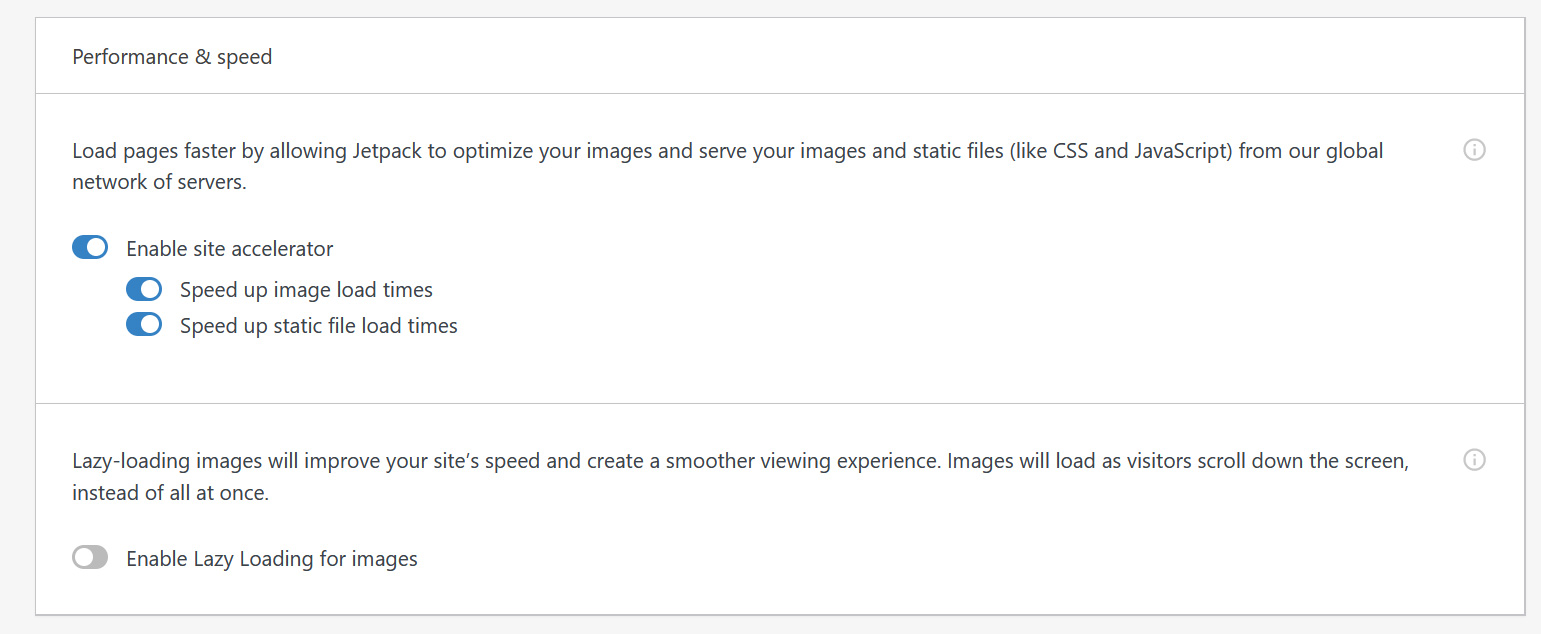
It was working before, so not sure if it’s a newspaper update, a wordpress update, or a jetpack issue. Tt will be hard to find out. I’ll leave Lazy-loading images off for now
Bettina Hello!
Do you have the latest update of the theme(11.5.1 version)?
Thank you!
Bettina Hello!
From what I know, the auto-update feature is disabled. Please check if you do not have any plugin which enable the auto-update.
Thank you!
 dra_proba
 I’m sorry to hear that this isn’t automated, too. The issue is resolved as follows:
td-newsletter/styles/tds_newsletter/tds_newsletter1.php -> Line: 559 and delete target="_blank"
How can I protect this plugin from automatic updates?
Anamaria Hello,
There was just released a theme update that should fix the reported problems with WordPress 6.0 -> https://i.imgur.com/AXJqh3L.png
Thank you!
 sanjeev
Dear tagDiv Team,
We are using tagDiv with user name sanjeev. Our Website is https://agniveer.com
In our website, there’s an error due to which I am unable to make changes in content as shared below
[30-May-2022 08:06:59 UTC] PHP Fatal error: Cannot redeclare tdc_on_remove_core_updates() (previously declared in /srv/htdocs/wp-content/plugins/td-composer/includes/tdc_main.php:359) in /srv/htdocs/wp-content/plugins/td-composer/includes/tdc_main.php on line 358
Whenever I click to Edit Content section, it keeps moving round and round till hours and nothing happens further. Screenshot – https://ibb.co/Tr3MS17
Requesting you to kindly check and help me to resolve it on priority as the site is LIVE. Thanks.
Awaiting for your active and earliest response,
Neelam,
Theme User, Site Admin,
Team Sanjeev.
 RECORD EUROPA
 Hello, we’ve already tried removing these categories, but it doesn’t change anything (see image:https://recordeuropa.com/wp-content/uploads/2022/05/menu-teste.png).
Meanwhile, we have put them back.
In fact they’ve been like this for months and with WordPress 5.9 we’ve never had any problems.
On the other hand, on the website that we have under development, these categories do not exist as shown in the images that we have already mentioned:
https://recordeuropa.com/wp-content/uploads/2022/05/mega-menu-with-sub-categories.jpg
And the problem remains.
Once again I point out that we have already tried to disable other plugins that may conflict and nothing works.
If the menu is updated, the first time you enter the front end the menu appears correct, but a simple refresh of the page (even without cache) the problem appears again.
You have access to our staging site, please use it if you think it can help you.
Thanks.
Anamaria Hello,
Please let me know if an error message appears when you try to update.
Thank you!
Anamaria Hello,
If the problem is with WPML, then this fix will be introduced in the next plugin update.
Thank you!
Anamaria Hello,
There was just released a theme update that should fix the reported problems with WordPress 6.0 -> https://i.imgur.com/AXJqh3L.png
Thank you!
Anamaria Hello,
There was just released a theme update that should fix the reported problems with WordPress 6.0 -> https://i.imgur.com/AXJqh3L.png
Thank you!
Bettina Hello!
We have 3 options of mobile versions that you can use:
1. Responsive version: A responsive version of your website is looking similar like on desktop, edit the page with TagDiv Composer, click on the mobile viewport: https://www.screencast.com/t/XDQJedlggSB ; there you can see your mobile version and you can edit the elements there or adjust them to look better.
2. Mobile pages: https://tagdiv.com/newspaper-10-3-7-update-brings-customizable-and-fast-mobile-pages/
3. Mobile theme plugin: The Mobile Theme is a performance optimized theme included in the Newspaper main theme and it loads only for mobile devices. It comes with its own templates/design for page, post, category, etc so your current templates from the desktop theme will get converted to the mobile theme layout. For more details, please take a look here: https://forum.tagdiv.com/the-mobile-theme/ and https://forum.tagdiv.com/mobile-theme-introduction/
A full explanation you can find here: https://www.youtube.com/watch?v=SpGkOnJeNZY
You can choose to use which one is more affordable and useful for you.
If anyone doesn’t fit as you created, then make a test and deactivate ALL plugins except tagDiv ones, also if you are using a cache plugin, deactivate it, clear all cache and try again.
Note: If you want to use version 1 or 2, then you need to deactivate the Mobile theme plugin and see the results.
Thank you!
Anamaria Hello,
I’m glad the problem is resolved.
Also, I recommend that for future updates when you want to do them, make the update with only tagDiv plugins activated during the update process, and deactivate the other plugins.
There is a possibility that some plugins may interfere with the theme update process.
Thank you!



