
 Calin
Calin Hi,
Thank you for sharing with us your experience with our new plugin, also for the time that you take to notice us about those problems.
I pass them on our developers and I hope those will be fixed for the coming update.
Thank you for your time!
Calin Hello,
Unfortunately, there is no guide for how to move from Newsmag to Newspaper, but I will try my best to help you.
First, you need to make sure that you have a full backup for your website and database.
Now what you need to know is that during this process some elements, design from your website can be changed, so here are the steps that you need to do:
Right now you have the Newsmag theme activated, what you need to do is to install via WordPress the Newspaper theme, but do not activate it. After the theme is installed, go in plugins and disable all tagDiv plugins you have enabled, after that you need to activate the new theme (Newspaper theme) and make sure that you update and activate tagDiv Composer, tagDiv Standard pack (those plugins should bring back the website look and can be installed from Newspaper > plugins), also enable the rest of tagDiv plugins that you are using -> https://i.imgur.com/MvKx52B.png
I hope this will help you!
Calin Hi,
I see, so the problem is that the latest images from the Pinterest were not updated. It looks that the widget is working, so what I suggest is to set a different username, try with coca-cola and after that set your username back.
In case that this is not solving the problem, then, please contact us via email at contact@tagdiv.com and provide wp-admin access. Also, please add the link of this topic in email to can identify you.
Thank you!
 Lauren Yeomans
Hi I am having some issues with my theme. I have updated my banner but when I scroll on a mobile it goes to the old newspaper banner.
My URL: https://allnftspace.com/
thanks !
Lauren YeomansHi I am having some issues with my theme, I have updated my banner but when I scroll on a mobile it goes to the old newspaper banner.
thats my URL and the only issue is when its on a mobile https://allnftspace.com/
thanks !
 sylentears
 still waiting for the update on request.
 simchris
 Also make sure you go to ‘settings’ about in Chrome to ensure updated to latest version. I have all sorts of weirdness with Chrome when there is pending update. In chrome you can also do F12 to get to the console view to see if page is generating some error that needs to be addressed in the CSS, or something not loading properly. 🙂
 Tim4962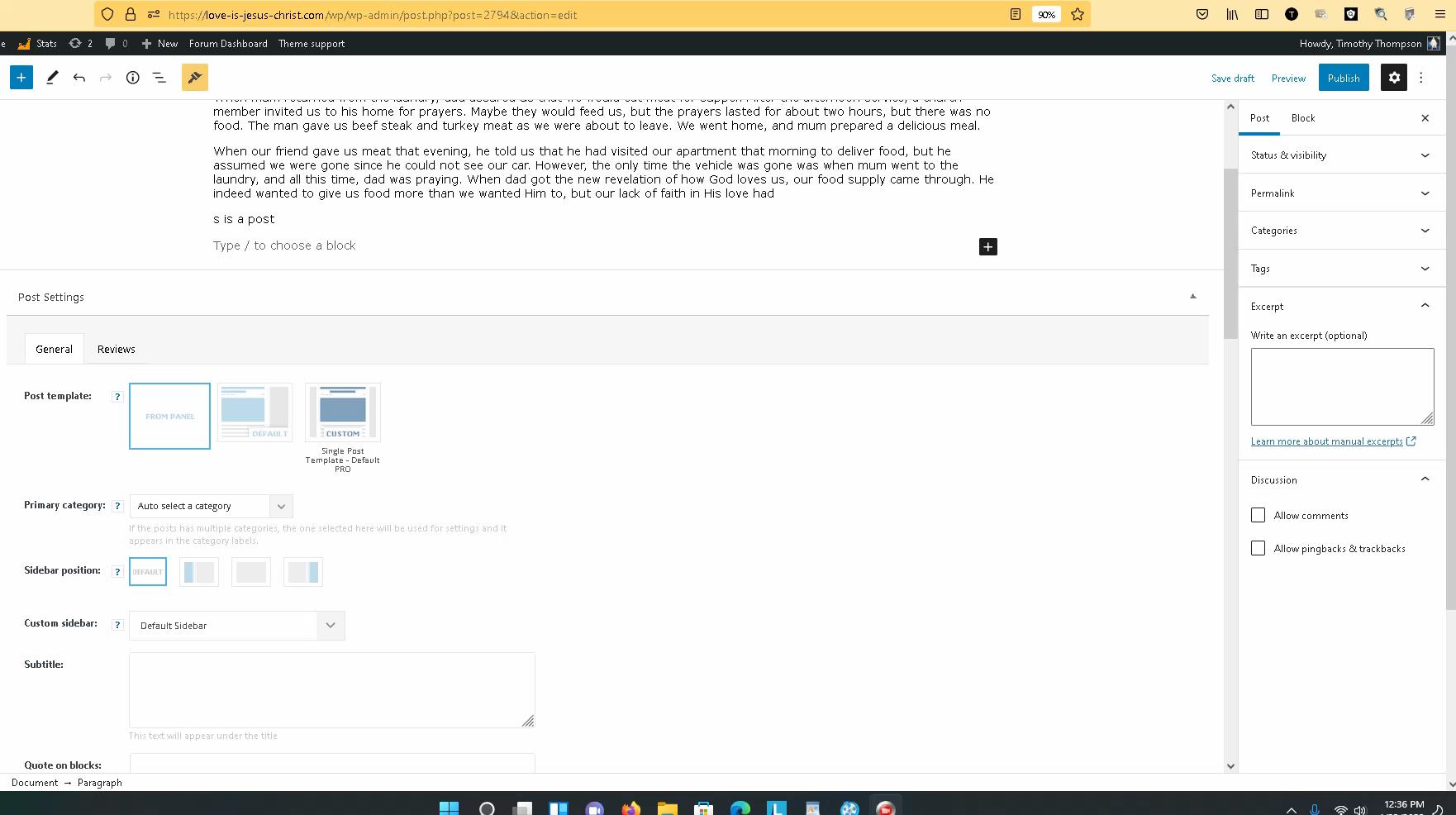
I have created well over 100 articles and have added many plugins. The last update was about two weeks ago. I have done a lot since then.
THE PROBLEM: The problem is when I try to create a “NEW POST”. Now as I create the post articles using the sidebar admin menu. I no longer see the area where I can add an image. Maybe I am having a really bad day. I could really use your sincere help in this matter.
I tried reinstalling WordPress, no luck. I deactivated all plugins except the Newspaper theme and still made no difference. I do understand that I can add an image on any part of the article, but that image would not show up on the front page, homepage newspaper theme. You can see my page here, My Home Page
Maybe reinstalling the newspaper theme? I am just trying not to lose my work. But as I wait for your response I am going to back up the site again.
So again, nothing on the side panel where I can add an image. Don’t see this, (Select or Upload Media)
Thanks for your help!
Timothy Thompson
 reloaded
Hi, it’s been a while i was thinking about it and i think i would like to try switching to Newspaper after years of Newsmag.
One of the reasons is that Newsmag seems to be going discontinued judjing the number of updates they receive. Newsmag is kind of 2 updates per year in the last 2 or 3 years VS countless updates for newspaper.
My doubs are about the transition: what are the steps i should follow in order to avoid problems? Do they have any plugins in common? Do you recommend switching off all plugins before theme installation?
And What will happen to post template styles which i randomly used with newsmag? Will they find an automatic conversion in newspaper of what else?
Thanks,
Paolo
 mmchunt
https://btlonline.org/ – The Newspaper theme download no longer includes the most recent version of WP Bakery Page Builder tested with the theme. We developed our site several years ago using Page Builder instead of TagDiv.
The site shows the following for the Page Builder plugin:
WPBakery Page Builder
You have version 6.6.0 installed. Update to 6.8.0. View version 6.8.0 details.
Why is the plugin no longer included in the download? Version 6.6 was released 2/22/2021. There have been 2 releases since that time. When are you planning to give users a new version? It would be far too much work for us to redo our site using TagDiv Composer.
 Bettina
 Hello @JJ0000 !
Please check our guides from here and from the left side:
– https://forum.tagdiv.com/ads-adsense-overview/
– https://forum.tagdiv.com/using-other-ads-non-adsense-ads/#
Please note that any change you make in the files after update will be overwritten and you have to make the changes again.
Thank you!
 motorstof
Hi there,
I believe like many others I have the problem that the facebook social counters does not update, it shows 0 fans, while it should be 1700+. This happens when I use both the ID and the name ‘Motorstof.nl’. When I look into the Social Networks tab from the theme panel all seems to look OK, I see both the followers on my Facebook page and Instagram account.
I have already tried deleting the social counters plugin with the tagdiv composer plugin as it was mentioned as a possible solution for this issue. Meaning I disconnected the accounts, disabled and deleted the plugins, reinstalled the plugins and reconnected the account. I currently do not have a caching plugin active, but it did not help.
The theme version is 11.4, which should be the last version as far as I can see. Further than that, I can not seem to find anymore possible solutions for this problem. Any help would be more than welcome.
Facebook page: https://www.facebook.com/Motorstof.nl
Website: Motorstof.nl
Bettina Hello @lian!
We will investigate further and try to come up with a solution in the future updates.
Thank you for understanding!
Bettina Hello @kmos!
You need to take into account:
External factors: server speed, if you are using CDN or not, the external resources loaded by your website like ads, fonts, tracking scripts like Facebook Pixel, Google Analytics, Twitter analytics, Hotjar and so on.
Internal factors: the number of elements on the page, image size, image formats, if you are using mobile optimized layouts, console errors.
Our developers are working a lot to improve the page speed in every update.
As a suggestion, disable the lazy load animation. Other starting points to improve your website page speed are here:
– https://forum.tagdiv.com/how-to-make-the-site-faster/
– https://forum.tagdiv.com/topic/score-100100-pagespeed-with-newspaper-wordpress-theme/
– https://www.infophilic.com/get-almost-100-pagespeed-newspaper-theme/
– https://developers.google.com/speed/docs/insights/v5/about
– https://www.youtube.com/watch?v=tnkVapqhIHc
Please check the tutorials from those platforms gt metrix and Google Pagespeed Insights and I’m sure you can increase the page speed.
Please note that page speed is not covered by the support team: https://forum.tagdiv.com/newspaper-theme-support/
Thank you for understanding!
 Lian
Lian This problem remains unsolved with the latest update
Single Post Bg Featured Image cached when used tagDiv CSS Analyzer.
Result: Display the same image on all articles.
Please fix this ASAP.
 Anamaria
 Hello,
Please make sure the tagDiv Standard Pack plugin is updated and activated.
Those shortcodes and the error are from tagDiv Standard Pack, and this plugin is not required from version 10.4, because the new demos are using cloud templates.
Thank you!
 kimstipguide
 hi
Bettina
I’ve tried various things.
I do not know.
Looking forward to theme updates.
thank you.
 ar15usr
 **UPDATE**
I have defined in the wp-config.php file the:
define( ‘WP_MEMORY_LIMIT’, ‘256M’ );
define( ‘WP_MAX_MEMORY_LIMIT’, ‘512M’ );
and now the Theme Status shows:
WP Memory Limit 256 MB/request
…but the problem still persists.
 Newsworldlab
My whole website setting changed and upset by your new update. No idea what to do now.
 jasaj
jasajAfter we update Newspaper theme to 11.4. our logo in the header starts to be out of the original proportion (.
Link to our webpage:
https://mina.news/
It should be like on link below:
https://mina.news/wp-content/uploads/2021/05/MINA-LOGO-01.png.
The second issue we have with the last update is “large letters” on mobile phones web browsers.
Screenshot:
https://mina.news/minabigletters/://mina.news/minabigletters/
Thanks in advance!
MINA
 Rostyslav
Updates are not immediately applied to the page after saving.
I’m editing the header. When I make changes, I have to wait up to 5 minutes for the updates to be applied. What is it?
Anamaria Hello @cc.mark,
I’m very sorry to hear this news and we don’t want the updates to cause this problem, and we’re trying to prevent them, but there are different cases because there are different settings for each server/website and plugins.
Also, in the last update, we introduced the option for backup before updating for settings from Theme Panel -> https://i.imgur.com/p7MAZEU.png
If you want for the next update we can offer you assistance to update, we will check together what could be the problem that occurs when you update and the settings from the theme panel are lost, but you need to have a backup made before.
Thank you for your understanding!
 marcorroma
 Thanks for the reply. Hope it will be added in the next update.
Anamaria Hello Charlie,
You can find a header template in the tagDiv Cloud Library looking the same as the Theme Panel.
Unfortunately, only if you make changes to the theme files, but they will be overwritten with each update.
Also, using a cloud template you have several options.
Thank you!
Bettina Hello @marcorroma!
Yes, I understand your request. In this moment, a developer is looking and testing this issue in order to provide a solution in the next update.
Thank you!



