
- Apitd_api_top_bar_template::update_key
- Apitd_api_top_bar_template::update
- Apitd_api_single_template::update_key
- Apitd_api_single_template::update
- Apitd_api_footer_template::update_key
- Apitd_api_footer_template::update
- Apitd_api_smart_list::update_key
- Apitd_api_smart_list::update
- Apitd_api_thumb::update_key
- Apitd_api_thumb::update
- Apitd_api_category_top_posts_style::update_key
- Apitd_api_category_top_posts_style::update
- Apitd_api_category_template::update_key
- Apitd_api_category_template::update
- Apitd_api_module::update_key
- Apitd_api_module::update
- Apitd_api_block::update_key
- Apitd_api_block::update
- Apitd_api_header_style::update_key
- Apitd_api_header_style::update
 Catalin
 Hi,
Please make sure when you update the theme to the latest version of it. First of all, you need to make a full backup to your database and then, you have to remove
your old theme and then add the new theme folder which contains the latest version of the theme. Also, you have not to overwrite because then you will encounter some problems. Check here -> https://forum.tagdiv.com/install-via-ftp/
Hope this helps and let us know how it goes!
Thank you!
 Simion C.
 Hi,
From what I can see the website looks alright at the moment, the latest theme is installed
– http://prntscr.com/nfrcqv
Maybe you solved the problem you were having. If you follow the guide it should work
– https://tagdiv.com/updating-the-core-of-tagdiv-themes/
The most reliable method to update is by FTP – https://tagdiv.com/update-newspaper-theme/
If you have more questions let us know.
Thanks
Simion C. Hi,
The recent 9.7 is somewhat a major update in a way, there were some modifications made to how the theme and theme plugins work – https://tagdiv.com/updating-the-core-of-tagdiv-themes/
This means that to maintain the same functionality now the composer plugin has to be active at all times, because many theme files are now part of it.
If you follow the steps in the guide carefully there should be no problem. Most reliable method to update is by FTP, delete the old theme and upload the new theme. Update all the plugins as mentioned. Also here is a guide – https://tagdiv.com/update-newspaper-theme/
If you use a child theme, note that since most of the theme files are in a plugin, it will not work anymore.
Thanks
 MKJ
MKJ There is abolutely no useful information in the article you mention when it comes to modified template files. How can we now do this mods update-safe?
MKJ Sorry, guys, what is the message here? That we have to edit template files in a plugin folder? Usually, this is not update-safe. Theme template files should be in the theme folder, that we can overwrite them in the child theme.
-
This reply was modified 7 years by
MKJ.
 Robert90
From the last 4 updates https://developers.google.com/speed/pagespeed/insights/?hl=ro&url=https%3A%2F%2Fwww.vdtonline.com%2F i see my website on mobile don’t have speed. and from the last updates speed boster i do’t can install because it’s one problem.
Salut de la ultimile 4 updateuri siteul pe mobil imi arata ca nu e optimizat am incercat cateva optiuni pe aici dar pe mobil nimic nu reusesc sa il optimizez. Imi puteti da cateva idei va rog frumos de la ce poate fii (fondatorii acestei teme va rog nu imi mai dati link-uri de la oameni fara creier ca au optimizat ei perfect ca am incercat o optimizare cu cateva coduri in functions.php si am stricat site-ul o noapte m-am chinuit sa il repar, cei ce optimizeaza pun coduri bune si dupa cred ca le schimba habar nu am !!!!)? Multumesc frumos !!!!
Simion C. Hi,
There is a quick fix you can try before this is fixed by us in a theme update, it is mentioned in this topic – https://forum.tagdiv.com/topic/newspaper-backend-issue-cannot-modify-header-information-headers-already-sent/
Let us know if the problem is fixed after trying it.
Thanks
 gpm79
gpm79 I do not see any update button of anything. Delete the plugin by ftp, install it and activate it from the theme panel and keep giving the same error. I have already uploaded all the files of the theme but the error keeps appearing.
MKJ Are you going to fix this in the next update?
-
This reply was modified 7 years by
 Calin
Calin Hi,
Indeed there is an issue in theme files you need to make some changes in wp-content/themes/Newspaper/footer.php
-> https://www.screencast.com/t/MH1mHUzX
This will fix the problem, also this fix will be include in coming update.
Thank you for your understanding!
 WilRC
WilRC Thanks, I will be very pleased if you do so.
It will save me a lot of work at each update.
-
This reply was modified 7 years by
WilRC.
 Tuudi
TuudiHi Guys!
I read previously that after update to 9.7.1 version my files from child theme will stop working. That’s exactly what happened in my website.
The problem what I have currently is how I can manually edit those files:
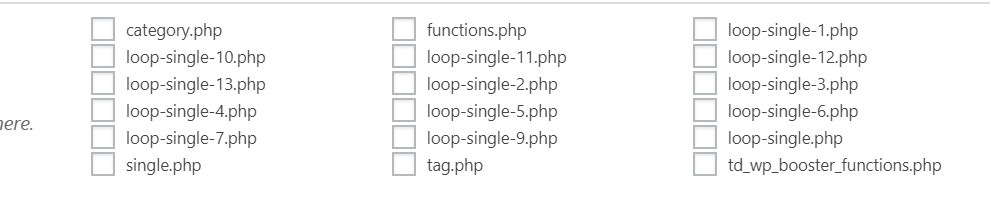
I manually implemented Ratings plugin into my website in every loop-single files:
` <div class="td-post-content">

        <?php echo $td_mod_single->get_content();?>

    </div>

<strong><div><?php if(function_exists('the_ratings')) { the_ratings(); } ?></div></strong>

    <footer>

        <?php echo $td_mod_single->get_post_pagination();?>

        <?php echo $td_mod_single->get_review();?>`
My question is: in which place can I now edit manually post templates?
Thanks a lot!
MKJ “In that case, you should not make an overwrite to your old files…”
Sorry, what? We cannot overwrite template files update-safe? Are you serious? This would be the worst update I have seen after years working with WordPress. Believe me or not, but there are plugins out there that need modifications of themes files. How can we do this now?
-
This reply was modified 7 years by
 stuartmasson
 Hi Calin. Is there any additional information on resolving this information? I’ve been having the same issues since the last update – can’t even download a blank cloud template without getting the above error, let alone edit existing templates.
I have disabled pretty much every plugin to try and resolve this, but have had no luck so far.
Thanks,
stuart
MKJ Hi, I have the same problem with single_template_2.php. How can we now modify the template file update-safe? Do you want me to change core files in the plugins folder? Seriously? How can I overwrite this template file using the child theme?
Simion C. Hi,
That would be the case, the child theme is quite limited after the recent update. Most theme files have been moved in the composer plugin as mentioned here
– https://tagdiv.com/updating-the-core-of-tagdiv-themes/
So now the file that you used to modify is in the composer – http://prntscr.com/nfpxm0 which could be modified but you will have to do it each time you update the theme and plugins.
Maybe consider using a search plugin which has this functionality, try free plugins. Here are some examples – https://colorlib.com/wp/search-plugins-for-wordpress/
– https://www.quora.com/Is-there-a-WordPress-search-engine-plugin-that-allows-you-to-search-outside-of-your-website
Thanks
Simion C. Hi,
So you are referring to the order of the posts that are displayed in the mega-menu. That would be a latest sort order, so they will appear by publish date. Currently there are no sorting settings for the mega-menu, maybe it will be considered for a future update. Sorry for the inconvenience.
Thanks
Simion C. Hi,
You can use the previous theme version if that is what you want, and update at a later time for example.
If you require the previous theme version you can download it from here
– https://forum.tagdiv.com/topic/important-new-update-newspaper-9-7/
Thanks
 doctorresidual
I have been on my site since morning having issue installing the updated version of TD composer plugin.
It has crashed my website.
It has affected hundreds of other websites too.
Kindly fix this plugin.
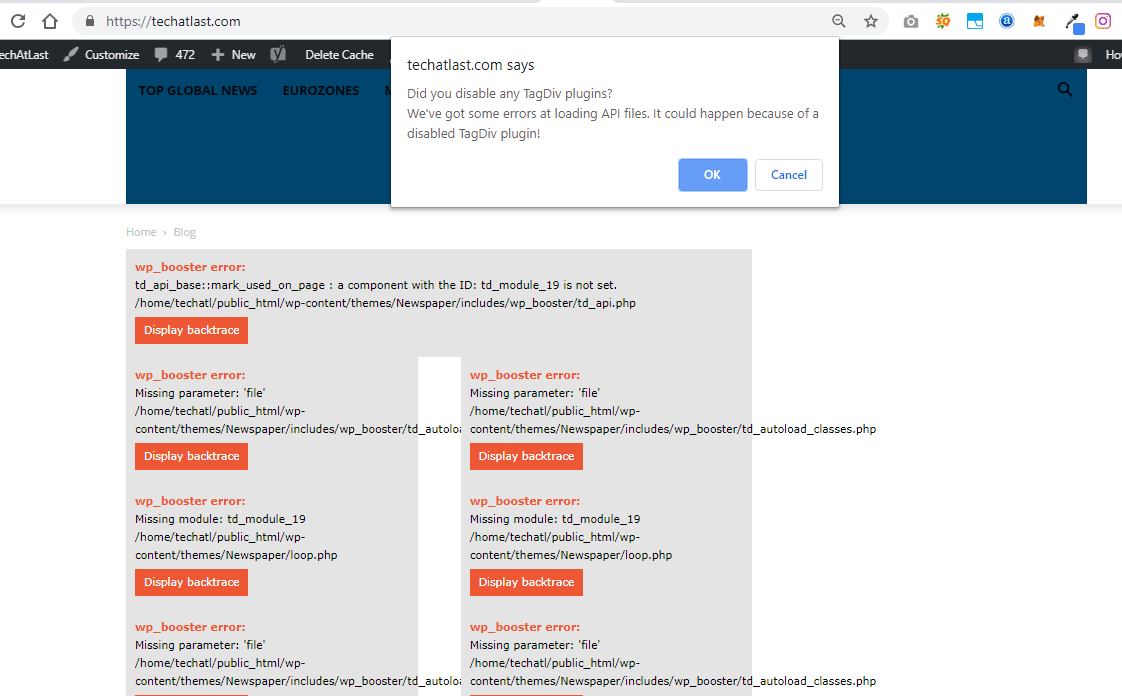

doctorresidual Still same error. I have tried several times. Why update the plugin to break our sites?
Simion C. Hi,
The 9.7 update was a somewhat major update, now the tagDiv composer has to be active at all times in order to maintain the same functionality. Most issues that can happen after update are related to how the theme is updated.
For example if you update by FTP the old theme has to be deleted and the new one uploaded. Then the plugins have to be updated as mentioned in the guide provided above. If you use a child theme this may not work anymore, the recent changes are the cause.
You can however not update for the time being and keep using the previous theme version, that depend on you entirely. You can update in the future if you should consider it. Maybe try it on a local copy of the site to see what happens, while having the main website kept safe. There are plugins that can duplicate a website if you should consider this suggestion.
If you want us to take a look you can send us an email at contact@tagdiv.com and provide admin access as well as FTP or cPanel. Let us know.
Thanks
 DeonvanHui
Good day
On my site http://www.getithartbeespoort.co.za my Instagram posts (@getithartbeespoort) are not showing. If I enter another account (@kormorant1) it shows? I set the element settings to 1 row and 4 images. My social media Instagram link is on and working. Not sure what other settings I have to change? Can it be that the Instagram account takes some time to update?
Thank you
Deon
 henrib
When i try to update to 9.7.1 i get an error message:
‘Can not be installed. The theme has no style.css stylesheet’
What is wrong?
 ahmetekinler
1- I’ve added some code to the \includes\widgets\td_page_builder_widgets.php file. Where do I add these codes in the new theme? (like: https://prnt.sc/ne6a15 )
2- Please give some details. I don’t want automatic and short answers.
Simion C. Hi,
It seems the same is happening on my end as well, I made a test with the plugin. The buddypress pages all display the warning you mention, in the frontend
– http://prntscr.com/nfnnmp
I am testing with the latest WordPress, theme, and plugin versions and it is happening. I also tried an older plugin version, but same result. This may be happening after the theme 9.7 update, the warning refers to a file that did not exist prior to 9.7.
I will add this issue on our list immediately, it will be investigated and fixed as soon as possible. I am sorry for this inconvenience.
Thanks
