
 simchris
 Hmmm…
using either ‘td-theme’ or ‘tdtheme’ does not un-enqueue (remove) the main style.css from head.
Hmmm…
oh…
// 1001 priority because visual composer uses 1000 function load_front_css() {
will try de-enqueue priority of 1100
yep … that was the trick, I had upped priority to 999, but you clever folks had it at 1001 … 🙂
Sorted!
Thanks
-
This reply was modified 9 years by
simchris.
 Simion C.
 Hi,
You don’t need to activate Visual composer, it is provided pre-activated with the theme. Updates of visual composer come bundled with updates of the theme. You can use all of Visual composers features from the start, no activation needed. More information here in this guide – https://forum.tagdiv.com/how-to-update-visual-composer-plugin/
Thanks
 Bogdan B.
 Hello,
Sorry but that is not a default theme element. Is it an extension of visual composer maybe There is no such setting in our theme. What element is being used?
Thank you!
 Catalin
 Hello Maui No Ka Oi Magazine,
I have inspected your website and I saw that you are using some untested plugins as you can see here ->
https://www.screencast.com/t/6VdlwXvi5 Notice that all of these are untested with the theme and these cause a lot of unknown issues, like this -> https://www.screencast.com/t/onol49wp Try to disable all of them, leave just Visual Composer to active, clear all your caches and install only the plugins that come bundled with the theme packet and rule out any conflicting plugins.
Thanks for your understanding!
Bogdan B. Hello,
Please make sure you use the latest version of the theme (7.6.1) and the latest version of visual composer: 5.0.1
If the option is still missing please reinstall the theme using this guide: https://forum.tagdiv.com/how-to-update-the-theme-2/
Also disable all plugins except visual composer, clear cache and reset cdn files.
Thank you!
Bogdan B. Hello,
The 2 sticky ads are like so because you have the smart sidebar class set on the row in visual composer: https://www.screencast.com/t/PqgTovr0XFa6
Please read this guide to learn how to set or remove the sticky sidebar: https://forum.tagdiv.com/smart-sidebar-2/
As for the ad boxes and the gap, you use separate rows on the sidebar so your sidebar is split in 3. That mens that the sidebar element will wait for the other sto show up with all content before showing the next row. You have the row set to shoe on the left the block most popular with 5 posts and on the right, the ad box with 2 ads.
It simply waits for the row to finish before showing the next row with content: https://www.screencast.com/t/DcUIkoVkcxR
If you want a continous sidebar and no gap between elements, add it on the same row and there will be no more gaps.
Thank you!
Bogdan B. You can try it out and download it from our free theme: https://forum.tagdiv.com/topic/td-github-page-seems-to-be-gone-or-down/ but keep in mind that it will not run in parallel with visual composer. Please jsut use one or the other as both could create certain issues.
It is still experimental on newspaper and newsmag. On ionMag it is fully implemented and working 100%. On newspaper and newsmag, it can still provide a few hiccups.
Thank you!
Catalin Hello Berbi,
I have checked your console and I noticed that you have a lot of js errors as you can see here -> https://www.screencast.com/t/62bPU9cOLZcy Also, I saw that you are using some untested plugins which can interact with the theme core files and cause these errors. Please try to disable all of them, leave just Visual cOmposer to active, clear all your caches and install only the plugins that come bundled with the theme packet and rule out any conflicting plugins. Also, if the problem is still there, please make a new clean install via FTP way because this is the surest method in this regard. Notice that the smart sidebar is a sensible functionality of sidebar and if you will have some interferences between JavaScript code, this will not work and that’s why it is very important to rule out all your untested plugins which might cause these errors from your console.
Hope this helps and let us know how it goes!
Thanks for the message!
Catalin Hello luckykatem,
This could be a plugin conflict so please disable all plugins except visual composer, clear cache and reset CDN files if you use it. Please also check any custom code you might have added to the theme panel or the theme files. If you use a child theme, please switch to the main theme to make sure it does not affect the proper functionality of the theme.
Thank you!
 otsnews
Hello,
Since updating recently to WP 4.7.2, it seems Visual Composer is breaking the edit pages screen. It goes to a blank screen and I cannot get any errors through PHP or WP_DEBUG.
What is the deal with the VC plugin as we have obviously used it to build up the theme, though only deactivating the plugin allows us to access the edit page screen.
Would you be able to give us some help in getting this fixed?
Thanks
 Girltrotteuse
Hi
I followed the social counter settings. Everything was ok : the app id, secret key and son one. I used the visual composer. But the facebook social counter shows up 0 followers.
Is there any step I have to add ? Thank you for your help.
Bogdan B. Hello,
1 and 2 You can translate these titles from the theme translation settings: https://www.screencast.com/t/lzB1RPvhHj
3. I’m not sure what a hover tab is. Is it a standard tab element? yu can add a tab in visual composer from it;s element list.
4. Please use this guide to set up your counter: https://forum.tagdiv.com/tagdiv-social-counter-tutorial-2/
I;m nost sure what an archived article is. Posts get archived once they become old enough.
http://www.wpbeginner.com/plugins/how-to-archive-posts-without-deleting-them-in-wordpress/
Thank you!
Bogdan B. Hello,
Please increase the system status parameters like so: https://forum.tagdiv.com/system-status-parameters-guide/
Also , please disable all plugins except visual composer, clear cache and reset cdn files if you use it. Please also check any custom code you might have added to the theme panel or the theme files. If you use a child theme, please switch to the main theme to make sure it does not affect the proper functionality of the theme.
If the border still does not show up, then please contact us via email at contact@tagdiv.com and provide wp-admin so we can login and investigate. Please also include a link to this topic.
Thank you!
Bogdan B. Hello,
Please increase your system status parameters like so: https://forum.tagdiv.com/system-status-parameters-guide/
The issue could be a memory limitation but it could also be a plugin conflict. You should check your browser console when you do not see the error and check it again when you see the error so you can see if there is an error provided that can provide a clue of why this happens.
Right now there is no error on your slider but I can see a console full of errors: https://www.screencast.com/t/Abgfkoq1z1a
please disable all plugins except visual composer and revolution slider, clear cache and reset cdn files if you use it. Please also check any custom code you might have added to the theme panel or the theme files. If you use a child theme, please switch to the main theme to make sure it does not affect the proper functionality of the theme. Then check the browser console again (from the browser inspector)
Thank you!
Bogdan B. Hello,
If these ad fields are not empty: https://www.screencast.com/t/A1J5N2TQbSz thank maybe these errors in your browser console might have something to do with the disappearing ads:
https://www.screencast.com/t/vepSRPbQ
Please disable all plugins except visual composer, clear cache and reset cdn files if you use it. Please also check any custom code you might have added to the theme panel or the theme files. If you use a child theme, please switch to the main theme to make sure it does not affect the proper functionality of the theme.
Thank you!
Catalin Hello Videnciastral,
You cannot open a ticket to Visual Composer staff because this type of plugin come bundled with our theme, and it is built-in with our theme. If you want to have access to plugin support, you should buy it, but it is unnecessary this thing. If you have some troubles with this plugin in our theme, please ask them, and we will be glad to help you.
Thanks for your understanding!
Bogdan B. Sorry but I cannot provide any other suggestion. Our theme provides modules and blocks, visual composer provides accordions, tabs and a few other elements and you can use revolution slider (not flex slider)
Unfortunately if none of these options are good for your project you will have to use a plugin that can provide the desired effect.
Thank you!
 AndroidKosmos
Hey,
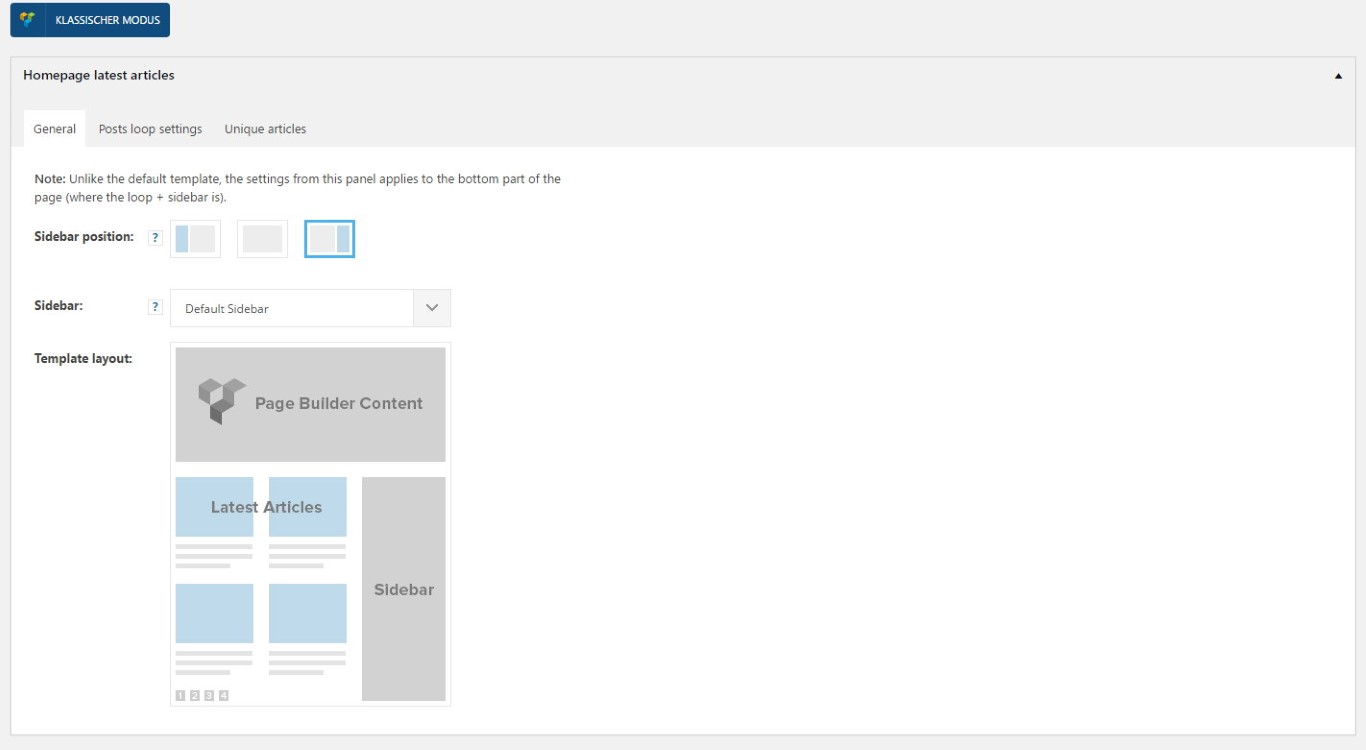
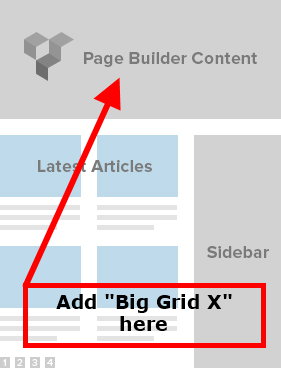
i’ve changed my frontpage completely and now use your “Hompage latest article” function, because i want a blog-style only. So is it possible to get one of your “Big Grid Blocks” above the latest articles?
Then i could deactivate the “visual composer” completely, because visual composer slow down the webpage and use so many scripts i don’t need.
Catalin Hello mRelby,
As you can see, if you will test our demo on iPad, you will notice that the sidebar will be sticky and work as properly. I suspect your issue happens due to your theme settings. Try to disable all the active plugins, leave use Visual Composer to active, clear all your caches and install only the plugins that come bundled with the theme packet and rule out any conflicting plugins. Also, if the problem is still there, you should make a new fresh install via FTP only with required plugins and check the results. Notice that if it goes on our demo, it should work on your side.
Thanks for your understanding!
Bogdan B. hello,
There seems to be a custom ad placed in the content in visual composer and 2 sidebar ads.
It is like so because you set it up to show 3 ads. Look: https://www.screencast.com/t/1mpldTROZ
There is athe big content ad in the middle and 2 ad boxes on the right.
You also have a widgetized sidebar that will bring the newspaper default sideabr onto the page: https://www.screencast.com/t/um9kkWIb and that also contains ad spots: https://www.screencast.com/t/cTm13RgM
Thank you!
Bogdan B. Hi,
The element is created custom for the dark demo version. In order to re-create it you need to create a tab element in visual composer and only use grids with style 1. Then you ned to add an extra class to the tab element: td-tab-color
Once you did this, you need to copy over the css from the black version into the main style.css file: http://screencast.com/t/2A3bCsQF
Thanks.
Catalin Hello marcusvilson,
Please keep in mind that the plugin come bundled with the theme packet and it should work as properly, without any activation. You should install the theme via FTP way because this is the surest method in this regard. Also, for more information about Visual Composer, consult the documentation here -> https://forum.tagdiv.com/update-the-visual-composer-plugin-wpbakery/
Thanks for your understanding!
Bogdan B. Hello,
same as the previous reply. Disable the plugins as this sounds more and more like a plugin conflict:
please disable all plugins except visual composer, clear cache and reset cdn files if you use it. Please also check any custom code you might have added to the theme panel or the theme files. If you use a child theme, please switch to the main theme to make sure it does not affect the proper functionality of the theme.
Thank you!
Bogdan B. Hello,
Please disable all plugins except visual composer, clear cache and reset cdn files if you use it. Then install the mobile theme before any other plugins and check to see if it works properly.
Thank you!
Catalin Hello Videnciastral,
I have checked your website and I saw that you are using a lot of untested plugins which can interact with the theme core files and cause a lot of unknown issues. Try to disable all of these, leave just Visual composer to active, clear all your caches and install only the plugins that come bundled with the theme packet and rule out any conflicting plugins.
If you do not have any access to load media in your media library, please make sure that you have set them all the permissions for upload folder in your Cpanel/FTP. Also, check your system status parameters to be higher increased according to our documentation here -> https://forum.tagdiv.com/system-status-parameters-guide/
Also, if the problem is still there, please try to make a new clean install from scratch via FTP and check the results.
Thanks for the message!
