
- TutorialsFrom WPBakery to tagDiv Composer
- TutorialsDefault Block Settings Guide
- TutorialsHow to Update the WPBakery Page Builder plugin
 janellelcarter
Hi,
I have been able to successfully embed Google maps in posts using the Editor role. I have an API key set up with google and I copy the iframe code below.
However when other Authors on my site try to embed the code below it doesn’t work. They add the text, it displays correctly in the visual editor, but when they save the draft the iframe code completely disappears. Authors mustn’t have the correct permissions to embed maps. I’ve verified this by changing one of my Authors to an Editor and suddenly it worked.
How can I give Authors permission to embed maps (using the code below) without having to make them into Editors? I don’t want them to have all the other permissions that come with being an Editor.
Any help would be greatly appreciated!
Post showing embedded map:
https://revesbyparents.com.au/2018/06/29/lambeth-reserve-picnic-point/
Code to embed the map:
<iframe style=”border: 0;” src=”https://www.google.com/maps/embed/v1/place?key=AIzaSyD5iABQHzGG4pa6Co2dbONeWZCXWSwUeIE&q=Lambeth+Reserve+Picnic+Point” width=”600″ height=”450″ frameborder=”0″ allowfullscreen=”allowfullscreen”><span data-mce-type=”bookmark” style=”display: inline-block; width: 0px; overflow: hidden; line-height: 0;” class=”mce_SELRES_start”></span><span data-mce-type=”bookmark” style=”display: inline-block; width: 0px; overflow: hidden; line-height: 0;” class=”mce_SELRES_start”></span><span data-mce-type=”bookmark” style=”display: inline-block; width: 0px; overflow: hidden; line-height: 0;” class=”mce_SELRES_start”></span><span data-mce-type=”bookmark” style=”display: inline-block; width: 0px; overflow: hidden; line-height: 0;” class=”mce_SELRES_start”></span><br />
</iframe>
Thank you!
Janelle
 mark1webmaster
How do I add/use form short code in a row/column?
I attempted to add my Ninja Forms short code into a Row using a inline test element but it just displayed it as text on the published page. There is no readily available documentation for TagDiv Composer so here I am asking. I have very little experience with visual editors and none with TagDiv or Visual Composer. I thought that maybe Visual Composer documentation might help, but it is not searchable and I don’t have time to go through all that.
 tylerdavis7
tried updating to latest theme version and latest visual composer version with the theme update. Nothing is showing up when I use a media masonry grid. Help?
 Tatiane Pires
First: I don’t want blocks or modules with two equal width columns.
When I select a row’s properties, there are very limited options for the number of columns. Perhaps it’s buried in some tab I simply happened to overlook. The thing is: on Visual Composer it’s possible to configure a lot more options as for number of columns and their widths by figuring out the math of it.
On Visual Composer I can set the columns like: 3/12+3/12+6/12 or 2/12+2/12+2/12+3/12+3/12 or whatever, I think the point is clear that this is a lot more flexible.
I need something much simpler as for columns’ configuration: 1/2+1/2. Again empty columns, so I can insert whatever text element, html element or any other element I need.
However I had to select the page by the post ID on the database, and input the following into post_content:
[vc_row][vc_column width="1/2"][/vc_column][vc_column width="1/2"][/vc_column][/vc_row]
Because if this change was to be made on WordPress’ default editor, then TDC would cry out like “You made changes outside TDC”. ¬¬
If this is the case that I missed something on TDC row settings, would you point it out, please?
Or, in case configuration of a row’s columns has really become restricted to those few options, I suggest to bring back a field like Visual Composer’s to input the fractions that sum up to the number of columns.
 Catalin
 Hello Ryansmccain,
Yes, the TD Composer plugin will recognize the old Visual Composer shortcodes. You can read our useful guide from here -> https://forum.tagdiv.com/visual-composer-tagdiv-composer-transition/
Thanks for your understanding!
Catalin Hello eoryeon,
I have checked your website and it seems to work and I do not bring HTTP ERROR 500.
Notice that the 500 error is usually a server side error meaning that there is something wrong but the server couldn’t provide more information about the problem. It is a general error usually caused by configuration issues with the websites programming, PHP or system permissions.
I found here some useful information about possible reasons for this errors and a few tips in order to fix it: http://pcsupport.about.com/od/findbyerrormessage/a/500servererror.htm Also, please try to disable all the active plugins, leave just Visual Composer to active, clear all your caches and install only the plugins that come bundled with the theme and rule out conflicting plugins. Also, please try contacting the hosting provider, tell them this problem and they should be able to provide a more accurate response.
Thanks for your understanding!
 ctoweett
 It is recommended you rebuild the same page again using td composer if you used visual composer, but make sure you deactivate visual composer if you intend to use td composer. The shortcodes used by visual composer might not work well with those of td composer (especially in future updates).
 pavel@earnware.com
 When you edit inside the tagdiv composer, in the TEXT not VISUAL – and use single quotes – then save it and open it again – those single quotes become double quotes – when you type in for html elements, here: 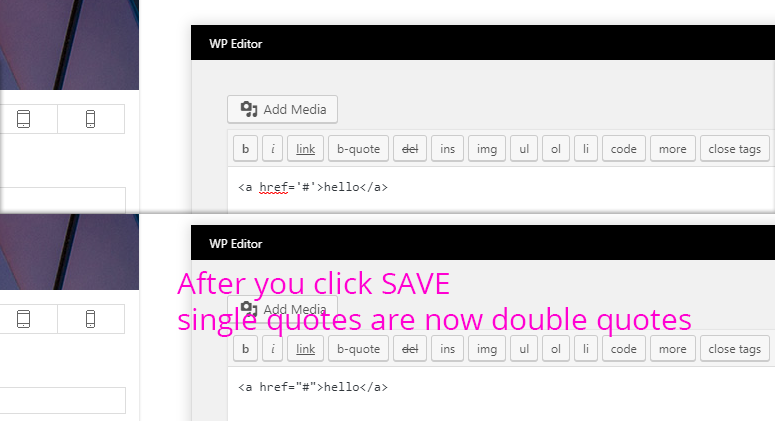
*Note that the WordPress regular Editor doesn’t do this..
Catalin Hello tanteidee,
Try using only TD Composer shortcodes because if you are using WP Bakery and then load with TD Composer, might appear some errors. Try to recreate all of your page elements with TD Composer page builder and check the results. You can check here -> https://forum.tagdiv.com/visual-composer-tagdiv-composer-transition/
Thanks.
 Simion C.
 Hi,
It cannot be fixed unfortunately, there will be problems when both are active. The single image or other Visual composer elements or row layouts will be affected negatively in this case. Also if you for example you create a page with one of the composers, then edit it with the other.
We strongly advise that only one of the page builders be used and active.
Thanks
Catalin Hello sk_rocks,
If you want to use these settings you should use only Visual Composer functionality because our TD COmposer does not have these options, sorry! -> https://www.screencast.com/t/3dhph13Vj Use only Visual Composer for that page if you do not want to get some errors.
Thanks for the message!
Simion C. Hi,
Try editing the page with Visual composer, I believe that is what you used to create it. Select another icon, see how they look. Maybe those are not available anymore for some reason. What icons are you using? I will try them on my end.
Thanks
 jakobe75
Many folks have asked about this.
This is the method I use.
I want to be able to selectively show or hide menu items from the main desktop menu or the mobile menu.
Why?
Sometimes there are many extra buttons a user will need to have access to quickly on a mobile device, but these items dont need to show on the main menu. Often we add supplemental links at the footer of websites for advertising inquires or secondary pages. We dont want them on the main menu, but they are important, yet we dont want mobile users scrolling for miles to find the button either.
or another reason…
The items shown in a drop down or megamenu on the desktop do not look good on mobile.
for example, you may have a button called “help” on the desktop. This button would indclude items like “reset password” or “your account”.
on a desktop it rolls over very nicely, but on mobile it requires an extra tap to the “help button” and then drop the menu down to see the choices.
so to solve this you can selectively hide or show menu items via CSS
They will still load and might be visible for a split second as CSS will only visually hide it wont remove it.
You will often need to create TWO menu items of the same things.
You can show one to the desktop users and show another to the mobile users.
To hide menu items from desktop but show on mobile:
(find the menu item number in the menu section of wordpress, just roll mouse over and look at the link at the bottom of the browser, it will contai your menu item #)
Then add this to the Custom CSS section of your theme panel with your menu numbers
(replace 123 with your menu item number)
@media(min-width:767px){
.menu-item-123, .menu-item-123{
display:none!important;
}
To show items ONLY on desktop and HIDE on mobile try this
It is especially usefull when you dont want drop downs to appear on the mobile menu slideout but still want the items to show in the mobile menu slideout.
@media(max-width:767px){
.menu-item-123, .menu-item-123{
display:none!important;
}}
Admins feel free to correct me.
Simion C. Hi,
1. That is the mega-menu with sub-categories with the Newspaper theme, Newsmag has a mega-menu design like this
– https://forum.tagdiv.com/newsmag-mega-menu/
Again, the links and example are using the Newspaper theme not Newsmag. Despite similarities there are also functionality and design differences between the two themes.
2. You could edit the page with the builder you used to create it, probably Visual composer (now WPBakery page builder). That seems to be a heading or title, set a border right to it of the color you want, check in the CSS or design tab settings.
Or use CSS to do that – https://www.screencast.com/t/xYOdyi91K3
.vc_custom_1505806546312 {

border-right: 3px solid white;

}
Thanks
Simion C. Hi,
All the demos are made with the tagDiv composer, using theme blocks, grids etc. The demos used to be made with Visual composer previously, but they have been remade. The tagDiv composer is the main page builder provided with the theme. However Visual composer (now WPBakery) is still provided in the package.
– https://forum.tagdiv.com/tagdiv-composer-tutorial/
So there will be no problem creating pages with our page builder. Also there are many demos to choose from and install
– https://demo.tagdiv.com/select_demo/select_demo_newspaper
– https://forum.tagdiv.com/demos_introduction/
– https://forum.tagdiv.com/installing-demos/
Thanks
Catalin Hello ds-2,
Please keep in mind that we every time recommend to our customers that before doing a theme update to do a full backup to the database to avoid losing all of the data. We do not recommend to update the theme using the Envato Toolkit plugin because it’s not the reliable way and might appears some errors, sorry! Please update the theme via FTP way because this is the surest and healthy way for updating your theme. Please follow the steps from here -> https://forum.tagdiv.com/install-via-ftp/ Try to recreate your pages using only the TD Composer and remove the Visual Composer shortcodes. This tutorial can help you -> https://forum.tagdiv.com/visual-composer-tagdiv-composer-transition/
Hope this helps and let us know how it goes!
Thanks for your understanding!
Simion C. Hi,
If absolutely required and if you decided to continue using WPBakery, you can enable the support for posts in the plugin settings
– https://www.screencast.com/t/VgpekLH7X
We do not recommend this however, more so if you should in the future switch to the tagDiv composer
– https://forum.tagdiv.com/how-to-use-visual-composer/
Thanks
 Danny
DannyJust a thank you to to whole tagDiv Team for creating the best theme i ever used for Word Press.
Seen a few posts that the page or front page is loading slow well mine already loaded pretty fast out of the box but with some custom modifications and a little sacrifice on the visual eye candy and mega menu’s it now loads ultra fast (does depend also on how close u are to the server ofcourse but still lol)
GTmetrix scores:

Pingdom scores:

Simion C. Hi,
Thank you for your appreciation, we will try to add even more features to the composer over future updates. We strongly recommend it for pages and now as of 8.8 and Cloud library plugin, it can also be used to create templates for posts, categories etc.
1. If those plugins are conflicting with the composer, maybe consider looking for other similar plugins if they are essential for the website.
2. How exactly are the sidebars breaking? From what I can see you use standard theme blocks in most posts I checked, in the sidebar. Problems with the layout may happen if you used Visual composer in the actual post content, and now the tagDiv composer is active. We strongly recommended users not to do this. This may be an issue when both composers are active.
The new template library section will be provided by installing this plugin
– https://www.screencast.com/t/1VzpUOcK
Thanks
Simion C. Hi,
First I see that you are using theme version 8.7.5 and an older WPBakery version (5.0.1). Update to the version provided in that theme package (5.4.7)
– https://forum.tagdiv.com/how-to-update-visual-composer-plugin/
Page builder problems can also be caused by insufficient resources
– https://forum.tagdiv.com/requirements-for-newspaper/
Please check the theme system status panel and see if it is set according to the documentation. WP-memory can be set higher if possible.
If you decided to use WPBakery page builder for your website, please deactivate the tagDiv composer plugin, when both are active there could be problems.
Thanks
 mrdeleon06
Hi, i already install the Newspaper 8.0 theme and all the plugins, but when i try to use the option “Edit with TD Composer” the page goes blank and it doesnt let me edit anything. it just let me edit with visual composer, but i want to use TD Composer. Do someone had the same problem? and how can i fix it??
 beermoney
Hello,
I have run into an issue with TD Composer not loading the WP Editor when trying to edit a text block with title. The loading icon just spins forever. We are wanting to move away from WPBakery Visual Composer and use your TD Composer but ran into this issue on the very first thing we tried to do.
We’re green in the System Status. I have tried disabling plugins and it didn’t seem to matter. It looks for many other posts that this takes someone logging into the site and inspecting things. So I have already created an account for someone from tagDiv. But, just wanted to post here first before emailing.
 RNation
 I would prefer to use just the tagdiv composer since the pages already use it but I need some kind of pagebuilder for posts and custom post types also.
Maybe you can help me out with using the page templates. I have a template choose but upon filling the visual text box with content the styling or layout doesn’t change on the front end. It just lays everything out the way it’s typed with no formatting. This is with visual composer off.
I did install TinyMCE Advanced which helps a little bit but I don’t get all of the extra easy css options like rounded corners, colored borders etc. that I get with visual composer.
When do you guys plan on releasing these updates, are we talking about a month or so or a year? Just looking for a guesstimate.
Thanks
Simion C. Hi,
@Chris The Newspaper theme supports PHP versions up to 7.2 since update 8.7
– https://www.screencast.com/t/AeJXPT1u
So there should be no problem using the theme and theme plugins with the version you intend to. Be sure to use theme version 8.7 or newer with that PHP version. Clear all caches, CDN as well if used, also browser caches could create visual problems.
The theme requirements are mentioned here, check if the system status is configured correctly
– https://forum.tagdiv.com/requirements-for-newspaper/
Thanks
Simion C. Hi,
Indeed, the tagDiv composer cannot be used on posts for the moment. This will change in a coming update, there will be changes to how the post templates are created (the post templates will have the option to be created with the tagDiv composer).
The tagDiv composer will be integrated further with the theme over future updates.
We do not recommended using the WPBakery page builder on posts, but you can enable it if required for your website
– https://forum.tagdiv.com/how-to-use-visual-composer/
If you use it on posts and the tagDiv composer is active, there could be layout problems. The single image element will also not display properly when both page builders are active.
So you should decide on one page builder and deactivate the other. We strongly advice to use the tagDiv composer. Many future options and settings will be added specially for it.
Thanks
