Catalin
 Hello xbass,
You should provide your website URL so I can take a closer look at it. I suppose that you are using our page builder TD COmposer and in the past, your buttons have been added with Visual Composer and most likely, that’s why you bring the shortcodes buttons because our page builder does not recognize it. Provide your website for more investigations. If is not what you mean, provide more details about your problem.
Thanks for the message!
 Simion C.
 Hi,
There should be no problem in using the Revolution slider. If you updated the theme to version 8, please update the plugins as well including the revolution slider. Deactivate it and delete it, then install the new one from the latest theme package.
In Newspaper 8 the tagDiv composer was introduced
– https://forum.tagdiv.com/tagdiv-composer-tutorial/
If you use Visual composer deactivate the TagDiv composer from the plugins section, this is activated by default when the theme is updated or installed for the first time.
If you want to use the new editor, you must recreate all the pages with it
– https://forum.tagdiv.com/visual-composer-tagdiv-composer-transition/
Also check the theme system status and see if the parameters mentioned in this guide are set properly
– https://forum.tagdiv.com/system-status-parameters-guide/
This will ensure the proper functionality of the theme and plugins.
Then try placing the revolution slider on the page you want. If the page was built with Visual composer use it to place the slider. Do not edit pages built with one editor, with the other.
If you still have problems please provide more details, and maybe some screenshots if possible so we can understand better and help you.
Thanks
 xbass
xbass I just found it, in visual editor -which I never use- is a formatting button, that’s what I did not see yesterday.
Cheers!
 MediaServicesTagDiv
 I also cannot use Visual Composer – trying to Add and element does nothing, and Choose Layout Option just gives me a spinning ajax loading graphic which I’ve waited for over 2 minutes. On our Newspaper system status page everything is okay (green or gray) except Caching (which we don’t want) and Speed Booster (which disabled itself v4.1 – Disabled – incompatible plugin detected: all-in-one-event-calendar-extended-views/all-in-one-event-calendar-extended-views.php).
We are using Newspaper on 2 websites now and I’m on a 3rd website with WordPress 4.8 installed just today, I’ve uploaded the Newspaper 8 theme by FTP and all plugins are active except for WP User Avatar which I turned off and deleted – after I was alredy having problems.
Any assistance getting me back up and running would be appreciated.
-
This reply was modified 9 years by
MediaServicesTagDiv.
 birchoff
 I can’t use, for example, visual composer to set my homepage. Last time i’ll guess it
 Bogdan B.
 Hello,
You can use visual composer just as before. We do not restrict the use of VC. But you will have to keep in mind that in the future we will add no new features to the visual composer plugin. We will only add new features to our own tagdiv composer. We will still provide updates to vc but no new blocks or grids.
We will be able to provide older theme versions via email.
Thanks
 RadioUahid
 Thank you for your fast reply. Two follow-up questions:
– Can I also deactivate TagDiv Composer and continue to use Visual Composer? Cause on other pages I use parallax elements which are now not working anymore?
– Just in case I fail to recreate the page. Could you theoretically provide the installer for the latest pre 8 version of Newspaper?
 Edward
 Try this method:
Step 1 – Install both the Visual Composer and tagDiv Composer plugins.
Step 2 – The page has to be recreated using the new page builder. You will have to build a new page and edit it with the tagDiv Composer replicating your original page (made with Visual Composer).
Step 3 – Save the page. Replace your homepage with the newly created one. You can always revert to the original page if you encounter any problems.
Step 4 – Disable visual composer as it is not recommended to keep both plugins active.
Important Note: Do not use both page builders on the same page!
Catalin Hello fgmotta,
The travel demo uses the background image a bit different. It has it set on the row in the Visual Composer or TD Composer. You need to edit your homepage and access row settings: http://screencast.com/t/9udWgjVdz http://screencast.com/t/Z2VHdgzUTuV3
Thanks for your understanding!
Bogdan B. Hello,
Please do not use an old child theme with the new version of the theme
Please read this guide to learn about the child theme functionality: https://forum.tagdiv.com/topic/setting-up-child-theme/
Keeping both the tagdiv composer and visual composer plugins active at the same time will cause layout problems especially with the single image elements
Please only use one or the other, not both at the same time
Thank you!
Catalin Hello Gee95,
Before updating your theme, please check our documentation here -> https://forum.tagdiv.com/visual-composer-tagdiv-composer-transition/ -> https://forum.tagdiv.com/tagdiv-composer-tutorial/ because there you will find all the steps which are needed to take in order to move your website on our page builder, TD Composer.
Hope this helps!
Thanks for your understanding!
Bogdan B. Hello,
OK, let us try to get a hang of this issue.
Each page must be built with the builder you use on your site. If you want top use tagdiv composer, then disable visual composer and create the pages from scratch using the tagdiv composr
If you want to use visual composer, disable the tagdiv composer and create the pages from scratch using visual composer (they have already been created with visual composer so it is not needed but i wrote so you understand the pattern here)
On every page builder, you have to create the pages using that particular page builder. Not create a page with one and use the other to edit it.
If for some reason this functionality as I have described still provides the error, please contact us via email at contact@tagdiv.com and provide a link to your site and wp-admin so we can login and investigate the problem.
Thank you!
 Gee95
Gee95Morning guys,
I’m a bit slow to move due to my site being widely popular around this time of year.
I’m currently on version 7.8 and want to move to 8.1 – But continue to use WPBakery Visual Composer, for now, until a later stage when I can convert all my pages e.g. homepage to the new TagDiv page builder.
How is this possible? Have you got a guide where I can quickly follow so my website will only be down for a few minutes?
Also, does upgrading change my website structure and Google crawling? As when i’ve changed themes in the past, it’s taken days for Google to detect the structure change and crawl and rank again.
Many thanks,
Catalin Hello emceenetwork,
1)Errors happened during tdcIframeData.init() -> bindViewsModelsWrappers()!
Please do not use this setting in Seo by Yoast:
https://www.screencast.com/t/n8Cc35EofLh Also, if you are using the WP Super Cache plugin, please ensure that has been right setup according to our documentation here -> https://forum.tagdiv.com/cache-plugin-install-and-configure/
2)Also, the third important rule is to do not edit a page which was created with Visual Composer with TD Composer.
Also, I have inspected your website and I saw that you are using some untested plugins which can interact with the theme core files and causes a lot of unknown issues like this.
Clear all the caches and check the results.
Thanks for your understanding!
Simion C. Hi,
In Newspaper 8 the new tagDiv composer was introduced as the main page builder
– https://forum.tagdiv.com/tagdiv-composer-tutorial/
It will be activated by default when the theme is installed or updated. In some cases there can be problems when both Visual composer and the tagDiv composer are active at the same time.
If you decide to use the tagDiv composer you will have to recreate all the pages with this new front-end editor
– https://forum.tagdiv.com/visual-composer-tagdiv-composer-transition/
You can keep using Visual composer after updating the theme and disable the tagDiv composer, then make the switch when you think the time is right.
The option to display pages in blocks is available for Visual composer as well
– https://www.screencast.com/t/4HR4wu8gxPj
Page Id’s can be entered in the filter in order to display specific pages if necessary
– https://www.screencast.com/t/PtWrlmq7
Here in the live demo you can see most of the features of the theme (latest theme version)
– https://demo.tagdiv.com/newspaper/
Check the Features menu.
Thanks
 steve83
Apologies for starting a new thread on this. I’m not getting anywhere with my previous thread and need to summarise everything in hope of a solution.
5 days ago I upgraded Newspaper theme to 8.1. All my pages were created with visual composer.
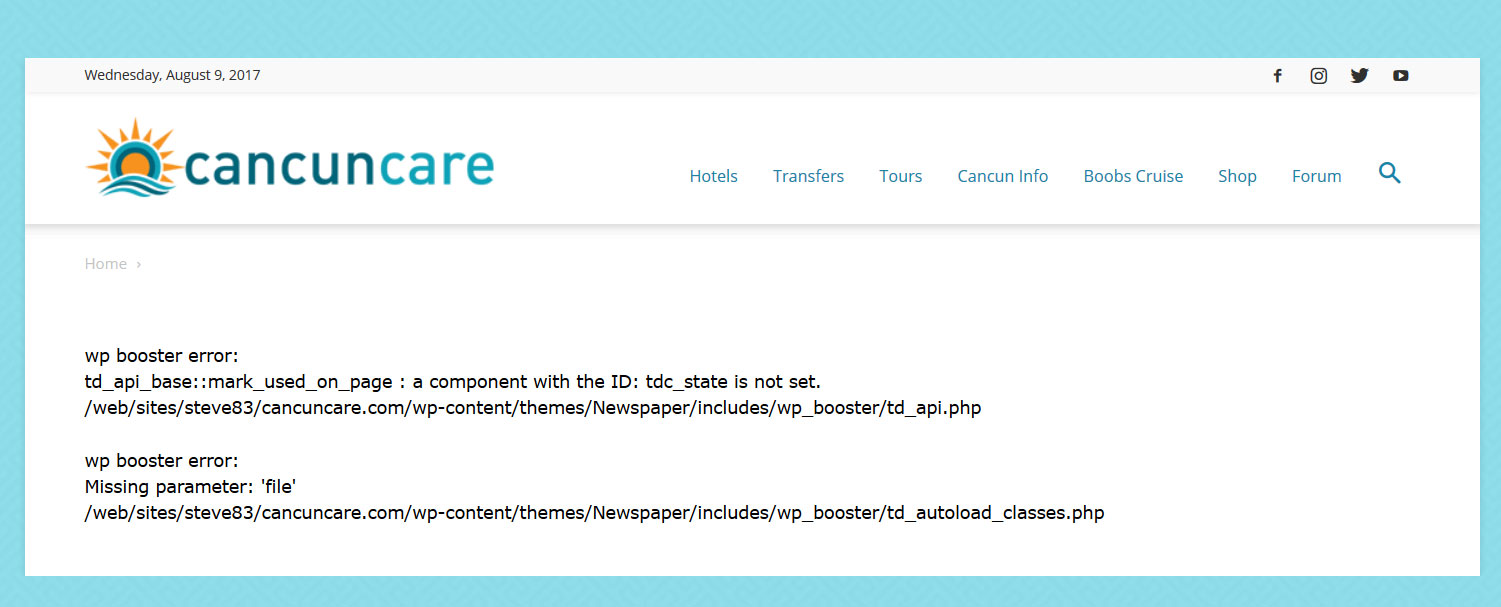
With tagdiv composer deactivated and visual composer activated my pages give the following error.
wp booster error:
td_api_base::mark_used_on_page : a component with the ID: tdc_state is not set.
/web/sites/steve83/cancuncare.com/wp-content/themes/Newspaper/includes/wp_booster/td_api.php

wp booster error:
Missing parameter: 'file'
/web/sites/steve83/cancuncare.com/wp-content/themes/Newspaper/includes/wp_booster/td_autoload_classes.php
(screenshot http://www.cancuncare.com/screenshot/homepage-with-vc.jpg)
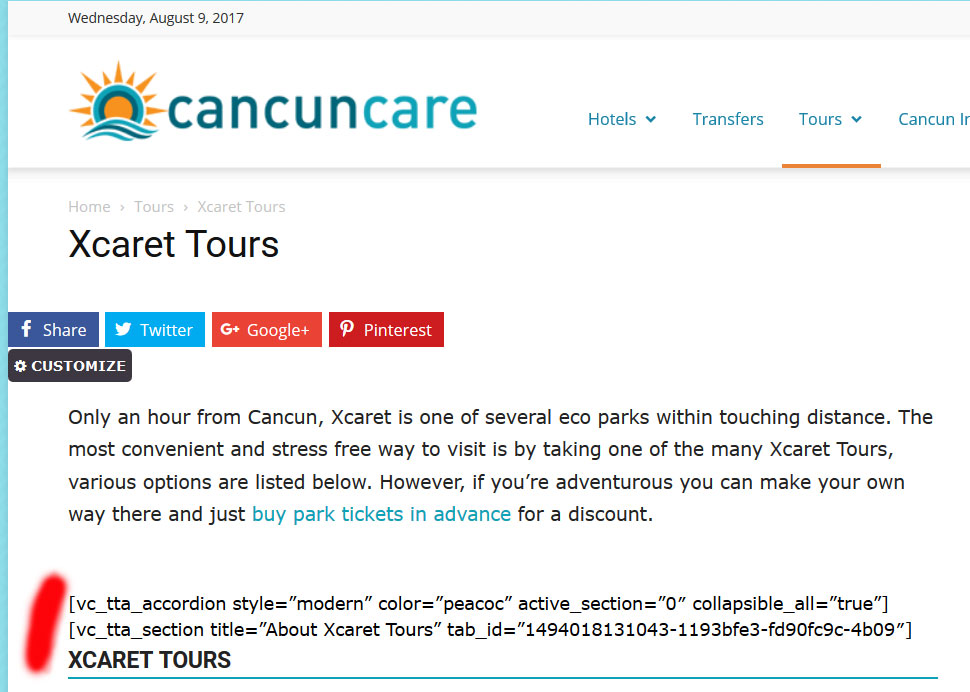
With tagdiv composer activated and visual composer deactivated many elements do not show at all, instead displaying the visual composer code.
(screenshot http://www.cancuncare.com/screenshot/page-with-tc.jpg)
The only way I have found to get the pages to show somewhat correctly is to install and activate both tagdiv composer and visual composer, which when I do so results in some page elements rendering incorrectly (images showing at an incorrect size and sidebars appearing below content). Re-making these pages from scratch results in the exact same problems. I understand having both tagdiv and visual composer enabled is not good. But disabling tagdiv results in the wp-booster error, and disabling visual composer results in elements not displaying.
I have been going round in circles for the last 5 days and am no further on than when I started. I really need a proper solution to this, the latest Newspaper update (8.1) broke my site and I need to get it fixed.
I am happy to provide wordpress login and ftp details if you could advise me on a secure way to do this.
Catalin Hello bokitchan,
1)Errors happened during tdcIframeData.init() -> bindViewsModelsWrappers()!
Please do not use this setting in Seo by Yoast:
https://www.screencast.com/t/n8Cc35EofLh Also, if you are using the WP Super Cache plugin, please ensure that has been right setup according to our documentation here -> https://forum.tagdiv.com/cache-plugin-install-and-configure/
2)Also, the third important rule is to do not edit a page which was created with Visual Composer with TD Composer.
Also, I have inspected your website and I saw that you are using some untested plugins which can interact with the theme core files and causes a lot of unknown issues like this.
Clear all the caches and check the results.
Thanks for your understanding!
Simion C. Hi,
Something is not functioning properly on your website. A theme reinstall and testing with only Visual composer enabled should fix the problem. Clear any caching installed as well.
The single images you mention seem to be created with the tagDiv composer, maybe you used both editors on the same page. That is strongly not recommended and can create these problems.
Try recreating the page in Visual composer, or create a similar page with single image elements and check if they display like that. Keep the tagDiv composer deactivated.
Layout issues like sidebar being displayed below main content are also caused by plugins or custom code, or modifications to the theme files directly or through a child theme maybe.
Thanks
 mehmednaim
 My active addons list is:
Akismet Anti-Spam (version 3.3.4)
Before and After Slider for VC (version 1.2)
Contact Form 7 (version 4.8.1)
Font Awesome 4 Menus (version 4.7.0)
Global Gallery (version 5.42)
Google Captcha Pro (reCAPTCHA) by BestWebSoft (version 1.30)
tagDiv Composer (version 1.0)
tagDiv Social Counter (version 4.2)
VaultPress (version 1.9.2)
Jetpack (version 5.2.1)
WP Missed Schedule (version 2014.1231.2017.5)
WP RSS Aggregator (version 4.11.1)
WP Super Cache (version 1.5.3)
WP User Avatar (version 2.0.8)
WP-Mail-SMTP (version 0.10.1)
WPBakery Visual Composer (version 5.2)
Yoast SEO (version 5.2)
Edward https://forum.tagdiv.com/how-to-use-visual-composer/
How to update Visual Composer plugin: https://forum.tagdiv.com/how-to-update-visual-composer-plugin/
But developres strongly recommend you to use tagDiv Composer with Newspaper: https://forum.tagdiv.com/visual-composer-tagdiv-composer-transition/
Important Note: Do not use both page builders on the same page!
-
This reply was modified 9 years by
Edward.
Simion C. Hi,
In some cases having both the editors active can cause problems. If you are using Visual composer for your website, deactivate the tagDiv composer.
The tagDiv editor is activated by default when the theme is installed or updated
– https://forum.tagdiv.com/tagdiv-composer-tutorial/
Thanks
Simion C. Hi,
You could use Visual composer on posts, but it is not officially recommended. The composer is only meant to be used on pages in the theme documentation
– https://forum.tagdiv.com/how-to-use-visual-composer/
There may be problems if you use it on posts, but you can keep using it if is absolutely necessary and you used it before.
Thanks
 34ML
34ML Hello, I’m having the exact same problem and to make sure it’s not caused by other plugins or custom code I created a fresh WordPress installation on https://update.rahetbally.com/ and installed ONLY Newsmag & the attached version of Visual Composer (I even deleted Jetpack and other default plugins) and yet it doesn’t work.
The page at https://update.rahetbally.com/test/ is supposed to have two columns “Desktop”: should be visible on lg,md,sm and “Mobile”: should be visible on “xs” only. But you can see clearly that none of the classes (vc_hidden-lg vc_hidden-md vc_hidden-sm vc_hidden-xs) are added to the columns.
Here’s the backend code for /test:
[vc_row][vc_column width="1/3"][/vc_column][vc_column width="1/3" offset="vc_hidden-xs"][vc_custom_heading text="Desktop"][/vc_column][vc_column width="1/3"][/vc_column][/vc_row][vc_row][vc_column width="1/3"][/vc_column][vc_column width="1/3" offset="vc_hidden-lg vc_hidden-md vc_hidden-sm"][vc_custom_heading text="Mobile"][/vc_column][vc_column width="1/3"][/vc_column][/vc_row]
You can see that the ‘vc_hidden’ classes are ignored in the generated HTML:
<div class=”vc_row td_uid_2_59889dbb6feb4_rand wpb_row td-pb-row”><div class=”vc_column td_uid_3_59889dbb6ffe4_rand wpb_column vc_column_container td-pb-span4″><div class=”wpb_wrapper”></div></div><div class=”vc_column td_uid_4_59889dbb7009e_rand wpb_column vc_column_container td-pb-span4″><div class=”wpb_wrapper”><h2 style=”text-align: left;font-family:Abril Fatface;font-weight:400;font-style:normal” class=”vc_custom_heading”>Desktop</h2></div></div><div class=”vc_column td_uid_5_59889dbb705e4_rand wpb_column vc_column_container td-pb-span4″><div class=”wpb_wrapper”></div></div></div>
Thank you,
Bogdan B. Hello,
Both visual composer and the tagdiv composer will not work both at the same time. Please only use one or the other.
As for the add-ons, they themselves have not been tested with our theme. Only the masic visual composer plugin is tested but not it’s add-ons.
Thank you!
 llucson
 Hi.
I do not use child theme. I also do not use visual composer. Just Tagdiv composer
Thanks