Andrei L.
 Hi
The message appear because the old folder wasn’t deleted. Login in your account using a ftp client, navigate at your-wp-install/wp-content/plugins and delete js-composer folder. After this step you should be able to update the plugin from your dashboard.
Before making any changes make sure you do a full backup to your current wp-install and the database also: https://codex.wordpress.org/WordPress_Backups
Thanks!
Andrei L. Andrei L. Hi
Our demos are tested and works fine on mobile devices. I am not sure why this happens on your site but you can try to deactivate all plugins except Visual Composer, clear all caches and test again.
If the problem persist please provide your site url so I can have a closer look at this issue.
Thanks!
Andrei L. Hi
Please address us via email at contact@tagdiv.com including a link to this conversation and also give us wp-access so we can have a closer look at this and we will get back to your as soon as possible.
Thanks!
Andrei L. Hi
I’ve checked your id with social counter plugin and works fine on my side: http://screencast.com/t/NoOISDCx – http://screencast.com/t/O7lngqX1p Make sure you’ve added the id as I’ve indicated in my screen, clear all caches and test again.
Thanks!
Andrei L. Hi
The above solution won’t work in child theme as td_module_single_base.php file can’t be edited via child theme. Here you can check all files which can be edited with child theme: https://forum.tagdiv.com/newsmag-child-theme-support/ Also when you update the theme all customizations will be lost as the old files are deleted and new theme files are added instead. You will have to keep track your customizations and re-add them again after each theme update.
Thanks!
Andrei L. Hi
I’ve checked your site and the images are displayed fine now: http://screencast.com/t/puftBhRqEIB If you still need assistance on this please let us know.
Thanks!
Andrei L. Hi
On this post template the featured image have a different style than the rest of post content. All post content it’s included in a container which have fixed a margin and padding. Changing its style will affect post content layout and to achieve the desired rezult it’s required a new approach for this post template.
Unfortunately we can’t offer customization services at the moment so if you still need guidance on this or you’re not aware of the steps you need to take in this regard please consider hiring a developer or a freelancer to do this for you.
Thanks!
Andrei L. Hi
I’ve checked your site and noticed that you’re using an older version of Visual Composer plugin. Try to update the plugin at V 4.11.2 which is included in theme’s path: https://forum.tagdiv.com/newsmag-how-to-update-visual-composer-plugin/ clear all caches and test again.
Let me know how it goes.
Thanks!
Andrei L. Hi
Please address us via email at contact@tagdiv.com including a link to this conversation and we will guide you trough necessary steps in order to get the refund.
Thanks!
Andrei L. Hi
Please make sure that the image links to media file: http://screencast.com/t/94hQFMhp and general modal image it’s disabled in theme panel > post settings. Also make sure that you’re using the last theme version available on themeforest, V 2.3.6 and V 4.11.2 of Visual Composer plugin.
Thanks!
Andrei L. Hi
This is a global settings and applies on all posts. To apply it only on some specif posts you’ll need to edit the function which generate the featured image for posts and add some additional conditions such that the image to be displayed only on desired posts: http://screencast.com/t/hgLBDXkR1Okh For example to display the featured image only if the post belongs to a specific category.
Thanks!
Andrei L. Hi
Make sure you have the latest version of visual composer active, V 4.11.2, also deactivate all plugins except Visual Composer, clear all caches, purge cdn files if you’re using then test again.
Let us know how it goes and if the problem persist please send us an email at contact@tagdiv.com with your login credentials and we will inspect this issue as soon as possible, also include a link to this topic.
Thanks!
Andrei L. Hi
Sorry about that, now I’ve fixed the code and it’s displayed fine.
Thanks!
Andrei L. Hi
Try to update the theme at latest version available on themeforest, V 2.3.6, and also update Visual Composer plugin at V 4.11.2 which is included in theme’s path. Here you can find our update documentation: https://forum.tagdiv.com/topic/visual-composer-not-working-6/#post-106390 – https://forum.tagdiv.com/newsmag-how-to-update-visual-composer-plugin/
Thanks!
Andrei L. Hi
Try to update the theme at latest version available on themeforest, V 2.3.6, and also update Visual Composer plugin at V 4.11.2 which is included in theme’s path. Here you can find our update documentation: https://forum.tagdiv.com/topic/visual-composer-not-working-6/#post-106390 – https://forum.tagdiv.com/newsmag-how-to-update-visual-composer-plugin/
Thanks!
Andrei L. Hi
Try this css in theme panel > custom code > custom css: http://screencast.com/t/ap9kbdornyYe
Thanks!
Andrei L. Hi
Try to update the theme at latest version available on themeforest, V 2.3.6, and also update Visual Composer plugin at V 4.11.2 which is included in theme’s path. Here you can find our update documentation: https://forum.tagdiv.com/topic/visual-composer-not-working-6/#post-106390 – https://forum.tagdiv.com/newsmag-how-to-update-visual-composer-plugin/
Thanks!
Andrei L. Hi
Replied you here: https://forum.tagdiv.com/topic/visual-composer-not-working-6/#post-106390
Thanks!
Andrei L. Hi
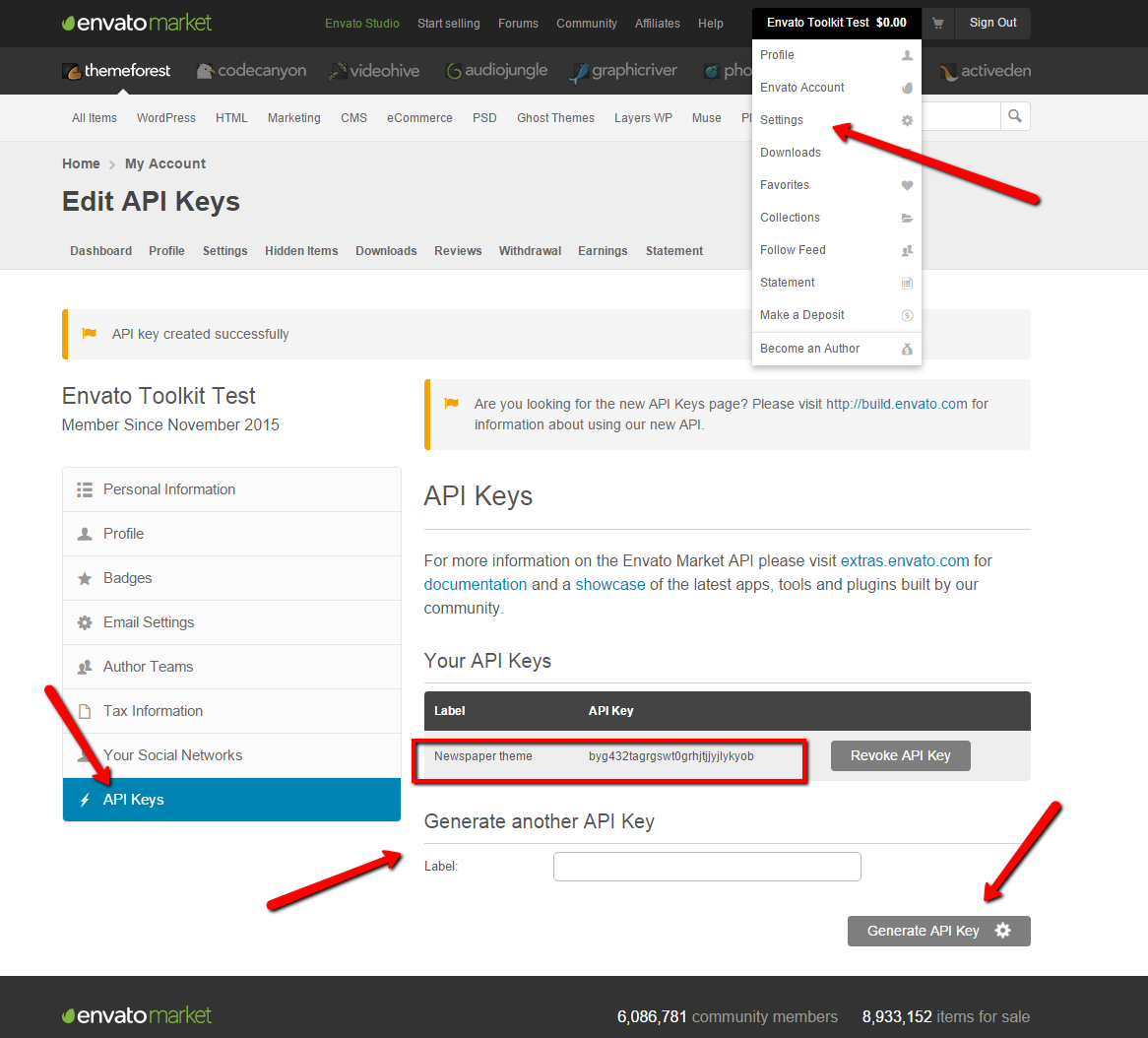
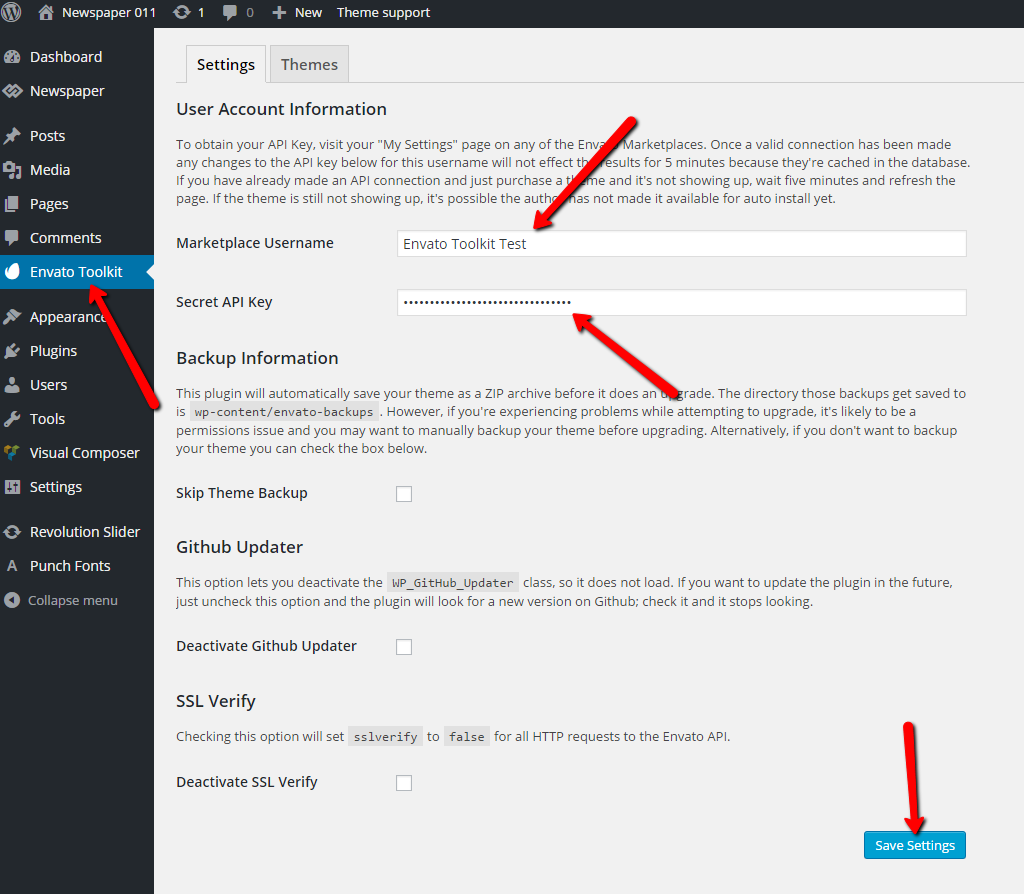
The API key can be found in your envato account following this image: https://forum.tagdiv.com/wp-content/uploads/2015/11/2015-11-18_1503.png The key must be add in plugin’s panel as it’s indicated here: https://forum.tagdiv.com/wp-content/uploads/2015/11/2015-11-18_1505.png
If you still can’t manage to connect with you themeforest account use the ftp method to make the update, or update it via wordpress. Both methods are detailed in our documentation: https://forum.tagdiv.com/how-to-update-the-theme-2/
Thanks!
Andrei L. Hi
I assume that you have the directory browsing set to OFF on your server. When I try to access the uploads folder I get a 403 forbidden message: http://screencast.com/t/H1QTDmGc however the files within this folder can be accessed.
Contact you host provider and ask him if he set any restriction on your folders as he may be able to offer more details in this regard.
Thanks!
Andrei L. Hi
Make sure you’re using the last theme version available on themeforest, V2.3.6, clear all caches then test again.
If you still can’t manage to solve this please provide your site url so I can have a closer look at this issue.
Thanks!
Andrei L. Hi
Try this css in theme panel > custom code > custom css: http://screencast.com/t/27KwjcMbd7
.td-header-main-menu {

border-radius: 13px;

}
A 3px radius won’t be to visible so I’ve used a bigger value for the demonstration but you can change it as you want.
Thanks!
Andrei L. Hi
Indeed there was an issue with jQuery after last WordPress update. However we updated the theme and now the conflict it’s fixed. Best solution to fix the issues related with image display it’s to update the theme at current version available on themeforest, V 2.3.6 and also update Visual Composer plugin at V 4.11.2. Here you can find our update documentation: https://forum.tagdiv.com/newsmag-how-to-update-the-theme/ – https://forum.tagdiv.com/newsmag-how-to-update-visual-composer-plugin/
Thanks!
Andrei L. Hi
Try this css in theme panel > custom code > custom css: http://screencast.com/t/UZE72WeCMB
.sf-menu .td-icon-menu-down{

    display: none;

}
Thanks!