Bogdan B.
 Hello,
The sitewide post template works only for posts that have the ‘from panel’ template specified to them. If you create a post and select any other template than from panel: http://screencast.com/t/xml6FccBjZSh then it will be over-ride the setting.
Please check your posts to see if the template is set to from panel and let us know.
Thank you!
Bogdan B. Hello,
The slider gallery on 3 columns is defined here: http://screencast.com/t/81yl7lvjv
You can change the thumb used by changing td_1021x580 with td_1068x0
Thank you!
Bogdan B. Hello,
@everyone
Please send an email at contact@tagdiv.com with your login information so we can inspect the issue and figure it out.
Thank you!
Bogdan B. Hello,
You need to check if the page is public. If it’s not then it will not work. Please access your page when you are logged out and see if can be accessed.
Thank you!
Bogdan B. Hello,
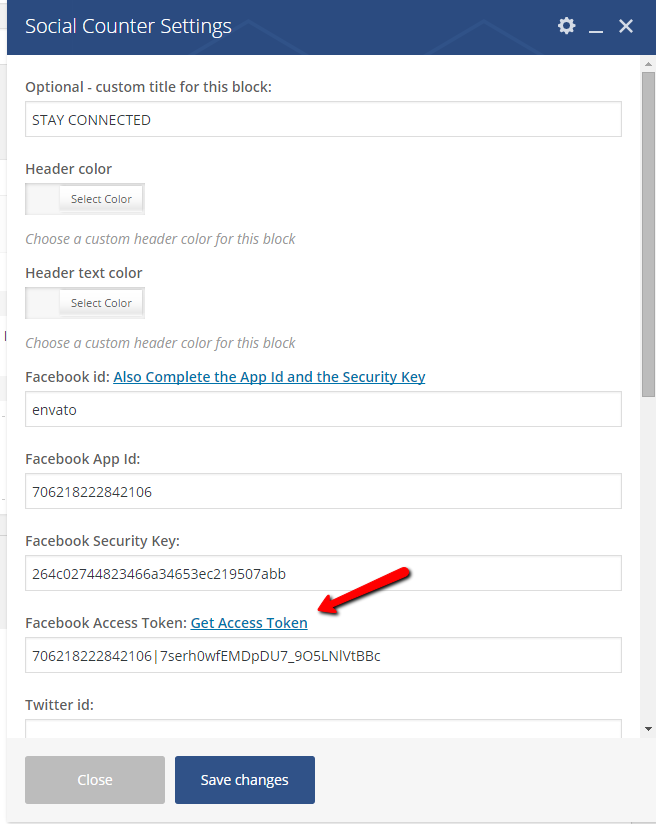
* The social counter plugin needs to be updated as well. Please remove the old one and install the one that comes with the current version of the theme. A few things have been changed regarding the facebook buttons in the current version 6.6.1 because of facebook changes. Please follow this tutorial to see how to set it up: https://forum.tagdiv.com/tagdiv-social-counter-tutorial-2/
* Unfortunately the update script does not show in the current version. We are going to fix it in the new version. Please send us an email at contact@tagdiv.com so we can provide it. Please include a link to this topic as well.
* As for the sticky menu you can set it from here: http://screencast.com/t/MhlTePSAZQi
Thank you and sorry for the inconvenience!
Bogdan B. Hello,
We tested the new version of WP with our theme and everything is OK. You can update your WP without problems.
Thank you!
Bogdan B. :)) Mistake by my part as well. Did not see the 4 w’s.
Please use this custom css and remove the old one:
.home .tp-rightarrow.default, .home .tp-leftarrow.default{

display:none !important;

}
Thank you!
Bogdan B. Hello,
There is a known issue with playlist items if you use more than one playlist on a page it will not work. So if you use more than 1 playlist, please just use one until this can be fixed. If not, please provide a link to your website so we can inspect the issue.
Thank you!
Bogdan B. Hello,
The jetpack photon feature is known to cause problems with our theme. We advice every user to avoid this option.
Thanks.
Bogdan B. Hello,
@JCAires please check your account settings and contact facebook to see why this is the case.
@akpanpromise Please Copy the App ID and the App Secret Key to the Social Counter Widget, and then click Get Access Token. like this image suggests: https://forum.tagdiv.com/wp-content/uploads/2015/07/td_facebook_on_vc.png
You can also try it without plugins to rule out a plugin conflict.
If your counter still shows 0 likes, then please send an email at contact@tagdiv.com with your login information so we can take a look. Please include a link to this topic.
Thank you!
Bogdan B. Hello,
Please try this without other plugins activated. Disable all of them except visual composer and woocommerce and clear your cache to see if there is a plugin that is conflicting with woocommerce.
Let us know how it goes.
Thank you!
Bogdan B. Hello,
The modification is all css related
you will need to use the media queries to target just the mobile viewport. Then you can make images use the whole container width and change positioning:
@media (max-width: 767px){

.td_module_11 .td-module-thumb {

    width: 100%;

position:relative;

}

.td_module_11 .td-module-thumb .entry-thumb{

width:100%;

}

}
Now you will need to position the titles and excerpts.
This should get you started on your task.
Thanks.
Bogdan B. Hello,
At the moment we do not have this in plan, but we always try to improve our theme and maybe in a future version, more sorting options will be available.
Thank you!
Bogdan B. Hello,
Please use the latest version of the social counter. It comes with version 6.6.1 of the theme. Then please follow this tutorial to see how to set it up. The method is a bit different: https://forum.tagdiv.com/tagdiv-social-counter-tutorial-2/
Thank you!
Bogdan B. Hello,
You cannot ‘turn’ categories into pages but you can create pages in visual composer and then redirect your category links to the pages. You can use a 301 redirect plugin to get it done. Then you can simply create a page and just filter the desired category on all blocks.
I hope this helps.
Thank you!
Bogdan B. Hello,
Please provide a link to your website and the slider. And also provide some screenshots so we can see how it should display.
Thank you!
Bogdan B. Hello,
You can use the above method to force the blocks/modules you want to display the wordpress square thumbnail as i showed above.
Block 4 uses module 2
Block 7 uses module 6
The related articles uses the module you assign it to display from here: http://screencast.com/t/DoBqScVl263
And the live search uses module mx2
You can find all these files here: http://screencast.com/t/ciBgQqMJiGE6
You can use the methods above to edit these files and modify the thumbnails to get them square. If you cannot manage on your own you can hire a freelancer to help out on this task from sites like studio.envato.com as we cannot offer any custom work at the moment.
Thank you for your understanding.
Bogdan B. Hello,
I assume you are getting your code from here: https://apiok.ru/wiki/pages/viewpage.action?pageId=42476656
Unfortunately not all plugins/widgets can be implemented with our theme. Some work, other do not. We have not tested any other sharing plugins so we cannot say for sure which one will work but there is a bunch of them out there. Test a few of them out and see which one works best.
Thank you!
Bogdan B. Hello,
This is a list of tested plugins: http://screencast.com/t/XtWhRFXMBqjZ
Unfortunately some features get updated and other new options get implemented. Even these tested plugins have some options that do not work anymore. It is hard to keep track of plugins and all of their updates.
You can do a search on our forum and see what other people use though.
Sorry for the inconvenience and thank you for your understanding.
Bogdan B. Hello,
You can see the list of header styles: https://forum.tagdiv.com/header-styles/
You can use header style 9 of you wish and simply use a float left on the logo.
It is difficult to create a full logo template aligned left and the ad on the right. People use different logos and the ad will fall under the logo if the logo will be too big. We had to limit the logo in some way so the ad would keep it’s position.
Thank you for your understanding.
Bogdan B. Hello,
Please try to disable all your plugins except visual composer and woocommerce, clear your cache and purge files if you use cdn and check if the error is still there to rule out a plugin conflict.
You can also try to update the theme to the latest version 6.6.1 – https://forum.tagdiv.com/how-to-update-the-theme-2/ and also check for other version of the woocommerce plugin.
Let us know how it goes.
Thank you!
Bogdan B. Hello,
It seems your button title is too long and the css for woocommerce does not let it jump to another line.
You can override this with this code:
.woocommerce #respond input#submit, .woocommerce a.button, .woocommerce button.button, .woocommerce input.button{

    white-space: normal!important;

}
Simply place the code in the theme panel->custom css box
result:http://screencast.com/t/LKoyl4OlC
Thanks.
Bogdan B. Hello,
Unfortunately your website cannot be accessed and i could not inspect the issue. Please let us know when we can access it.
Thank you!
Bogdan B. Hello,
Unfortunately you cannot hide the sidebar based on smartlists but you can hide it based on post id’s. Every post has a unique id you can see with your browser inspector: http://screencast.com/t/LOWjAktF
Fopr example the post id from the above screenshot is 1385 so i would use css to hide the sidebar on that particular post like so:
.postid-1385 .td-main-sidebar{

display:none!important;

}
You can use this code to apply it to your particular posts you want to use smartlists on. Simply copy and paste the code then change the id. (you can get the id from the back-end as well: http://screencast.com/t/gYFV7SoYF)
Thanks.
Bogdan B. Hello,
I tested this and found that using a
element instead of a span for your links will eliminate the space.
example:
You can then use this custom css to enlarge the images to 100% and reduce margins:
.td-post-content img{

width:100%;

}
Thank you!