Calin
Calin Hi,
If you want to add shortcodes to a page or a Cloud Template, please use the Shortcode element.
If you don’t see the Shortcode element in tagDiv Composer, make sure you’re using the latest theme version (12.7.5).
Calin Hi,
Based on the screenshots you provided, it appears that you are using the tagDiv Mobile Theme plugin. In this case, it’s important to maintain separate caches for desktop and mobile devices. Please make sure that your caching plugin supports device-based caching, so it can generate distinct cache versions for desktop and mobile.
If you’re using the free version of Cloudflare, this functionality is not included by default. To enable separate caching for mobile and desktop in Cloudflare, you can configure Cache by Device Type using Cache Rules, or enable it through Automatic Platform Optimization (APO) for WordPress.
Calin Hi,
Cloud templates are the templates that you get from the tagDiv Cloud Library, and you can edit them with tagDiv Composer.
– https://forum.tagdiv.com/how-use-tagdiv-cloud-library-templates/
– https://forum.tagdiv.com/cloud-library-templates/
Calin Hi,
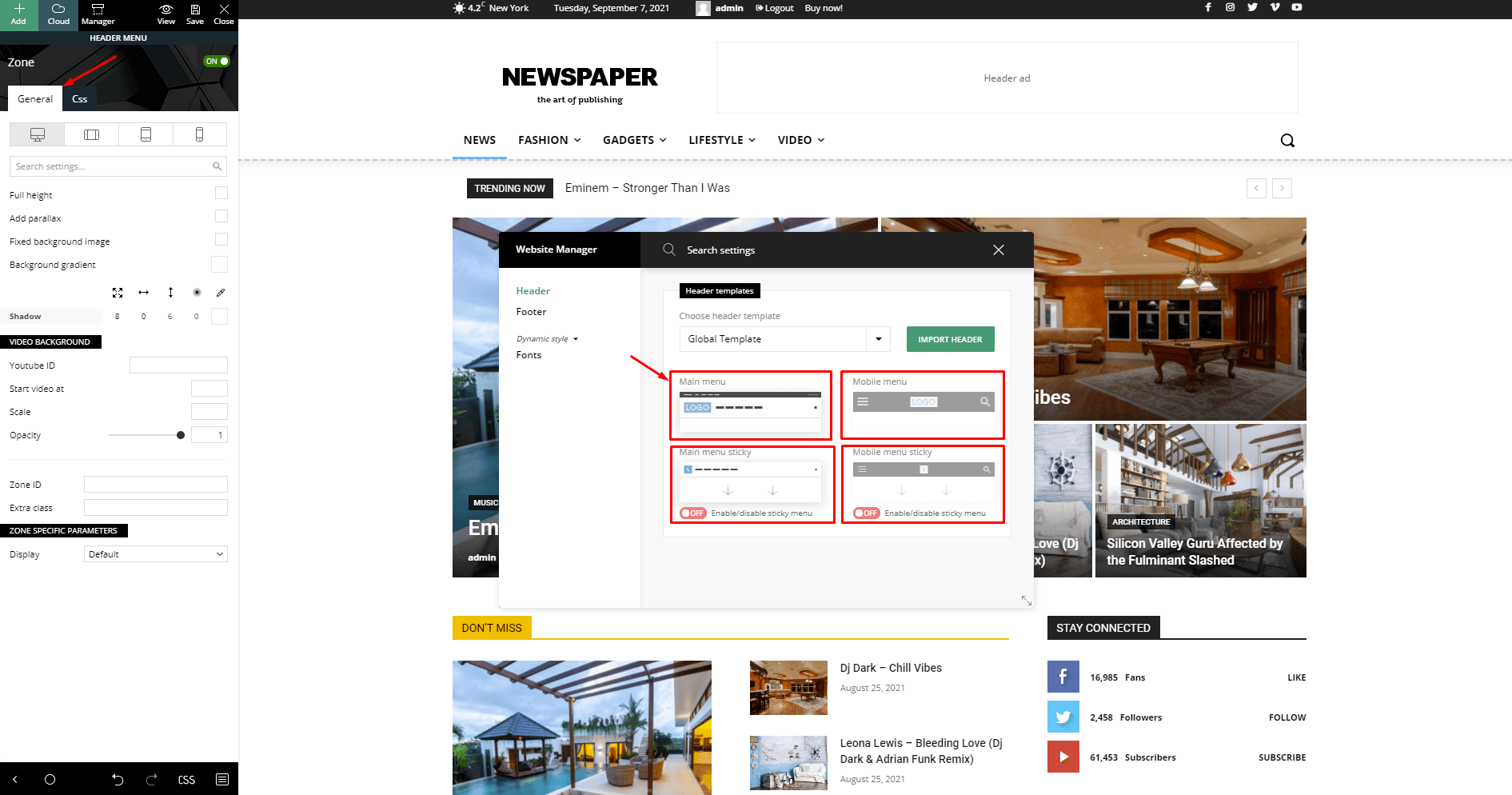
This means the sticky header for that cloud header template was never set up. What you should do is to add the elements you want to appear in the sticky header into that empty column.
Calin Hi,
Usually, the solution is to add the code from the bottom of this guide – https://forum.tagdiv.com/requirements-for-newspaper/ meaning this one – https://i.imgur.com/q6RyLGA.png in the htaccess file. Then the issue should be solved.
Let me know the results!
Calin Hi,
Could you please contact us via email at contact@tagdiv.com and provide temporary wp-admin access https://www.wpbeginner.com/plugins/how-to-create-temporary-login-for-wordpress-no-passwords/ to check the settings that you have made so far?
Calin Hi,
From your screenhost, I see that you are using mobile templates, which are normally used only when you want the mobile version of the website to be different from the desktop version. If you want to be as on a desktop, then is no need of that, the theme has a responsive version, which can be adjusted with tagDiv Composer by selecting the mobile viewport – https://prnt.sc/DlK-25TLvJL7
Also, using a mobile page template, you must be sure that the cache plugin used can offer a separate cache for mobile and desktop, otherwise, it will deliver the wrong version on the wrong device.
Related to the menu, those can be created under Appearance> Menu and https://forum.tagdiv.com/main-menu/ and should be set on the menu elements with tagDiv Composer, by selecting the desired menu https://prnt.sc/3qIFiPoJkPz9 – https://prnt.sc/Y2qo5NAGV5W7
Calin Hi,
You can try to set the cs sin a different place, for example, in the theme panel > custom code> custom css. Also, the above example will work if you are using a cloud template for an article; if it is a standard template, it will not work.
Thank you!
Calin I see, in this situation, you could use a css like this one:
.tdb_single_content  p:first-child.dropcapp3:first-letter{

font-weight: 900;

}
Just add any css you need for the first Drop Cap, the css will apply only on the drop cap that is on the first paragraph inside the post
Calin Hi,
Sorry for the late reply. Our response time is normally under 24 hours, except on weekends and days off.
In your screenshot, you have a flex block builder and the flex block builder use modules, which can be created or imported from cloud – https://prnt.sc/jDMhMSNb8mQS
To set a module to a flex block builder, edit that page/template with tagDiv Composer, select the element and in in “Module” tab select the module template you want to use on that flex block https://prnt.sc/ZlGN06bBJ6k0
Calin Hi,
The request has been added on our list.
Thank you!
Calin Hi,
I think that you want to do it like this -https://demo.tagdiv.com/newspaper_shop_watches_store/ if yes, then it can be done use tagDiv Composer, select the Woo product block and search for the button option, which should be under the Layout tab. https://prnt.sc/NdCypAZ3uyd5
Calin Hi,
Those templates are different, so if you do not have a website with an RTL language, I recommend not using the Default RTL PRO, which is only for RTL languages.
Thank you!
Calin Hi Vladimir,
To have the same layout on mobile as on desktop, please check your plugin and see if you are using the tagDiv mobile theme plugin and/or amp plugin, if you have any one of them, please disable those plugins, clear the cache and check again, the same information and layout from desktop will also be used on mobile.
Thank you!
Calin Hi,
If you set multiple category filters for a block, then the articles that will be displayed can be part of any category set in the filter, and will be display the 5-6 (depends on the post number set on the block) and base on the sort option if is latest, then it willbe display the latest 5 articles from all those categories set in the filter. Maybe you thought that if you have a block that is displaying 5 articles, you can set multiple categories on it, for example, 5 categories, and each article will be from a different category. If so, unfortunately, it does not work like that. You can do this, but for this, you need to use the ID filter and set the ID of the articles you want to display.
Thank you!
Calin Hi,
I just checked teh website, and it appears that the sticky header is only on mobile, so I checked with the Wayback Machine to see how it was before the update https://prnt.sc/iT5WXE67POYX, and it was exactly as it is now, only for mobile https://web.archive.org/web/20260212122551/https://www.electronicsforu.com/, so this is not a theme update-related.
Please check our documentation for how to enable the sticky header https://forum.tagdiv.com/header-manager/ – https://forum.tagdiv.com/wp-content/uploads/2019/07/Header-Main-Menu.png
Calin Hi,
The model does not match the content. The current state has involved an issue. You could try an UNDO operation (CTRL+Z / CTRL+SHIFT+Z). Most of the time the problem is from a shortcode that is not compatible with our theme or a plugin conflict, therefore after you set it with tagDiv Composer and save the page, the next time when you try to edit it, you’ll get that error.
If is only for one page, this is from some settings/shortcodes set on it and it can be fixed using the page revision https://wordpress.com/support/page-post-revisions/
If the problem persists, please contact us via email at contact@tagdiv.com and provide temporary wp-admin access, and we’ll check it as soon as possible.
Thank you!
Calin Hi,
Unfortunately, I can not see the screenhost, I do not have access to the Google Drive.
Those settings were previosly made in teh theme files? If so, then indeed after updating the theme, those changes/settings are removed and reverted to normal.
Thank you!
Calin Hi Maple Epoch,
Could you please provide some more details related to teh settings you’ve made and some screenshots? Or if possible please contact us via email at contact@tagdiv.com, providing temporary wp-admin access. We’ll check it as soon as possible.
Thank you!
Calin Hi,
Most of the time, the problem is from a shortcode that is not compatible with our theme; therefore, after you set it with tagDiv Composer and save the page, the next time you try to edit it, you’ll get that error. The simplest and fastest way to resolve it is to use a page/template revision – https://wordpress.com/support/page-post-revisions/ (in this case will be a post template revision).
If the problem persists, please contact us via email at contact@tagdiv.com and provide temporary wp-admin access, and we’ll check it as soon as possible.
Thank you!
Calin Hi,
This is because I think you search in the cloud templates after the default, but those have a different name, please search after Single Post Template 1, that one is used for the default demo.
Calin Hi,
No, this is not a must; it’s just an alternative that can be used with a newspaper theme.
Thank you!
Calin Hi,
As I mentioned, the header for mobile is different from the one on the desktop, so what you can do is to copy the top row from the desktop and paste it on mobile https://i.imgur.com/2opJ8Qv.png – https://i.imgur.com/SqZTzMz.png – https://prnt.sc/sbSC2mhHa4OL
Calin Hi,
Using tagDiv Standard Pack provides the old php blocks and templates. Once you disable it you should replace all blocks with flex blocks and templates to cloud templates.
You can use cloud templates for taxonomies too https://prnt.sc/FfAAXF_r_Cbm
Thank you!
Calin Hi,
Could you please clarify the question? Do you want to use more drop caps on an article, and you want to use the same drop cap, but apply it only to the first drop cap?