Calin
Calin Hi,
The SELECT SQL_CALC_FOUND_ROWS wp_posts.ID are used for rows and blocks (our theme stores the settings from rows and elements in database and the mentioned sql is one of those that make a request to them).
– how to use the Flex Blocks cache option
– use a cache for database, object cache should help.
– reduce the number of rows (rows and inner rows) from pages and cloud templates.
– reduce the number of blocks.
Thank you!
Calin Hi,
There are certain situations where we can assist with license-related issues. For this, please contact us via email at contact@tagdiv.com and provide the license key.
If the domain no longer exists or is no longer using the theme, we may be able to help further.
Thank you!
Calin Hi,
Unfortunately, for the moment, that is the only Ajax filter that the theme has on flex blocks that is similar to what you need.
The theme also has filters and sorting for taxonomies – https://forum.tagdiv.com/filters-sorting-taxonomies/
Calin Hi,
When you see shortcodes on your site, it means one of the theme plugins is no longer installed. After your screenshots, the problem is related to the tagDiv Social Counter, which can be installed from Newspaper > plugins – https://forum.tagdiv.com/tagdiv-social-counter-intro/
Calin Hi,
Could you please provide a bit more detail regarding your question? Are you referring to WooCommerce variations? https://prnt.sc/ZZZXesvGtP1n
Calin Hi,
I understand the situation.
What I recommend is to use a staging version of the website when performing the theme update. This allows you to safely test the update and check whether there are any impacts on the website layout or functionality before applying it to the live site.
Calin Hi Paniki2300,
The Revolution Slider is currently showing the immediately next available plugin version rather than the latest one. This is expected behavior, which is why the version displayed may not match the most recent release.
To properly update the plugin, please follow these steps:
1. Connect to the theme account and download the full package
2. Unzip the downloaded package
3. Inside the extracted files, locate the plugins folder
4. Find the revolution_slider folder, which contains the plugin files
5. Use the zip inside this folder to install or update the plugin manually following the standard update procedure: https://forum.tagdiv.com/how-to-install-revolution-slider-v5/
Thank you!
Calin Hi aroundmedia ,
When WordPress articles shared on Facebook no longer display the image, title, and description (link preview), it is typically because Facebook’s crawler is unable to properly access or interpret the Open Graph (OG) meta tags on the site.
Please find below a related topic that may help clarify or resolve the issue – https://wordpress.org/support/topic/facebook-doesnt-display-thumbnail-for-my-posts/
Calin Hi,
Thank you for the additional details, I understand the situation now. You have multiple categories, most of which include an extra section dedicated to exclusive articles. However, a few categories do not contain exclusive content, and you’d prefer not to display that section for them.
In this case, the simplest solution would be to duplicate your current Cloud Category Template, remove the exclusive section from the duplicated version, and then assign this new template to the categories that do not include exclusive articles.
Hi,
Could you please provide a bit more detail?
Are you referring to changes made in the Theme Panel settings or modifications made directly within the theme files? If changes were made directly to the theme files, please note that these will be overwritten during a theme update. In such cases, it’s recommended to use a child theme for customizations.
If you are referring to Theme Panel settings, these should not be affected by a theme update.
A few recommendations:
– always perform a full backup before running any updates
– before updating the theme, take note of the active theme plugins, and after the update, ensure all required plugins are installed and up to date. If any required plugin is missing, you can reinstall it from Newspaper > Plugins
How to Update the Newspaper Theme – https://forum.tagdiv.com/how-to-update-the-theme-2/
Thank you!
Calin Hi,
The situation you are facing is usually related to the cache. Please clear all cache and object cache. If a CDN is used, purge the CDN, and teh situation will be resolved.
Thank you!
Calin Hi,
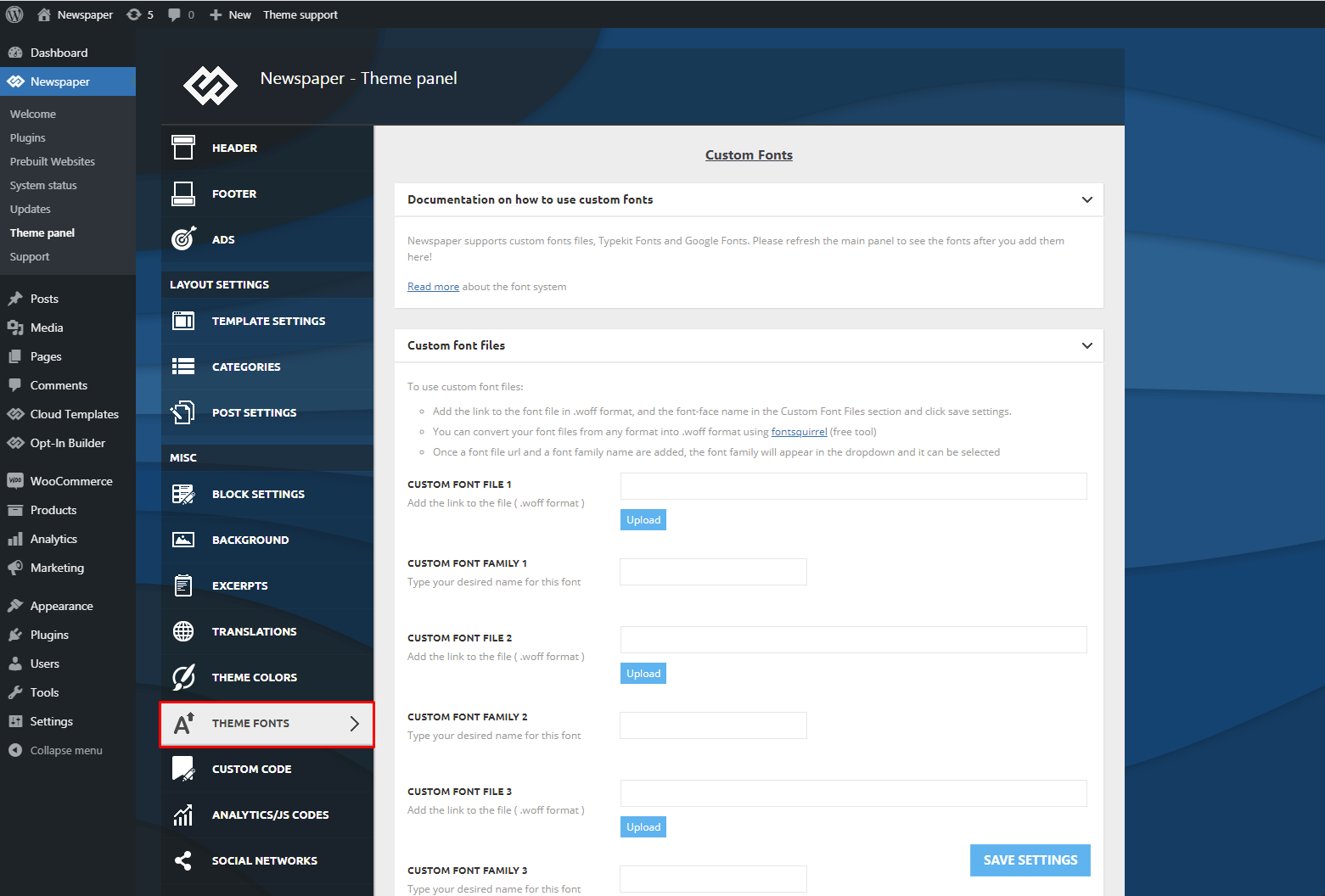
As an alternative approach for managing fonts, we recommend downloading and uploading the desired fonts manually via the Theme Panel (Fonts section). Once uploaded, assign these fonts to the relevant theme elements.
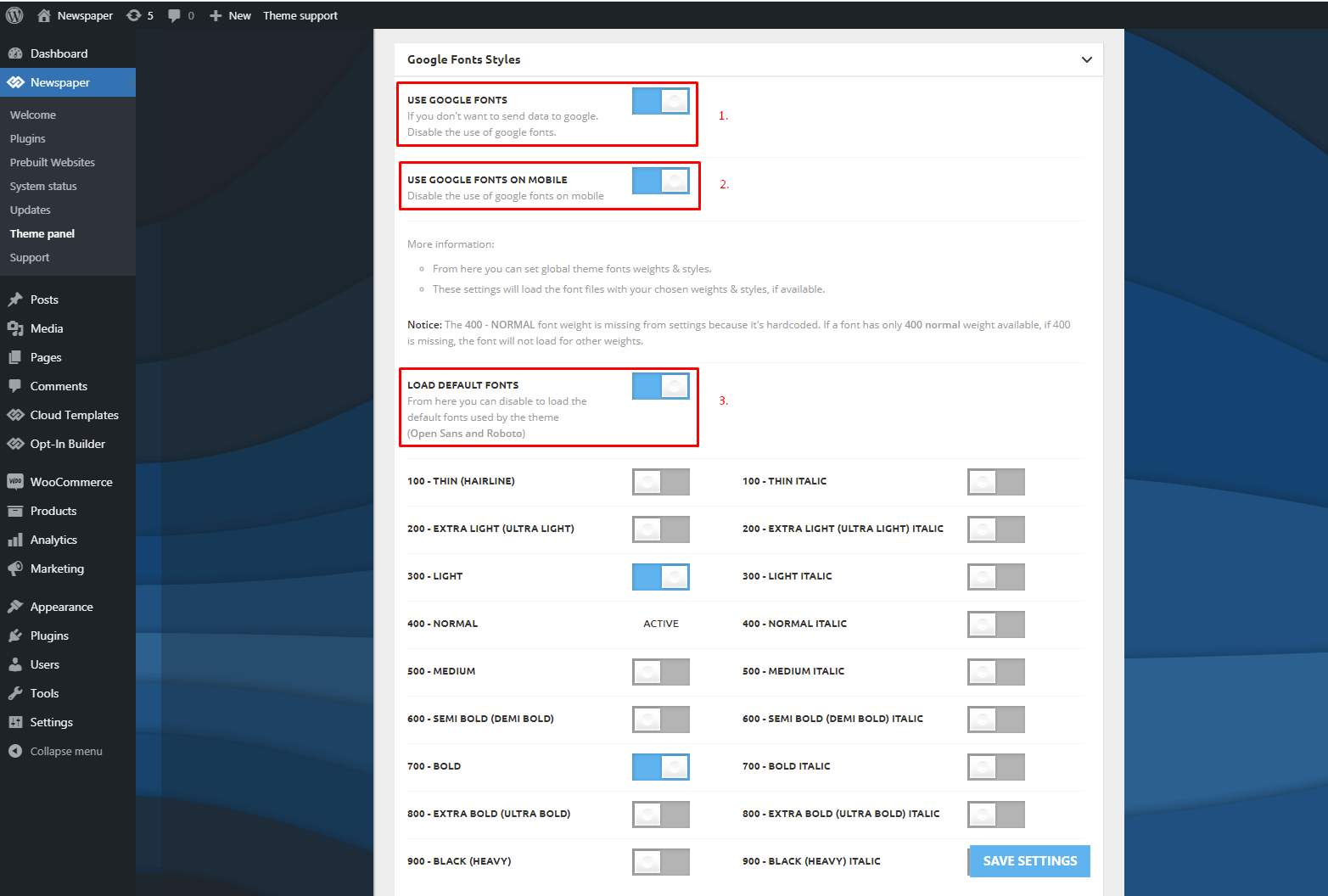
After confirming everything is properly configured, disable Google Fonts from the Theme Panel. This will prevent external requests and ensure that only the locally uploaded custom fonts are used.
For more detailed guidance, please refer to our documentation here: https://forum.tagdiv.com/font-customization/ – https://forum.tagdiv.com/wp-content/uploads/2015/05/Newspaper-Theme-Fonts-Settings.png – https://forum.tagdiv.com/wp-content/uploads/2015/05/Google-Fonts-Styles.png
Calin Hi,
Error 522 (Connection Timed Out) indicates that Cloudflare is unable to establish or complete a connection to the origin server. This typically occurs when the server is unavailable, under heavy load, or actively blocking Cloudflare IP ranges. The error is triggered either when the initial TCP handshake is not completed within 15–19 seconds, or when the server fails to respond to a request within 90 seconds.
Please test the site using only the theme’s required plugins (td plugins). If a child theme is currently active, switch to the main theme. Ensure that all caching mechanisms, including page cache and object cache, are fully disabled during testing.
In the majority of cases, this issue is caused by a third-party plugin. If the site functions correctly with only the theme plugins enabled, proceed by reactivating the remaining plugins one at a time, verifying functionality after each step. This process will help identify the plugin responsible for the issue.
Review the error logs from both WordPress and the hosting environment to identify any underlying issues. If error log is not currently enabled, activate debugging and error log, then reproduce the issue to capture relevant errors. Once completed, analyze the logs for any newly recorded entries that may indicate the root cause.
Calin Hi,
I see, you method can work, and what you can do is to use the post/page id to apply the css on it, this will be like this postid-217 – https://www.kadencewp.com/help-center/docs/kadence-theme/find-page-or-post-id/
Calin Hi,
Those days will be a theme update, and it will also include an improvement to the weather widget.
Thank you!
Calin Hi,
Usually, the exclusive tag is applied when the content on that article is locked, and this is applied automatically on those elements, but in case you use it differently, please let me know.
Calin Hi,
The theme provides an ajax filter that can be used on flex blocks and I see that you have it for one block on your site – https://prnt.sc/jeBp92on7Kme
Flex Block Settings Guide – those can be set on all blocks and flex blocks – https://prnt.sc/cNBP9jSCewY8
I hope this will help you!
Calin Hi,
There are a few situations where this issue can occur: plugin conflicts, redirects, or a 404 page modified in a child theme.
I assume you may have already checked these, but if you can share a link where we can review the issue, we’ll do our best to identify the cause.
Calin Hello,
Our developers have already prepared a package for Newsmag; however, in the meantime, a vulnerability was identified in Newspaper, which has been prioritized.
An update for Newspaper will be released in the coming days, after which we will verify whether this vulnerability also affects Newsmag. If not, we will proceed with releasing the existing package.
Thank you for your understanding.
Calin Hi,
Yes, that’s very likely Facebook often caches old data. It can take some time for the updated image to appear.
You can speed it up by using Facebook’s Sharing Debugger to force a refresh.
Calin Hi,
I will forward this to our developers, and they will check it out.
Also, I want to let us know that using a mobile page/template will still load teh tagDiv Composer and cloud library (because those are used to create those pages and cloud templates for the mobile version). Normally, this option should be used when you need to have different content on mobile pages and mobile templates, maybe a smaller page with fewer elements, blocks, and for a different layout. Having the same layout and content will be better to use the responsive version, instead of the mobile page/template.
Here are a few additional recommendations you can try. For some users, all themes work without issues, while for others, only certain ones function properly. This can vary depending on the extra plugins in use, as well as any caching or optimization plugins installed.
-> Footer delayed load https://prnt.sc/FS34hBno40sx (under the theme panel > footer > footer delayed load)
-> MINIFY INLINE CSS and AGGREGATE INLINE CSS – https://prnt.sc/en14t6CQChM- (under the theme panel > block settings> inline css)
-> Don’t load on mobile/desktop, this option is only on the cloud header for HEADER MENU https://prnt.sc/udlAW4icvSPP on HEADER MENU STICKY https://prnt.sc/9pKnilQdWyex on MOBILE MENU https://prnt.sc/ff7fRQvTnaXt and on MOBILE MENU STICKY https://prnt.sc/Mm-4mbC4WB68
-> Flex Blocks cache – https://forum.tagdiv.com/use-flex-blocks-cache-option/
Also, it is recommended to use a good cache plugin and even Cloudflare (CDN)
Thank you!
Calin Hi,
I just checked teh website and it appears that you already managed to create a popup menu using a page and the popup element.
Thank you!
Calin Hi,
Unfortunately, there is no such option in our theme, but I think this can be achieved using an age verification/content warning plugin – https://www.wpbeginner.com/showcase/best-age-verification-plugins-for-wordpress/
Calin Hi,
This can be done with the Newsmag theme only if you are not using Auto Ads, as those cannot be controlled by the theme.
If you are using banners or standard ads, they will be displayed on any page or template where the Ad Box element is added. So, if you want a specific page or template to have no ads, you’ll need to create it without adding any ad elements.
As mentioned, this approach works only if you are not using Auto Ads.
Also, you can try dedicated plugins for ads, like Advanced Ads or Ad Inserter to set display conditions (Advanced Ads: Go to the edit screen of the page, locate the Ad Settings meta box, and check the option to disable ads. Alternatively, in the plugin settings, set display conditions to “Specific Pages” and choose “is not” to exclude it.)
Google AdSense Auto Ads Exclusio. If you are using Auto Ads, you can exclude specific pages directly through the AdSense dashboard.
– Ads > By site
– Page exclusions > Manage
Click Add exclusion, paste the URL of the page, and select “This page only” or “All pages in this section”.
-> https://www.youtube.com/watch?v=nhBFTpq_SEc
Calin Hi,
The demo you are using is the Downtown Magazine PRO and in that demo the block titles have been set using the tagDiv Composer with teh element Inline text, so you can edit it by editing the pages/templates with tagDiv Composer, selecting the elements that create the block title, for example thetxt, button and the inner row is the one that has in css tab the border https://prnt.sc/Zso5OkrfRAgc
Thank you!