

 pavel@earnware.com
 There’s more.. on mobile it loads a very weird version of the logo:  that cuts the logo..
-
This reply was modified 5 years by
pavel@earnware.com.
-
This reply was modified 5 years by
-
This reply was modified 5 years by
pavel@earnware.com Can you add this option in the future? Why not have the general accent color overwrite it?
pavel@earnware.com Well, check this out: 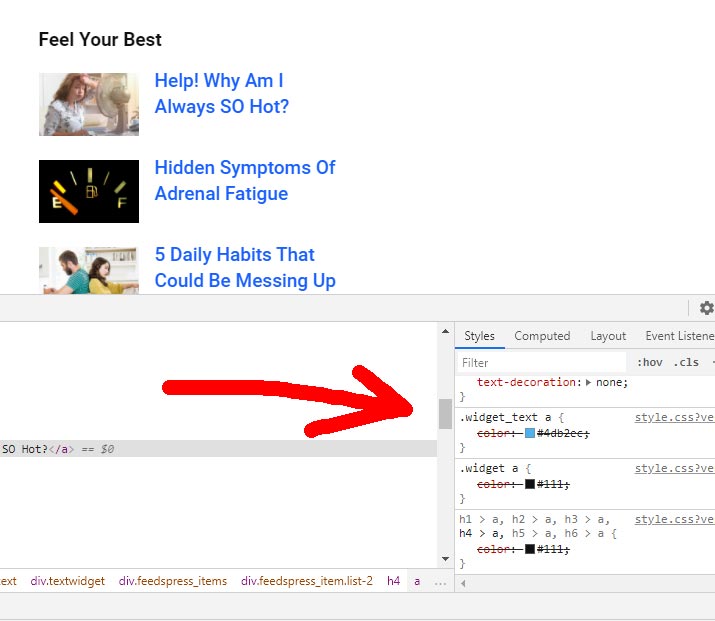
It’s overwritten with custom css, but.. there is still “.widget_text a” style that cannot be overwritten from the Theme Panel. Here’s the live website, you can see the problem in the sidebar “Look Your Best” widget https://reliablenews.org/trumps-impeachment-unlikely-as-gop-backs-him/
Theme Accent color doesn’t work for it. On this specific website, the theme accent color is #1960ff.
-
This reply was modified 5 years by
-
This reply was modified 5 years by
pavel@earnware.com I added a css fix to it, but you could of course add it to the general css file for the future.
Many times, we just place a twitter link, after the first paragraph, what to do in this case? If it needs to be there, at the top? CSS would help.. Please include it in the next update!
pavel@earnware.com And is there any possibility that the theme, would update all by itself and import some old settings?
pavel@earnware.com I can see it is loading https://www.dailytreasure.com/wp-content/plugins/td-composer/legacy/Newspaper/assets/css/td_legacy_main.css?ver=5a862b9d7c39671de80dd6dee389818b – do you know why?
pavel@earnware.com Hey there, please check again, this is a fresh install, no conflicts.
You can check it here, I made a testing part, you’ll see it where is says “Featured”, https://www.dailytreasure.com/
pavel@earnware.com The advertiser that is targeting these ads is criterio, if that helps somehow.
We tested without any plugins, same thing.
pavel@earnware.com Only works if I inlined everything, so via tagdiv composer it doesn’t work unfortunately, only background color – but the image doesn’t appear. It would be nice in the next update to make the images appear first.
Let me know if you need any other feedback, we have at least 200 messages of people not seeing the background – bad!
pavel@earnware.com Updated the theme, did all the steps in the CDN, still the image doesn’t show up, here is the screenshot  , need help! The conflict appears to a specific user, targeted in US, in specific sessions as you can see. We need the image to load before the ad, as the conflic appears, and it never ends and due to this the image loads last.
This is the page, https://teapartypac.org/
pavel@earnware.com What is there to test – these are Google Ads! This is happening only to the backgrounds, nothing else is affected.
pavel@earnware.com The ads are regular Google Ads, nothing else, as you can see in the screenshots.
pavel@earnware.com Right, why then modules below are not set with that padding as well? It doesn’t make sense..
pavel@earnware.com I am applying background image to the row itself. Now you suggest to use some temporary patches in order to make it work – I think it should be by default like that. Why would a row show with edges off if I apply a background to it?
pavel@earnware.com Right, but it’s not empty, it has a background and the left-right width should be equal to below elements. Like in my case – the modules.
pavel@earnware.com Hi Calin,
Well… why it is not by default like that? We have to each time adjust it – when it is broken basically.
pavel@earnware.com Hi Calin,
Thank you!
When will the next Update be released?
pavel@earnware.com Also, Calin,
Tried to import a 9.7.3 to a 9.7.3 import – all plugins deactivated – doesn’t work.
pavel@earnware.com Hi Calin,
Deactivated all the plugins, left only TagDiv Composer – and it still doesn’t work. The Theme is activated, still doesn’t work!
pavel@earnware.com Can you include this button in that pop-up, because right now it is invisible to be honest down there.
Thank you!
pavel@earnware.com Hey,
The shortcode problem was fixed in the 9.2 release or not? It is unclear in the log..
pavel@earnware.com The color picker, in the latest version, goes behind and you can’t use it.
pavel@earnware.com Waiting for this and the shortcode problem to be released in the next update. Thank you!
pavel@earnware.com The RocketLoader is not a plugin by the way, but a setting inside CloudFlare Here’s a Link
pavel@earnware.com It’s not a plugin, it’s a setting inside Cloudflare.
