

 simchris
 You can also use the Facebook debug tool.
And make sure you have working OG/Meta tags.
Sometimes FB cannot capture a story due to the type of content, or if almost identical content has previously been shared — it’s totally random.
simchris You need to set a CORS directive for the font being loaded. Or setup exception to load the icon font locally.
See the docs for your CDN service on how to do that.
simchris Whew! Hate it when that happens 🙂
simchris v1.7 crashed our site … sites running 1.6 no issue.
I personally have been recommending sticking with 1.6, rolling back if you upgraded.
If new customer, request 1.6 from contact@ytagdiv.com
We spent entire day testing 1.6 v 1.7 (couple of us folk on the forum here), and both came to conclusion there was some minor issue that can cause problems with PHP queries going into some kind of spiral loop of doom.
Seriously … if you can, go back to 1.6 to save your sanity until 1.7.1 comes out!
simchris You might have issues if your site times out in the middle of doing something.
Wow, GoDaddy still having DNS issues? I had friend whose site was down for a week, and that was 10 days ago. …. !!
simchris Works for me.
You need to
a) set the disable comments on posts to OFF (default); make sure you didn’t make that “on”
b) normal WordPress function (see WP codex) – under WP settings > discussion > allow comments
c) if you don’t have that set properly, you can also check the box for discussion, per post from built-in wordpress option
wordpress docs
https://codex.wordpress.org/Settings_Discussion_Screen
simchris Try using F12 in Chrome or IE to see if you post page(s) have error of some kind.
Your home page took forever to load and some weird pop up blocking page load.
You have some java errors – the link to close the slide-out elment bottom-right of page won’t even close in IE11/64.
Post I tested was responsive.
simchris theme is optimized for WordPress 4.2x due to some notable minor changes in WordPress 4.2 which are all for the good, but did break a couple of older plugins.
Worth updating to 4.2 but then roll back if you have problems with current theme FIRST, before switching.
simchris If you have 1.7 note it has some major bugs…
ask support for v 1.6 which DOES work … support@tagdiv.com
simchris Note Facebook periodically has issues “capturing” content when overloaded.
They are having problems today, April 1, due to the “overload” of fake news items and “gotcha” posts related to April Fools’ Day.
Usually you can try to share later on …
for our site this morning, we have been manually copy/pasting the headline and first paragraph, link, and photo to get stuff into our FB timeline.
Nothing to do with the theme, technically.
FB just gets busy … doesn’t always work. This is why it works one day, does not the next. Welcome to the internet 🙂
simchris I’ve run into this with o-embed in post for SoundCloud, actually.
I seem to recall fixing this on our other site with CSS,
iframe{max-width:100%}
simchris Check the JetPack support forum to see if they have any problems, as they do from time to time. JetPack services are hosted on Automattic’s servers, so if they have issue, it can impact you. Try using it without any other plugins running, to see if something conflicts with it. Some JetPack features are well known to be buggy unless you’re using default WordPress themes.
You can also check the JetPack documentation and support pages, as it’s not part of the theme.
Does JetPack work when you’re using the default WordPress theme?
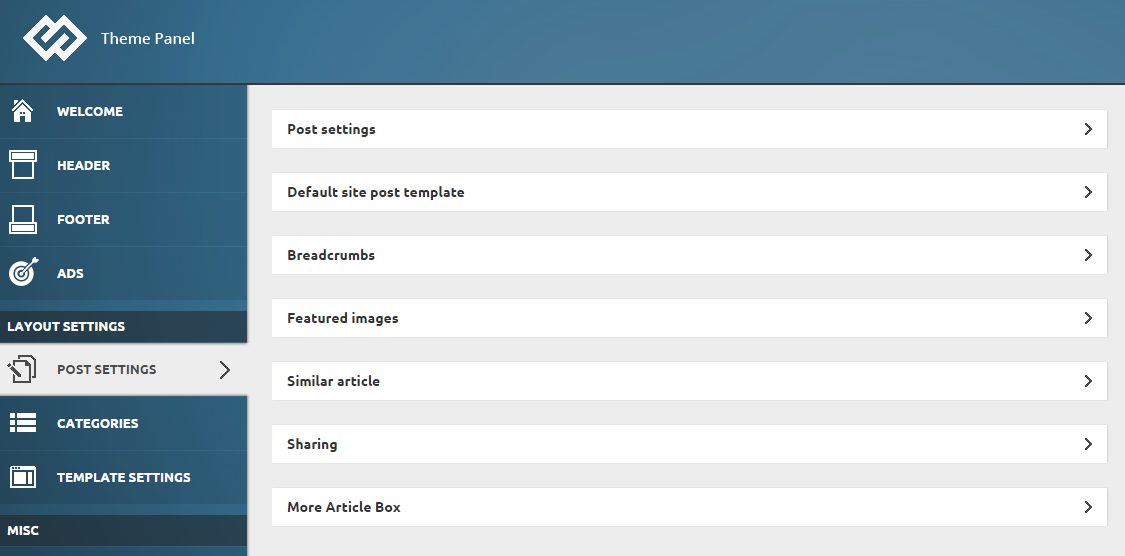
simchris No, how about the theme panel > post settings ?
THEME PANEL > POST SETTINGS > SHARING
simchris Check to see if you have a “user roles” plugin running which sets who can do what.
With some versions of Visual Composer I think they have a settings page also which can disallow authors/contributors from doing some things. Have not had to deal with that myself.
simchris Looks fine to me.
You might have zoom function on, or need to clear cache. Chrome holds onto cache pretty tight.
simchris FYI — there is a NEW plugin for Disqus made by a third party we are testing which is designed to “lazy load” Disqus, using their API …
supposed to solve the time out and various other shenanigans with Disqus…
check the wordpres.org plugins repository to check it out….
I can’t yet say “yay or nay…” (soon!)
simchris Common issue with WordPress and HTML entities as “&” is not a normal character on the web.
So, you often have to escape that as ‘ & or if this stupid thing auto corrects here, it’s & amp; with no spaces).
-
This reply was modified 11 years by
simchris.
simchris Turn them off from the admin panel under post settings ?
simchris Google has made the mobile test more “rigourous” as part of the push to ding sites for not being mobile friendly starting late April 2015; and they are sending cautionary emails to websites not mobile ready.
But it looks like they went a bit nuts on the mobile test …
Some of my “perfect” sites suddenly dropped also for things which technically don’t matter.
I have a hunch this will “adjust” — as they are “right now” using a “perfect” rendered page for the benchmark, which is unrealistic unless the page is completely built for “mobile first” with desktop as secondary.
Other words — minor grain of salt on that.
simchris Often an issue with not enough memory allocated to php for your domain.
Ideally at least 128MB should be allocated, 256MB is better. Depending on your account they may limit that to as little as 16 or 32MB. Anything less than 64MB with modern themes, especially those using something like Visual Composer, and all those fun options like infinite loading, etc., all are queries via ajax and/or dbase.
First try increasing the memory allocated to php for your domain, or ask your host what the current limit it.
simchris Newsmag does not replace Newspaper.
Newspaper 5.0 will be out in a month or so, and will have many of the features of Newsmag, but keep the best of Newspaper. (This according to past posts from 2015 on this topic.)
simchris I think you can edit that behavior in:
/includes/td_config.php
        td_api_thumb::add('td_640x350',
            array(
                'name' => 'td_640x350',
                'width' => 640,
                'height' => 350,
                'crop' => array('center', 'top'),
                'post_format_icon_size' => 'normal',
                'used_on' => array(
                    'Slide - 2 columns'
                )
            )
        );
I think this from the WP codex applies, unless I’m mistaken
1. If false (default), images will not be cropped.
2. If an array in the form of array( x_crop_position, y_crop_position ):
– x_crop_position accepts ‘left’ ‘center’, or ‘right’.
– y_crop_position accepts ‘top’, ‘center’, or ‘bottom’.
-
This reply was modified 11 years by
simchris The plugin is found in the theme files you download from ThemeForest in the “plugins” folder.
simchris Hi
luckily there are no more font caching errors in that report.
In theory my code for functions.php from my optimization page should help with the removing “?” stuff, but not always.
For those other items, check the actual folders to see if they have custom htaccess files for short TTL windows which in some cases are needed so that the theme can actually see changes.
Double check the .js caching setting in your htacess for syntax.
simchris email contact@tagdiv.com and include your purchase code
good idea to make safe backups of your entire site, settings, dbase, images, themes, plugins, etc.
