
 Vlad S
 Hello !
This issue is only on default using child theme. Here is the fix:
Go into tagDiv Composer plugin – Legacy – Newspaper and copy the single.php file into your newspaper child theme root folder: https://www.screencast.com/t/Zhehhx05aY
This will fix your issue !
Thank you !
Vlad S Hello !
Take a look at what GTMetrix says: https://gtmetrix.com/reports/nayaseekhon.com/pcI6C1i2
Page speed is not determined only by the theme, there are other factors like hosting, content, plugins and so on. You should take them step by step and see where you can improve.
Thank you !
Vlad S Hello !
You can increase your page speed by following ALL the steps found in this tutorial: https://tagdiv.com/how-to-increase-page-loading-speed/
This usually provides great result !
Thank you !
Vlad S Hello !
That means that you have a setting or a code in your live site that breaks the theme. The fastest way I would say is to reinstall the theme. If you reinstall ONLY the Newspaper theme then everything should be fine.
Otherwise check your host settings they may be different from the one on your localhost.
Let me know if you try this solution.
Thank you !
Vlad S Hello !
Please contact us via email at contact@tagdiv.com and provide admin login, as well as cPanel or FTP if possible. We will take a look. Include a link to this topic in the email.
Thank you !
Vlad S Hello !
That can achieved by using the tagDiv Composer. Please make sure that you select the row, not the entire header. As you can see here I have selected the row and added a background image: https://www.screencast.com/t/JcjvRedjL
Thank you !
Vlad S Hello !
Yes, you can activate your key on your localhost and then on your live website.
Thank you !
Vlad S Hello !
According to Envato license terms a theme can be used for a single end product (website)
– https://themeforest.net/licenses/standard
– https://themeforest.net/licenses/terms/regular
Thank you!
Vlad S Hello !
In order to acces the Newspaper full features you will have to activate and update the required plugins: https://www.screencast.com/t/PQnhAZILg
Please take a look at our documentation regarding updating the Newspaper Theme: https://forum.tagdiv.com/how-to-update-the-theme-2/
Thank you !
Vlad S Hello !
In order to change your menu background you will have to edit it from Theme Panel as you can see here: https://www.screencast.com/t/Nyi3e5hpGY
Thank you !
Vlad S Hello !
We are sorry for your inconvenience !
It is mandatory to delete all what was left from the older version before intalling this update. Overwriting the files would cause a lot of problems and maybe you’ve missed something while deleting the old files. Have you checked the plugins to be deleted too ? If you are certain that you have installed the updates correctly by deleting all of the older versions and made a clean install from scratch please contact us via email at contact@tagdiv.com and provide admin login, as well as cPanel or FTP if possible. We will take a look. Include a link to this topic in the email.
Also take a look at our documentation about installing the theme and plugins: https://tagdiv.com/how-to-install-plugins-and-update-plugins/ ; https://tagdiv.com/how-to-install-newspaper-theme/
Thank you !
Vlad S Hello !
Unfortunately not. The Mobile theme cannot be edited. What you can do is disable mobile theme on pages / posts from here: https://www.screencast.com/t/b9FlHW8fuw
We are sorry for the inconvenience !
Thank you !
Vlad S Hello !
I’ve seen that it loads every time but it does take a time to load. Please make sure that you do not have a plugin conflict, please deactivate ALL non theme-related plugins, also if you are using child theme or cache plugin, deactivate them, clear all cache and try again.
Also, try updating your page speed: Here is a tutorial on how to increase it: https://tagdiv.com/how-to-increase-page-loading-speed/ as you can see here you need to improve some things in order to make your page better: https://gtmetrix.com/reports/portalacionista.com.br/v6qP33jK
Thank you !
Vlad S Hello !
We have re-checked your page using 3 different mobile devices + our mobile emulator. We cannot seem to find the issue you mention. We have checked every page, every post. Please reset your browsers cache even on mobile devices and let me know.
Also please do not share your personal data here because it is visible to other users !
Thank you !
Vlad S Hello !
Please make sure that you do not have a plugin conflict, please deactivate ALL non theme-related plugins, also if you are using child theme or cache plugin, deactivate them, clear all cache and try again.
Also make sure that you have updated the theme and plugins properly: https://forum.tagdiv.com/how-to-update-the-theme-2/
Thank you !
Vlad S Hello !
In order to make the site full width you have to select every row of your page using the tagDiv Composer and then set the stretch mode you want like here : https://www.screencast.com/t/BkWwdHh6
In order to make the post page full width you will have to add a single post template and then edit it. Check more about how to have single post template here: https://tagdiv.com/customize-articles-with-single-post-templates/ And for the header you can do it here: https://www.screencast.com/t/xf56tQN0.
These are the ways you can increase your page width from theme options. Anything above this will require custom code.
Let me know if this helped you !
Thank you !
Vlad S Hello !
You can achieve that by editing the ROW using the tagDiv Composer and going into the CSS tab as you can see here: https://www.screencast.com/t/IWNHo5hzjhjb
Thank you !
Vlad S Hello !
You can achieve this if you are using a cloud template header. To do so you will have to do the following:
Go into your cloud library and search for a header that fits your taste: https://forum.tagdiv.com/header-manager/
After you have imported your header,
– edit it using the tagDiv Composer
– add an Inner Row under the logo
In that inner row you can add a text with title element and edit the content as you can see here: https://www.screencast.com/t/V4dVVaWe
In this way you will be able to have a text under your logo.
I hope this was helpfull !
Thank you!
Vlad S Hello !
Please go and check your page ! I hope it is the result you want ! Also please note not to leave your personal data here because other users can see it too. If you want the buttons square you will have to simply remove the ” Border-radius ” from the CSS.
I hope you like it !
Thank you !
Vlad S Hello !
Please contact us via email at contact@tagdiv.com and provide admin login, as well as cPanel or FTP if possible. We will take a look. Include a link to this topic in the email.
Thank you !
Vlad S Hello !
It just needs some modifications. Please let the code in and send me a link to your page so I can fix it !
Thank you !
Vlad S Hello !
Please make sure your ads sizes are set to be Responsive in Google Adsense. If their size si set to FIXED then they will cause issues like here.
Thank you !
Vlad S Hello !
In order to set 1 template site-wide you will have to select it from here: https://www.screencast.com/t/2t22KyG2lf
Let me know how this worked out !
Thank you !
Vlad S Hello !
The only way to have ads above the header is to create your own custom header using the tagDiv Composer and use adBoxes. If you follow the steps here:
https://forum.tagdiv.com/header-manager/ And here: https://forum.tagdiv.com/custom-ad-spots/ You will be able to create a custom header with adboxes so you can have the ads as you wish !
Thank you !
Vlad S Hello !
In order to have the benefits of a full Newspaper Theme you will have to activate the required plugins:
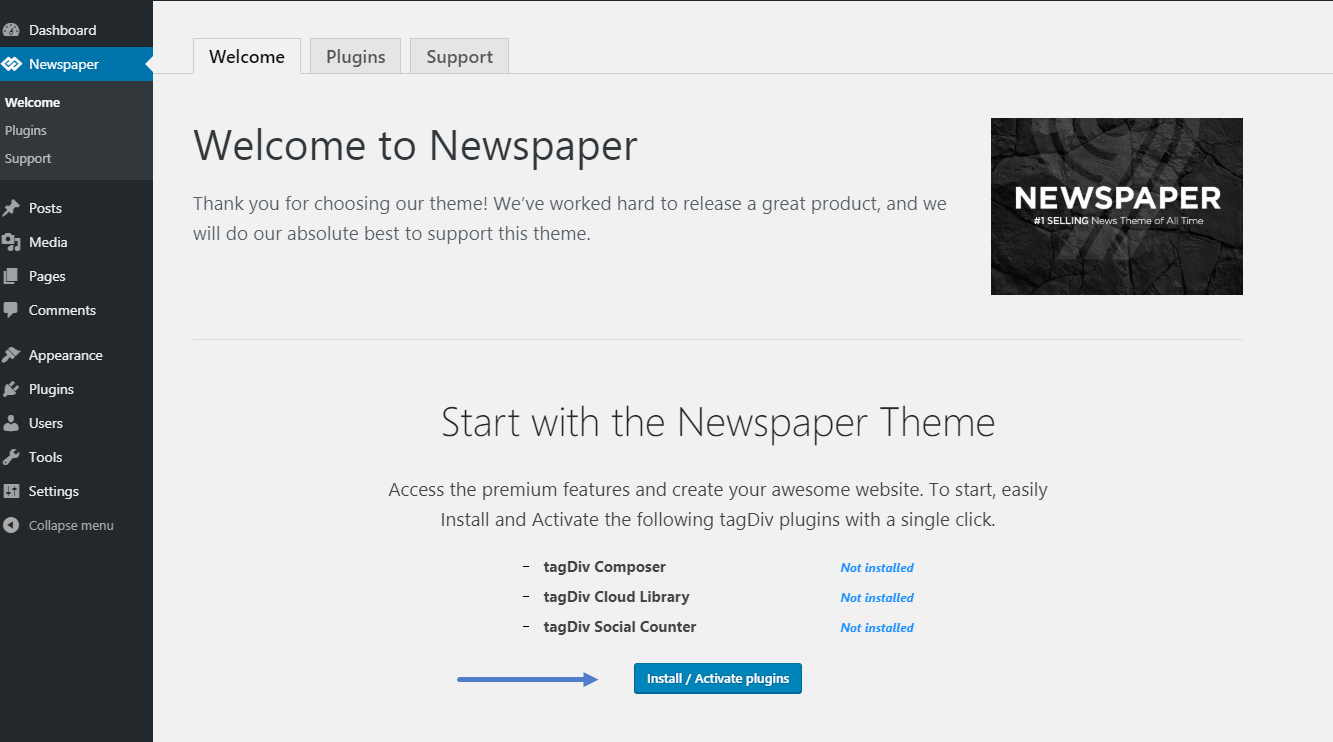
The child theme is in the Folder you have from Envato and requires manual instalation as you can see here: https://forum.tagdiv.com/install-via-wordpress/
I hope this was helpfull !
Thank you !
