
 Andrei L.
 Hi
Please make sure that the parameters from system status have the values indicated in our documentation: https://forum.tagdiv.com/system-status-parameters-guide/ Also check the browser’s console while you’re trying to save the settings. Usually there should be a 403 or 404 error in console which refers to admin-ajax.php file.
The theme makes many requests to admin-ajax.php and file the security module from your server may treat it as a thread. In this situation that file is banned and the theme can’t access it anymore. Try to contact your host provider and ask him if you that file is banned or if there is any firewall on the server which may block the request.
Thanks!
Andrei L. Hi @LPnm
Please make sure that the parameters from system status have the values indicated in our documentation: https://forum.tagdiv.com/system-status-parameters-guide/ Also check the browser’s console while you’re trying to load the translation. Usually if the translation are not successfully loaded there should be a 403 or 404 error on admin-ajax.php file.
The theme makes many requests to admin-ajax.php file the security module fro your server may treat it as a thread. In this situation that file is banned and the theme can’t access it anymore. Try to contact your host provider and ask him if you that file is banned or if there is any firewall on the server which may block the request.
Thanks!
Andrei L. HI
@gregy1403 we still use inline css for our blocks. However this is on our todo list and we hope that we will find an alternative in shortest time possible.
Thanks!
Andrei L. Hi
Try to deactivate all plugins except Visual Composer, clear all caches then test the site again. Also make sure that the parameters from system status have at least the value indicated here: https://forum.tagdiv.com/system-status-parameters-guide/
You can also check browser’s console while you’re saving the settings in theme panel. If the settings can’t be saved usually there should be a 403 or 404 error on admin-ajax.php file. The theme makes many requests to admin-ajax.php file the security module fro your server may treat it as a thread. In this situation that file is banned and the theme can’t access it anymore. Try to contact your host provider and ask him if you that file is banned or if there is any firewall on the server which may block the request.
Thanks!
 wowa1986
Hello
My website http://www.yesasia.ru/
1. Not displayed block “Editor’s Choice” – https://pp.vk.me/c837626/v837626403/31fe/6HllC4znknw.jpg
2. How to activate “tagDiv Mobile Theme”?
3. Why does not work “SMART SIDEBAR” on the main page? It works in the post, but it does not work on the home page.
Thank you
Andrei L. HI
Please check this link for more details about 403 errors and how can be fixed in wp: http://www.wpbeginner.com/wp-tutorials/how-to-fix-the-403-forbidden-error-in-wordpress/
Hope this helps!
Thanks!
 StuartStPaul
403 Forbidden
Request forbidden by administrative rules.
and my URL gets changed to
anyone got any ideas please…..
StuartStPaulI am locked out of my site http://www.DorisVisits.com with an error message 403 forbidden entry. Help please
Andrei L. Hi
Please make sure that the parameters from system status have at least the values indicated in our documentation: https://forum.tagdiv.com/system-status-parameters-guide/ also try to deactivate all plugins except Visual Composer, clear all caches then test again.
If the problem persist check browser’s console while you’re saving the settings. If the settings cannot be saved there shroud be an 403 or 404 error which refers at admin-ajax.php file.
Let us know how it goes and if the problem persist please send us an email at contact@tagdiv.com with your login credentials and we will inspect this issue as soon as possible, also include a link to this topic.
Thanks!
 clifetrust
HI. I’ve installed the Ultimate Member plugin, it seems working alright, but when I use a login or registration of the Ultimate Member, it gave 403 Forbidden, “You don’t have permission to access on this server” error. I do have other website in same hosting company with same Ultimate Member plugin but it doesn’t give the error.
Is it the server problem? or does your theme login/logout conflict to the Ultimate Member plugin? then how to avoid this error? Thanks
 stheodoratos
Greetings and thank you for the theme,
Im having an issue with Ninja Popups for WordPress Plugin,
When i install and activate the plugin, i am unable to Add a New Page and getting this error “Are you sure you want to do this, return back”.
I checked my appache errors and i get this:
Error 188.4.49.30 403 GET /wp-admin/post-new.php?post_type=page HTTP/1.0
When i deactivate the plugin, everything works fine. Please i need your help.
Thanks
 Nano
Nano Hey Chris,
Gracious !!!
Thank you for the detailed explanatory reply. As far this system status ( https://snag.gy/P2ApmR.jpg) to be believed , my host run on Apache server and hence the HTACCESS codes written by you under this thread should be valid.
As per recommendation, I started my HTACCESS file with :
<IfModule pagespeed_module>
ModPagespeed on
ModPagespeedEnableFilters collapse_whitespace
ModPagespeedEnableFilters remove_comments
ModPagespeedEnableFilters rewrite_images
ModPagespeedEnableFilters insert_dns_prefetch
</IfModule>
and then I added following code after default rewrite codes of WordPress:
AddType text/javascript .js
AddType application/vnd.ms-fontobject .eot
AddType application/x-font-ttf .ttf
AddType application/x-font-opentype .otf
AddType application/x-font-woff .woff

# BEGIN Expire headers
<IfModule mod_expires.c>
ExpiresActive On
ExpiresDefault "access plus 5 seconds"
ExpiresByType image/x-icon "access plus 2500000 seconds"
ExpiresByType image/jpeg "access plus 2500000 seconds"
ExpiresByType image/png "access plus 2500000 seconds"
ExpiresByType image/gif "access plus 2500000 seconds"
ExpiresByType application/x-shockwave-flash "access plus 2500000 seconds"
ExpiresByType text/css "access plus 700000 seconds"
ExpiresByType text/javascript "access plus 700000 seconds"
ExpiresByType application/javascript "access plus 700000 seconds"
ExpiresByType application/x-javascript "access plus 700000 seconds"
ExpiresByType text/html "access plus 600 seconds"
ExpiresByType application/xhtml+xml "access plus 600 seconds"
ExpiresByType font/truetype "access plus 2500000 seconds"
ExpiresByType font/opentype "access plus 2500000 seconds"
ExpiresByType application/x-font-woff "access plus 2500000 seconds"
ExpiresByType image/svg+xml "access plus 2500000 seconds"
ExpiresByType application/vnd.ms-fontobject "access plus 2500000 seconds"
</IfModule>
# END Expire headers

# BEGIN Cache-Control Headers
<IfModule mod_headers.c>
<filesMatch "\.(ico|jpe?g|png|gif|swf)$">
Header set Cache-Control "public"
</filesMatch>
<filesMatch "\.(css)$">
Header set Cache-Control "public"
</filesMatch>
<filesMatch "\.(js)$">
Header set Cache-Control "private"
</filesMatch>
<filesMatch "\.(x?html?|php)$">
Header set Cache-Control "private, must-revalidate"
</filesMatch>
</IfModule>
# END Cache-Control Headers

<IfModule mod_headers.c>
    Header unset ETag
</IfModule>
<IfModule mod_alias.c>
RedirectMatch 403 /xmlrpc.php
</IfModule>

<IfModule mod_deflate.c>
  # Compress HTML, CSS, JavaScript, Text, XML and fonts
  AddOutputFilterByType DEFLATE application/javascript
  AddOutputFilterByType DEFLATE application/rss+xml
  AddOutputFilterByType DEFLATE application/vnd.ms-fontobject
  AddOutputFilterByType DEFLATE application/x-font
  AddOutputFilterByType DEFLATE application/x-font-opentype
  AddOutputFilterByType DEFLATE application/x-font-otf
  AddOutputFilterByType DEFLATE application/x-font-truetype
  AddOutputFilterByType DEFLATE application/x-font-ttf
  AddOutputFilterByType DEFLATE application/x-javascript
  AddOutputFilterByType DEFLATE application/xhtml+xml
  AddOutputFilterByType DEFLATE application/xml
  AddOutputFilterByType DEFLATE font/opentype
  AddOutputFilterByType DEFLATE font/otf
  AddOutputFilterByType DEFLATE font/ttf
  AddOutputFilterByType DEFLATE image/svg+xml
  AddOutputFilterByType DEFLATE image/x-icon
  AddOutputFilterByType DEFLATE text/css
  AddOutputFilterByType DEFLATE text/html
  AddOutputFilterByType DEFLATE text/javascript
  AddOutputFilterByType DEFLATE text/plain
  AddOutputFilterByType DEFLATE text/xml

  # Remove browser bugs (only needed for really old browsers)
  BrowserMatch ^Mozilla/4 gzip-only-text/html
  BrowserMatch ^Mozilla/4\.0[678] no-gzip
  BrowserMatch \bMSIE !no-gzip !gzip-only-text/html
  Header append Vary User-Agent
</IfModule>

RewriteEngine on
RewriteCond %{HTTP_REFERER} !^$
RewriteCond %{HTTP_REFERER} !^http(s)?://(www\.)?tomatoheart.com [NC]
RewriteRule \.(jpg|jpeg|png|gif)$ – [NC,F,L]
The last code is to prevent hotlinking. Now as far I can read understand from your comment , the above written codes must have taken care of the required gzip/deflate settings through HTACCESS and should add up to 20 points to my score , but it didn’t happen 🙁
I still have these settings under htaccess and have also modified functions.php but the icrement in Pagespeed is only 2-4 points. On other side, I do feel my backend and homepage little faster while using after adding all these things. But there is no such impact on GTMAtrx score.
As you have mentioned :
Enable compression for the following resources to reduce their transfer size by 424.8KiB (79% reduction).
When I have already configured HTACCESS to compress it, why is it still showing there? AM I doing something wrong?
About Image optimisation thing, I use “Insanity plugin” to reduce file size while uploading the image and”optimus plugin” to compress it. the JPEG compression is set to 70 because I am worried to set it to 50 ( as recommended by you) because of the need of image quality. Since I am doing various changes, I will force regernerate and optimise images once I finalise all design aspect of my site.
Though I also tried checking GTMatrix points for my post page ( https://gtmetrix.com/reports/tomatoheart.com/vW3rCLXw ) , but it’s even worst than the homepage ( PAGESPEED SCORE: 53, YSLOW: 51)
about your second reply ( server side optimisation) , Being fron a non-programmer background, I will copy this comment and send it to my hosting provider to ask if they need to do anything.
Do you think there is something you can comment on my current situation.
Thank you.
-
This reply was modified 10 years by
Nano.
Nano Hi Bogdan,
Yes we already had conversations through email ( and that’s why I mentioned that TagDiv has already tried) but I have already tried each and everything except fresh installation.)
But then what does it mean by the fresh installation. This is already a new theme and has been freshly installed 2 weeks back and I am facing this issue since the new theme installation.
I have tried installing default theme or previous theme and all works totally fine because there is no Ajax based login on any other theme. And as far mydomain.com/wp-admin login is concerned , it’s working very fine.
So, either there is some conflicting code in ajax login.php or it’s getting some redirection command from somewhere ( means by any old unused deleted plugin codes). Though I have already repaired, optimized my database and have deleted old Wordfence plugin related files and many other files using grabage collector plugin.
In the very first solution to this issue , TagDiv support has told me to check with Hosting provider because they noticed ( see this image that the theme can’t access admin-ajax.php . When ajax pagination is used the theme makes many requests at this file and server security module may treat it as a thread and it will be banned.
I asked about this my hosting provider, they replied that they can’t see any issue from server side and-and A 403 error is normally linked to how you have file permissions setup and the theme might have changed a few permission while activating.
Can you please check if any such 403 errors are still coming? Where should I look for file permission? then I also tried following method suggested under many threads to stop redirection:
One possible solution, I found to the similar problem is this:
Go into PhpMyAdmin to your WordPress database
Find the table named wp_usermeta
Find the rows titled session_token
Delete the value associated with it
(Mind you the value is huge and your browser might freak out. I did it by clicking ‘edit’ for that record first, then toggling the null value for the field on and off, selecting the empty field and pressing delete a couple of times to make sure, and then hit save)
But it didn’t work either. I am not sure if it’s the theme issue or not , but it happens only with this theme and only when using Ajax login. Can you tell me where will I find this Ajax login.php file to see if there are any redirection option?
Can’t we stop this redirection by writing some code? I have also changed/renew the SALT security codes under WPconfig.php but nothing worked till now.
I am just waiting for one angel who can look and rectify this issue.
Thank you.
Nano Hi,
as per your instruction, I contacted my hosting provider with all the details I had as well as your reply.
Here is what my hosting support team has to say :
”
Hi,
We can’t see any issue our side. A 403 error is normally linked to how you have file permissions setup. Maybe the theme when installed should have changed a few. ”
I have tried various things today including disabling various plugins but I am still not able fix to it. I have sent you a mail with “Login” credential details on contact@tagdiv.com .
Please go through it and try to resolve it.
Thank you.
 muppins
Ad code:
<script type="text/javascript">

  ( function() {

    if (window.CHITIKA === undefined) { window.CHITIKA = { 'units' : [] }; };

    var unit = {"calltype":"async[2]","publisher":"chaoticways","width":300,"height":250,"sid":"Chitika Default"};

    var placement_id = window.CHITIKA.units.length;

    window.CHITIKA.units.push(unit);

    document.write('<div id="chitikaAdBlock-' + placement_id + '"></div>');

}());

</script>

<script type="text/javascript" src="//cdn.chitika.net/getads.js" async></script>
Size: 300×250
put in template 11 post type.
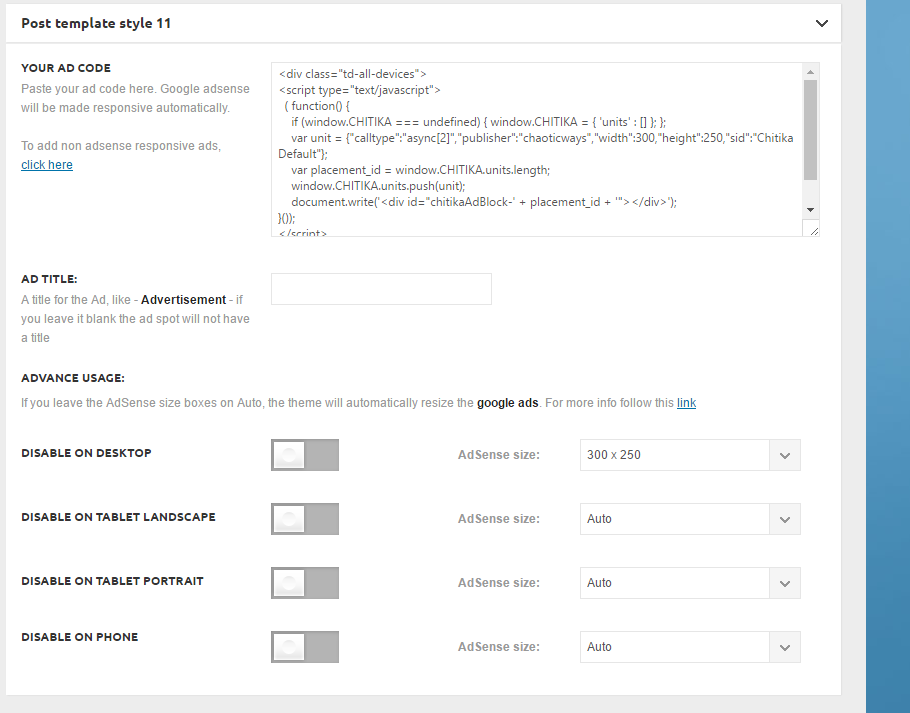
It’s not showing up on the top right next to the video:
http://ghesports.com/runescape-chaotic-ways-pk-video/
Nor is it showing on the homepage.
 Bogdan B.
 Hi,
I’m not sure exactly what highlight you want and where. i assume you weant to highlight the menu items that contain links to these categories. If this is the case then you can use this code :
.menu-item-404, .menu-item-403, .menu-item-65{

background-color:lightgrey;

}
If this is not what you mean, then please provide more details to what and how you want highlighted
Thank you!
 rebelone
 I also had a fatal error updating the theme. Already tried visual composer and cleared cache, but it didn’t work:
Warning: require_once(td_deploy_mode.php): failed to open stream: No such file or directory in /kunden/403446_74074/viel-unterwegs/wp-content/themes/Newspaper/functions.php on line 14
Fatal error: require_once(): Failed opening required ‘td_deploy_mode.php’ (include_path=’.:/usr/local/lib/php’) in /kunden/403446_74074/viel-unterwegs/wp-content/themes/Newspaper/functions.php on line 14
Andrei L. HI
Please make sure that the ad-code is correct, also try to deactivate all plugins except Visual Composer, clear all caches then test again. If the problem persist check browser’s console while you’re saving the settings. If the settings cannot be saved there shroud be an 403 or 404 error which refers at admin-ajax.php file.
Let us know how it goes and if the problem persist please send us an email at contact@tagdiv.com with your login credentials and we will inspect this issue as soon as possible, also include a link to this topic.
Thanks!
 Catalin
 Hello b2bmediawebro,
I have checked the mail and I did not get any email from you. Please make a reply to the Alin response. Also, I have tried again to access your website URL and this is still unavailable…I get the 403 error.
Thanks for our understanding!
 orbofdarkness
Hi there,
1.) I noticed that the featured image comes slightly to the right and not in line with the social button and the article content. Can it be aligned to the social buttons? it would look neater. Kindly see screenshot for the query.
http://www.awesomescreenshot.com/image/1440302/c5d73bc3a3506ca8384169a91d873ae8
URL – http://searchoflife.com/blogchatter-classes-with-richa-singh-2016-04-29
Thanks,
Prasenjit.
 jmynott
Hello,
I am trying to set up my wordpress site using Newspaper theme. My domain, http://www.tynk.space, is hosted with Hostgator. When I try to install Visual Composer, I get an error page from Hostgator that says the following:
ERROR 403 – FORBIDDEN
Why am I seeing this page?
403 errors usually mean that the server does not have permission to view the requested file or resource.These errors are often caused by IP Deny rules, File protections, or permission problems.
In many cases this is not an indication of an actual problem with the server itself but rather a problem with the information the server has been instructed to access as a result of the request. This error is often caused by an issue on your site which may require additional review by our support teams.
Our support staff will be happy to assist you in resolving this issue. Please contact our Live Support or reply to any Tickets you may have received from our technicians for further assistance.
I have checked with Hostgator and they seem to think it is not an issue on their end, and that it could be a compatibility problem. they’ve directed me to you.
Do you have any suggestions of how to fix this please?
thanks
Jenna
 Rmax
RmaxI doon’t know since when I have this problem but I just noticed.
Look the image :
http://image.noelshack.com/fichiers/2016/28/1468428403-screenjpg.jpg
My website : http://casques-vr.com
Thanks
Andrei L. Hi
I am not sure why this happens but you can try to deactivate all plugins except Visual Cosponsor, clear all caches then test again. Also check if other settings from theme panel are properly saved.
You can also check browser’s console while you’re saving the settings on google analytics section and check if there are any errors. If the settings are not saved there should be an 403 or 404 error.
Let us know how it goes.
Thanks!
Andrei L. Hi
Try to deactivate all; plugins except Visual Composer, clear all caches then test again. Also check the browser console while you’re trying to open some sections from theme panel. Usually if the drop-down window does not appear it should be a 403 or 404 error in console.
Let us know how it goes and if the problem persist please send us an email at contact@tagdiv.com with your login credentials and we will inspect this issue as soon as possible, also include a link to this topic.
Thanks!
 belikeliquid
 “Usually there should appear a 403 or 404 error. If this happens contact your server administrator and explain the situation, as it’s requested many times during the a save the file it’s treated as threat so it’s banned”
>> what file is requested?
-
This reply was modified 10 years by
belikeliquid.


