- NewsmagUsing the theme translations together with WPML
- NewsmagHow to update a plugin
- NewsmagCustom Post Type Support
- NewsmagAbove footer ads
- NewsmagWeather Widget
- NewsmagHow to update the theme
- NewsmagIntroduction
- NewsmagLogo & Favicon
- NewsmagFooter templates
- NewsmagUsing other ads
- NewsmagCustom ad spots
- NewsmagArticle ads
- NewsmagSidebar ads
- NewsmagHeader ads
- NewsmagLoading image effects
- NewsmagCategory top post styles
- NewsmagSmart Lists
- NewsmagGeneral settings
- NewsmagTheme thumbs
- NewsmagtagDiv slider gallery
 rodrigosicone
Hi,
After I update my theme to the version 8.7 any time that I create a new post or update a featured image on a post, the category page is not showing the image with the right size as you can see here on these 2 examples: http://take.ms/z8tNV and http://take.ms/Mec2r
My website is https://rotadocanguru.com.br
Can you please help me resolving that?
Thanks
Rodrigo
 Broly
BrolyHello,
I activated Version 8.7 AMP plugin but I’m facing a problem: images are not shown, the code for every picture is like
<amp-img class=”lazy lazy-hidden size-medium wp-image-49734 aligncenter amp-wp-enforced-sizes i-amphtml-element i-amphtml-layout-responsive i-amphtml-layout-size-defined i-amphtml-layout” src=”data:image/gif;base64,R0lGODlhAQABAIAAAAAAAP///yH5BAEAAAAALAAAAAABAAEAAAIBRAA7″ alt=”” width=”400″ height=”266″ sizes=”(min-width: 400px) 400px, 100vw” style=”width: 100vw;”><i-amphtml-sizer style=”display: block; padding-top: 66.5%;”></i-amphtml-sizer></amp-img>
That corresponds to an empty GIF.
Images works fine in “non AMP” version of the page.
I’m using Offload S3 plugin for images, so they’re serverd using Cloudfront, can it be related?
There’s a way I can solve this problem?
 Ayudaenibiza
 Hello Bogdan,
I´m placing my ADS at theme panel AMP plugin setting. I´ve change the code to:
<div class=”td-visible-phone”>
</div>
but still doesnt working…
Any idea?
 Bogdan B.
 Hello,
Where are you placing your ads? Please note AMP is for mobile only so td visible desktop will not work.
You have to place the ad code in the amp section of the theme panel
Thank you!
 bilimsenligi.com
Merhaba ingilizce diline tam hakim değilim. Google webmaster tools da aşağıdaki hata bilgisi vermekte. Ve bu sürekli artmakta. Lütfen yardımcı olurmusunuz.
https://www.bilimsenligi.com/ web sitesinin sahibine,
Search Console, sitenizin Hızlandırılmış Mobil Sayfalar ile ilgili 3 yeni sorundan etkilendiğini tespit etti. Bu, Google Arama sonuçlarında Hızlandırılmış Mobil Sayfalar ile ilgili olumsuz bir etkinin olabileceği anlamına gelir. Bu sorunları inceleyip düzeltme seçeneğini değerlendirmenizi öneririz.
Etkilenen sayfa sayısına göre sıralanmış şekilde yeni bulunan ilk 3 sorun:
The inline ‘style’ attribute is not allowed in AMP documents, use ‘style amp-custom’ tag instead
“a” HTML etiketinde izin verilmeyen özellik
“amp-img” etiketindeki “width” düzeninde özellik için geçersiz değer
Bogdan B. Hello,
In order to have that sort of implementation you will need to add extra checks to your code.
Here is an example:
 <?php

                    $time = human_time_diff(get_the_time('U'), current_time('timestamp'));

                    $pos = strpos($time, 'months');

                    if ($pos>0) {

                        echo $td_mod_single->get_date(false);;

                    }

                    else{echo $time . ' ago';}

                    ?>
I checked for ‘months’ and if the string is found, it will revert back to the original date. You can also check for days or even years
I hope this helps.
Thanks
 Simion C.
 Hi,
@notageek4u From what I can see at first glance, you could try and optimize the website more. For example the homepage has 10mb in size, that would be high. Regenerate the thumbnails because it seems some of the thumbnails are not created properly and the full image size is served
– https://www.screencast.com/t/DcTg0vMwK
There are many speed guides and tutorials here on the forum that you can follow. Some of them here, but there are many
– https://forum.tagdiv.com/cache-plugin-install-and-configure/
– https://forum.tagdiv.com/cloudflare-cdn/
– https://forum.tagdiv.com/how-to-make-the-site-faster/
– https://forum.tagdiv.com/topic/score-100100-pagespeed-with-newspaper-wordpress-theme/
– https://forum.tagdiv.com/topic/newspaper-theme-speedify-your-website/
– https://forum.tagdiv.com/topic/tutorial-chriss-custom-optimizations-for-functions-php-etc/
Thanks
 mariusfv
Hi,
On Themeforest (https://themeforest.net/item/newspaper/5489609)
& on tagDiv blog (https://tagdiv.com/blog/)
I do not find any CHANGELOG about version 8.7.1 (for me is very important Changelog, could you please update the changelog for version 8.7.1?).
Thanks in advance!
Bogdan B. Hello,
Please provide an example of where exactly do you want to place a social icon.
Thanks
 Catalin Simion C.
 Paginile de AMP nu vor afisa Facebook comments, folosing plugin-ul tagDiv. Vor trebui facute modificari pentru a le afisa sau a implementa un meniu. Mai multe informatii aici
– https://www.ampproject.org/docs/reference/components/amp-facebook-comments
– https://www.ampproject.org/docs/reference/components/amp-sidebar
 rp7digit
hello sir? how to change color in category box??
example http://prntscr.com/ihp2gh
Bogdan B. Hello,
font awesome might be among the compatibility list but chances are you have a plugin that is not there. Speedbooster deactivates itself once a plugin that is not on the list is detected. Here is an example on my end with and without speedbooster:
with speedbooster active: https://www.screencast.com/t/8RfwP7l5Rxo
without sppedbooster active: https://www.screencast.com/t/9QFD4wYDkl
Please check under the system status to see if speedbooster is indeed active or has been disabled: https://www.screencast.com/t/ySg8bZRScS or https://www.screencast.com/t/fiRubZMjOx
Thank you!
Simion C. The tag cloud widget is available, it is provided by default WordPress
– https://www.screencast.com/t/rmHdkVAr
Those images are default placeholders for multi-purpose elements, they will not cause any problems. Example
– https://www.screencast.com/t/M3QNkwXFFUk
They will be added as long as the multi-purpose plugin is installed and active.
Thanks
Catalin Hello mrx,
Yes, this is the actual AMP behavior, sorry!
Thanks.
Simion C. Hi,
The AMP plugin can be installed from the theme provided plugins panel
– https://www.screencast.com/t/SPclSst5
All the plugins are provided in the full theme package, plugins folder
– https://www.screencast.com/t/bpDxgI3i19
Thanks
 prashanth
Hi,
I would like to know whether Newspaper theme is compatible with Google AdSense Auto Ads as the theme has already an inbuilt Ad manager. If yes, then can you please guide me how to add google auto ads?
Paste the ad code between the <head> and </head> tags of each page where you want to show Auto ads
I know I can add the code by going to theme editor. But I think it may get removed while updating the theme? Can I add this code on the theme panel where I input Analytics code?
Finally I also wish to know the procedure add Google Auto Ads on AMP.
Thanks.
 Pierreto
When i see all messages, site slower, amp problem, i’m little bit affraid to install it.
I use AMP for WP plugin and i want to know if we can deactivate the AMP mode in Newspaper theme?
And if have no conflict with them?
 irfan.id
 This is interesting, I also found some of my page directed to AMP and some not.. But, I don’t care about that. In my prespective AMP just to improve blog search rank (Google should love more blog with AMP) and leave visitor with article in ad, so it will increase my ads click.
That why I prefer to uninstall TD mobile and use TD AMP instead, bacause Newspaper mobile responsive theme.
For me, whatever it will be show on google page with AMP or not, it doesn’t matter.. Just my opinion.
Thanks
 meri
meriHi,
When I check my website on my cellphone, I sometimes get the AMP version and sometimes the mobile one. I don’t understand the logic as I use the same cellphone. Could you kindly explain?
And, is there a way to just push 1 version? (AMP for example)
Thanks for your help
meri But now the problem is: how do I modify the font size (of block 21 for example) when I use it in a widget? (like “most popular articles” for example)
 FauzyAbdan
 I have all posts get the same problem.
I’ve tried deactivate all 3rd plugin, and only activated plugins bundled with the theme.
Here’s the sample URL:
https://www.otomotifzone.com/2018/02/20/tahun-2018-mario-sa-tampil-di-tiga-kejuaraan-berbeda-dua-diatara-level-asia/amp/
Thanks
AyudaenibizaHi there, if just installed the plugin and copied my non-Adsense code
<div class=”td-visible-desktop”> … blablabla… </div>
or
<div class=”td-all-devices”> <!– Your NON AdSense code here – this ad will show on all devices –> </div>
in the plugin custom ad box but cannot see them. Do I need to set any other code for AMP stuff?
Thank you!
 reidostorrents
My box with the latest articles is no longer showing up on the right side when the user scrolls down the page.
The box is simply at the bottom of the page.
How can i fix it?
Screenshot:
 m2sahin
hi,
I thought it was an advanced Membership system compatible with Buddypress when I took this theme.
I’m very upset to see you have no membership system.
When I asked if it would included in next updates, you said you didn’t have a plan like this.
But The Membership system compatible with BuddyPress for me is very important.
so I will ask for your help.
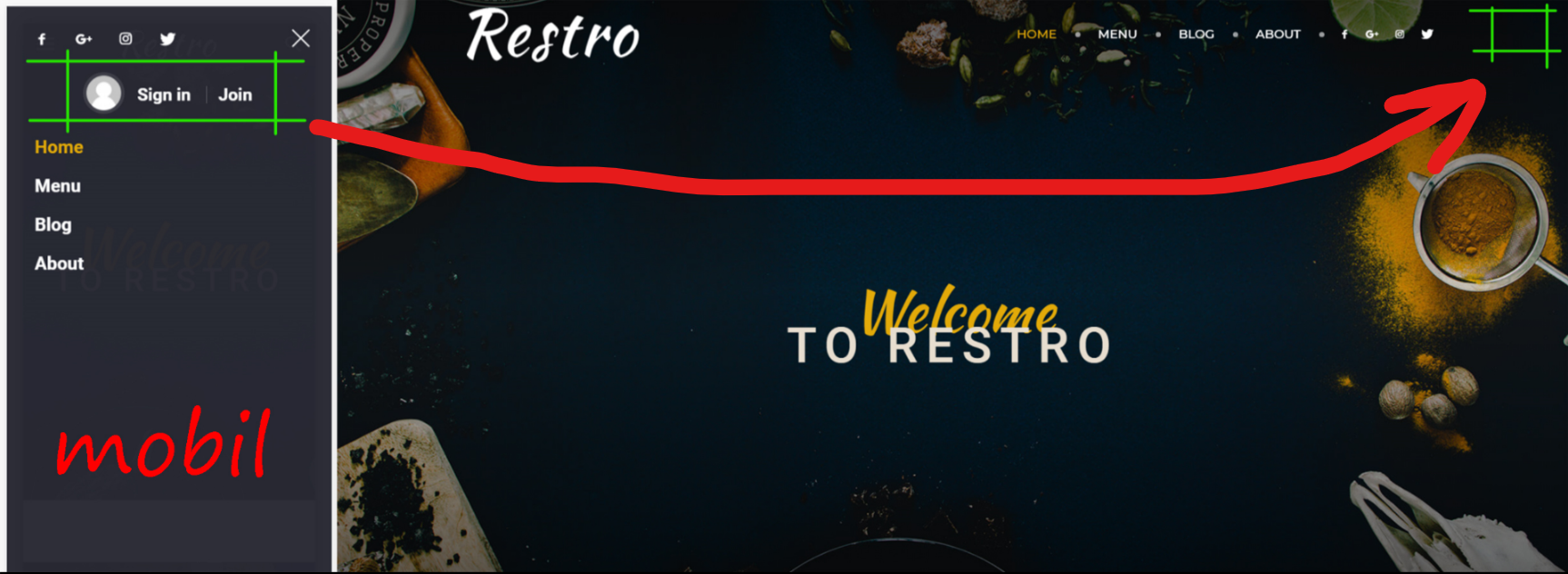
1- can i do it like in a photograph → https://i.hizliresim.com/G9D3d3.png
and can i change CSS settings
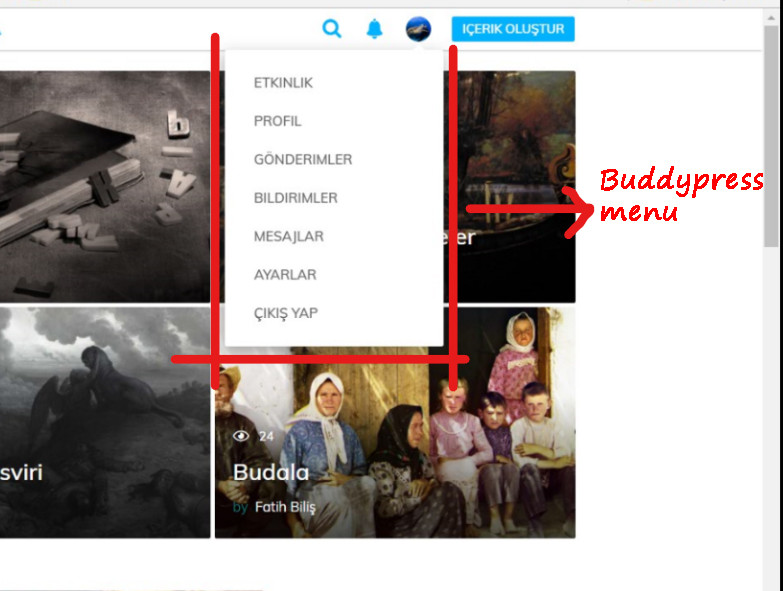
2- Can I put a buddypress menu on the profile like in a photo → https://i.hizliresim.com/kO6G6J.jpg
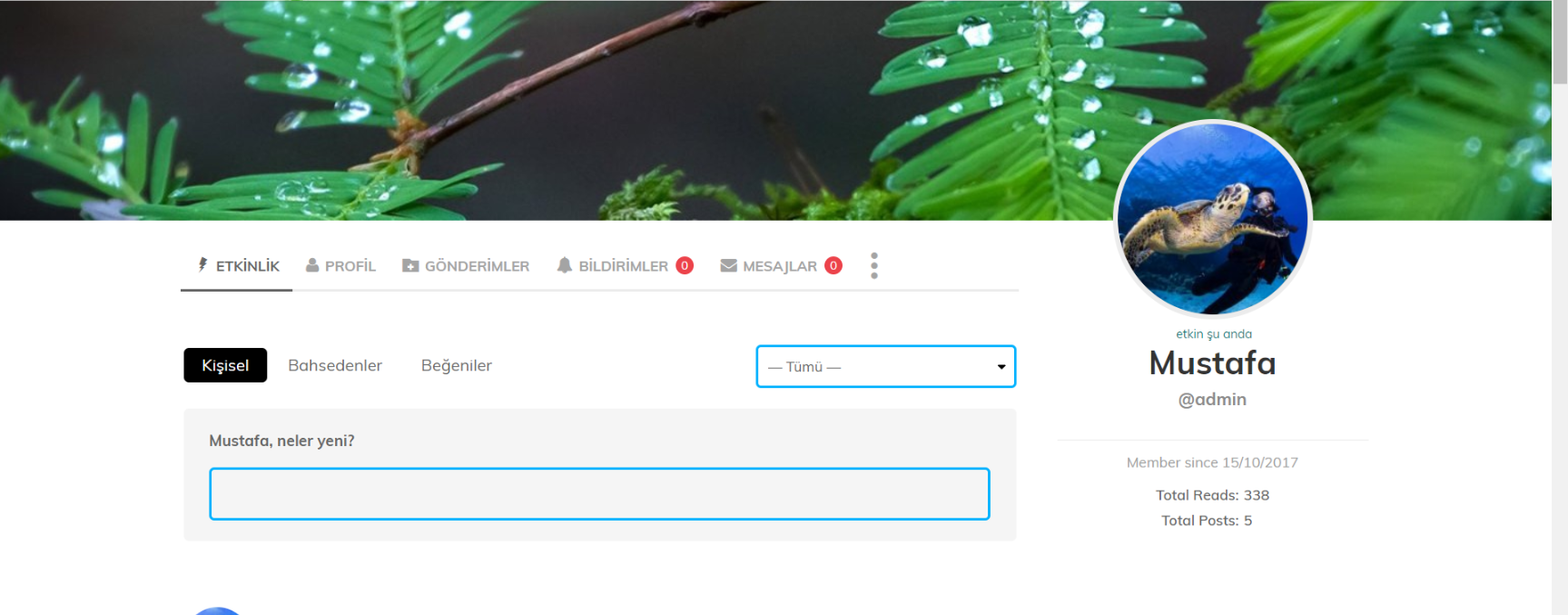
3- is it possible to change BuddyPress profile page css settings → Example → https://i.hizliresim.com/y0qNJ9.png
note: The main slice is not English. If I speak rude, I apologize.
thank you