
- ApiPractical example – How to add a new Block and Module
- Apitd_api_top_bar_template::delete
- Apitd_api_top_bar_template::update_key
- Apitd_api_top_bar_template::update
- Apitd_api_top_bar_template::add
- Apitd_api_single_template::delete
- Apitd_api_single_template::update_key
- Apitd_api_single_template::update
- Apitd_api_single_template::add
- Apitd_api_footer_template::delete
- Apitd_api_footer_template::update_key
- Apitd_api_footer_template::update
- Apitd_api_footer_template::add
- Apitd_api_smart_list::delete
- Apitd_api_smart_list::update_key
- Apitd_api_smart_list::update
- Apitd_api_smart_list::add
- Apitd_api_thumb::delete
- Apitd_api_thumb::update_key
- Apitd_api_thumb::update
 Oran Matityahou
Can you please help?
I just see blank page
https://playjunkie.wpengine.com/wp-admin/post.php?post_id=259&td_action=tdc
Thanks,
Oran
 Thalisson
Hello guys! I’m having problems with the site’s image highlights.
In Google News the highlights images are wrong.
This happened after changing my theme.
Where is the error?
site: https://www.tudoemtecnologia.com/
Example
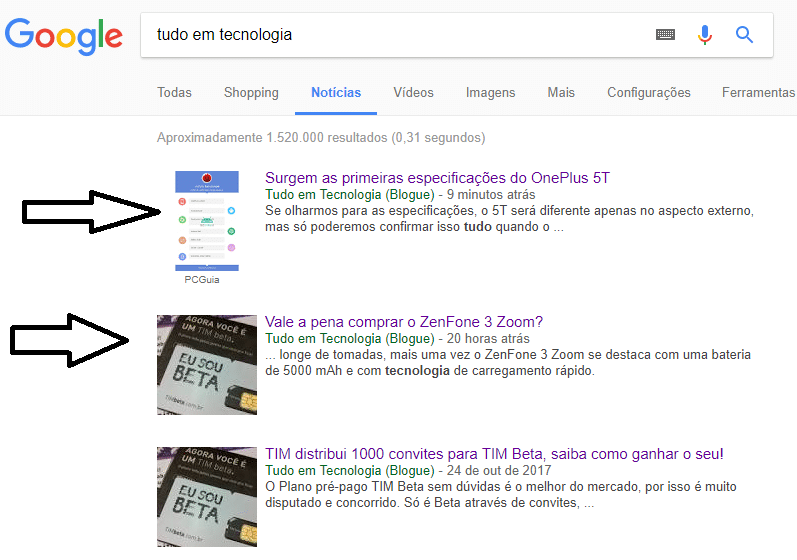
Thanks
 monet
monetHi there,
First of all, congratulations for your work.
Amazing theme, beautiful design, robustly build…. thumbs up!
Thank you!
I have a few question regarding the translation / localization, perharps you can point me in the right direction here. The main site is in Spanish, and I am using WPML for english as second language.
I’ve read and research, however still have some issues with:
1. Translation .po – .mo files / Theme panel options “mismatch”.
I am getting this error:
WPML Plugin is active! When the plugin is active, the *.po - *.mo files are used instead of Theme Panel Translation.
So following the indications in your documentation, I’ve added the .po – .mo files accordingly for spanish.
However:
a. The “error” message is still on.
b. Not all the string are translated.
Mainly you can see that in some parts of the signin form.
Example: “Create account”, “Welcome! Register for an account”, “Forgot your password? Get help”, etc…
Even if I see this options in the “theme panel” / “Translations” they are NOT in the .mo .po files to modify or translate.
Am I missing something here? 🙂
Any ideas?
2. How to Translate Widget “Custom Titles”.
Simply question, I’ve added quite a few different “theme widgets with custom titles”, however they are not appearing as “Strings” in WPML…
How can I translate the “custom titles”?
3. Banners by language.
I know this is a “hard one”, but I assume I am not the first one to ask and it could be useful for others.
Any way to change the banner by language?
Sorry to bother you guys, but help will be much appreciated!
Thanks in advance.
Fernando.
PS: The site is still on development, however here are the links in any case you need them:
http://dev.gabrielfariasiribarren.com/
http://dev.gabrielfariasiribarren.com/en/
 I-rover
 Simon and how I can do like this? (may be it wasn’t correct the first request). It’s example in one similar site (block of links after every post)
http://www.screencast.com/t/POOPQfgBGRq
-
This reply was modified 8 years by
I-rover.
 beermoney
Is Visual Composer no longer bundled with Newspaper 8 now that you guys have built TD Composer? I downloaded the latest version of the theme and in Newspaper -> Includes -> Plugins there is only two plugins. td-composer & td-social-composer. I went to use TD Composer a while back and just didn’t care for it. I would like to continue to use Visual Composer. Constantly being told there is an update is annoying though.
 Arafat
I want to do some customization see this: https://prnt.sc/h1x00t
1. How to add search box here. (Please check the image)
2. How to rename ABOUT US text & how to make it Center.
3. How to rename FOLLOW US text & how to make it Center.
 alexliu0317
 Hello again!
My apology for sending 2~3 emails a day, sometime 4 seeking for your help.
However, this is all brand new to me, and I got another huge question from Bing.
Can you please tell me what to do? I don’t even know where to go to operate these commends.
Verify ownership for: jazko.com
Option 1: Place an XML file on your web server
Download BingSiteAuth.xml
Upload the file to http://jazko.com/BingSiteAuth.xml
Confirm successful upload by visiting http://jazko.com/BingSiteAuth.xml in your browser
Click the verify button below
Option 2: Copy and paste a <meta> tag in your default webpage
You can add a <meta> tag containing the authentication code to the <head> section of your default webpage.
<meta name=”msvalidate.01″ content=”23D518B6F43448754E67E202E536BA23″ />
An example:
<html>
<head>
<meta name=”msvalidate.01″ content=”23D518B6F43448754E67E202E536BA23″ />
<title>Your SEO optimized title</title>
</head>
<body>
page contents
</body>
</html>
Option 3: Add CNAME record to DNS
Add CNAME (alias) record with name c89e928f523800c2a4cd246e7c22896b and value verify.bing.com.
So your DNS provider will resolve host c89e928f523800c2a4cd246e7c22896b.jazko.com to verify.bing.com.
How to add a CNAME record to:
 Iker Glez
 Hello Catalin,
My website is http://salamancanews.es/
Mobile screen: http://salamancanews.es/wp-content/uploads/2017/10/Mobile1.jpg
I want it to look like this on the mobile screen: http://salamancanews.es/wp-content/uploads/2017/10/EP-example.jpg
In the laptop screen I have managed to put the image all the width lengthening the row:
http://salamancanews.es/wp-content/uploads/2017/10/Laptop.jpg
Thank you very much
Iker
 JorgeA
Hello, I need some help about banner ads
I want to include a Banner Ads in header of a Category Group o Section Post,
a send you a image example!!
https://k60.kn3.net/4/1/A/A/4/2/E31.jpg
Thank You
Jorge A.
Argentina
 Edward
 No.
For example try to sharing this link: https://demo.tagdiv.com/newspaper/wordpress-news-magazine-charts-the-most-fashionable-new-york-couples-in-2016/
Result:

Tag from url is correctly:
<meta property=article:author content="https://www.facebook.com/TagDiv/" />
 savunmahatti
 Hello thank you for your reply.
I try cloud flare options with your guide. But in safari browser i don’t see module images and ect.
For example: I don’t see social media icon on safari. Look at this image: https://cdn.pbrd.co/images/GQzkooY.png
and my website: http://www.savunmahatti.com
can you help me?
 Simion C.
 Hi,
Please note that blocks display differently, depending on the row layout. For example a block may display three modules on a full row, and two modules in a different row setting. Here you can see how all the blocks look in all layouts
– https://demo.tagdiv.com/newspaper/block-1/
I have browsed the website, but I do not see any problem with the homepage, category pages, post pages, etc.
Maybe I am misunderstanding the issue.
Thanks
Simion C. Hi,
The header ad is displayed on all the website. If you want to remove the header ad on specific pages, you could create a condition in the header template code, where the ad is called
– https://developer.wordpress.org/reference/functions/is_page/
An example here – https://forum.tagdiv.com/topic/page-without-top-ad/
Thanks
 Catalin
 Hello thephoenix911,
Unfortunately, please notice that here -> https://www.screencast.com/t/ScRM6NI3M you will find all of the header styles templates which are available. The theme does not have any such an option that allows you to increase or decrease the logo and ad space, sorry! To achieve best theme results, I suggest you use only one header template from our lists. As an example, if you want to display a bigger logo, you should try using the Header Style 10 which display the logo in full-width.
Thanks for your understanding!
 michaelaulia
 Hi Catalin,
Which article was the one in your screenshot? As mentioned on my first post, it seems to happen only on articles with “Post Style 6” and “without Sidebar”. This is an example of one: https://www.cravingtech.com/razer-basilisk-fps-gaming-mouse-review.html. Another here: https://www.cravingtech.com/oppo-a77-review-great-value-price.html
I’ve tried different browsers (Opera, IE, Firefox, Chrome) in 2 different computers (1 at work and 1 at home) and still looks the same here – unless yours don’t have the issue somehow at your end?
Cheers
 ShibumiOz
 Thanks. Since updating to Theme 8 Newspaper I have started to experience issues with modifying elements. http://www.pigsfly.info user boblee p/w pa66word
Page in question is POLITICS2 after adding a TEXT BLOCK I am unable to delete the existing text and insert text or code that I need. Most blocks are also exhibiting the same problems. Additionally I revamped my HOME page and adjusted the menu accordingly but have the weirdest problem – the landing page is not the HOME page – when I manually use the tab to go to HOME the url indicates home-new and I am stumpted hoe to locate and fix this issue
Your advice and guidance would be much appreciated.
Thanks in advance Bob
-
This reply was modified 8 years by
ShibumiOz.
Catalin Hello dmitrio,
I have inspected your Adsense and it seems that code is not delivered as expected. Please ensure that you have followed all these steps from here -> https://support.google.com/adsense/answer/7036617?hl=en&utm_source=aso&utm_medium=link&utm_campaign=ww-ww-et-asfe_
Doubleclick ads have not been tested with our theme and based on our user experience, they require an extra implementation to work properly, but I have not seen this requirement before.
Maybe this topic will provide more information
– https://forum.tagdiv.com/topic/tutorial-responsive-ads-with-google-dfp/.
You could also try the suggestion from the link you provided, and check if the ads display properly.
Thanks for your understanding!
Simion C. Hi,
1. You could use some CSS for that. Like in this example
– https://www.screencast.com/t/4Fwq03zg
.woocommerce-page .current-cat > a {

color: yellow;

}
Enter the code in Theme panel->Custom CSS section (chnage the color to what you want)
2. I don’t know how something like that could be done. Probably by editing the plugin files. There could be solutions online that you can try, in similar topics.
Thanks
Simion C. Hi,
That would have to be done by creating as mentioned, copies of the theme taxonomy.php file found in the main theme folder. Use your available taxonomies names when creating the copy in the child theme. An example
– https://www.screencast.com/t/8wAwEJpXm
– https://www.screencast.com/t/2mTSbkfE
Now you can customize this created copy, it will be used to display the taxonomy page. Taxonomy pages cannot be customized like default category pages, in the theme panel. There could be more support for custom post types added in future theme updates, but I cannot say for sure.
Thanks
 vamsinani24
I’m not a new user and have been using the theme for more than 3 years now.
Recently I found that the new articles whichever I’m publishing have a small thumbnail on the sidebar. Previously it used to be in perfect dimensions. I regenerated the thumbnail, but still, it says the same.
Screenshot – http://prntscr.com/h1o08g
sample link to check the sidebar – https://www.igadgetsworld.com/toycool-multi-functional-outdoor-ac/
 dmitrio
Hello, I’m a new user of AdSense, so I’ve got a very basic question on how to get Ad configuration done. I have a code from AdSence, that actually looks like this:
<script async src="//pagead2.googlesyndication.com/pagead/js/adsbygoogle.js"></script>

<ins class="adsbygoogle"

     style="display:block; text-align:center;"

     data-ad-layout="in-article"

     data-ad-format="fluid"

     data-ad-client="ca-pub-2865731985189512"

     data-ad-slot="3419420472"></ins>

<script>

     (adsbygoogle = window.adsbygoogle || []).push({});

</script>
my question is: where I have to paste this code to get it working. When I pasting this code directly into theme’s dedicated place, nothing happens but I see in the console errors:
show_ads_impl.js:1 GET https://googleads.g.doubleclick.net/pagead/ads?client=ca-pub-2865731985189512&output=html&h=250&slotname=3419420472&adk=1050321431&adf=1218564006&w=300&lmt=1508877900&format=300x250&url=https%3A%2F%2Fdmitr.io%2F&flash=0&avail_w=324&wgl=1&adsid=NT&dt=1508877899975&bpp=7&bdt=490&fdt=8&idt=32&shv=r20171021&cbv=r20170110&saldr=aa&prev_fmts=728x90&correlator=1444114385766&frm=20&ga_vid=2088642563.1508877900&ga_sid=1508877900&ga_hid=590819360&ga_fc=0&pv=1&iag=3&icsg=2&nhd=1&dssz=2&mdo=0&mso=0&u_tz=180&u_his=2&u_java=0&u_h=1440&u_w=2560&u_ah=1324&u_aw=2560&u_cd=24&u_nplug=4&u_nmime=5&adx=928&ady=902&biw=1411&bih=1250&abxe=1&eid=10583696%2C21060831&oid=3&nmo=1&zm=1.40&rx=0&eae=0&fc=528&brdim=49%2C23%2C49%2C23%2C2560%2C23%2C1978%2C1324%2C1411%2C1250&vis=1&rsz=%7C%7CoeE%7C&abl=CS&ppjl=u&pfx=0&fu=16&bc=1&jar=2017-10-24-20&osw_key=1608009942&ifi=2&xpc=pGQYNGqMsK&p=https%3A//dmitr.io&dtd=141 403 ()
thank you in advance.
 victorescobar
We are using WPBakery Page Builder to load our post categories. But we are having some difficults in loading page times. Example: https://fotospublicas.com/editoria/cotidiano/ . What can we do to improve page loading times?
 simchris
 /AMP/ and mobile plugin are two totally different things and unrelated.
The AMP plugin would serve the AMP version endpoint using template to those devices compatible with AMP, and mobile template shown to others.
You can hook the adsense ads into the amp template, using the Automattic AMP plugin; Google the topic as it’s not related to Newspaper in any way.
You generally need to edit the AMP template, or add function or plugin to hook the ad into the footer or header of the amp template via the hooks provided for that.
Food for thought anyway 🙂
simchris We’ve been a news publisher since 1981, and were one of the first sites in Google News 12 years ago. Started using WP for news portals with version 1.5.
ACF (Advanced Custom Fields) is a free plugin to make custom fields with more granular control including shortcodes and if/then usage of custom fields and formatting options. The PRO version adds more options and support, but not necessary for most things.
The Automattic AMP plugin by same folks who make WordPress allows you to ‘hook’ into the template via function, or modify the template to include whatever you want.
Both are free to use. No cost, no ‘premium’ functions, etc.
Food for thought anyway — we do it on our 15 news portals right now, all in AMP. 10 in Google News and BING News; 2 in Apple News.
Just feedback on the topic as long time AMP user and early adopter when it was first in BETA.
Simion C. Hi,
A cache can cause a delay before the changes on the website are displayed. Most caching plugins have configurations and settings in order to avoid this for known users for example. Also some caching plugins can interfere with the mobile theme plugin functionality.
The recommended caching plugin would be the WP Super Cache
– https://forum.tagdiv.com/cache-plugin-install-and-configure/
Thanks



