- ApiPractical example – How to add a new Block and Module
- Apitd_api_top_bar_template::delete
- Apitd_api_top_bar_template::update_key
- Apitd_api_top_bar_template::update
- Apitd_api_top_bar_template::add
- Apitd_api_single_template::delete
- Apitd_api_single_template::update_key
- Apitd_api_single_template::update
- Apitd_api_single_template::add
- Apitd_api_footer_template::delete
- Apitd_api_footer_template::update_key
- Apitd_api_footer_template::update
- Apitd_api_footer_template::add
- Apitd_api_smart_list::delete
- Apitd_api_smart_list::update_key
- Apitd_api_smart_list::update
- Apitd_api_smart_list::add
- Apitd_api_thumb::delete
- Apitd_api_thumb::update_key
- Apitd_api_thumb::update
 Anamaria
 Hi,
Your issue is related to the server. We did everything we could.
This malware infects not only theme files but also WordPress files or other plugin files. This malware was not detected only in our theme but also in many other themes and plugins https://www.bleepingcomputer.com/news/security/massive-balada-injector-campaign-attacking-wordpress-sites-since-2017 / -> https://cybernews.com/security/wordpress-malware-epidemic-balada-injector/ -> https://www.geoedge.com/balda-injectors-2-0-evading-detection-gaining-persistence /
Thank you!
Anamaria Hi,
Have you tried blocking them with wordfence? Something like this would work – https://prnt.sc/1V-dHi7xTQXk. But it may most likely take some time until all the URLs are blocked, as they keep changing. Eventually, they will all be blocked, however, and the attack will stop.
I think it could be done from Cloudflare as well, if you use Cloudflare. That URL can be blocked like this, for example – https://community.cloudflare.com/t/possible-to-block-specific-page-access/106765/3. In case you are using Cloudflare, this would be a very good solution because Cloudflare will block them before they reach the website. But if it isn’t possible to set up Cloudflare, the wordfence method will work as well. Please try it as soon as possible.
Thank you!
Anamaria Hi,
Using our theme you can choose from 3 mobile versions
-> mobile responsive => https://www.screencast.com/t/oJ2ShOp47
-> mobile theme plugin => https://forum.tagdiv.com/the-mobile-theme/
-> mobile page => https://tagdiv.com/newspaper-10-3-7-update-brings-customizable-and-fast-mobile-pages/
If you created the mobile pages with tagDiv Composer, then when you install the Mobile Theme plugin, your pages will be overwritten by the plugin (the mobile theme comes with its templates for page, post, category, etc so your current templates from the desktop theme will get converted to the mobile theme layout, the page content is made without builders in mobile editor => https://www.screencast.com/t/xbgZG8kH also, the options that are provided to edit the mobile theme version are limited (this keeps the things simple)).
This is a video about Responsive Newspaper Theme, AMP & Mobile Theme, Mobile Pages & Templates -> https://www.youtube.com/watch?v=SpGkOnJeNZY
So, the mobile responsive is what you see when that you select the viewport on phone => https://www.screencast.com/t/matV17hH, so some settings may apply for each viewport(where is the border blue), and others are not(where the border is black).
The mobile page has the mobile templates from Cloud Library => https://www.screencast.com/t/YCcZ8rL8
The Mobile responsive version of the theme and the mobile page editor can be edit with tagDiv Composer, the mobile theme plugin cannot.
For example, you can have the mobile theme plugin activated and use the mobile page/mobile responsive version for the homepage/pages, but for the categories pages/404 page, you can’t use the mobile page/mobile responsive version if you have the mobile theme plugin activated.
So, if you want to design the pages with tagDiv Composer, you can use the mobile page or mobile responsive version.
Thank you!
 eman
emanHello, is it possible to keep the same display of the home page in mobile version as when AMP activated? In summary, I want to deactivate AMP (which give me a problem for Google SEO), but keep the visual of the home page which is much prettier than the simple mobile version.
Thanks very much for help
 Niyas
Niyas Hi
Removed the element from the Single Post Template – Default PRO, but still it’s showing on mobile devices. please help.
mobile settings: Mobile+Amp
website : techzain.com
-
This reply was modified 2 years by
Niyas.
 Bettina
 Hello @jose405 !
Do you use the mobile theme or AMP? Please uninstall them and try again.
Thank you!
Bettina Hello @jose405 !
Do you use the mobile theme or AMP? Please uninstall them and try again.
Thank you!
Bettina Bettina  ceo
ceoNeed help
I have got issue on drop down section where i got unnecessary row of sub-category you can see in the image I pin point it in yellow color. Please suggest me how to solve this issue.
Bettina Hello Ken!
1. You can drag and drop the whole row at the bottom of the page. Check out this video: https://www.screencast.com/t/pxuOzYIIpcG.
It seems that the page content has been added in the Gutenberg editor; that’s why you cannot edit it in the tagdiv composer. You should add the content in the tagdiv composer by using the element “text with title” or “column text.”.
2. The page templates can’t be global on each page, and it is not working as a single template, for example. This is because maybe you want to have different elements on the pages of your site. If you need the same design, then you can copy-paste the element on the other open page with the TagDiv Composer. Right-click on the element, then copy and paste it after another element from another page. Right-click on the element, then paste after or before it.
This issue seems to be the same as at point 1: content should be added with the help of the tagdiv Composer elements, deleted from Gutenberg, and also deleted from the row as I described above.
You can have different headers and footers for your pages by selecting the header and footer you want from the Website Manager: https://forum.tagdiv.com/tagdiv-composer-website-manager/.
Do not edit the header because it will change on every page of your website.
A row can be added with a drag-and-drop after another row, and it should display a green color.
Please note that you can’t customize the other elements other than the ones added with the TagDiv Composer.
Thank you!
 jakegeno
 Now I kind of figured out what’s happening. In this part of code:
c = window.tdcAdminSettings.globalHeaderTemplateContent,

    d = !0) : "no_header" === f && (a = !0);

    if ("" !== c) {
window.tdcAdminSettings.globalHeaderTemplateContent is null, so probably should be fixed in the code to check not only for empty string, but null as well or make sure that globalHeaderTemplateContent is always set to something.
Anyway to quickly fix this is to go to “Cloud templates” menu in admin panel, then in section “Header templates” set first “Header Template Global” as global (for some reason I have 2 “Header Template Global” Header templates there).
jakegenoHi!
When I’m trying to edit single post template with tagdiv composer I get following error in console:
Uncaught URIError: URI malformed

    at decodeURIComponent (<anonymous>)

    at Object.b64DecodeUnicode (js_files_for_wrapper.min.js?ver=6e115e4f3fd55dfd38f44cc142869bd1:14:90)

    at js_files_for_wrapper.min.js?ver=6e115e4f3fd55dfd38f44cc142869bd1:44:305

    at js_files_for_wrapper.min.js?ver=6e115e4f3fd55dfd38f44cc142869bd1:45:375

b64DecodeUnicode @ js_files_for_wrapper.min.js?ver=6e115e4f3fd55dfd38f44cc142869bd1:14

(anonymous) @ js_files_for_wrapper.min.js?ver=6e115e4f3fd55dfd38f44cc142869bd1:44

(anonymous) @ js_files_for_wrapper.min.js?ver=6e115e4f3fd55dfd38f44cc142869bd1:45

load-scripts.php?c=0&load%5Bchunk_0%5D=jquery-core,jquery-migrate,utils,wp-polyfill-inert,regenerator-runtime,wp-polyfill,wp-hooks&ver=6.4.2:2 jQuery.Deferred exception: Cannot read properties of undefined (reading 'getShortcodeFromData') TypeError: Cannot read properties of undefined (reading 'getShortcodeFromData')

    at Object.saveHeaderState (https://evhicle.org/wp-content/plugins/td-composer/assets/js/js_files_for_wrapper.min.js?ver=6e115e4f3fd55dfd38f44cc142869bd1:28:388)

    at Object.init (https://evhicle.org/wp-content/plugins/td-composer/assets/js/js_files_for_wrapper.min.js?ver=6e115e4f3fd55dfd38f44cc142869bd1:23:279)

    at https://evhicle.org/wp-admin/post.php?post_id=131&td_action=tdc&tdbLoadDataFromId=115&tdbTemplateType=single&prev_url=%2F%2Fevhicle.org%2F2023%2F12%2F16%2Fapple-may-be-making-major-changes-to-some-of-its-iphone-sizes-next-year%2F:808:44

    at c (https://evhicle.org/wp-admin/load-scripts.php?c=0&load%5Bchunk_0%5D=jquery-core,jquery-migrate,utils,wp-polyfill-inert,regenerator-runtime,wp-polyfill,wp-hooks&ver=6.4.2:2:25304)

    at fireWith (https://evhicle.org/wp-admin/load-scripts.php?c=0&load%5Bchunk_0%5D=jquery-core,jquery-migrate,utils,wp-polyfill-inert,regenerator-runtime,wp-polyfill,wp-hooks&ver=6.4.2:2:26053)

    at e (https://evhicle.org/wp-admin/load-scripts.php?c=0&load%5Bchunk_0%5D=jquery-core,jquery-migrate,utils,wp-polyfill-inert,regenerator-runtime,wp-polyfill,wp-hooks&ver=6.4.2:2:27300)

    at t (https://evhicle.org/wp-admin/load-scripts.php?c=0&load%5Bchunk_0%5D=jquery-core,jquery-migrate,utils,wp-polyfill-inert,regenerator-runtime,wp-polyfill,wp-hooks&ver=6.4.2:2:27330) undefined

ce.Deferred.exceptionHook @ load-scripts.php?c=0&load%5Bchunk_0%5D=jquery-core,jquery-migrate,utils,wp-polyfill-inert,regenerator-runtime,wp-polyfill,wp-hooks&ver=6.4.2:2

t @ load-scripts.php?c=0&load%5Bchunk_0%5D=jquery-core,jquery-migrate,utils,wp-polyfill-inert,regenerator-runtime,wp-polyfill,wp-hooks&ver=6.4.2:2

setTimeout (async)

(anonymous) @ load-scripts.php?c=0&load%5Bchunk_0%5D=jquery-core,jquery-migrate,utils,wp-polyfill-inert,regenerator-runtime,wp-polyfill,wp-hooks&ver=6.4.2:2

c @ load-scripts.php?c=0&load%5Bchunk_0%5D=jquery-core,jquery-migrate,utils,wp-polyfill-inert,regenerator-runtime,wp-polyfill,wp-hooks&ver=6.4.2:2

fireWith @ load-scripts.php?c=0&load%5Bchunk_0%5D=jquery-core,jquery-migrate,utils,wp-polyfill-inert,regenerator-runtime,wp-polyfill,wp-hooks&ver=6.4.2:2

fire @ load-scripts.php?c=0&load%5Bchunk_0%5D=jquery-core,jquery-migrate,utils,wp-polyfill-inert,regenerator-runtime,wp-polyfill,wp-hooks&ver=6.4.2:2

c @ load-scripts.php?c=0&load%5Bchunk_0%5D=jquery-core,jquery-migrate,utils,wp-polyfill-inert,regenerator-runtime,wp-polyfill,wp-hooks&ver=6.4.2:2

fireWith @ load-scripts.php?c=0&load%5Bchunk_0%5D=jquery-core,jquery-migrate,utils,wp-polyfill-inert,regenerator-runtime,wp-polyfill,wp-hooks&ver=6.4.2:2

s.<computed> @ load-scripts.php?c=0&load%5Bchunk_0%5D=jquery-core,jquery-migrate,utils,wp-polyfill-inert,regenerator-runtime,wp-polyfill,wp-hooks&ver=6.4.2:2

c @ load-scripts.php?c=0&load%5Bchunk_0%5D=jquery-core,jquery-migrate,utils,wp-polyfill-inert,regenerator-runtime,wp-polyfill,wp-hooks&ver=6.4.2:2

fireWith @ load-scripts.php?c=0&load%5Bchunk_0%5D=jquery-core,jquery-migrate,utils,wp-polyfill-inert,regenerator-runtime,wp-polyfill,wp-hooks&ver=6.4.2:2

s.<computed> @ load-scripts.php?c=0&load%5Bchunk_0%5D=jquery-core,jquery-migrate,utils,wp-polyfill-inert,regenerator-runtime,wp-polyfill,wp-hooks&ver=6.4.2:2

Q.onsuccess @ js_files_for_wp_admin.min.js?ver=6e115e4f3fd55dfd38f44cc142869bd1:49

IndexedDB (async)

get @ js_files_for_wp_admin.min.js?ver=6e115e4f3fd55dfd38f44cc142869bd1:49

(anonymous) @ post.php?post_id=131&td_action=tdc&tdbLoadDataFromId=115&tdbTemplateType=single&prev_url=%2F%2Fevhicle.org%2F2023%2F12%2F16%2Fapple-may-be-making-major-changes-to-some-of-its-iphone-sizes-next-year%2F:778

load (async)

(anonymous) @ post.php?post_id=131&td_action=tdc&tdbLoadDataFromId=115&tdbTemplateType=single&prev_url=%2F%2Fevhicle.org%2F2023%2F12%2F16%2Fapple-may-be-making-major-changes-to-some-of-its-iphone-sizes-next-year%2F:777

(anonymous) @ post.php?post_id=131&td_action=tdc&tdbLoadDataFromId=115&tdbTemplateType=single&prev_url=%2F%2Fevhicle.org%2F2023%2F12%2F16%2Fapple-may-be-making-major-changes-to-some-of-its-iphone-sizes-next-year%2F:812
Note that editing homepage works perfectly fine and currently I have only 3 plugins activated: tagDiv Composer, tagDiv Cloud Library and tagDiv Newsletter.
Site url: evhicle.org
 nagi
nagiRespected Sir/Mam,
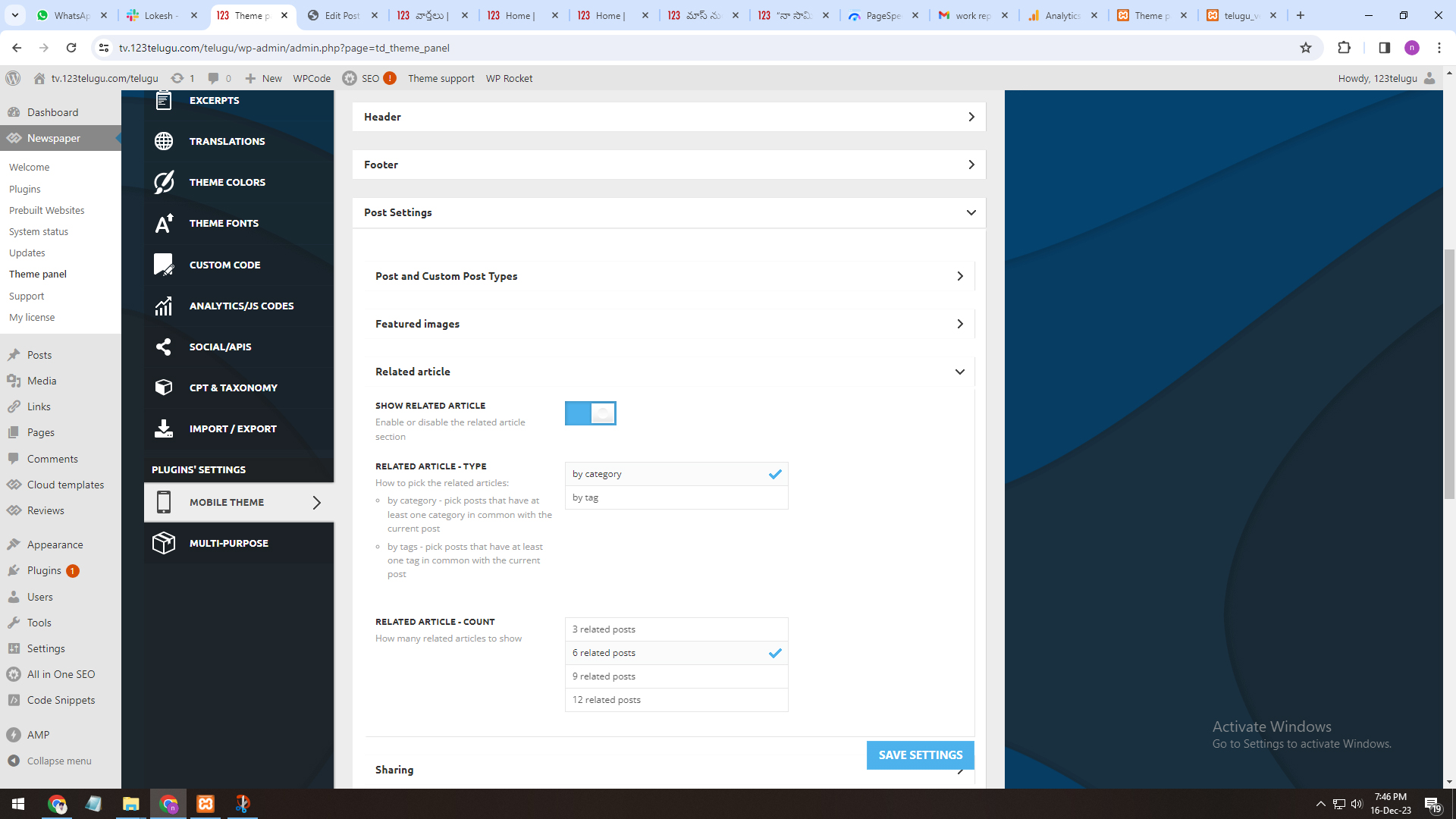
I am a developer at Mallemaala Entertainments, located in Hyderabad. We have a few requirements for our movie review website. I am hereby mentioning our requirements.
1. Related Articles
We have one issue while implementing Newspaper theme
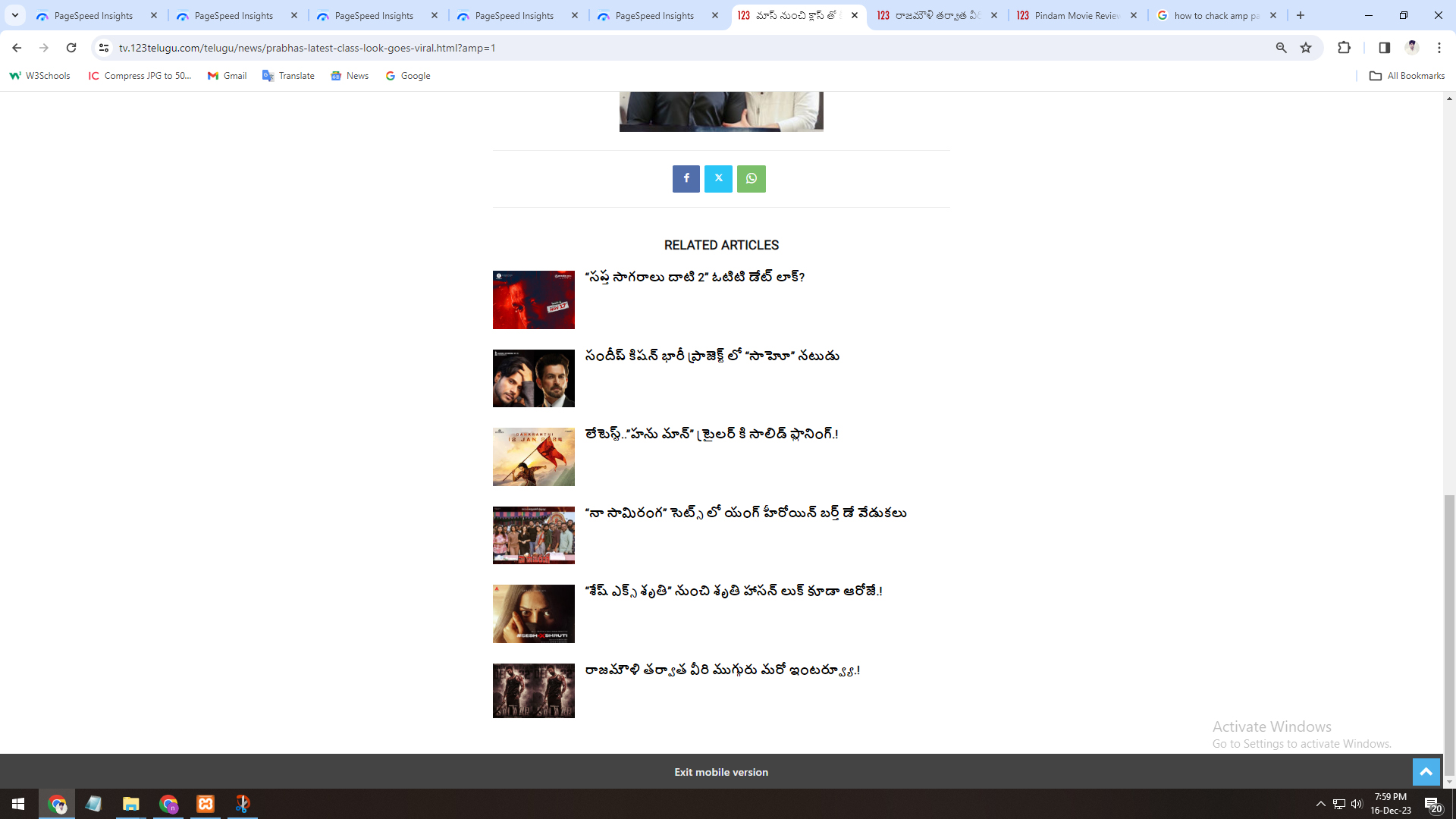
One is in Amp inner pages, is there any option to display related articles of that particular category.
Currently, when we open any amp page, related posts are coming from all categories, but we need to display particular category.
https://gallery.123telugu.com/images/theme_test/Narender-16-12-2.jpg
https://gallery.123telugu.com/images/theme_test/Narender-16-12-1.jpg
 pavel_t
I need to do a basic thing: show individual issues of a magazine/ezine. I prepared a TD Cloud template that displays articles in individual categories (headline, fashion, entertainment, etc.) as I need. But now I don’t know how to mark individual articles so that they belong, for example, to the 2023/25 issue, i.e. the address is mymagazine.com/issue/202325, and then the prepared template will display the articles that belong to this issue. I can’t find a filter in the individual TD elements that says “include articles with the given attribute”, in general, not just from those that I can already select from the list at that moment. I assume that it must be somehow possible, because that is basically the principle of how magazines and newspapers work. How do I do that?
Bettina Hello @forevermogulmag!
Unfortunately, only if you will install it on your end. You can use a staging version for example.
Thank you!
 Calin
Calin Hi,
Please make sure that the mobile theme plugin and amp plugin are not installed, because those will change the mobile layout.
For further assistance please provide a link to the website.
Thank you!
 pratul11
 I already have Cloud Library plugin installed. Theme & WordPress is updated. Child theme is activated.
Tried loading your tagDiv Cloud Template for Shop but this is what happens even after long time waiting to install…
Screen Recording Video Link. Please check the link.
-
This reply was modified 2 years by
pratul11.
 djalejo
When using Flex Loop Filter with Flex Loop Builder, I want to avoid verbose, ugly query parameters as below:
http://www.mydomainname.com/?tdb_tax_tdtax_my_taxonomy_name=something
Instead I would like to see something like:
http://www.mydomainname.com/?mytaxonomyname=something
The problem is I already created and used the custom taxonomy tdtax_my_taxonomy_name following the example of one of the prebuilt websites (my mistake). I am using ACF.
If I change the Taxonomy Key in ACF it will break my site, so that is not an option.
I already set up a permalink rewrite via ACF Advance Settings for the custom taxonomy, so I can go to http://www.mydomainname.com/portfolio/category/something and that works.
The problem is still the Flex Loop Filter and the long, ugly query parameter. I am sure this can be changed with some php magic, but how?
Any help greatly appreciated.
Bettina Hello @jguillen !
Please edit the homepage with the TagDiv Composer and add the elements you need there in order to display some information on the page. Documentation here: https://forum.tagdiv.com/homepage-how-to-build-and-set-it/
I can see that you use the mobile theme plugin.
We have 3 options for mobile versions that you can use:
1. Responsive version: A responsive version of your website looks similar to the desktop version. TagDiv Composer is used to edit the page.Click on the mobile viewport: https://www.screencast.com/t/XDQJedlggSB. There, you can see your mobile version and edit or adjust the elements to look better.
2. Mobile pages: https://tagdiv.com/newspaper-10-3-7-update-brings-customizable-and-fast-mobile-pages
3. Mobile theme plugin: The Mobile Theme is a performance-optimized theme included in the main Newspaper theme that only loads on mobile devices. It comes with its own templates and designs for pages, posts, categories, etc., so your current templates from the desktop theme will get converted to the mobile theme layout. Please see https://forum.tagdiv.com/the-mobile-theme/ and https://forum.tagdiv.com/mobile-theme-introduction/ for more information.
A full explanation is here: https://www.youtube.com/watch?v=SpGkOnJeNZY
If you need to use mobile version 1 or 2, then you need to uninstall the Mobile Theme plugin and AMP.
Thank you!
Bettina Hello @forevermogulmag!
Yes. You can add the ID of the Bookmark page to that element on the homepage.
It’s called the Single Post Reading Progress Bar. It can be used only on the articles, not on any page.
Yes, it is possible. Check this guide: https://forum.tagdiv.com/create-frontend-submission-form/
You can find an example in this section: https://demo.tagdiv.com/select_demo/newspaper-prebuilt-websites/ -> Directory/Listings
For customization and other services, you can contact our custom work team here: https://tagdiv.com/premium-customization-services/.
Thank you!
 youthost
Specific from the beginning that is not a problem of server/cache or plugin conflict, the same problems are present on your demos shop for example https://demo.tagdiv.com/newspaper_shop_audio/
When the quantity of the product is changed in the cart and then pressed the “Update Cart” button, or when a product is deleted from the cart by pressing the X, the ‘Woo Menu Cart’ does not update, this is important and could confuse customers.
This also happens when there is a product in the cart and press on the product (product detail / product page), sometimes resulting in the Woo Menu cart ’empty or differently updated, this also is important and could confuse customers.
I believe that everything derives from the failure to update something at the time of the actions: “Update Cart” Button, Delete Cart Item, etc.
This thing I think everyone is interested.
Here they talk about something similar that could help you in the solution:
https://github.com/woocommerce/woocommerce/issues/11064
Here also some IMG from your demo site
https://drive.google.com/file/d/1rzSssUVU_Bwrl9FOo-5OPYLIuaweVrtq/view?usp=sharing
The cart reports items even if empty, even if you update the page.
https://drive.google.com/file/d/10UMsBmTIQuIAHAsZI4vXROgr2r1ml0qx/view?usp=sharing
The cart reports the previous quantity even if the ‘Update Chart’ button has pressed, even if you update the page.
https://drive.google.com/file/d/1HQtBeLFAHD5wccaPR5rOfJi4lHmBENap/view?usp=sharing
https://drive.google.com/file/d/1IwxFgly8VOZAIXUqw8rSiCUvmzJjR0MR/view?usp=sharing
Going in detail of the product the Woo Menu chart displays the data of the previous product, even if you update the page.
NOTE: People cannot encounter these problems in the purchase of products on any operational site.
 danna
dannaWhen I enter various words in the search, it doesn’t find some of the matching posts. For example, when I search for Schnaderbeck, it doesn’t find this article, even though the name is in the title: https://raiffeisenzeitung.at/5-fragen-an-viktoria-schnaderbeck-raiffeisen-kag/ What could be the reason for this?
All the best and thanks a lot,
Daniel
Bettina Hello Megan!
Please let me know what exactly is not working there, so I can check regarding your example.
A solution for sending a screenshot/video is this:
Download, capture, and send: https://www.techsmith.com/jing-tool.html
After making the screenshot, you will have a link; paste it here.
Thank you!
Bettina Hello @eman!
We have the Module Views element that can be added to the Module template and used for your custom block on the homepage, for example, with the help of the Flex Block Builder element. Documentation here:
– https://forum.tagdiv.com/modules-builder-newspaper-theme/
– https://forum.tagdiv.com/flex-block-builder-flex-loop-builder/
Thank you!