
- NewsmagUsing the theme translations together with WPML
- NewsmagHow to update a plugin
- NewsmagCustom Post Type Support
- NewsmagAbove footer ads
- NewsmagWeather Widget
- NewsmagHow to update the theme
- NewsmagIntroduction
- NewsmagLogo & Favicon
- NewsmagFooter templates
- NewsmagUsing other ads
- NewsmagCustom ad spots
- NewsmagArticle ads
- NewsmagSidebar ads
- NewsmagHeader ads
- NewsmagLoading image effects
- NewsmagCategory top post styles
- NewsmagSmart Lists
- NewsmagGeneral settings
- NewsmagTheme thumbs
- NewsmagtagDiv slider gallery
 Bill Fleak
 We are wanting to edit the Post Loop that is used on our Cloud Template used to display the content for categories. We would like to add some content under the Sample post title text. Just need to know the location of the file needing to be edited. What is the difference between Post loop and Post Loop 2 blocks? Where are those files located as well?
We Would like to use the child theme method. Please share instructions for this as well so when we do updates it will not be an issue. Thank you.
See video.
https://www.screencast.com/t/c7bKkRKjcFiS
-
This reply was modified 4 years by
Bill Fleak.
 dimitrisv
 Thank you Calin. I tried what you said and still no luck.
I am in favour of the first option (to have the responsive look and feel while the AMP is also validated)
I will contact you via email to provide you access and do your magic.
 Calin
Calin Hi,
I think that you want to add auto ads, for this you can set auto ads for amp here -> https://i.imgur.com/aPoUpzf.png also for auto AdSense ads the code need to be set between
I hope this will help!
Calin Hi ChandlerBing1985, if you are using the mobile theme with amp then the mobile version and amp version will have a different layout, also the layout can be edited from Newspaper > theme pane > mobile theme -> https://i.imgur.com/DJ7XtVY.png also some settings for amp can be set from amp, like the one with redirect mobile users to amp and where to apply the amp -> https://i.imgur.com/jyPVbIg.png
I hope this will help you!
 Edward
 By the way, AMP will probably cease to exist soon.
One of the largest Western publications in the field of search marketing, SearchEngineLand, has decided to abandon AMP pages on its website (https://searchengineland.com/why-were-turning-off-amp-pages-at-search-engine-land-376228).
In June, Google announced that the use of AMP would cease to be a requirement for including content in the “Top News”. This gave another reason to discuss whether it is worth continuing to support this technology.
Calin Hi,
You can use the amp like this:
– responsive version or mobile page template with amp, setting the amp on “reader” -> https://i.imgur.com/SMroJZy.png
– using the mobile theme plugin with amp, in this way the amp will have the mobile theme layout and the mobile theme plugin can be used only for mobile, for mobile and amp, or only for amp.
Right now I do not see to have some amp version on your website.
Thank you!
 lpro
lproHi,
I have a problem with the advertisement google article inline and sidebar. The advertisement don’t show in the article, is not visible
but if i add ads with only easy widget html him functions… (but isn’t responsive)
why with functions of theme panel doesn’t work?
Example: here
I have same problem with the ads sidebar, ads don’t show ( themepanel + ads box widget )
 vasite
 I have created one post type post_recipe and one custom taxonomy category_recipe using plugin WCK and both working fine with tagDiv, for example http://www.icookgreek.com/syntages/oi-koyzines-tis-elladas/ (see the submenu of 2nd menu item ΣΥΝΤΑΓΕΣ, it is ok).
I use a plugin for recipes WP Recipe Maker that creates some extra custom taxonomies, like wprm_course, wprm_cuisine and wprm_keyword. These are that have problem for example icookgreek.com/kouzina/nistisimi/ (see the submenu of 2nd menu item ΣΥΝΤΑΓΕΣ, it is blank).
 ChandlerBing1985
 Hi Bettina, thanks for your reply. We have both mobile theme and AMP (transitional) active. The homepage is the one created with mobile theme, while the posts are in AMP. When I want to switch to the mobile version of the posts, there is a problem. As you can see from the video, the header has GOSSIP written on it which I can’t change in any option present within wordpress. I would like to change the mobile version of the posts. Where can I find the settings?
In the video you can see the homepage, the article in AMP version and then the one in mobile version (the last one you see is the one I would like to modify, specifically the header).
 Bettina
 Hello!
I’ve checked your website and it seems you haven’t the Mobile Theme plugin or AMP.
Let me explain you which options of mobile versions are:
1. Responsive version: A responsive version of your website is looking similar like on desktop, edit the page with TagDiv Composer, click on the mobile viewport: https://www.screencast.com/t/XDQJedlggSB ; there you can see your mobile version and you can edit the elements there.
2. Mobile pages: https://tagdiv.com/newspaper-10-3-7-update-brings-customizable-and-fast-mobile-pages/
3. Mobile theme plugin: The Mobile Theme is a performance optimized theme included in the Newspaper main theme and it loads only for mobile devices. It comes with its own templates for page, post, category, etc so your current templates from the desktop theme will get converted to the mobile theme layout. For more details, please take a look here: https://forum.tagdiv.com/the-mobile-theme/ ; https://forum.tagdiv.com/mobile-theme-introduction/
A full explanation you can find here: https://www.youtube.com/watch?v=SpGkOnJeNZY
If you’ll use Mobile theme plugin, then you can not edit the pages with TagDiv Composer.
You have only some settings for this layout, which you can find in Theme panel -> Mobile Theme. The same thing for AMP plugin too. Please note that if a page is made by Composer, than the content won’t be displayed on Mobile theme version. You should create the content with the Mobile Editor.
Please provide the link and a screenshot or a video, so I can help you efficiently.
Thank you!
Bettina Hello!
By editing a page with TagDiv Composer you could delete elements but also the row called “Empty column”.
You could try to delete it like this: select the row, press the button delete from your keyboard, then with your mouse select “YES”.
Also you have another option too, check this: https://www.screencast.com/t/pxuOzYIIpcG
In order to add your posts from that tag in the tag page, you need to add the element called “Flex block” or “Posts Loop”. Also, add the tag created to your posts. For example, for flex block choose the filter: Current tag in order to display the posts from the current tag. Also, for the category page, you can use a flex block with the filter: Current category in order to display the posts from the current category. Please check the video: https://www.screencast.com/t/dr5rNIts72lj
Hope that helps you!
Thank you!
 Varavina
HI Team,
I’m facing some weird issue while creating posts.
I tried many fixes, but the problem not resolved, However, after disabling Newspaper theme, the issue disappeared.
Can you please help me out?
Sample error screenshot : https://prnt.sc/20d83mt
Thanks,
NaGG
dimitrisvAfter moving to the newspaper theme, we noticed a significant drop in the organic referrers in our site.
Following investigation we realised that although the AMP and Mobile versions were active, the site cannot be validated as such in the tester.
We go here: https://search.google.com/test/amp
If we disable the mobile theme plugin and leave the AMP active we get the error that “Linked AMP version is invalid”
If we activate the Mobile Theme plugin (while we keep the AMP plugin active) we get a “Not An AMP page”
We add the url of the page: (demo server) https://pathologiaeu.ecode.gr/ To be told that there is no AMP version of the page. This really hurts our search ranking.
What we like to have is to have our mobile pages to be rich in content (like the mobile version that you see in the responsive mode and/or mobile template) but to also offer the AMP versions for those who desire to see the AMP – say the search indexing bots and some users on very low bandwidth.
 ekraft
Hello,
I see the COVID data as a sample table that can be inserted on a page, but how do I create a blank table – and more so, is there any way to tie it to a data source behind the scenes, such as a JSON-driven DataTable?
Thanks.
 Montage Creative
Hi team,
Is there a way or code I can use in order to make the same text appear across every post on my site without having to manually include it.
For example, I might need to have the words: “the content on this page is not financial advice…” at the bottom of every new article that is posted, and all existing articles (200+).
ChandlerBing1985Hi, I recently installed this theme on http://www.contra-ataque.it and wanted some clarifications. Given the new Google regulations is it better to activate only AMP for posts or the mobile version of posts? Currently amp is active but I can’t change the layout of AMP and also I can’t change the layout of the mobile theme (in the image you can see how, despite different settings, the logos and colors of the demo gossip theme are present https://ibb.co/Jd5xvX4). Where can I change logo and other parameters? Moreover, with Google Site Kit I can’t get the banners in the mobile version automatically. Finally I noticed in Analytics the suffix at the end of the url tdb action=tdb ajax, what does it refer to?
 JohanM1228
Hi,
I have a flexblock in the right rail for all article pages on our site with the filter set to only show articles from the current category. However, the articles in the list are from all categories. How do I fix this?
Example: https://money.slickdeals.net/credit-score/free-weekly-credit-reports/
This has articles from the banking, credit cards and points & miles categories.
screenshot: https://drive.google.com/file/d/1H-ouB0oQ-1yh2ljfzH-CEWF2z0dnlQBa/view?usp=sharing
 AndreaPagani
 Hi Bettina!
I don’t know why, but now it’s working fine… -_-‘
I’m looking my website from a smartphone and a PC (with /?amp=1) and I’m able to track both with Analytics.
A WordPress’ mistery! 😀
Thanks,
Andrea
dimitrisv Here is the setting:
dimitrisv Thanks Bettina. I was just unaware that the lazy loader also provides this effect.
One more silly question.
Can you please confirm that if we like our readers to see in their mobiles the newspaper theme, we have to mark the AMP choice?
I noticed that if we select Mobile or Mobile+AMP, it displays the simplified/plain version.
Thank you!
vasite hi, i made a video, you can see here youtube.com/watch?v=l7YNtrX2LEo
you can see the 2nd menu ΣΥΝΤΑΓΕΣ on my site on this link is not working here icookgreek.gr/tags/kids-friendly but for example in homepage is working
AndreaPaganiHi! I’m trying to track my website http://www.officina.news in mobile version (AMP), but I can’t display Google Analytics code.
I think I’ve pasted the right code in Theme settings – Mobile Theme – AMP Analytics (because I can see it with Analytics while browsing categories).
{
“vars”: {
“account”: “UA-XXXXXXXXX-1”
},
“triggers”: {
trackpageview”: {
“on”: “visible”,
“request”: “pageview”,
}
}
}
What’s wrong with the website?
Thanks!
Andrea
 Legally Flawless
Greetings,
We are having a problem with our website for the past 1 month or so as many times the mobile view is showing on the PC and vice versa. Kindly help us regarding the same as our visitor experience is being hampered.
Thanks and regards.
Team Legally flawless
http://www.legallyflawless.in
E-mail: legallyflawless.info@gmail.com
 reactbiz
 Hi Bettina,
I don’t understand how you can say everything is working fine, when is not (and your video shows that). Every single link in the the Popular Category in the footer goes to just one same blog which is assigned only to Opportunity category.
For example if you click on Marketing link in the Popular category in the footer. That link has five blogs assigned to it in the (categories of the blog post editor), but it doesn’t show any blogs assigned to marketing. it only shows a blog assigned to Opportunity which is not assigned to marketing or anything else, except opportunity category. And that happens with every link in the Popular Category. In other words all 23 links in the Popular category display only one same blog. The same happens if you click on any category links in the main menu.
I have tried to edit Popular Category in the footer with TagDiv composer and maybe assign blogs there, but there is not facility to do that. Am I missing something?
Regards
Mike
 danna
dannaHello,
as CLS get’s more important i just wanted to know how i can fix he following issue:
I’ve activated the mobile theme and it seems like scrolling causes a CLS as you can see on the screenshot:
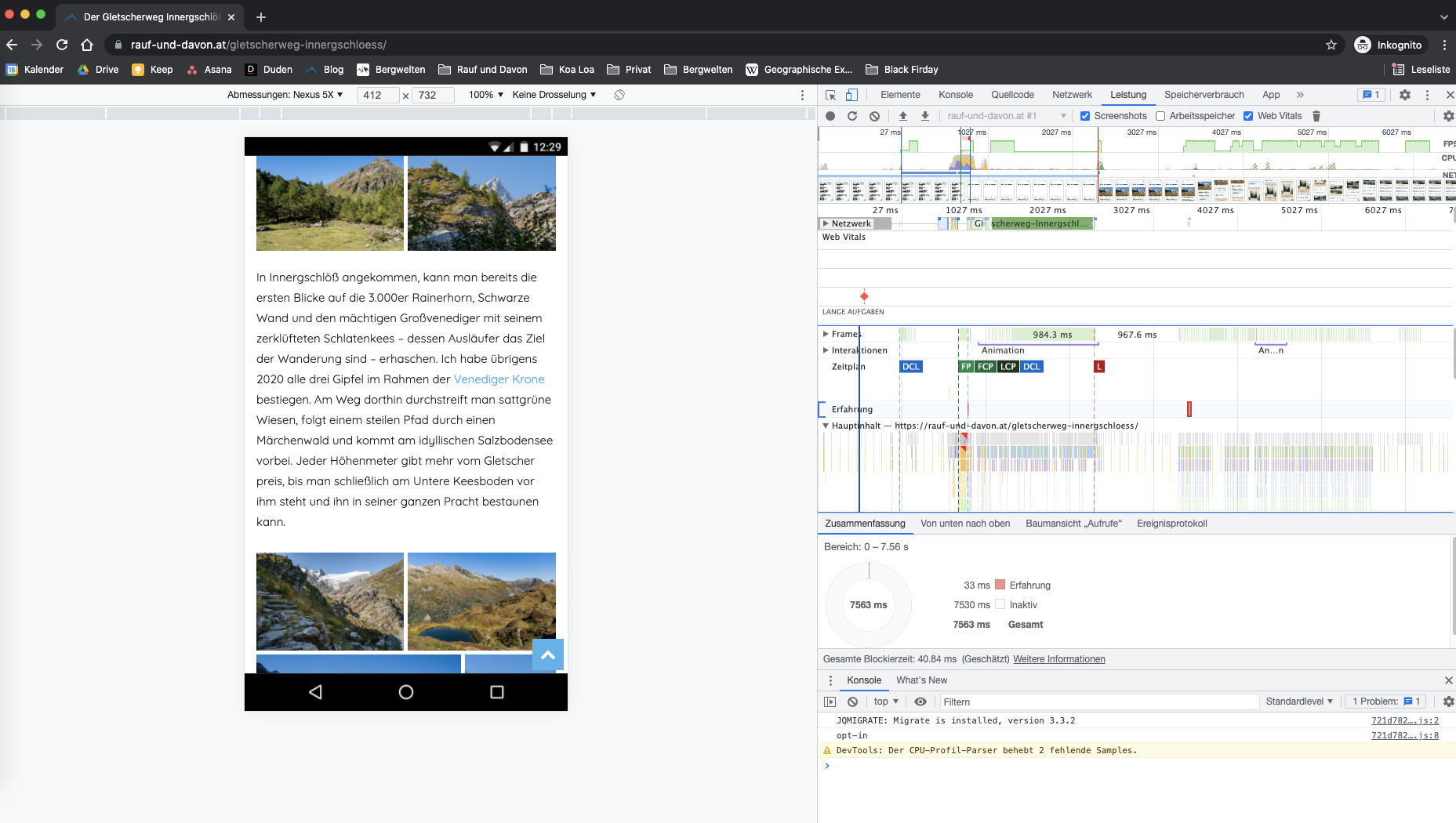
This always happens on every page but only when you start scrolling. Can you please take a look at it and tell me how to fix that 🙂
For example here: https://rauf-und-davon.at/reedsee-wanderung/
All the best and thanks,
Daniel



