
- ApiPractical example – How to add a new Block and Module
- Apitd_api_top_bar_template::delete
- Apitd_api_top_bar_template::update_key
- Apitd_api_top_bar_template::update
- Apitd_api_top_bar_template::add
- Apitd_api_single_template::delete
- Apitd_api_single_template::update_key
- Apitd_api_single_template::update
- Apitd_api_single_template::add
- Apitd_api_footer_template::delete
- Apitd_api_footer_template::update_key
- Apitd_api_footer_template::update
- Apitd_api_footer_template::add
- Apitd_api_smart_list::delete
- Apitd_api_smart_list::update_key
- Apitd_api_smart_list::update
- Apitd_api_smart_list::add
- Apitd_api_thumb::delete
- Apitd_api_thumb::update_key
- Apitd_api_thumb::update
 ijusttrylah
 Hi anamarie,
Please find the video to the error here: https://www.dropbox.com/scl/fi/kw76eh8xjy7twp59jelmb/RPReplay_Final1725015795.mp4?rlkey=xakrhnjafkcilaea6tr4w50ey&st=xlw79kzi&dl=0
 Anamaria
 Hello,
Using our theme you can choose from 3 mobile versions
-> mobile responsive => https://www.screencast.com/t/oJ2ShOp47
-> mobile theme plugin => https://forum.tagdiv.com/the-mobile-theme/
-> mobile page => https://tagdiv.com/newspaper-10-3-7-update-brings-customizable-and-fast-mobile-pages/
If you created the mobile pages with tagDiv Composer, then when you install the Mobile Theme plugin, your pages will be overwritten by the plugin (the mobile theme comes with its templates for page, post, category, etc so your current templates from the desktop theme will get converted to the mobile theme layout, the page content is made without builders in mobile editor => https://www.screencast.com/t/xbgZG8kH also, the options that are provided to edit the mobile theme version are limited (this keeps the things simple)).
This is a video about Responsive Newspaper Theme, AMP & Mobile Theme, Mobile Pages & Templates -> https://www.youtube.com/watch?v=SpGkOnJeNZY
So, the mobile responsive is what you see then that you select the viewport on phone => https://www.screencast.com/t/matV17hH, so some settings may apply for each viewport(where is the border blue), and others are not(where the border is black).
The mobile page has the mobile templates from Cloud Library => https://www.screencast.com/t/YCcZ8rL8
Mobile responsive version of the theme and the mobile page editor can be edit with tagDiv Composer, the mobile theme plugin not.
For example, you can have the mobile theme plugin activate and use the mobile page/mobile responsive version for the homepage/pages, but for the categories pages/404 page you can’t use the mobile page/mobile responsive version if you have the mobile theme plugin activate.
So, if you want to design the pages with tagDiv Composer, you can use the mobile page or mobile responsive version.
Better deactivate the mobile theme plugin and see the results, and assign the mobile page for page, like this => https://www.screencast.com/t/lektAhyjd
Also, clear your cache.
Thank you!
 mubassirhayat
I have a website that uses the Newspaper theme. I was using the mobile option for the mobile theme, not the AMP option. Now with the new update the theme by default is using the AMP option and I don’t know how to change it. My page are not opening on the mobile browser. What do I do. Also my live search is working fine but my search page doesn’t show any results.
Your prompt help is needed. Our traffic is being affected by this issue.
 darrenhive
 I’ve been through tht twice already and the prblem is still persisting. Here’s what theconsole log shows.
jquery.min.js?ver=3.7.1:2 jQuery.Deferred exception: Cannot read properties of undefined (reading 'models') TypeError: Cannot read properties of undefined (reading 'models')
at Object.getFirstModelByZoneType (https://<removed>/wp-content/plugins/td-composer/assets/js/js_files_for_wrapper.min.js?ver=5b75a1149b707159a7e71fd3bf09ff7b:316:340)
at Object.getShortcodeFromData (https://<removed>/wp-content/plugins/td-composer/assets/js/js_files_for_wrapper.min.js?ver=5b75a1149b707159a7e71fd3bf09ff7b:353:457)
at Object.saveHeaderState (https://<removed>/wp-content/plugins/td-composer/assets/js/js_files_for_wrapper.min.js?ver=5b75a1149b707159a7e71fd3bf09ff7b:28:388)
at Object.init (https://<removed>/wp-content/plugins/td-composer/assets/js/js_files_for_wrapper.min.js?ver=5b75a1149b707159a7e71fd3bf09ff7b:23:279)
at https://<removed>/wp-admin/post.php?post_id=49498&td_action=tdc&tdbTemplateType=page&prev_url=%2F%2F<removed>%2F:1138:44
at c (https://<removed>/wp-includes/js/jquery/jquery.min.js?ver=3.7.1:2:25304)
at fireWith (https://<removed>/wp-includes/js/jquery/jquery.min.js?ver=3.7.1:2:26053)
at e (https://<removed>/wp-includes/js/jquery/jquery.min.js?ver=3.7.1:2:27300)
at https://<removed>/wp-includes/js/jquery/jquery.min.js?ver=3.7.1:2:27330 undefined
(anonymous) @ jquery.min.js?ver=3.7.1:2
(anonymous) @ jquery.min.js?ver=3.7.1:2
setTimeout
(anonymous) @ jquery.min.js?ver=3.7.1:2
c @ jquery.min.js?ver=3.7.1:2
fireWith @ jquery.min.js?ver=3.7.1:2
fire @ jquery.min.js?ver=3.7.1:2
c @ jquery.min.js?ver=3.7.1:2
fireWith @ jquery.min.js?ver=3.7.1:2
(anonymous) @ jquery.min.js?ver=3.7.1:2
c @ jquery.min.js?ver=3.7.1:2
fireWith @ jquery.min.js?ver=3.7.1:2
(anonymous) @ jquery.min.js?ver=3.7.1:2
(anonymous) @ js_files_for_wp_admin.min.js?ver=5b75a1149b707159a7e71fd3bf09ff7b:49
IndexedDB
get @ js_files_for_wp_admin.min.js?ver=5b75a1149b707159a7e71fd3bf09ff7b:49
(anonymous) @ post.php?post_id=49498&td_action=tdc&tdbTemplateType=page&prev_url=%2F%2F<removed>%2F:1108
load
(anonymous) @ post.php?post_id=49498&td_action=tdc&tdbTemplateType=page&prev_url=%2F%2F<removed>%2F:1107
(anonymous) @ post.php?post_id=49498&td_action=tdc&tdbTemplateType=page&prev_url=%2F%2F<removed>%2F:1142
That’s the warning, and here are the errors.
td_wp_admin.min.js?ver=12.6.7:1  Uncaught SyntaxError: Identifier '_extends' has already been declared (at td_wp_admin.min.js?ver=12.6.7:1:1)

    at td_wp_admin.min.js?ver=12.6.7:1:1

(anonymous) @ td_wp_admin.min.js?ver=12.6.7:1

js_files_for_wrapper.min.js?ver=5b75a1149b707159a7e71fd3bf09ff7b:400  Uncaught ReferenceError: tdDetect is not defined

    at HTMLIFrameElement.loadIframe (js_files_for_wrapper.min.js?ver=5b75a1149b707159a7e71fd3bf09ff7b:400:385)

    at HTMLIFrameElement.dispatch (jquery.min.js?ver=3.7.1:2:40035)

    at HTMLIFrameElement.<anonymous> (jquery.min.js?ver=3.7.1:2:38006)

loadIframe @ js_files_for_wrapper.min.js?ver=5b75a1149b707159a7e71fd3bf09ff7b:400

dispatch @ jquery.min.js?ver=3.7.1:2

(anonymous) @ jquery.min.js?ver=3.7.1:2

load

add @ jquery.min.js?ver=3.7.1:2

(anonymous) @ jquery-migrate.min.js?ver=3.4.1:2

(anonymous) @ jquery-migrate.min.js?ver=3.4.1:2

(anonymous) @ jquery.min.js?ver=3.7.1:2

each @ jquery.min.js?ver=3.7.1:2

each @ jquery.min.js?ver=3.7.1:2

Le @ jquery.min.js?ver=3.7.1:2

on @ jquery.min.js?ver=3.7.1:2

checkIframe @ js_files_for_wrapper.min.js?ver=5b75a1149b707159a7e71fd3bf09ff7b:406

init @ js_files_for_wrapper.min.js?ver=5b75a1149b707159a7e71fd3bf09ff7b:400

init @ js_files_for_wrapper.min.js?ver=5b75a1149b707159a7e71fd3bf09ff7b:410

(anonymous) @ js_files_for_wrapper.min.js?ver=5b75a1149b707159a7e71fd3bf09ff7b:411

(anonymous) @ js_files_for_wrapper.min.js?ver=5b75a1149b707159a7e71fd3bf09ff7b:411

post.php:1  Access to fetch at 'https://cloud.tagdiv.com/services-img/banner-composer.png' from origin 'https://<removed>' has been blocked by CORS policy: No 'Access-Control-Allow-Origin' header is present on the requested resource. If an opaque response serves your needs, set the request's mode to 'no-cors' to fetch the resource with CORS disabled.

domExtractorInjector.bundle.js:1
GET https://cloud.tagdiv.com/services-img/banner-composer.png net::ERR_FAILED 200 (OK)
C @ domExtractorInjector.bundle.js:1
(anonymous) @ domExtractorInjector.bundle.js:1
h @ domExtractorInjector.bundle.js:1
A @ domExtractorInjector.bundle.js:1
(anonymous) @ domExtractorInjector.bundle.js:1
load
(anonymous) @ domExtractorInjector.bundle.js:1
(anonymous) @ domExtractorInjector.bundle.js:1
(anonymous) @ domExtractorInjector.bundle.js:1
Show 8 more frames
Show less
This is running on a dev environment with no caching or optimization plugins
 Bettina
 Hello @campbell !
If you have the latest update of the theme, then you should have that option.
Other solution could be to place a CSS code in the Live CSS section like:
a {color: #003484;}
Thank you!
Anamaria Hello,
Please check the wp-memory to 256M, and is still not working, please double it and check the rest of the settings from our guide -> https://forum.tagdiv.com/requirements-for-newspaper/ also make sure that you are using SSL and you have a good bandwidth, the one from our server is 1GB/s and the one that I use at home is 500MB/s, if you have low bandwidth, then you can access parts of the cloud, this can be done from the frontend, for example, if you are on a post -> https://i.imgur.com/4G74M7F.jpg or from tagDiv Composer -> https://i.imgur.com/2F6MhfI.png or from backend -> https://www.screencast.com/t/wekHmc7kJ8J
Thank you!
Anamaria Hello,
You have malware on the website because I can not access it. Please update to the latest version 12.6.7
If you want to update the theme, you should download the latest version of it from the Theme Forest account and download it.
I recommend that you update the theme manually https://forum.tagdiv.com/how-to-update-the-theme-2/ via FTP/cPanel/File Manager, also if possible disable extra plugins during the theme update to avoid any problems that may arise and make sure that you have activated the tagDiv Standard pack plugin to keep the website’s look. You can try to update the theme on a staging website.
After you update the theme, you need to update the theme plugins too.
In the worst cases, the settings in the theme panel may be lost (there have been isolated cases), in these cases, after the theme plugins that were previously used are activated, you will have to use a backup for the theme panel -> https://forum.tagdiv.com/import-export-theme-settings/
You could consider reinstalling the WordPress version, and checking for this plugin wp-zexit.php. It might be wise to inspect via FTP if it doesn’t appear in the WordPress -> Plugins. Additionally, using Wordfence to scan the website and remove unknown users would be prudent.
Change admin passwords and delete admin accounts you are not familiar with;
– Delete any weird/unknown plugins;
– Delete the weird/unknown themes;
– Clean unfamiliar Theme Panel injected code (example – https://i.imgur.com/4q70kCv.png);
– Clean WordPress files (example – https://i.imgur.com/stJCqiK.png)
Please block /wp-json/tdw/save_css
If an attacker wants to target this URL /wp-json/tdw/save_css they can do so. Even if the website uses a different theme, the attacker can still try that URL. We could add an option to be able to enable/disable the Live CSS, it will be considered. But for now in order to remove it this can only be done with a modification to the composer plugin. I think that all that removing it requires is to comment this line of code – https://prnt.sc/RtwvL5Nc4ikR -> https://prnt.sc/ymZmhdUfp57U But as I mentioned, the attacker can still try to access the URL.
Thank you!
 daveslc
We link our photos to the attachment page. On the attachment page, the thumbnail loads, but the larger photo either won’t load or takes several minutes to load.
Site: https://www.cyclingwest.com
Attachment page example: https://www.cyclingwest.com/racing/gravel-racing/la-crescent-minnesota-to-host-the-2025-and-2026-usa-cycling-gravel-national-championships/attachment/img_5024-edit/
 RECORD EUROPA
 In order to improve accessibility to WCAG 2.0 AA compliance, it is important to add a Skip to Content link (it will allow you to go directly to the post content, ‘skipping’ the menu for example), for this there must be an element with an ID to which this link can be pointed.
In the case of personalized pages this is easy.
But in the case of predefined post templates (e.g.: style1, style2…) how can we add an ID to the DIV with the ‘.td-container-wrap’ class, considering that this class is indicative of the main content. Is there a snippet we can add? Or will you add this ID in the future to improve the theme’s accessibility?
Thanks.
Bettina Hello!
The autoload for CPTs is the feature that loads, for example, another CPT as the scrolling autoload for posts. Edit a CPT template, and you can find the settings there: https://app.screencast.com/g5dEkeMutlK12
Thank you!
Bettina Hello @campbell !
Please update the theme to the latest update to have access to all the options and features.
Thank you!
Bettina Hello @campbell !
Edit the category template with the tagdiv Composer and change the color of your links from here: https://app.screencast.com/OH8FvrubvKoMI
Thank you!
 triva
triva Quick update, I deactivated AMP plugin just now, and now it looks better… Can you please check if that was the issue, is my theme functional now?
 sohailahmed160
 Hello,
The AMP post views counter issue is still not fixed.
Anamaria Hello,
Did you have tried the steps from here ” A much simpler and faster alternative is to duplicate the cloud template you want to use in another language, edit it and select the desired language – https://i.imgur.com/z1CqgBo.png (edit the name) – https://i.imgur.com/dPX8ROs.png – https://i.imgur.com/Lc81IgP.png This method needs to be used to translate all cloud templates.”?
The cloud templates are in the cloud templates section https://i.imgur.com/EYUGxIR.png
Global” means setting a global template, for example, a header for all pages and a template for the respective language.
It is not necessary to set them in the child theme.
Thank you!
Anamaria Hello,
Using our theme you can choose from 3 mobile versions
-> mobile responsive => https://www.screencast.com/t/oJ2ShOp47
-> mobile theme plugin => https://forum.tagdiv.com/the-mobile-theme/
-> mobile page => https://tagdiv.com/newspaper-10-3-7-update-brings-customizable-and-fast-mobile-pages/
If you created the mobile pages with tagDiv Composer, then when you install the Mobile Theme plugin, your pages will be overwritten by the plugin (the mobile theme comes with its templates for page, post, category, etc so your current templates from the desktop theme will get converted to the mobile theme layout, the page content is made without builders in mobile editor => https://www.screencast.com/t/xbgZG8kH also, the options that are provided to edit the mobile theme version are limited (this keeps the things simple)).
This is a video about Responsive Newspaper Theme, AMP & Mobile Theme, Mobile Pages & Templates -> https://www.youtube.com/watch?v=SpGkOnJeNZY
So, the mobile responsive is what you see then that you select the viewport on phone => https://www.screencast.com/t/matV17hH, so some settings may apply for each viewport(where is the border blue), and others are not(where the border is black).
The mobile page has the mobile templates from Cloud Library => https://www.screencast.com/t/YCcZ8rL8
Mobile responsive version of the theme and the mobile page editor can be edit with tagDiv Composer, the mobile theme plugin not.
For example, you can have the mobile theme plugin activate and use the mobile page/mobile responsive version for the homepage/pages, but for the categories pages/404 page you can’t use the mobile page/mobile responsive version if you have the mobile theme plugin activate.
So, if you want to design the pages with tagDiv Composer, you can use the mobile page or mobile responsive version.
Better deactivate the mobile theme plugin and see the results, and assign the mobile page for page, like this => https://www.screencast.com/t/lektAhyjd
Also, clear your cache.
Thank you!
 hospitality-school
I AM NOT USING ANY CACHE PLUGIN BUT ONLY Cloudflare SERVICE FOR CACHING. HERE IS MY SITE:
https://www.hospitality-school.com/
My homepage version for mobile and desktop are different. But time to time I am seeing mobile version while visting from laptop or pc. What’s the solution? I have enabled mobile theme plugin but not amp.
This is my cloud template settings: https://tinyurl.com/24xcq6os
This is how I set my desktop version to be visible through cloud template: https://tinyurl.com/2cnehzgx
and the mobile version: https://tinyurl.com/2b73ohv7
But EVERY NOW AND THEN I AM SEEING THIS MOBILE VERSION IN DESKTOP. WHAT’S THE SOLUTION. WHY IT CANT PROPERLY DELIVER PROPER VERSION FOR PROPER DEVICES?
 Michelle26
 Thank you, I followed the instructions and created mobile pages. However, the mobile version does not always load.
I looked it up and the recommendation clearing the cache. I did that, but a few hours later the mobile version stops loading.
We have talked to the server people and they said the error log shows its a problem with TD Composer.
These are the errors they showed me:
2024/08/28 13:18:08 [error] 936811#936811: *49657 FastCGI sent in stderr: “PHP message: PHP Warning: Undefined array key “tdb_templates” in /home/wplive/web/wp-live/wp-content/plugins/td-cloud-library/includes/tdb_functions.php on line 634″ while reading response header from upstream, client: 207.46.13.150, server: , request: “GET /iconos_gem-ai-01/ HTTP/1.0”, upstream: “fastcgi://unix:/var/run/php/php8.1-wplive.sock:”, host: “panamagemcharters.com”
2024/08/28 12:57:34 [error] 936811#936811: *49132 FastCGI sent in stderr: “PHP message: PHP Warning: Trying to access array offset on value of type bool in /home/wplive/web/wp-live/wp-content/plugins/td-composer/legacy/common/wp_booster/td_video_support.php on line 88PHP message: PHP Warning: Trying to access array offset on value of type null in /home/wplive/web/wp-live/wp-content/plugins/td-composer/legacy/common/wp_booster/td_video_support.php on line 88” while reading response header from upstream, client: 181.197.54.47, server: , request: “GET /en/offshore-fishing-tour/?gad_source=2&gclid=CjwKCAjwiaa2BhAiEiwAQBgyHtR0v0Xhz_uTK3kEoZCwEjW8kfL0CpAiIBFhnWyhtSrTMEOe9BtXIBoCHIoQAvD_BwE HTTP/1.0”, upstream: “fastcgi://unix:/var/run/php/php8.1-wplive.sock:”, host: “panamagemcharters.com”, referrer: “https://m.youtube.com/”
2024/08/28 12:36:17 [error] 936811#936811: *48843 FastCGI sent in stderr: “PHP message: PHP Warning: Trying to access array offset on value of type bool in /home/wplive/web/wp-live/wp-content/plugins/td-composer/legacy/common/wp_booster/td_video_support.php on line 88PHP message: PHP Warning: Trying to access array offset on value of type null in /home/wplive/web/wp-live/wp-content/plugins/td-composer/legacy/common/wp_booster/td_video_support.php on line 88” while reading response header from upstream, client: 190.218.50.143, server: , request: “GET /en/offshore-fishing-tour/?gad_source=2&gclid=EAIaIQobChMInZWYm_z8hwMVx-XjBx0_ey7yEAEYASAAEgIY__D_BwE HTTP/1.0”, upstream: “fastcgi://unix:/var/run/php/php8.1-wplive.sock:”, host: “panamagemcharters.com”, referrer: “https://m.youtube.com/”
could you please help?
Bettina Hello @campbell!
That sticky header in this demo is the same with the same elements. Please follow the steps like this: https://app.screencast.com/rWJPUy2wOJUbg
If there is another problem, then contact us via email at contact@tagdiv.com and provide the following:
– admin url and credentials
– a link to this topic in order to identify you
We will investigate the issue and let you know what can be done there.
Thank you!
 productivedigital
https://staging.nicktimothy.com/about-me/
Trying to set up an about me page here, looking to use the Text with title as the other text modules only allow one paragraph of text but the editor does not load. Screenshot below.
There is a 403 error in the console failing to load wpeditor.
I’ve cleared my browser cache and the server cache (it’s siteground hosting), this is a fresh install with no other themes or plugins present.
Anamaria Hello,
You can use this option https://forum.tagdiv.com/use-tabbed-content-shortcode/ it’s not like your example, but you can try it.
The tabbed content works with pages, so please check the documentation.
You can add in the page flex block and filter them as you want https://i.imgur.com/2kkw68K.png
Thank you!
 hamzaaboufirass
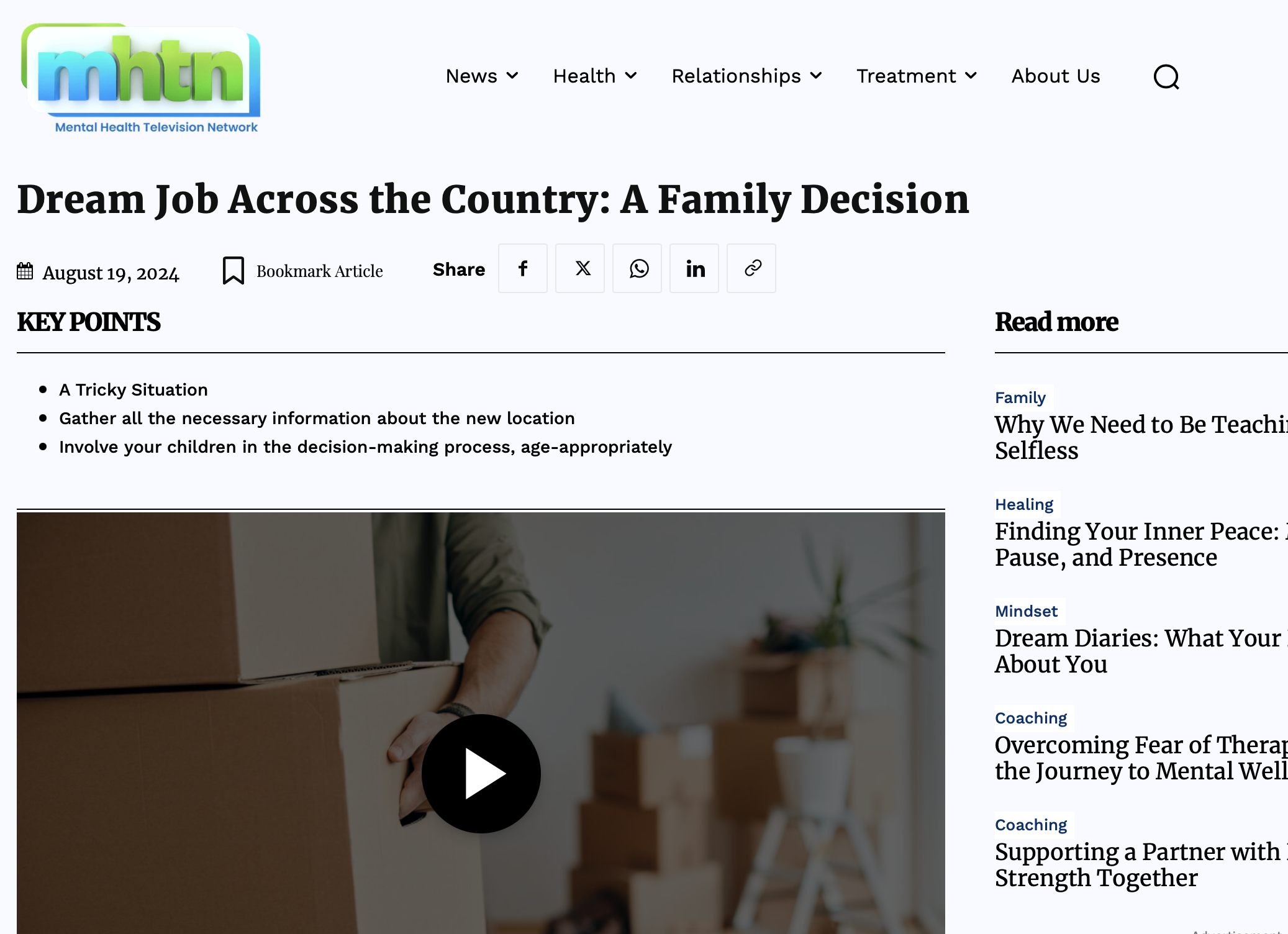
Issue with H3 tag, key points showing the whole text instead of just the h3 tag
Having issue with many posts, example:
https://mhtn.org/are-americans-losing-faith-in-college/
It should be like this:
https://mhtn.org/dream-job-across-the-country-a-family-decision/
When I remove the Gutenberg code and replace with standard html it works
 PSIall
1. The logo is not showing
2. How do I eliminate this space?
 vimalgopal
Site url: concentratedwisdom.com
I intent to create a separate template for each page.
For example I want a contact us page with no sidebars, a services page with sidebars, an about us page with different banner style and a different header/footer, a shop/product page with different styles based on different product.
 simchris
 Using the Redirection plugin is super useful 🙂
I also posted the regex codes in forum to setup proper 301 redirects for /amp and /?amp type URLs. 🙂



