- ApiPractical example – How to add a new Block and Module
- Apitd_api_top_bar_template::delete
- Apitd_api_top_bar_template::update_key
- Apitd_api_top_bar_template::update
- Apitd_api_top_bar_template::add
- Apitd_api_single_template::delete
- Apitd_api_single_template::update_key
- Apitd_api_single_template::update
- Apitd_api_single_template::add
- Apitd_api_footer_template::delete
- Apitd_api_footer_template::update_key
- Apitd_api_footer_template::update
- Apitd_api_footer_template::add
- Apitd_api_smart_list::delete
- Apitd_api_smart_list::update_key
- Apitd_api_smart_list::update
- Apitd_api_smart_list::add
- Apitd_api_thumb::delete
- Apitd_api_thumb::update_key
- Apitd_api_thumb::update
 casprom
 I tried but didn’t find anything. In the meantime we published this article which is a good example https://squared-potato.pt/x4-foundations-analise/
The author even tried to put the review score but when it saved and published, all gone!
I’ve sent an email yesterday with credentials if you need to login. It in your contact email.
 nilasisx
 Yes. it works. but I compared it with my other site but has differences as shown in the video. The amount I scroll on both sites, both scroll has different, especially on mobile devices. The newspaper’s Progress bar does not go with scrolling. it takes little time to adjust. I’m talking about this latency. Where the other site’s progress bar goes according to the scroll, doesn’t matter how much or how fast users scroll. And that latency feels that the web page jitter.
here is a better example video (screen recording): https://1drv.ms/f/s!Av5FAKsItry3nE4LQlxz5oc7JK_t?e=06SSeh
Thank you.
 Anamaria
 Hello,
We have some filters like this. For example, add a flex block in a post template, go to the filter tab of the element’s settings, and from the dropdown category filter, you can choose between Single – More from author, Single – Related by category, Single – Related from tags. Those special filters will work as expected https://forum.tagdiv.com/flex-block-settings-guide/
Thank you!
 Calin
Calin Hello,
I just checked the links from your screenshots and those are in source of page – https://i.imgur.com/vJ0gFPA.png
Related to the links with amp extension, usually this situation appears when you are using amp or the amp was enabled for a period of time and after that is disabled and the amp links are still on google results, what needs to be done in this case is to set a redirect on those amp links and ask google to reindex the website.
-> https://forum.tagdiv.com/topic/kiss-amp-goodbye/
Thank you!
 muktipolice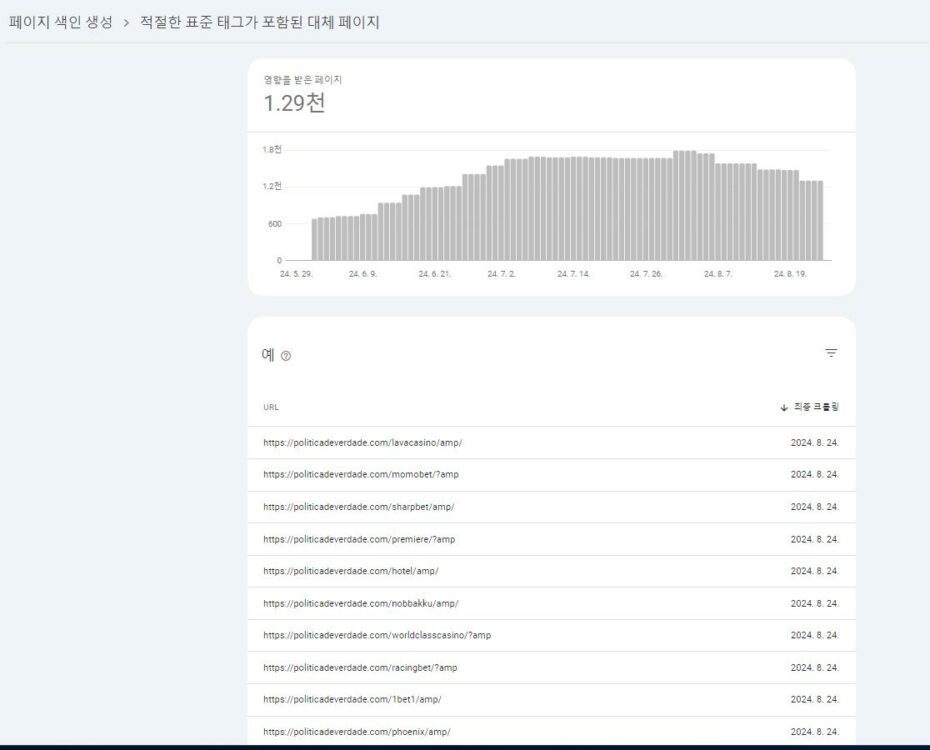
Alternate page with appropriate standard tags ??
Do you know how to modify these errors items?
It has all the amp signs on it. Can you guess?
-
This reply was modified 2 years by
muktipolice.
 Mar
MarHello,
In the doctor pro theme there are options to upload images and also a CV. I need the option for each doctor that want to register his profile to upload an audio file also, and this file has to be available to all the visitors of that profile for download and also the possibility to leave a review from the users for that audio. Like for example the doctor wants to upload his last conference to let it available for download to all the visitors.
Thanks!
thank you!
 Handykosasih
 Hi Anamaria,
Thanks for your prompt reply. The error is only shown when we edit the home page with tagDiv composer & no one element does not move or edit. see the link : https://postimg.cc/v4ctXxKk
Wordpress Current version: 6.6.1
Theme Version: 12.6.6
PHP version: 8.1.28
We did not use any codes on the back end. Here is the list of installed plugins.
https://postimg.cc/pySTz9Dp
Thank you
 fariborzmorshedi
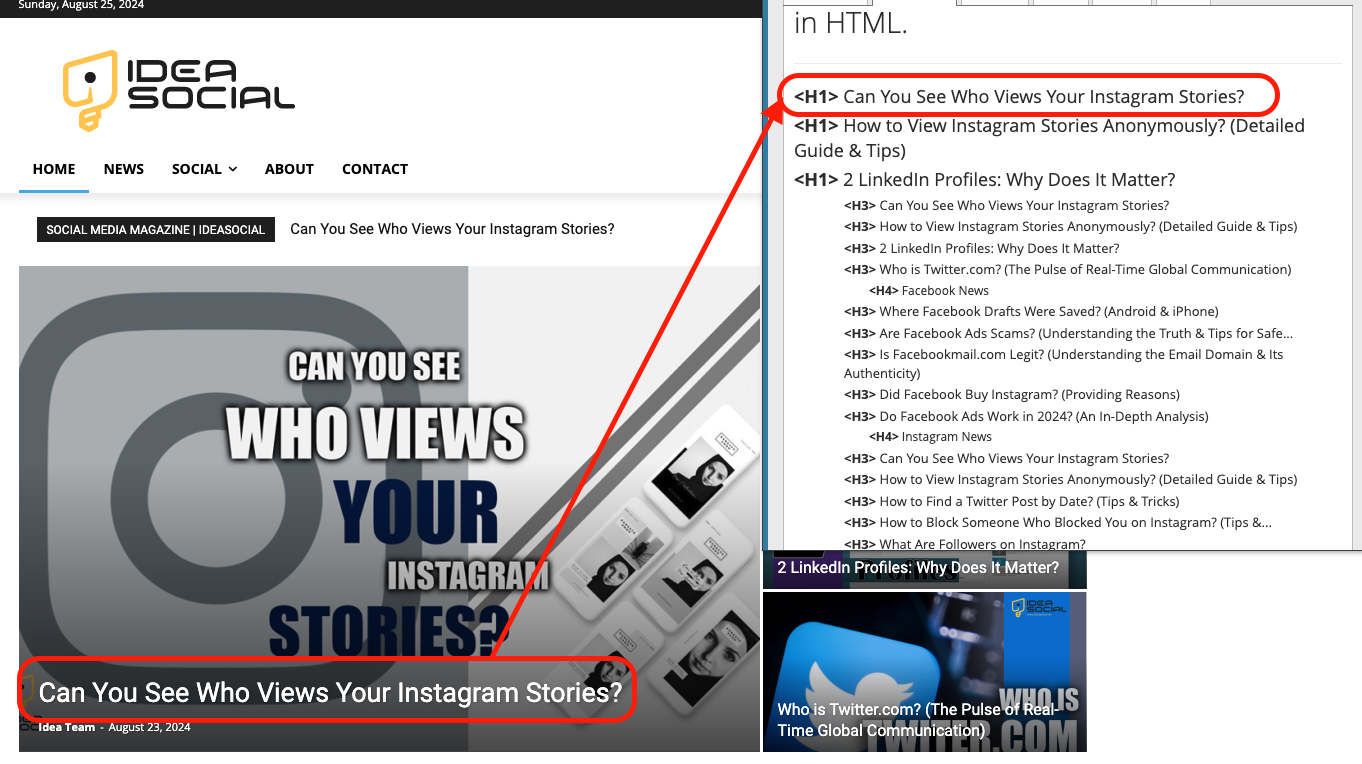
 the problem about the post tag not the title of the general section.
for example, when I publish a new post the H1 will be changing.
https://ideasocial.net/wp-content/uploads/2024/08/Screen-Shot-2024-08-25-at-11.03.05-AM.png
look carefully H1 read from the post not the title of the page.
 zzaidi
Hi – I have a Newspaper license for my website for over 5 years now: cricexec.com
Recently we had a phishing attack, we believe due to a vulnerability in the theme.
This is a different issue from the known Balada issue, because we have Tagdiv 4.8 installed and the issue here wasn’t redirection.
The issue is this: we have removed the user registration/signup prompt from the website — because we don’t want just anybody to be able to create an account.
However, there are still thousands of spam accounts being created somehow (all “subscriber” accounts). We keep deleting them and they keep coming back. For example just yesterday there were 7,000 spam accounts we deleted.
And even after that, overnight dozens have been created.
One of these spam accounts recently launched a phishing attack, which we had to deal with.
The question is this: if we are not making signup visible, how are hackers able to create WordPress user accounts on our site? And how can this be blocked?
 Paata
PaataHi. I have already tried twice to install the ” Coaching pro ” prebuilt website, but it does not install perfectly. For example: the course page does not open, the video embedded in the title does not appear on the main page, the course catalog does not appear on the main page, etc.
Now I deleted it again and I’m starting to install it for the third time. Please send me the specifics of setting up the ” Coaching pro ” prebuilt website and/or give me the instructions for setting it up.
 Abder Fath
Hello,
There’s an issue with the sign-up form on my website. When a user enters his personalized email like (example@example.agency), it says email incorrect. It only works if the personalized email has a popular domain used (like .com, .net…). Is there a way to fix this? If not, please include it in your next update.
Screenshot : https://i.ibb.co/QpzqMPF/sign-up-email.png
Thank you!
 Saniya
 I have the same issue with the default styling.
For example, If I want to change the color of all category tags on all pages, there should be a common place to do that. For example, if I create a green category tag and set it as the default, then all category tags across the entire website should automatically become green. Currently, I only see the custom CSS option for this.
-
This reply was modified 2 years by
Saniya.
Anamaria Hello,
You can use the flex blocks and set on them what category of posts you want to show, and then this block will display the same posts for all categories; if you set the special filter for the current category, which dynamically displays the posts from that category within each category https://forum.tagdiv.com/flex-block-settings-guide/
The Posts Loop automatically filters the posts depending on the cloud template you set (for example, on the category page, there will be posted posts from that category) https://forum.tagdiv.com/posts-loop/
Thank you!
Calin Hi TheZugzwangBlog, the WP Rocket plugin is ok, it is one of the best, but it’s not free, the plugin that we have in our guide is free so our users cab use it without extra costs, but the results with WP Rocket are better.
The amp version in 2024 is no really need, but this depends on users, this in some situations can provide extra traffic – https://support.google.com/webmasters/thread/276667253/is-amp-need-in-2024?hl=en
Thank you!
 TheZugzwangBlog
I’m trying to improve google core vitals metrics and would like some help. When analyzing one of our article URLs: https://thezugzwangblog.com/rules-of-chess/ PageSpeed recommends to minimize the work of the main thread (https://pagespeed.web.dev/analysis/https-thezugzwangblog-com-rules-of-chess/00ovo6sf4z?hl=en&form_factor=desktop) on mobile but I don’t know how I can do it. Also LCP and FCP metrics fail on both mobile and desktop. What can I do to solve this?
Thanks
TheZugzwangBlogHi,
I don’t currently have the AMP plugin active but I do have the tagDiv Mobile Theme plugin active. I don’t know if I should activate the amp plugin and in which cases I should do it.
On the other hand, I’m currently working with WP-Rocket but I see that you recommend another cache plugin like super cache, is it worth making the change?
Thanks
Calin Hi,
If you have lot of visitators at once, then you need to use a good cache plugin for example WP Rocket is one of the best, but is not free, also it can be use the Litespeed, this one is a little harder to configurate but you can get good results on page speed. now, in addition to the cache plugin, you must also use a CDN (Cloudflare) and the speed will be even better. Also, you should avoid using options such as the most popular and view count because they make extra requests and when there are a lot of visitors, these stops will slow down the site. (statistics can be obtained using a GA code). The use of web-type images helps a lot to make the site fast.
If it is possible to give me a link to the site, I can inspect it and suggest what can be improved on it.
Thanks
Anamaria Hello,
You have the mobile theme plugin activated; please disable it.
Using our theme you can choose from 3 mobile versions
-> mobile responsive => https://www.screencast.com/t/oJ2ShOp47
-> mobile theme plugin => https://forum.tagdiv.com/the-mobile-theme/
-> mobile page => https://tagdiv.com/newspaper-10-3-7-update-brings-customizable-and-fast-mobile-pages/
If you created the mobile pages with tagDiv Composer, then when you install the Mobile Theme plugin, your pages will be overwritten by the plugin (the mobile theme comes with its templates for page, post, category, etc so your current templates from the desktop theme will get converted to the mobile theme layout, the page content is made without builders in mobile editor => https://www.screencast.com/t/xbgZG8kH also, the options that are provided to edit the mobile theme version are limited (this keeps the things simple)).
This is a video about Responsive Newspaper Theme, AMP & Mobile Theme, Mobile Pages & Templates -> https://www.youtube.com/watch?v=SpGkOnJeNZY
So, the mobile responsive is what you see then that you select the viewport on phone => https://www.screencast.com/t/matV17hH, so some settings may apply for each viewport(where is the border blue), and others are not(where the border is black).
The mobile page has the mobile templates from Cloud Library => https://www.screencast.com/t/YCcZ8rL8
Mobile responsive version of the theme and the mobile page editor can be edit with tagDiv Composer, the mobile theme plugin not.
For example, you can have the mobile theme plugin activate and use the mobile page/mobile responsive version for the homepage/pages, but for the categories pages/404 page you can’t use the mobile page/mobile responsive version if you have the mobile theme plugin activate.
So, if you want to design the pages with tagDiv Composer, you can use the mobile page or mobile responsive version.
Thank you!
Anamaria Hello,
I recommend to use 8.0,8.1 or 8.2 , but please also, update the theme to the latest version 12.6.6
I recommend that you update the theme manually https://forum.tagdiv.com/how-to-update-the-theme-2/ via FTP/cPanel/File Manager, also if possible disable extra plugins during the theme update to avoid any problems that may arise and make sure that you have activated the tagDiv Standard pack plugin to keep the website’s look. You can try to update the theme on a staging website.
After you update the theme, you need to update the theme plugins too.
In the worst cases, the settings in the theme panel may be lost (there have been isolated cases), in these cases, after the theme plugins that were previously used are activated, you will have to use a backup for the theme panel -> https://forum.tagdiv.com/import-export-theme-settings/
You could consider reinstalling the WordPress version, and checking for this plugin wp-zexit.php. It might be wise to inspect via FTP if it doesn’t appear in the WordPress -> Plugins. Additionally, using Wordfence to scan the website and remove unknown users would be prudent.
Change admin passwords and delete admin accounts you are not familiar with;
– Delete any weird/unknown plugins;
– Delete the weird/unknown themes;
– Clean unfamiliar Theme Panel injected code (example – https://i.imgur.com/4q70kCv.png);
– Clean WordPress files (example – https://i.imgur.com/stJCqiK.png)
Please block /wp-json/tdw/save_css
If an attacker wants to target this URL /wp-json/tdw/save_css they can do so. Even if the website uses a different theme, the attacker can still try that URL. We could add an option to be able to enable/disable the Live CSS, it will be considered. But for now in order to remove it this can only be done with a modification to the composer plugin. I think that all that removing it requires is to comment this line of code – https://prnt.sc/RtwvL5Nc4ikR -> https://prnt.sc/ymZmhdUfp57U But as I mentioned, the attacker can still try to access the URL.
If you want, you can contact our custom work team here, and they can help you update the theme safely: https://tagdiv.com/premium-customization-services/
Thank you!
 KatiaWaegemans
When someone posts a comment on my site, I do receive an email to inform me about this. However, when I reply to them (via wordpress), they don’t get informed about my reply unless they go back to the site. Is there a way to activate this? Now, I just send them the answer also by mail but then the discussion continues via mail and not on the site.
Examples are here: https://www.theveniceinsider.com/explore-venice-through-these-10-captivating-books/
Thanks
Katia
Anamaria Hello,
If you want sticky ads in the footer, you can use anchor ads -> https://support.google.com/adsense/answer/7478225?hl=en the AdSense code needs to be set between head tags, this can be set in our theme in Theme Panel -> Analytics/Js Codes. Example: https://prnt.sc/1tju9qf -> https://prnt.sc/10jk7fq+
Thank you!
 abirahemmed
Hello,
Today, I purchased the “Newspaper – News & WooCommerce WordPress Theme” for $59. Could someone please clarify whether this purchase has an expiration date for the license, or if I can use the theme on my website indefinitely? And how many websites can I use for this theme license?
Thank you.
 50PlusToday
 Yes, the quotes I included prior to the update are fine. When I create new posts is when they show up in all caps – here’s an example – https://50plus-today.com/make-friends-in-your-fifties/
Anamaria Hello,
You need to update the theme, you should download the latest version of it from the Theme Forest account and download it.
I recommend that you update the theme manually https://forum.tagdiv.com/how-to-update-the-theme-2/ via FTP/cPanel/File Manager, also if possible disable extra plugins during the theme update to avoid any problems that may arise and make sure that you have activated the tagDiv Standard pack plugin to keep the website’s look. You can try to update the theme on a staging website.
After you update the theme, you need to update the theme plugins too.
In the worst cases, the settings in the theme panel may be lost (there have been isolated cases), in these cases, after the theme plugins that were previously used are activated, you will have to use a backup for the theme panel -> https://forum.tagdiv.com/import-export-theme-settings/
You could consider reinstalling the WordPress version, and checking for this plugin wp-zexit.php. It might be wise to inspect via FTP if it doesn’t appear in the WordPress -> Plugins. Additionally, using Wordfence to scan the website and remove unknown users would be prudent.
Change admin passwords and delete admin accounts you are not familiar with;
– Delete any weird/unknown plugins;
– Delete the weird/unknown themes;
– Clean unfamiliar Theme Panel injected code (example – https://i.imgur.com/4q70kCv.png);
– Clean WordPress files (example – https://i.imgur.com/stJCqiK.png)
Please block /wp-json/tdw/save_css
If an attacker wants to target this URL /wp-json/tdw/save_css they can do so. Even if the website uses a different theme, the attacker can still try that URL. We could add an option to be able to enable/disable the Live CSS, it will be considered. But for now in order to remove it this can only be done with a modification to the composer plugin. I think that all that removing it requires is to comment this line of code – https://prnt.sc/RtwvL5Nc4ikR -> https://prnt.sc/ymZmhdUfp57U But as I mentioned, the attacker can still try to access the URL.
If you want, you can contact our custom work team here, and they can help you update the theme safely: https://tagdiv.com/premium-customization-services/
Thank you!
 Atithya
 Here are two website examples, we are migrating one of our websites to another domain, but the older domain showing pages correctly and the new domain is showing pages with gaps:
Old website: https://www.electronicsb2b.com/category/eb-specials/industry-report/
New website: https://eleforyoubizz.in9.cdn-alpha.com/category/eb-specials/industry-report/
Please click ok on center popup to view the new website page.