- NewsmagUsing the theme translations together with WPML
- NewsmagHow to update a plugin
- NewsmagCustom Post Type Support
- NewsmagAbove footer ads
- NewsmagWeather Widget
- NewsmagHow to update the theme
- NewsmagIntroduction
- NewsmagLogo & Favicon
- NewsmagFooter templates
- NewsmagUsing other ads
- NewsmagCustom ad spots
- NewsmagArticle ads
- NewsmagSidebar ads
- NewsmagHeader ads
- NewsmagLoading image effects
- NewsmagCategory top post styles
- NewsmagSmart Lists
- NewsmagGeneral settings
- NewsmagTheme thumbs
- NewsmagtagDiv slider gallery
 Simion C.
 Hi,
You simply have to install and activate the AMP plugin, if you decide to use it
– https://forum.tagdiv.com/tagdiv-amp-plugin-tutorial/
More information about AMP can be found online, please check here for example
– https://www.ampproject.org/docs/
– https://neilpatel.com/blog/the-definitive-guide-to-accelerated-mobile-pages-amp/
– https://moz.com/blog/accelerated-mobile-pages-whiteboard-friday
Thanks
 great1212
How can I use the AMP and what are the main advantages of this plugin?
Simion C. For example in the full big grid, first the modules are separated by an invisible border
– https://www.screencast.com/t/dtygC6hTpKQf
You could reduce that border with this result
– https://www.screencast.com/t/UuWmeVGjKoTk
The space between the 4 smaller modules could be reduced like this
– https://www.screencast.com/t/kl8Yn8hqfb
Increasing the values to create more space, maybe like this
– https://www.screencast.com/t/OSmf9tJYi
These are both codes used in the example
– https://pastebin.com/acTkHqvk
You could experiment with them, and the browser inspector
– https://forum.tagdiv.com/create-custom-code-using-the-browsers-inspector/’
Also there is the Live CSS editor, so you can see live what you are doing as you do it
– https://www.screencast.com/t/cdvsSRtYsC
 Bogdan B.
 Hello,
No, the amp template should not affect it but there is also the cdn to consider and sometimes the host offers a hosting side cache.
Please use this guide to set the cdn properly: https://forum.tagdiv.com/cloudflare-cdn/ and try to disable any cache coming from the host if there is one.
Thank you!
 Totelae
Hello guys, I have some questions 🙂
1 – Alt attribute
Is it normal that when we add an image using tagDiv composer (via extended or multipurpose shortcodes), the alt attribute disappears ? Check my website view-source:https://www.larbreetlapirogue.fr/ with encart-1.jpg for example.
2 – Up button
Why did you chose not to display it with a phone view ? If I want to display it, is it enought to comment the stylesheet like this :
@media (max-width: 767px)

.td-scroll-up {

    /* display: none; */

}
3 – With small width view (for example smartphone), I have ugly blank spaces as you can see here : https://www.screencast.com/t/ImcxTISQ
What I did : I cut a row in 4 columns, with equal width, and added background-image to columns. I would like images to be stuck to edges, and I’ve tried playing with padding and margin… without success.
Thank you !
 obccgmbh
Hi,
I configured the WP Super Cache like you said in: https://forum.tagdiv.com/cache-plugin-install-and-configure/
But we got big problems with release time of our posts. In Browsers like Opera or Firefox the Posts are working normally but on all mobile devices the posts are released about a day later. Is the reason the new integrated AMP Plugin?
Simion C. Hi,
The img tags should be converted automatically to the amp-img tags, by the plugin. Like it happens for all the other images in the posts, seems images entered in the copyright field are not converted however. I have already added this on our list and the developer team will take a look as soon as possible. Sorry for the inconvenience. You could for the moment to manually replace the img tag, and use amp-img tags to have valid AMP pages.
Thanks
Bogdan B. Hello,
Sorry but the menu is not available for the amp template.
Thanks.
Simion C. You could consider and try something else maybe, for example, if there is no featured image set, display a placeholder image of your choosing in the top post header. Try this condition in the post template 7 file
This is the modified template 7 file (single_template_7.php) you could give it a try
– https://pastebin.com/8wieaZKU
Replace the URL with an image of your choosing.
For database advice I cannot help you, that should be done and tested by professionals, since unpredictable things can happen.
 abc.xyz
 Simon, I understood that will take time for you to help me with that and I don’t want to bother you anymore with the question above. As a code amateur, I’ll try to experiment with them myself.
But, what I want to ask is: for the links below:
1. https://ibb.co/dxBAa8
2. https://ibb.co/m3ccNo
3. https://ibb.co/e5CDTT
I want to know which are:
1. All the files that control the space of thumbnails between right & left also above & below?
2. And how are they determined so I can then calculate them myself?
Bogdan B. Hello,
Please check the css tab and add a negative margin to the row like a -20px for example: https://www.screencast.com/t/EdYke49TSt0
Thanks
Bogdan B. Hello,
Please read the official amp docs to learn how amp works
https://www.ampproject.org/docs/
Not all mobile views will be amp. Only views coming from google on mobile.
Thanks.
Simion C. Hi,
1. As of the latest theme version, the tagDiv composer can be used to create post templates, category templates etc, not only pages
– https://forum.tagdiv.com/tagdiv-cloud-library-plugin/
– https://tagdiv.com/newspaper-8-8-update-what-s-new/
The composer will be loaded on every page, post etc, this cannot be disabled there would be no setting for that.
2. No need to use two AMP plugins, that could only result in problems. Choose a plugin and use it. Our AMP plugin may not have as many settings currently as do other plugins. We will try to add more in the future.
Analyze what you require and choose the appropriate plugin for AMP.
Thanks
Simion C. Hi,
It should be like in this example for a single post template, first select the template you wish to import and click on it
– https://www.screencast.com/t/TcqznPFtMaX
Then click create template and the composer should open with an import dialog
– https://www.screencast.com/t/XU7eqxb8upFW
– https://www.screencast.com/t/vH1JwOLKoyw
Or as you edit a created template with the composer, use the load template button
– https://www.screencast.com/t/EV1DM7HVg3S
– https://www.screencast.com/t/YJnQD8BXl
That will replace the previous template, if maybe you do not wish to have many templates created. What button is not appearing exactly? Try to clear the browser cache, or force refresh the page. Let us know.
Thanks
 texxxo
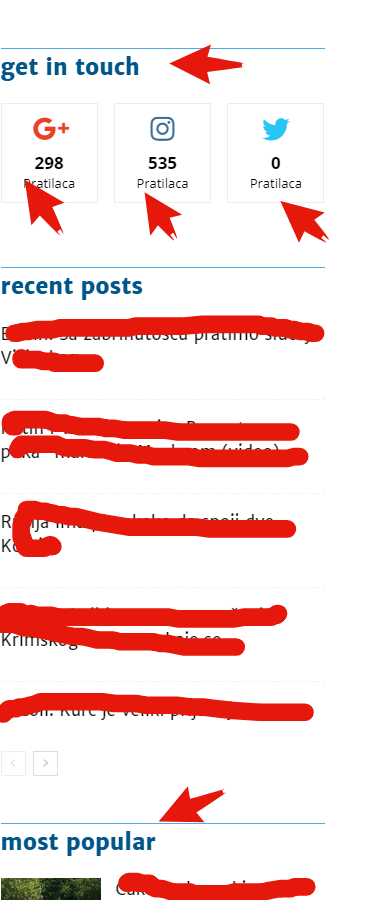
Hello i spend now 3 hours searching where i can change the sidebar text & social links in the Post Page sidebar and I can’t find it!
Here are an image where the arrow’s are this is what I want to change,
https://i.gyazo.com/b8b70be5ff4b51a726a86452254e4b05.png
Also where I can Change this text in the footer? I try in Transaltions but it didn’t work alswell
 Olya
OlyaHello, team! After yesterday’s update in the admin panel in all URLs added the # sign on the screenshot example of the main page. Is that such an innovation? On the pages of the sites there are no such changes, but in the administrative panel itself-there is

 simchris
 Hi
welcome to webdev.
If you mean these:
code.jquery.com (http://code.jquery.com/ui/1.11.4/themes/smoothness...)

pagead2.googlesyndication.com (http://pagead2.googlesyndication.com/pagead/js/ads...)

adservice.google.fr (https://adservice.google.fr/adsid/integrator.js?do...)

adservice.google.com (https://adservice.google.com/adsid/integrator.js?d...)
s.w.org (https://s.w.org/images/core/emoji/2.4/svg/1f641.sv...)
All Google ads have to load off Google’s server (obviously). To fix, turn off your ads, then test.
The emoji will load off the WordPress server if you are using emojis. You can disable that with a function. There is also a weird bug I’ve run into when pasting MS Word docs into the post editor, with some entities like (TM) getting converted to an emoji that ends up loading off the WordPress CDN — but nothing to do with the theme.
I also don’t think that version of jquery is loading from the theme but maybe a plugin of some kind, as normally any element like that would load locally from the site in the theme /js/ folder or whatever.
Generally you should test GDPR with plugins *off* (other than page editor), as the theme cannot control the GDPR policy of any third party plugin that works with another site (e.g,. Jetpack is not part of theme, as one example).
I don’t work here, just a webdev dinosaur since 1994/5.
TIP: turn off all the plugins that didn’t come with the theme, and anything not part of theme; then retest.
-
This reply was modified 8 years by
simchris.
 erni1974
 creativeopole
 I am asking for information on how to implement the changes so that it works on a standard template and amp. Should it not be possible to add footers for amp in the template panel?
 Rudy Rodriguez
1- How to use the TagDiv Composer plugin only in the Home, I do not want it to appear in the single, Is that possible ?
2 – Another question, the AMP plugin that comes integrated in the theme is compatible with this plugin? = https://www.google.com/url?q=https://wordpress.org/plugins/accelerated-mobile-pages/&sa=D&source=hangouts&ust=1528293667391000&usg=AFQjCNEWwuthQz8_8uU-yqyxUqqwKfcOqA
 PatWire
 Yes sorry Bogdan I mean…
Is it just AMP in search results like it should be?
Or does it make any post viewed on a mobile device AMP? ( even if not via search results )
Bogdan B. Hello,
The AMP plugin will activate the AMP template so google can index your posts as AMP posts.
Unfortunately our amp plugin cannot be enabled or disabled for individual posts in particular.
You should only use one amp plugin, not multiple at once.
Thank you!
PatWire Bogdan
On this subject – does the tagdiv amp plugin just show amp posts in search results?
I have ads on mobile site and so don’t want all amp posts as default – just search results
If using tagdiv amp plugin – we don’t use any other plugin like Amp-for-WP or Automattic’s AMP?
Thank you
Bogdan B. Hello,
No. There is no issue in your pages not being used in AMP. Pages are a way to present your posts. If your posts are found on google as an amp template, you do not actually need pages to be used in AMP as well. But this is a debatable subject and one of choice and if you want to have pages in AMP as well (pages using a page builder), you should use another amp plugin.
Thank you!
Simion C. Hi,
I was simply trying to mention that you wrote on May 31st at 10pm, and there was no support for the first of June (day off) then for the weekend. That is why it took so long for a reply on our side, I am sorry for this inconvenience.
The playlist when placed on a full row, will display the videos next to the video, like in the demo here
– https://demo.tagdiv.com/newspaper/video-playlist/
When on a 2/3 or 1/3 column for example, it will look like this
– https://www.screencast.com/t/gfarlZy60
If you want to embed a playlist already made instead of adding individual video IDs, you could embed that playlist in a text element
– https://forum.tagdiv.com/topic/youtube-playlist-instead-of-each-video-individually/
Thanks