
- TutorialsFrom WPBakery to tagDiv Composer
- NewsmagHow to update the WPBakery plugin
- NewspaperHow to update the WPBakery Page Builder plugin
- TutorialsHow to Update the WPBakery Page Builder plugin
- NewspapertagDiv Composer Tutorial
- NewspaperWhat’s Included in the Newspaper Theme Package
- Apitd_api_block::update
 thelansingjournal
I am using Business Directory Plugin to create a local business directory on my website. Here’s the general link to the directory page:
https://thelansingjournal.com/local-business-directory/
That page renders fine, but when I select one of the business categories, the category page doesn’t render correctly. Actually, it might be more correct to say that the page renders correctly, but my menu bar disappears and is rendered as a list of links at the top of my page:
https://thelansingjournal.com/local-business-directory/wpbdp_category/bakery/
The same thing happens when I click on any of the individual entries within the category:
https://thelansingjournal.com/local-business-directory/21053/calumet-bakery/
I was having a similar-looking with my 404 page a while ago, but that seems to have been corrected the last time I deleted and reinstalled tagDiv Composer. Does the composer need to be updated again? I’m not very tech savvy, but my web guy says, “Definitely the same poor coding issue. It looks like if there isn’t expected content, a loop, it doesn’t render properly.”
 vorilask
Hello. On bet3.GR (https://www.bet3.gr/), there is a grey horizontal line that has been created. I can assume that this happened through tagDiv Composer options. I might have selected something that I had not realized its function.
However, I am currently trying to fix it up, but I cannot discriminate if it is on row, on column or on element options.
There is no way to mark this grrey line via tagDiv Composer Homepage function, so as to change options, make some tests and resolve the issue. Since I cannot send you screenshots, you may open the homepage https://www.bet3.gr/, and carefully watch after horizontal main menu on first row initial modules: text block ΣΤΗΡΙΓΜΑ ΤΗΣ ΗΜΕΡΑΣ on the left, Call-To-Action Ψάχνεις στοιχηματική εταιρεία ΔΟΚΙΜΑΣΕ.
P.S.: There is a second separate issue: I have also created a mobile page for my website (https://www.bet3.gr/) via tagDiv composer, for non-AMP display. But I also edited it by WPBakery on WordPress pages section to customize some text blocks further more and as a result, it now only shows code inside both the page edit environment (classic mode, WPBakery Backend editor) and via tagDiv Composer. Here is my question: Can I delete this mobile site page and create it via tagDiv Composer from the beginning? It is now an entry of mobile page on my declared HomePage on Settings -> Reading.
 Bettina
 Hello!
First of all, please deactivate ALL plugins except tagDiv ones, also if you are using child theme or cache plugin, deactivate them, clear all cache(also from your browser) and try again. Also, check if you have WP Bakery and uninstall it.
Let me know the results!
Thank you!
Bettina Hello!
Yes. Please uninstall Wp Bakery and see the results.
Do not use both in the same time!
Thank you!
 Oldmagio
 Hello. I delete and re-install the WP Bakery but nothing change.
I see the same problem in the header cloud template: when I tried to modify the template in backend, in the front end nothing change.
Here: https://nuovaincognitacostantino.online/gioco-delleroe/ I found also some problem in the column, the last four colored rectangles are not centered. I found a problem in the Revolution Slider too: in the mobile mode doesn’t appear. It could be because of the same conflict?
How can I do?
And
Bettina Hello!
Please verify if you have WP Bakery plugin and uninstall it because there is a conflict between TagDiv Composer and WP Bakery.
Let me know the results!
Thank you!
 Anamaria
 Hello,
The new versions are for WordPress v5.7.1 and for Newspaper theme v10.4.
From the information provided it appears that the error occurs in wp-content/plugins/js_composer/ that is WP Bakery.
So, this error needs to be fixed by the authors of the plugin WP Bakery.
Also, what version of PHP are you using?
Thank you!
Anamaria Hello,
Please try to do the steps using only tagDiv plugins and see if the problem persists, because is possible to have a plugin conflict.
Also, if you use the WPBakery for pages, we strongly recommend using only one of those plugins with our theme (WP Bakery or tagDiv Cloud Library, but not both).
Thank you!
Anamaria Hello,
Did you use WP Bakery? Also, if you want to use a big grid, that element is from the tagDiv Standard Pack plugin, so please make sure if you have the Standard Pack plugin is activated.
This is a video about how you can import a cloud template https://www.youtube.com/watch?v=6m8-EebnfM0
you can find more tutorials on our channel on youtube =>https://www.youtube.com/user/tagdiv which can help you to design.
Thank you!
Oldmagio Hi Calin,
In your demos there are not image with full width layouts, it’s true. But there is not any kind of clarification about it, instead there is the clarification of the presence of WP Bakery plugin. Who knows these plugin knows also that there is the possibility to stretch the raw in every way. Beyond the images in the demo it should be better to add everywhere, over all before the purchase, the specific that despite the WP Bakery is bundled the theme has some (not evident) limitations, without this clarification there is the possibility to waste lot of time trying to know it.
Anyway: if your other theme support the full width, instead of to refund the purchase before, could you swap this license on themforest from this Newsmag theme to Newspaper theme? Or something similar faster solution.
What do you propose?
 Styleitaliano
Hello,
I made the responsive of this page http://walterd7.sg-host.com/home-def-3/ using wp-bakery,
unfortunately the images of the articles have disappeared.
As you can see this is the unresponsive page and the images are there: http://walterd7.sg-host.com/
Could you help me understand why?
I have already sent you admin logins to enter wordpress and check.
Please it’s urgent!
Anamaria Hello,
The problem is caused if you use WP Bakery for posts, unfortunately, we recommend using WP Bakery only for pages and not for posts => https://forum.tagdiv.com/how-to-use-visual-composer/
Also, if you use the WPBakery for pages, we strongly recommend using only one of those plugins with our theme (WP Bakery or tagDiv Cloud Library, but not both).
Please deactivated the WP Bakery and see if the problem persists.
Thank you for your understanding!
Anamaria Hello,
The problem is caused if you use WP Bakery for posts, unfortunately, we recommend using WP Bakery only for pages and not for posts => https://forum.tagdiv.com/how-to-use-visual-composer/
Also, if you use the WPBakery for pages, we strongly recommend using only one of those plugins with our theme (WP Bakery or tagDiv Cloud Library, but not both).
Please deactivated the WP Bakery and see if the problem persists.
Thank you for your understanding!
Oldmagio Hi Calin,
The WPBakery didn’t work and other parts of the theme too. Anyway I follow your suggestion about a potential error and I reinstalled everything, there was a problem between my client FTP and the upload to the database that corrupted some files and generated the problems.
I’m trying to make all the website with every pages and articles full width to fit everything to the borders, the voices in the menu too and the row of the footer too, usually is very fast and easy to do it, but here I can’t find the way.
Could you help me, please?
Thanks for your attention.
Anamaria Hello,
Have you checked for a plugin conflict? You will have to first start looking for a plugin conflict. please deactivate ALL plugins except tagDiv ones, also if you are using a child theme or cache plugin, deactivate them, clear all cache and try again.
In most cause when the column text not appears is from a plugin conflict.
Please check if you have WP Bakery plugin active because there is a conflict between both page builders
Thank you!
 Calin
Calin Hi,
The license that you get from envato is to activate the theme not the bundled plugins that are coming with it.
The WPBakery Page Builder plugin is and Bundled Plugin in our theme not a standalone plugin, please check the envato documentation for those plugins
https://help.market.envato.com/hc/en-us/articles/213762463-Bundled-Plugins
Thank you for your understanding!
Calin Hi,
Usually, then A critical error has occurred on your website appears it can be because of some plugins, here is a guide for this problem https://www.wpfixit.com/wordpress-error-there-has-been-a-critical-error-on-your-website/#:~:text=Once%20the%20plugins%20are%20off,just%20reactivated%2C%20is%20the%20problem.
Also make sure that all theme requirements are set as in our guide https://forum.tagdiv.com/newsmag-requirements-for-newsmag/ this will make the theme work better and prevent possible problems.
The WPBakery Page Builder plugin is and Bundled Plugin in our theme not a standalone plugin ( you do not need a license to use the version that comes with our theme ), please check the envato documentation for those plugins
https://help.market.envato.com/hc/en-us/articles/213762463-Bundled-Plugins
The license provide is only for the theme.
Thank you!
OldmagioHi there,
I can’t activate my WPBakery Page Builder. I didn’t find the license in “wpbakery.com/licenses” so I clicked on “import it” to import my license from Envato. I clicked on the wrong saved account with the automatic completion of the user and password and I paired wrongly my other account with other three license. How can link my license of Newsmag in this profile and how can I unpaire my other license from this account?
Best regards.
OldmagioHi there,
When I create or change every page through WordPress appears an error page:
“A critical error has occurred on your website.”
What could be the problem?
I can’t register the WPBakery yet. Is it possible that this problem is caused by a conflict between the WPBakery and WordPress?
Best regards
 Breinblik
 Your colleague already pointed me to this page: https://forum.tagdiv.com/custom-post-type-support/ and thank you but it doesn’t help me. Also i suspect the info on this page is outdated because i can’t find these files:
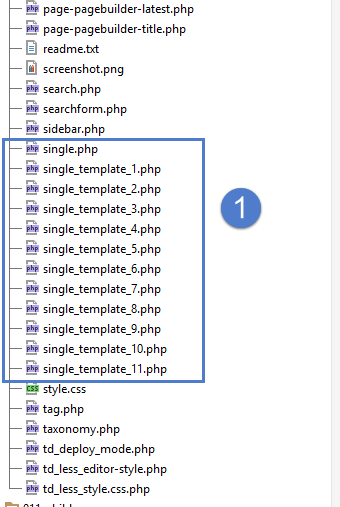
It looks like the root of the Newspaper theme but i don’t see these files in my theme folder, where are the located?
I would like to disable/uninstall WP Bakery pagebuilder but i first need to be sure that TagDiv Composer can offer me the same solutions.
-
This reply was modified 5 years by
Breinblik.
Breinblik Is there a way i can do it by modifying the PHP files? There must be a way right?
I’m being forced now to use the TagDiv composer and it doesn’t offer me a solution for this problem. The WP Bakery PageBuilder does.. but it’s not an option because then i have to rebuild all the pages again..
Bettina Hello!
Do not use both page builders on the same time.
For the moment, the only solution is to shift from WPBakery to Composer.
So, I gladly recommend you to shift from WPBakery to Composer, because WPBakery is an old builder plugin.
Please check our guide to know how to shift from WPBakery to Composer: https://forum.tagdiv.com/visual-composer-tagdiv-composer-transition/
If you will use a cloud template, then you can edit the template and find in Composer an element called ” Team Member ” and some settings for that. For more information about TagDiv Composer plugin, check our documentation here: https://forum.tagdiv.com/tagdiv-composer-tutorial/
Unfortunately, there is no such element(https://test.circulaireconsumptiegoederen.nl/doe-mee-test/) in TagDiv Composer to be able to build exactly the same feature.
You can not edit a default template/CPT with TagDiv Composer plugin.
Check the differences here:
– https://forum.tagdiv.com/design-post-pages-using-cloud-library-templates/
– https://forum.tagdiv.com/design-post-pages-using-default-templates/
If you want to try CPT, then you can take a look here:
https://forum.tagdiv.com/custom-post-type-support/
Hope that helps you!
Thank you!
Anamaria Hello, @Breinblik,
Did you use WP Bakery? If yes, we strongly recommend using only one of those plugins with our theme (WP Bakery or tagDiv Cloud Library, but not both).
Please disable it, and see if the column text appears.
Thank you!
 uddoktabarta
 Hi Anamaria, Thanks for your cooperation. The issue is fixed now. Actually, It was conflicting with Wp Bakery plugin. Now I have deactivated the WP Bakery now the website is perfectly fine.
Thanks again.
Have a nice day.
Anamaria Hello,
This page was created with tagDiv composer or did you use another page builder?
Also, if you use the WPBakery for pages, we strongly recommend using only one of those plugins with our theme (WP Bakery or tagDiv Cloud Library, but not both).
Also, make sure that you do not have a plugin conflict, please deactivate ALL plugins except tagDiv plugins, also if you are using a child theme or cache plugin, deactivate them, clear all cache and try again.
Thank you!
