- NewspaperFlex Block Builder and Flex Loop Builder
- NewspaperHow to use the Flex Blocks cache option
- NewspaperHow to edit modules for Flex Block X
- NewspaperHow to insert a block inside the content of a post
- NewspaperFlex Block Settings Guide
- NewspaperMeta Info on Modules and Blocks
- NewspaperTheme modules and blocks
- TutorialsDefault Block Settings Guide
- NewsmagBlock settings tutorial
- NewsmagCategory tag on modules/blocks
- NewspaperThumbnails – Fix strange looking images on blocks
- NewspaperBlock settings tutorial
- NewspaperCategory Tag on Modules/blocks
- ApiPractical example – How to add a new Block and Module
- Apitd_api_block::delete
- Apitd_api_block::update_key
- Apitd_api_block::update
- Apitd_api_block::add
- ApiAPI – Blocks – Introduction
- NewspaperWP Rocket and Newspaper Theme: Optimization Guide
 munvik
 On pagespeed insight, mobile version said that following is blocking scripts:
/wp-includes/js/jquery/jquery.js
However, on desktop version, it said that 2 blocking script resources and 19 blocking CSS resources.
JS
/wp-includes/js/jquery/jquery.js
/…includes/js/jquery/jquery-migrate.min.js
And lots of CSS
Though I used speedbooster plugin and followed the guide but still it is showing. Whats wrong
Further, it said Minifying /themes/Newspaper/style.css?ver=7.6 could save 12.9KiB (14% reduction) after compression.
How to resolve these issues
 Bogdan B.
 Hello,
Please read this guide: https://forum.tagdiv.com/newsmag-how-to-use-visual-composer/ and you will see that we only recommend using visual composer on pages, not on posts. Posts already have text blocks (text does not need to be added in a text box to show on a post) and already provides lists (bulleted or not) from the tiny mce editor.
It can be changed with css but it;s simpler to just not use VC to set up simple text or lists.
2. again, please use the default post editor and not VC for lists and text.
Thank you!
 LeadingSport
 Hi Simion,
Maybe I didn’t explain proper way. Point is, I’d like to remove backgroud color from the block title and at the same time remove the line that keeps the same color, or at least if possible make it thiner or shorter. Would that be possible?
Thank you for help,
LS
 Simion C.
 Hi,
@LeadingSport Unfortunatelly I can not view your test page – https://www.screencast.com/t/2jtJ5YcomMx If you also have the Newspaper magazine demo installed take a look at the answer below
@brigitte67 That is the transparent block titles style of Newspaper magazine as seen in the demo – https://demo.tagdiv.com/newspaper_magazine/ if you want to cancel the background transparency you will have to edit the demo_style.css found in the theme folder->includes->demos->magazine and comment or remove a line of code – https://www.screencast.com/t/kTBWhN7ISu8 it should look like this if you choose to comment it – https://www.screencast.com/t/tMVupdlmd5
The result is that now you can see the background set in each of the block settings – https://www.screencast.com/t/arzXTAcVKfN
Thanks
Bogdan B. Hello,
Sorry but unfortunately the mobile theme template cannot be changed at the moment. You cannot replace blocks with other ones as the mobile theme does not use visual composer. It was created specifically to only use the elements you see.
Thank you!
Bogdan B. Hello,
I’m sorry but I cannot see what you modified and cannot tell why the css makes the 2 items drop on separate lines. by default these 2 items are on the same line. I cannot know what you edited and what the result is.
If you want to alter the default structure of the modules and blocks please note that you will also need css skills as the css will break when changing the structure of the code. You will have to adapt the css to your customization
Thank you!
Simion C. Hi,
You could just remove Latest articles if you do not want it on your page by selecting the default template in page attributes – https://www.screencast.com/t/eInvqG5bc and then by editing your page in Visual composer editor, change the position of block 12 which is the Most Popular block by dragging it to be the last element on the page after the custom ad – https://www.screencast.com/t/ibrIDZH3QVEO – https://www.screencast.com/t/cxZ5miZT Please corect me if I misunderstood you.
Thanks
 championdads
 Thanks Simion. That has helped.
The blocks only showed as code though so I removed the sections of code and it worked.
BUT: There was another part to my email.
How do I move the latest articles main block up to the top, where you’d expect it to be.
My website is f1grandstand.com
 juliusuk
 Hello,
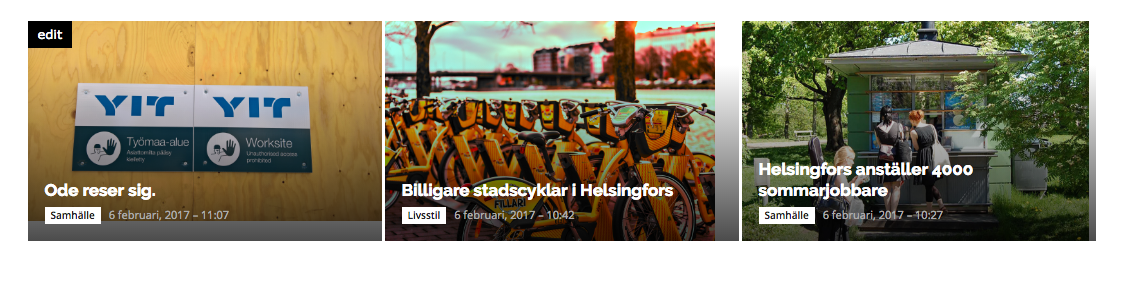
I’ve read the discussion and documents on regenerating thumbnails. I’ve used the tool to regenerate thumbnails without success. My uploaded images are large enough (2000px width), but still, depending on which bLock or Big Grid module, the pictures get grey bars in different modules.
example of big grid: http://smocka.fi/wp-content/uploads/2017/02/Screen-Shot-2017-02-06-at-11.14.34.png
These images are uploaded with widths of 2048 (http://smocka.fi/wp-content/uploads/2017/02/29180864370_5656e4cdec_k-1.jpg, http://smocka.fi/wp-content/uploads/2017/02/30704050895_a54f481393_k.jpg) and 1100 (http://smocka.fi/wp-content/uploads/2017/02/Smocka-kesatyo.jpg). WHy do the images not crop correctly in all big grids or blocks?
The site is now live at smocka.fi if you want to have a look.
Since there are so many thumbnail options, cropping a picture correctly for one certain big grid size manually is not an option since the aspect ratios change between modules.
I’m quite sure the theme is not supposed to work like this. Is there some setting for thumbnails that i might have missed?
 LinkAntonDE
Hello all,
For our Website we are using Block 24 (though the question is valid for other blocks as well) and can´t display the categories next to the title as shown in the online showcase (great feature btw 🙂
Showcase Example:
https://demo.tagdiv.com/newspaper/block-24/
In our website the categories are displayed in a dropdown after clicking “more”.
This is set in the “Ajax Filter” of the block settings. But i must be missing something to have the same function as in the showcase, right?
Regards,
Christian
 Catalin
 Hello mskeshia,
You should use the code below and place it in Theme panel->Custom CSS area.
The code is ->
@media (max-width: 767px){

.td-header-top-menu-full, .td-header-sp-top-menu {

display: block!important;

}

}
Notice that after this code is needed for some additional customizations if you want to bring best results. You should do it yourself because all of these involves custom work and we cannot provide this type of services at the moment, sorry!
Thanks for the message!
Catalin Hello saucemonsters,
If you want to make these changes, you should use a bit of CSS code to do that. Try the code below and place it in Theme panel->Custom CSS area.
.wpb_widgetised_column .td_block_5 .block-title > span{

background-color: green;

font-size:15px;

}
The result is here -> https://www.screencast.com/t/2UX2XH2w
Thanks for the message!
Catalin Hello lijojohnsonwk,
Yes, if you want to display pages on your blocks instead of posts, you should make this configuration from here -> https://www.screencast.com/t/TvKGsINl For more information about block settings, please consult here -> https://forum.tagdiv.com/block-settings-guide/
Thanks for your understanding!
 jjverdun
Hello,
I have 2 questions:
1)
I really need to sort out my posts by popularity. I know I can choose in the settings for blocks or page: Most Popular.
However, the counter is increased every time I refresh the page. I am afraid some of my users will just click and click so that their article can appear first on the list.
So my question: is there a simple way to restrict the post view counter increase by IP address?
2)
The default order categories pages is by Latest. How can I change the setting so that the default would be Most popular?
Many thanks for your assistance,
JJ
 Sebpa
SebpaHello
How can I make the color of the block title background color transparent so I only have the line:
https://www.dropbox.com/sh/5jlr1496h5f1bbk/AAAFobXe1XmXr4Mrf8LP_ohma?dl=0
 greatagainreport
 I want to be able to load page using pagination option in block setting
 XVanish
Salutare,
I’ve uploaded my custom fonts (Open Sans Light, Regular etc – using .woff2 file types) and switched all the fonts in the Theme Panel > Theme Fonts from Default to Open Sans Light. All good on most of the elements, blocks etc BUT I still have several elements within the website that still use the default hard-coded fonts (Roboto, default Open Sans, Verdana etc) and in most cases they are loaded from fonts.google which is a BIG PROBLEM if you want to get rid of the external css/js for website optimization.
I’ve searched this forum for similar topics and I found a few answers but no actual “good” solutions to my questions below; if there is a solution please let me know:
1. If you upload a custom font and you choose it as a default Body font in Body – General Font why do I still have other fonts throughout the entire website? Isn’t the smart choice to use the font defined there as a default font for the entire website? Why use hard-coded fonts everywhere – meaning that I need to amend each and every element’s CSS to get font consistency throughout the website.
2. Is there a GLOBAL way to get rid of the default Google or hard-coded fonts for the elements that don’t have font selection options within the theme panel? I found this option but that means I need to amend the main theme and I don’t want to touch that since I’m using a child theme.
3. Is there a way to properly tap into a theme’s hook for the default fonts, to change it from a child theme? I’m asking this because in the Documentation you clearly recommend NOT to use theme’s API in a child theme. If there is a proper / secure way then please provide some insight as to how should I do it, what functions to hook to etc.
Thank you!
 Michael
Hi,
I’ve created a couple of Pages (using Visual Composer), and am seeing two problems with text in a Text Block. The page is here: http://degnan.blog/michael-degnan/
1) Smaller Text size.
For Pages, the text in numbered (ol) and bulleted (ul) lists is not inheriting the size settings of the “page content” font. Its too small. This is not happening for Posts, where both (ol) and (ul) list items format match the “post content” settings.
I found the List CSS Setting adjustments for Posts in Theme Panel/Theme Fonts/Post Content. There is no similar setting for Lists in T.Panel/T.Fonts/Pages.
Where can I adjust this setting? If its custom CSS code, can you please provide it?
2) (OL) Numbers not showing.
When I use a numbered (ol) list, the numbers for each (li) list item (1.xxx, 2.xxx, 3.xxx, etc.) do not appear. They show in the Visual Composer Text Block settings WYSIWYG editor and on the page layout, but they do not show when the page HTML is rendered in the browser.
Have you seen this before, and how can I correct it?
Thank you
 MShayto9
Hi,
I’m trying to edit the homepage of my site ultimatehomelife.com – but when I go to the page I have set as my current homepage, click on “edit page”, click on the “+” sign of the Visual Composer, I no longer see the composition page with all the boxes I can move around.
And, if I try to create a new page and implement Visual Composer on that, whenever I try to click the “+” sign and use any of Add Element, Add Text Block, Add Template features, whatever I click on inside just prompts the “loading” sign to keep on loading forever, with nothing actually changing on the visual composer page itself.
 truth
truth Hi,
What I meant is that any user role that can publish posts – https://www.screencast.com/t/9iqExzZhHu should have access to the post settings in the dashboard.
I say every user that can write posts must have access to the post settings in the dashboard. Don’t you think?
WordPress is meant also for multi-author blogs/websites and as you can imagine not all authors can have the capability to publish: each author has different capabilities.
NOTE: when I say author I mean a user who can create content on a website. It has nothing to do with the definition of author given here: https://en.support.wordpress.com/user-roles/. So a user can be a “author” also without the capability to publish A.K.A. Contributor
Hope you understand 🙂
 brigitte67
 Hi,
I did that, but the title background colour for the blocks are not changing.
This is my website:
thotsntots.com
BTW, great theme. LOVE it!!
 Trigger56
 Hi there
that is the block I would like to install on my homepage
I’m also trying to figure out how to change the layout from a “blog” style to the categorised style as shown on that demo.
Thanks
 Delenn
All,
We have enable the Load More button on our blocks but the button is not finding the javascript code. Where is the code for the Load more and what should be in the section.
 mrx
mrxMore than two years ago there was a question about tag exclusion.
And now nothing is changed.
So, is it possible to exclude certain tags in block’s settings the same way as exclude categories?
Please, explain me is it really complex problem to solve it?
Just imagination I have a lot of posts with tags A and B. How to virtually separate them? One set of posts should exists with A but without B, and another set vice versa.
Why tags’ management system isn’t so versatile as categories’ one?
 simchris
Hi
I know I’ve missed something obvious; started to change our category headers – to
(Newsmag 3.1)
> Header Style 2
> Category pulldown filter [off]
Can’t see how to disable the ul.td.category block under the category NAME; redundant as we’re adding those to top menu bar, and already have category drop-down in sidebar.
e.g.,
https://californianewswire.com/CA/national_news_desk/
oh…. stupid me … no setting for this (ahem, hint hint – should be!)
I can remove this section in td_category_template_2.php
                        <div class="td-subcategory-header">

                            <?php

                            echo parent::get_sibling_categories();

                            echo parent::get_pull_down();

                            ?>

                        </div>