
- ApiPractical example – How to add a new Block and Module
- Apitd_api_block::delete
- Apitd_api_block::update_key
- Apitd_api_block::update
- Apitd_api_block::add
- ApiAPI – Blocks – Introduction
- Apitd_api_thumb::update_key
- Apitd_api_thumb::update
- Apitd_api_thumb::add
- ApiAPI – Thumbnail – Introduction
- Apitd_api_category_top_posts_style::update_key
- Apitd_api_category_top_posts_style::update
- Apitd_api_category_top_posts_style::add
- ApiAPI – Category top section style – Introduction
- Apitd_api_module::update_key
- Apitd_api_module::update
- Apitd_api_module::add
- ApiAPI – Modules – Introduction
- ApiUsing the Theme API in plugins
- ApiThe Theme API
 Catalin
 Hello GizmoSource,
Please notice that it is just a simple Block 1 -> https://www.screencast.com/t/kpUrwSt5 which can be customized from Visual Composer. For more information about how you can do this in VC, please consult the Block Settings guide here -> https://forum.tagdiv.com/block-settings-guide/
Thanks for the message!
 Edward
 How to update Visual Composer plugin
The theme includes a license for this plugin so you don’t have to buy it.
You don’t have to activate the plugin license, it’s already activated.
You can’t update Visual Composer directly from it’s producer.
You don’t have to worry about the plugin update warnings.
We provide updates on a regular basis, after we test the plugin for theme compatibility we include it in the latest theme update, inside the ../plugins folder
https://forum.tagdiv.com/how-to-update-visual-composer-plugin/
Catalin Hello David Henry,
Unfortunately, our theme does not have any block which displays 4 horizontal thumbs, sorry! You should consult our demo here -> http://demo.tagdiv.com/newsmag/block-1/ and there you will see all of our blocks which can be used in our theme. For more information about how you can use Visual Composer, please consult here -> https://forum.tagdiv.com/newsmag-how-to-use-visual-composer/ If you want to customize your website, you should make it yourself, because we cannot provide additional customizations in this regard, sorry!
Thanks for the message!
 Bogdan B.
 Hello,
Please remove the blocks from the mobile editor as the obile theme will not render visual composer blocks. If you add block shortcodes in the mobile editor, they will show up as code on the page itself.
Please read this guide: https://forum.tagdiv.com/the-mobile-theme/
Thank you!
 genoze
It seems like the Visual Editor would be available as well as the ability to ad or remove blocks and make changes to the category page? Is there any plan to add this feature? I’m aware that minimal changes can be made in the template area.
 GizmoSource
I want only a few categories to be displayed in that block but it is showing all the categories.
 Simion C.
 Hi,
All i see different is the excerpt and the block titles font – http://screencast.com/t/7M6BlKpl Please check any custom code you might have added and also reset cdn files if you use it. Also any modifications to the theme fonts should be done in theme panel – http://screencast.com/t/LFTh6edeG
Please corect me if i misunderstood the problem.
Thanks
Edward I need to install Yoast SEO and i know thant is not tested.
You’re wrong.
=====
Recommended plugins
WordPress SEO – SEO plugin
WP Super Cache – caching plugin
Contact form 7 – used to make contact forms
WooCommerce – eCommerce solution
bbPress – forum plugin
BuddyPress- social network plugin
Font Awesome 4 Menus- icon pack, supported in the theme menus
Wp User Avatar – Change users avatars
Jetpack – plugin with lots of features *it may slow down your site
=====
“WordPress SEO – SEO plugin” = Yoast SEO (https://ru.wordpress.org/plugins/wordpress-seo/)
Scroll down this page: https://forum.tagdiv.com/install-via-ftp/
Edward
D:\OpenServer\domains\site.ru
На локальный сервер инсталлируем?
-
This reply was modified 9 years by
Edward.
 Edragon
 And of course 30 seconds after I posted it I found it. 😉
Anyway if someone else is interested about it then you can find it here if you scroll down -> https://themeforest.net/item/newspaper/5489609?s_rank=2
Version 7.6 – December 20th, 2016
-
misc: Visual Composer plugin updated to the latest version 5.0.1
misc: Revolution Slider plugin updated to the latest version
misc: full compatibility with WordPress 4.7
new: DEMO – Beauty blog – a fresh and simple blog demo. Easy to use and beautifully designed
new: The Plugin Page from where a user installs the included plugins was completely redesigned to be more user friendly.
new: added support for block templates overwritten via the Theme API system in demos. All future demos can now load different block templates if needed.
new: the comment form is now validated with javascript. This was a long requested feature and we are very happy how it turned out.
misc: css fixes in the theme panel and the welcome screen
misc: we finally updated the social icons and we also removed the icons for dead services (picasa, Posterous etc)
misc: the Social Networks panel now checks each input to be correct, this prevents user error and bad URL’s that supposed to go to social networks profiles but instead go to 404 pages on the site
misc: we removed the max-width from srcset on images and the responsive images on mobile now work as expected
misc: translation panel information text
misc: on android, when a user uses the mobile search, it will autofocus on the input field now
fix: password protected comments now work as expected
fix: facebook videos that are in the content of the post now work and resize as expected
fix: font panel css issues
fix: the tag ajax filter now displays the tags in the order of the id’s the user selects. Before it was alphabetically
fix: home breadcrumb does not appear as structured data as required by the google metadata testing tool
fix: smartlists that had image captions with HTML where broken. Now we fixed them.
fix: category sorting options was not working sometimes.
-
This reply was modified 9 years by
Edragon.
Bogdan B. Hello,
The popular posts show your most popular posts based on the post views. If you want a custom sorting for a footer element then you will have to choose a footer template that does not come with predefined content and use the 3 footer sections in the appearance -> widgets There you can add your own elements in the footer and filter them from the block settings.
Thank you!
Simion C. Hi,
It should work if you set the border like this, in block settings – https://www.screencast.com/t/NIGWiYbh
Result – https://www.screencast.com/t/bbZhKBSTLq
Thanks
Catalin Hello MattiaVe,
Try to consult the following topic here -> https://forum.tagdiv.com/topic/view-numbers-in-block/
Thanks for the message!
 sangam116
I can’t edit any contents such as blocks, custom ads using visual composer. Also can’t edit any widgets in widgets window. I’m clueless Please help me in this.
thank you
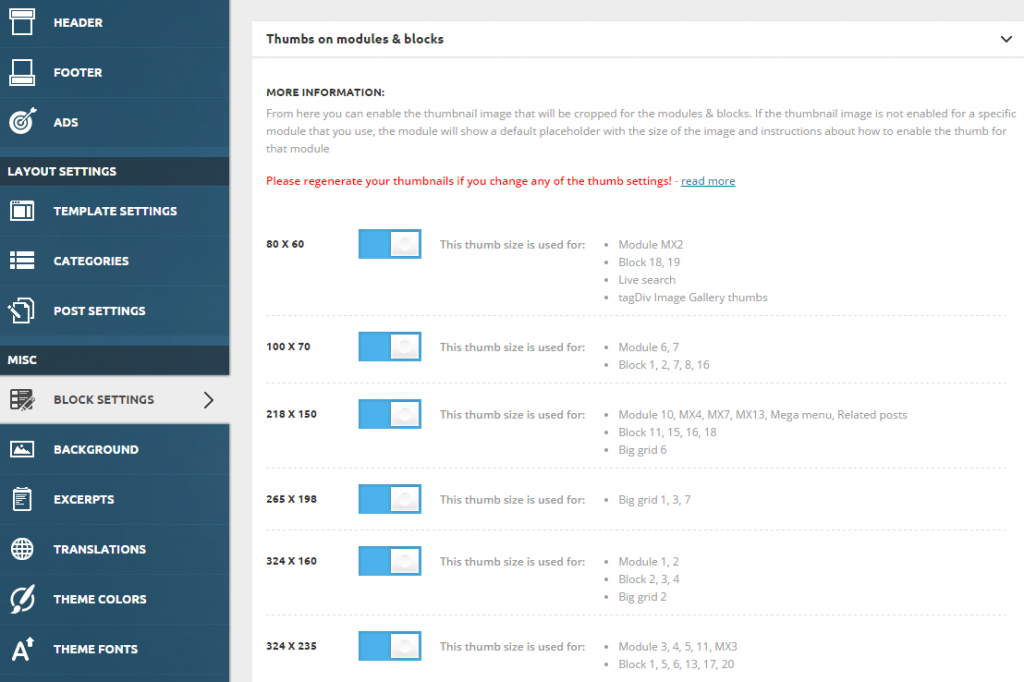
Bogdan B. Edward When you decide to post content on your website, the theme automatically generates thumbnails from the featured image to display the content on your pages in an attractive way. To make your website faster, you can control which thumbnail is generated. To do this go to Theme Panel > Block Settings > Thumbs on Modules/Blocks and disable the unused ones to save space on your server:
Simion C. Hi,
I don’t know exactly what you want, if you could make a screenshot and give more information it would help a lot.
If you want pagination on each block you can set it in each of the block settings – http://screencast.com/t/gcpcv7cbva – http://screencast.com/t/LsgmtUqpN
Thanks
Catalin Hello awtown,
Try to use the code below and place it in Theme panel->Custom CSS area.
The code is ->
.widget .block-title > span{
background-color:red!important;
color:green!important
}
The result is here -> https://www.screencast.com/t/1YF2MJTH2
Hope this helps and let us know how it goes!
Thanks for your understanding!
 ray
ray Hello, I have this as well….
Imported a DEMO and customized it from there… removing some blocks, adding others.
All’s well except that there are 3 blocks between the footer and the last one shown in the Visual Composer. It’s showing Latest Articles in main area and sidebar has Stay Connected, Adverisement, and latest Posts on sideaber.
How do I remove these blocks and why are they not showing in Visual Composer?
 Sanafan
 Found https://forum.tagdiv.com/topic/world-news-exchange-of-sections/#post-150914 from Bogdan. Changed template to pagination only and added a block for them.
Works fine!
 jadmac
The visibility function does not work when filters are applied. I have been trying to use various different blocks in the sidebar and only want to display selected pages, however when I attempt to “show page X only” the sidebar vanishes.
What might be causing this issue?
Thanks
 valkoprod
Hello
I have a problem between my theme and the plugin visual compose, When i go into my home page mounted with visual composer which contains many blocks,
I have just 1/5 of the blocks that are displayed. It annoys me because not seeing all the blocks it is impossible for me to modify on my page.
I do not know if the problem comes from the theme or the plugin, I reloaded the latest versions of the theme and the plugin but the problem is still there.
Need your help please it makes the day that it lasts and I have an urgency to correct on the website
thank you
 gilean
Hi guys, i wanna limit a block with a border style. I’ve tried to set border style solid (and not theme defaults) and border color red). when i save nothing happen. Going in to the block setting it appears that border stile and color is set to default again….why?
 MattiaVe
Hi friends, we love the ‘view counter’,
so much that we like to have in every new of home page.
Is there an easy way to realize it?
Thank you
(I attach screenshot how could be…)


 cwill15
 Maybe that post was a little misleading… These posts are going to be posted on a “category”. How can you access these sort functions to be alphabetically it only currently allows the following under category from onsite.
Latest
Featured Posts
Most Popular
7 days popular
By review score
Random
I have found the block information very useful so thank you regarding that but it doesn’t seem like it can work with the categories
Thanks,
Caleb
