
- NewsmagBlock settings tutorial
- NewsmagCategory tag on modules/blocks
- NewsmagtagDiv Composer Tutorial
- NewsmagWeather Widget
- NewsmagExchange widget
- NewsmagInstagram widget
- NewsmagHow to use the Visual Composer plugin
- NewsmagIntroduction
- NewsmagFooter templates
- NewsmagCustom ad spots
- NewsmagLoading image effects
- NewsmagSmart sidebar
- NewsmagFeatured images
- NewsmagGeneral settings
- Newsmag7 days post sorting
- NewsmagTheme thumbs
- NewsmagExcerpts introduction
- NewsmagTheme colors introduction
- NewsmagtagDiv slider gallery
- NewsmagVideo playlist
 Andrei L.
 Hi
1. You can change the block title color from footer in theme panel > theme color > footer: http://screencast.com/t/Vy4VBClyE – http://screencast.com/t/nuOeoAcG
2. Unfortunately there is no way to bold only the restaurant name. The function which generate the article titles for blocks returns a single string. To be able to apply a different property for the restaurant name, this should be added as a value which can be manipulated inside the function. The function which must be modified to achieve that is located in td_module.php: http://screencast.com/t/96vlbbHYjr You can give it a try if you want but this is a complex task and if you’re not aware of the steps you need to take in this regard please consider hiring a developer or a freelancer to do this for you.
Thanks!
-
This reply was modified 11 years by Andrei L..
 Bogdan B.
 Hello,
There is a tag color in category edit, but it will only apply to posts, not modules: http://screencast.com/t/j719l5DLdJN
You can only target the module category tag with custom CSS:
.td-post-category{

background-color: red

}
This code will apply to all categories at once. If you want to target a specific category you have to change the code and use the specific CSS class for each module/block.
Thanks
Bogdan B. Hello,
Visual composer elements were not tested on posts. They work but lose their CSS and styling. You need custom work to get them to display like on a page.
As an alternative, you can use a different block to achieve your goals. For example a block 14: http://screencast.com/t/JzduopNO1
and style it with CSS:
.single-post .td_module_mx1{

padding-bottom:5px;

padding-right:1px;

}

.single-post .td_block_14{

margin-top:15px;

}
You can change the padding/margin values to your preference.
Add the code to the theme panel->Custom CSS box.
Thanks
 Alex-ALex
1. If I in Theme panel -> Template settings -> Image loading – animations -> option “USE LOADING ANIMATION IMAGE” set active then all previews on the pages not available.
https://gyazo.com/e6d567962b15350558929abbdd0767b3
2. If I in Theme panel -> Categories -> CATEGORY TEMPLATE -> CHOOSE STYLE 1. The category list doesn’t work correctly, i see white block and nothing else.
 vladica79
I added this code for custom css style to change look of block title, and everything is perfect, but if i put link for block title, my custom style not working. What i need to ad in my code to resolve this?
.block-title span {
background-color: transparent !important;
position: relative;
border-radius: 0;
padding: 3px 70px 3px 20px;
}
.block-title span:before {
content: ”;
background-color: red;
width: 100%;
height: 100%;
position: absolute;
top: 0;
left: 0;
z-index: -1;
-webkit-transform: skew(-15deg);
-moz-transform: skew(-15deg);
-o-transform: skew(-15deg);
-ms-transform: skew(-15deg);
transform: skew(-15deg);
border-radius: 3px;
}
example:
http://prntscr.com/8udpc1
 having_fun
 Other things are under control, but image preview is still the problem, no images in the home page, blocks or dropdown menu, BTW can i make a dropdown menu of only texts naming sub categories as in other websites
 Catalin
 Hello @Yannik97,
Please try this code below in theme panel=>custom CSS area and you can add before the title blocks what content do you want.
.block-title span::before {

content: '\';

margin-right: 10px;

}
You can modify the margin value as you like
This content have to be generated in CSS. I suggest to use this link for more symbols: http://htmlarrows.com/symbols/
One example you can see below: http://screencast.com/t/sccS0qjPxt6b
Let me know how it goes!
Thanks.
 Alin [tagDiv]
 Hi,
1. Please check the documentation about how to make a category megamenu – https://forum.tagdiv.com/mega-menu/
If you done this properly and you still have issues, please disable all your plugins except Visual Composer, clear cache and check again.
2. Some plugins may conflict with the theme lazy load effect, so you could try to disable this feature – http://screencast.com/t/x2yxTw1cbj or check this without plugins.
3. Not exactly sure what you mean the url for category page must be mydomain.com/category/health
4 .Please check the documentation regarding the block settings, how to filter by specific category – https://forum.tagdiv.com/block-settings-tutorial/ and provide a link so I can inspect this and provide a solution.
Also this guide how to create and set a homepage – https://forum.tagdiv.com/homepage-how-to-build-and-set-it/ and you can check our youtube channel for some video tutorials – https://www.youtube.com/watch?v=rgWqozuqmJk
Thanks!
Thanks!
Bogdan B. Hello,
In order to place a custom ad in a category page, you will have to alter the theme files. You can use a ‘do_shortcode’ function to use your custom ad spots from the theme panel. For example use the code like this:
<?php echo do_shortcode('[td_block_ad_box spot_id="custom_ad_1"]');?> and place it in the category template you use: http://screencast.com/t/hEJfFrM6 (mine was a style 4)
result: http://screencast.com/t/ZuKiMZmS
Thanks.
-
This reply was modified 11 years by Bogdan B..
 Terrence
Hi,
I would like to add block using shortcode at the bottom of article. I intent to use Block 15, however i notice the that in Page view, Block 15 is showing 3 columns http://www.screencast.com/t/l4v4W1mU, however in Post view, it shows 5 columns http://www.screencast.com/t/t62Sk7IvsWut.
My intention is i want exactly the same view in Page with 3 columns.
Please advise.
Bogdan B. Hello,
The theme has a few options to insert ads. Please read the doccumentation on how you can use ads: https://forum.tagdiv.com/header-ad/ (there are 8 sections on ads)
For pages you can use visual composer’s ad box element.
Headers have their own ad space you can use. If you want to place another ad besides the one provided by the theme you will have to alter the theme core files.
If you want to use the code method for example in the category pages, you can use a ‘do_shortcode’ function and set it to use one of the custom ad spots from the theme panel:<?php echo do_shortcode('[td_block_ad_box spot_id="custom_ad_1"]');?> and place the code in the corresponding category file: http://screencast.com/t/LgZK8Zys2Uw
I hope this helps.
Thanks.
-
This reply was modified 11 years by Bogdan B..
Bogdan B. Hello,
Unfortunately the theme does not have an option for it, so you have to use the code method. You can use a ‘do_shortcode’ function: <?php echo do_shortcode('your shortcode here');?> and place it in the post template you use on your post (loop_single.php if it is the default one)
Every post template has a file to go with it. The default is without a number to it. The others correspond to their post template number.
You can add for example a trending now block in posts by editing the file template corresponding with the post template used, and add this line of code like here: http://screencast.com/t/Jf5SKCFx5Pka – http://screencast.com/t/7j8xHNyc6
<?php echo do_shortcode('[vc_row][vc_column][td_block_trending_now][/vc_column][/vc_row]'); ?>
As for the ads, the theme uses adsense code and every other custom ones have to be done by using this method here: https://forum.tagdiv.com/using-other-ads/
I hope this helps
Thanks!
-
This reply was modified 11 years by Bogdan B..
Alin [tagDiv] Hi,
The tagdiv gallery was not designed to be used in pages or in a text block.
You can try this custom css in Theme Panel > Custom Css – http://screencast.com/t/EXBQ0MoVbL
.page .td-pb-span12 .td_block_wrap .td-slide-on-2-columns .td-slide-galery-figure {

width: 100%;

}

.page .td-pb-span12 .td_block_wrap .td-slide-on-2-columns .td-doubleSlider-1 .td-slide-item img {

max-width: 100%;

}
Thanks!
Alin [tagDiv] Hi,
Bogdan replied here regarding the permalink – https://forum.tagdiv.com/topic/permalink-date/
In addition we will add an option to control the articles on blocks(including Big Grid) in a future update(we hope in the next theme update).
Thanks!
Bogdan B. Hello
The Newspaper grid wasn’t built with borders in mind so even if you add some they won’t look as the ones on Newsmag. You could try some custom css, ex – http://screencast.com/t/Mm1NwtGk
.vc_row.wpb_row, .td-pb-row{
border: 1px solid #e6e6e6;
}
.td-pb-span8{
border-right: 1px solid #e6e6e6;
}
Some elements may get broken and on some areas the borders may appear on the wrong location – http://screencast.com/t/Zq10e1Acf
You will need custom work to do it for the whole site, and at the moment we cannot provide it. You can hire a freelancer to do it if you really need these borders.
As for the width of the site, if you reduce it, blocks and grids will become broken. All the elements of the theme reside on the width of the site, and every pixel counts. Again, you will need custom work to modify width.
Thank you!
-
This reply was modified 11 years by Bogdan B..
Bogdan B. Hello George,
If you hide blocks with CSS you can try to add the !important attribute to them. CSS stands for cascading style sheets so the first display property gets overwritten by the display:none attribute so if the connection is slow, the blocks will appear at first then disappear from view. Unfortunately this cannot be controlled.
Unfortunately we could not access your mobile site to inspect the issue: http://screencast.com/t/xckx9bNjjy
Please check your server configuration.
Thank you
 dizajn
 Yes, i know, but where you change excerpt type there was before value option for all blocks to be changed at the same time. The number option for words / characters
Alin [tagDiv] Hi,
In version 6 of the theme we have more blocks that can help you to create your page using Visual Composer pagebuilder. And now you can add the excerpt length fore each module and like you can see it is specified also the block(s) where the modules is used – http://screencast.com/t/WwPwgyC11m3K
Thanks!
Alin [tagDiv] Hi,
If you add your condition here in td_block_ad_box.php you should be able to hide all ads on specific post – http://screencast.com/t/rjtt8VdJJ
For newsmag theme it is the same file.
Thanks!
having_fun How do i stop pages like About us, privacy, contact from appearing on home page predefined blocks or other article blocks ?
 croboy
 Hi Bogdan,
Thank you for a quick replay. Is there a way to make a custom post template that will include block at the end of every post or to hardcode it in main post template? I am really surprised that is not possible by default.
I am thinking to use article bottom ad for that but I would like to combine text with adsense code and theme is deleting everything except the adsense code. Is there a way that adsense code is not modified/resized? I think it would be great if you could have option “Use only original size” and in that case not to change code.
Thank you
 Boubacar
Hello, I want to show the limits of separation (borders) between the block theme, as on “Newsmag – News Journal Magazine” , I try via Visual Basic, but it does not function well!
I would like this —> http://hpics.li/b075350
I want to know if it is possible to reduce the size of the site for PC, I hope that the site looks like on “Newsmag – News Journal Magazine”, if possible. Too bad I was not chosen “Newsmag – News Journal Magazine” is more fluid on the screen
my site is: “www.panafricain.tv”
Thanks for your help
 George
Hi there,
I noticed a UI issue that Web page displays hidden blocks in first few seconds (if slow connection) in mobile.
But it shouldn’t happen as it is bad user experience.
Please advise how do we resolve this.
Link: Viralbae.com
Thanks!
PS: few blocks were hidden to show only in desktop through css. It still gets displayed in mobile if slow connection.
 Yannik97
Hi,
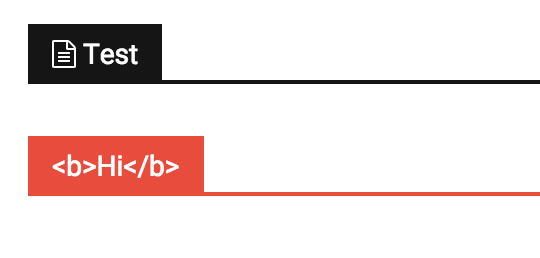
I want to use font awesome icons in titles of blocks.
When I add a icon with the <i> tag the title does not show up. When I insert a html block via visual composer I can add a icon but then I can’t change the color of the title background.
 Fritch
On each post at the end, there is a related articles section. It shows three articles in one row (because I have a sidebar) that are text only. Below that are the regular blocks that can be changed in the theme panel such as the author card, previous/next post, etc. Then, there is another ‘related posts’ section that includes pictures. This related posts section can be edited and controlled within the theme panel, however I cannot find any setting for the related posts section that contains text only and appear directly at the end of the post. I would like to turn off or remove the related articles row that is text only at the end of the post. Any help in finding the settings/code would be greatly appreciated. Thanks in advance.
Follow the links below to see a sample post and annotated images. Scroll to the end of the post to see what I am talking about.
http://www.thatemsguy.com/10-essentials-steps-to-getting-accepted-pathway-to-paramedic/
http://www.thatemsguy.com/wp-content/uploads/2015/10/thatemsguy_delete.jpg
http://www.thatemsguy.com/wp-content/uploads/2015/10/thatemsguy_keep.jpg


