
- NewspaperFlex Block Builder and Flex Loop Builder
- NewspaperHow to use the Flex Blocks cache option
- NewspaperHow to edit modules for Flex Block X
- NewspaperHow to insert a block inside the content of a post
- NewspaperFlex Block Settings Guide
- NewspaperMeta Info on Modules and Blocks
- NewspaperTheme modules and blocks
- TutorialsDefault Block Settings Guide
- NewsmagBlock settings tutorial
- NewsmagCategory tag on modules/blocks
- NewspaperThumbnails – Fix strange looking images on blocks
- NewspaperBlock settings tutorial
- NewspaperCategory Tag on Modules/blocks
- ApiPractical example – How to add a new Block and Module
- Apitd_api_block::delete
- Apitd_api_block::update_key
- Apitd_api_block::update
- Apitd_api_block::add
- ApiAPI – Blocks – Introduction
- NewspaperWP Rocket and Newspaper Theme: Optimization Guide
 Calin
Calin Hello mashmedia, this can be done by editing the homepage, go down to footer, select the block title and try this option – https://i.imgur.com/2JojqjP.png global header, this should set the header title to the right.
If you want to use a different header style, you can use the title element, that one has align options – https://i.imgur.com/uq601uu.png
I hope this will help you!
 Anamaria
 Hello,
You need to import a module template -> https://i.imgur.com/sosPmkb.png and after set it to the flex loop builder https://i.imgur.com/irYyvOk.png -> https://forum.tagdiv.com/modules-builder-newspaper-theme/
-> https://forum.tagdiv.com/flex-block-builder-flex-loop-builder/
Thank you!
Anamaria Hello,
The menu doesn’t work because you have here a code that blocks clicking on it https://i.imgur.com/3kuRotQ.png please check in the theme panel -> custom code -> custom css or live css and delete the code and check after.
Thank you!
Anamaria Hello,
You can edit the Single Post Template, select the block and use one from those filter options -> https://i.imgur.com/cgUwruv.png -> https://forum.tagdiv.com/flex-block-settings-guide/
Thank you!
Anamaria Hello,
You can remove the Single Post Author Box using Edit with tagDiv Composer with a right-click you can delete => https://i.imgur.com/BnhhxVh.png , or selecting the element and with drag & drop place into the deleting red zone from the bottom right of the page => https://i.imgur.com/vkQVCjn.jpg the same for date.
this change will be applied to all posts that use that template and you can delete any element like this.
Also, you can hide the author using the option on the blocks, edit the page and select the block you want to edit and in the tab called “Layout” you can hide the author => https://www.screencast.com/t/fjrVaQm5IX
Thank you!
 jamielrey
Good evening, how can I remove the author’s name from the post? For now, I have used a hidden setting, but can I do it as I did on the home page through the block setting?
 Alex
Alex INP on desktop doesn’t seem to have any problems.
– I assume that INP issue is happening on Mobile when modal popup block is used for Menu, Search etc elements.
When default Mobile Menu Burger and Search blocks is used INP on mobile has no problems.
 Patres10
Hi,
I just wonder if there is an element which could show in a block or a grid the sub-pages and not only categories of blog posts?
Thanks for the answer
 mukesh24932
Flex Loop Builder The Cloud Library Module Template set for this block is not valid or it no longer exists. Please select another Module Template. When try to change Categories Template Always I face Issue Anything Do it tough to understands All Tutorial Old When Watching Youtube try Then option in theme Video Document all old Your video never show Categories Page How to change One video see then try get above mention error
 Breinblik
 Hi thanks for looking into that! It seems to be fixed, thank you!
However there’s another problem now with the menu:
It says (index):551 Uncaught ReferenceError: jQuery is not defined in the console
    /* global jQuery:{} */

            jQuery(document).ready(function() {
var tdbMenuItem = new tdbMenu.item();
tdbMenuItem.blockUid = 'tdi_1';
tdbMenuItem.jqueryObj = jQuery('.tdi_1');
tdbMenuItem.isMegaMenuFull = true;
tdbMenuItem.megaMenuLoadType = '';
tdbMenu.addItem(tdbMenuItem);
});
This happens when i try to click an item in the menu which isn’t clickable anymore
 vallartamirror
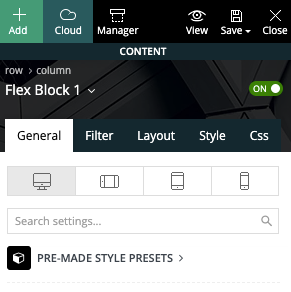
 Here is a screenshot showing the block used (Flex Block 1).
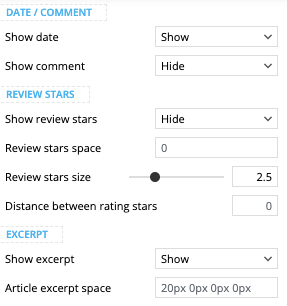
… with settings set to show excerpt and hide comments.
Here is also a screenshot of the category sections from my mobile…
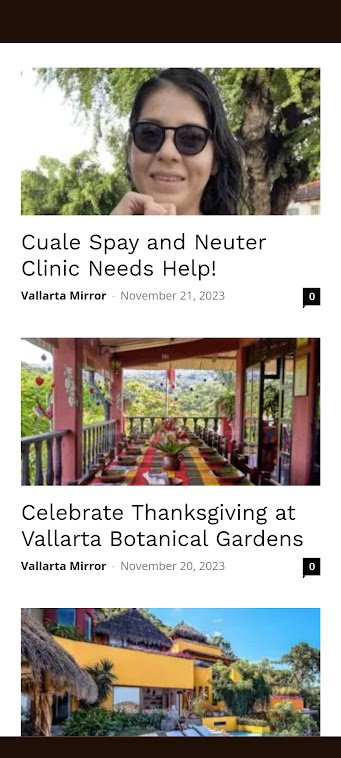
The page shown above can be found here. It displays correctly on desktop but not on mobile.
 syriawise
 I just diabled Defer Render-blocking JavaScript in SiteGround. It works!
Thank you very much!
Anamaria Hello,
I recommend using cloud templates, flex blocks, and big grid flex because are more flexible.
Also, using a cloud template, you can change the design as you want.
The templates that you see in theme panel are for standard templates, and you need to activate the tagdiv Standard pack plugin.
Thank you!
 kalaivani
 load-scripts.php?c=1&load%5Bchunk_0%5D=jquery-core,jquery-migrate,utils,wp-polyfill-inert,regenerator-runtime,wp-polyfill,wp-hooks&ver=6.4.1:5 JQMIGRATE: Migrate is installed, version 3.4.1
deprecated.min.js?ver=73ad3591e7bc95f4777a:2 wp.compose.withState is deprecated since version 5.8. Please use wp.element.useState instead.
i @ deprecated.min.js?ver=73ad3591e7bc95f4777a:2
D @ compose.min.js?ver=3189b344ff39fef940b7:9
(anonymous) @ td_js_for_guten_blocks_editor.min.js?ver=2542f6ebea260f8fc5fdc19a93688182:28
td_js_for_guten_blocks_editor.min.js?ver=2542f6ebea260f8fc5fdc19a93688182:7 Uncaught ReferenceError: lodash is not defined
at tdThemeControlsBlocksAttributes (td_js_for_guten_blocks_editor.min.js?ver=2542f6ebea260f8fc5fdc19a93688182:7:37)
at load-scripts.php?c=1&load%5Bchunk_0%5D=jquery-core,jquery-migrate,utils,wp-polyfill-inert,regenerator-runtime,wp-polyfill,wp-hooks&ver=6.4.1:13:3096
at blocks.min.js?ver=7204d43123223474471a:10:413
at data.min.js?ver=dc5f255634f3da29c8d5:2:12464
at redux-routine.min.js?ver=0be1b2a6a79703e28531:9:750
at data.min.js?ver=dc5f255634f3da29c8d5:2:11537
at Object.dispatch (data.min.js?ver=dc5f255634f3da29c8d5:2:12407)
at Object.apply (data.min.js?ver=dc5f255634f3da29c8d5:2:17805)
at blocks.min.js?ver=7204d43123223474471a:10:3399
at data.min.js?ver=dc5f255634f3da29c8d5:2:12464
tdThemeControlsBlocksAttributes @ td_js_for_guten_blocks_editor.min.js?ver=2542f6ebea260f8fc5fdc19a93688182:7
(anonymous) @ load-scripts.php?c=1&load%5Bchunk_0%5D=jquery-core,jquery-migrate,utils,wp-polyfill-inert,regenerator-runtime,wp-polyfill,wp-hooks&ver=6.4.1:13
(anonymous) @ blocks.min.js?ver=7204d43123223474471a:10
(anonymous) @ data.min.js?ver=dc5f255634f3da29c8d5:2
(anonymous) @ redux-routine.min.js?ver=0be1b2a6a79703e28531:9
(anonymous) @ data.min.js?ver=dc5f255634f3da29c8d5:2
(anonymous) @ data.min.js?ver=dc5f255634f3da29c8d5:2
apply @ data.min.js?ver=dc5f255634f3da29c8d5:2
(anonymous) @ blocks.min.js?ver=7204d43123223474471a:10
(anonymous) @ data.min.js?ver=dc5f255634f3da29c8d5:2
(anonymous) @ redux-routine.min.js?ver=0be1b2a6a79703e28531:9
(anonymous) @ data.min.js?ver=dc5f255634f3da29c8d5:2
(anonymous) @ data.min.js?ver=dc5f255634f3da29c8d5:2
(anonymous) @ data.min.js?ver=dc5f255634f3da29c8d5:2
ie @ blocks.min.js?ver=7204d43123223474471a:3
Qe @ block-library.min.js?ver=875919a30abea6016ef8:12
h_ @ block-library.min.js?ver=875919a30abea6016ef8:14
(anonymous) @ block-library.min.js?ver=875919a30abea6016ef8:14
VC @ block-library.min.js?ver=875919a30abea6016ef8:14
er @ edit-post.min.js?ver=6720d8a86f225f3ce492:7
(anonymous) @ post-new.php:2745
kalaivaniError is
Uncaught ReferenceError: lodash is not defined
td_js_for_guten_blocks_editor.min.js?ver=2542f6ebea260f8fc5fdc19a93688182:7 Uncaught ReferenceError: lodash is not defined
at tdThemeControlsBlocksAttributes (td_js_for_guten_blocks_editor.min.js?ver=2542f6ebea260f8fc5fdc19a93688182:7:37)
at load-scripts.php?c=1&load%5Bchunk_0%5D=jquery-core,jquery-migrate,utils,wp-polyfill-inert,regenerator-runtime,wp-polyfill,wp-hooks&ver=6.4.1:13:3096
at blocks.min.js?ver=7204d43123223474471a:10:413
at data.min.js?ver=dc5f255634f3da29c8d5:2:12464
at redux-routine.min.js?ver=0be1b2a6a79703e28531:9:750
at data.min.js?ver=dc5f255634f3da29c8d5:2:11537
at Object.dispatch (data.min.js?ver=dc5f255634f3da29c8d5:2:12407)
at Object.apply (data.min.js?ver=dc5f255634f3da29c8d5:2:17805)
at blocks.min.js?ver=7204d43123223474471a:10:3399
at data.min.js?ver=dc5f255634f3da29c8d5:2:12464
tdThemeControlsBlocksAttributes @ td_js_for_guten_blocks_editor.min.js?ver=2542f6ebea260f8fc5fdc19a93688182:7
(anonymous) @ load-scripts.php?c=1&load%5Bchunk_0%5D=jquery-core,jquery-migrate,utils,wp-polyfill-inert,regenerator-runtime,wp-polyfill,wp-hooks&ver=6.4.1:13
(anonymous) @ blocks.min.js?ver=7204d43123223474471a:10
(anonymous) @ data.min.js?ver=dc5f255634f3da29c8d5:2
(anonymous) @ redux-routine.min.js?ver=0be1b2a6a79703e28531:9
(anonymous) @ data.min.js?ver=dc5f255634f3da29c8d5:2
(anonymous) @ data.min.js?ver=dc5f255634f3da29c8d5:2
apply @ data.min.js?ver=dc5f255634f3da29c8d5:2
(anonymous) @ blocks.min.js?ver=7204d43123223474471a:10
(anonymous) @ data.min.js?ver=dc5f255634f3da29c8d5:2
(anonymous) @ redux-routine.min.js?ver=0be1b2a6a79703e28531:9
(anonymous) @ data.min.js?ver=dc5f255634f3da29c8d5:2
(anonymous) @ data.min.js?ver=dc5f255634f3da29c8d5:2
(anonymous) @ data.min.js?ver=dc5f255634f3da29c8d5:2
ie @ blocks.min.js?ver=7204d43123223474471a:3
Qe @ block-library.min.js?ver=875919a30abea6016ef8:12
h_ @ block-library.min.js?ver=875919a30abea6016ef8:14
(anonymous) @ block-library.min.js?ver=875919a30abea6016ef8:14
VC @ block-library.min.js?ver=875919a30abea6016ef8:14
er @ edit-post.min.js?ver=6720d8a86f225f3ce492:7
(anonymous) @ post-new.php:2745
how to fix it.please support
 Hal
HalI decided to try the Newspaper Theme’s “shop” template to build my wife an online shop. It’s not quite where I want it yet, but I’ve only been at it a few hours. I have some products, categories, prices, shipping, etc in place. I thought I had the PayPal setup and ready, but when I did a sample order, put them in the cart, and went to check out, I got this error:
There are no payment methods available. This may be an error on our side. Please contact us if you need any help placing your order.
Even though I’ve been through the PayPal setup several times and saved the settings, I’m still having this error.
Any advice would be appreciated.
Thanks,
Hal
 bananaj
Hello,
I tried to setup default font in theme panel, and it work on most elements but not the Big Grid Flex 3. It is still detected as Roboto but i don’t want that to be default
I know how to change font per element, i want to set default font for element post titles sitewide.
I changed font for Modules and blocks in theme panel
Can’t find where to set default for Big Grid Flex
thanks
/J
 toppersworld
 The default featured image that appears in the post top is blurred. All the images appearing in the block sections, related posts are of high quality. Only the default featured image that appears at the top of post appears blurred. I have attached in the screenshot.
Which option should I change to correct this problem?
Anamaria Hello,
A workaround can be to save an element or row: https://www.screencast.com/t/kVxpDT9SV in the tagdiv composer, so you can add it on every other page. The saved elements can be seen at the end of the other blocks when you add an element in the tagDiv Composer.
You can copy and paste the style from one block to another block -> https://tagdiv.com/flexibility-rows-columns-newspaper-theme/
-> https://tagdiv.com/right-click-menu-tagdiv-composer/
Thank you!
Calin Hello,
I think that you are referring to the post title from blocks, for this you can use the SEO option from the block (this will be displayed in tagDiv Composer) – https://i.imgur.com/uUtuBgQ.jpg
Thank you!
Anamaria Hello,
Please provide more screenshots with the block or a link to a website where the issue is. Make sure that you use a flex block.
Thank you!
Anamaria Hello,
It is not recommended to edit the files, because the js files are minified.
Please go to the theme panel -> block settings -> inline css and enable the option to minify the css and js and clear the cache.
Thank you!
Anamaria HI,
You can insert only a Flex Block, not a Flex Block Builder.
Thank you!
 trebol30
Flex blocks are inserted according to this video https://forum.tagdiv.com/set-block-inside-post-content/
But the Flex Block Builder cannot be inserted following these instructions, they do not work and are visually confusing.
How are Flex Block Builders introduced correctly in posts?
trebol30Since the 12.6.2 update, the titles (H) lose their correct reading for the Flex Block Builder modules in particular.
You can see the video https://www.loom.com/share/08425d238be1491cae7096d20908f778?sid=2e9c6911-f7a1-4829-89d5-ef1ab9744672



